

Updated October 2026. I’m Saizul Amin, a digital growth and web systems professional working on websites and SEO since 2017. I have rewritten this guide from scratch with practical steps, tested advice and sources, and I will keep it current. Last reviewed: October 2026.
Most SEO advice fails beginners in the same way: it lists fifty tactics and never says what to do first. This roadmap puts the work in order. It is built for a website that already exists and needs to grow, and it scales from a small business site to a large content library.
I have worked on websites and SEO since 2017. One project that shaped how I plan SEO was a recovery plan for a UK education website with roughly 600 published articles whose organic traffic had dropped. The causes were not mysterious: several articles targeted almost the same keywords, related pages barely linked to each other, there was no clear pillar structure, and old articles had not been refreshed. The 90-day plan below follows the same logic.
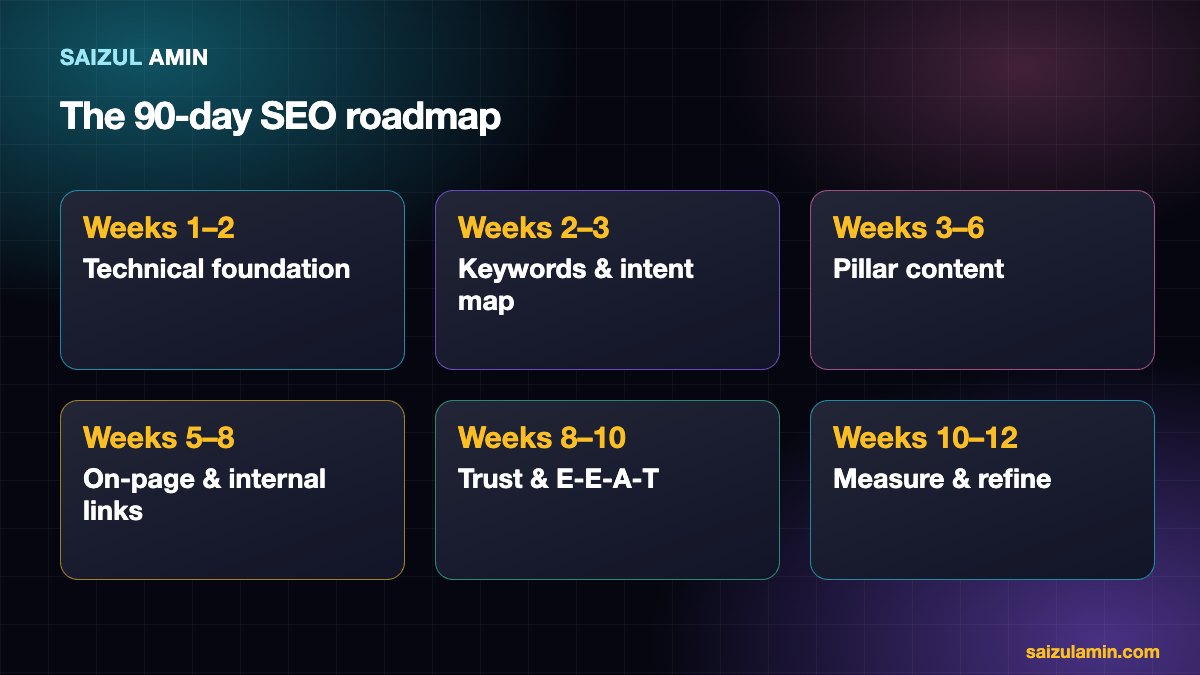
Weeks 1–2: Technical foundation
Nothing else matters if search engines cannot reach, render and trust your pages.
- Indexing: verify the site in Google Search Console, submit an XML sitemap, and check the Pages report for “Discovered/Crawled, not indexed” and errors.
- Crawl accessibility: make sure robots.txt is not blocking important sections and that important pages return a 200 status.
- Mobile and speed: test key templates on mobile and fix the biggest Core Web Vitals problems (see my guide to WordPress speed optimization).
- HTTPS and one canonical address: pick
wwwor non-wwwand redirect the other. - Duplicate and thin pages: list pages that add nothing (tag archives, near-duplicates) and decide whether to merge, improve or noindex them.
Weeks 2–3: Keywords and search intent
Choose topics by what searchers want, not by tool scores alone.
- List your core topics (5 to 10 themes your business can speak about with authority).
- For each theme, collect real queries from Google Search Console, Google autocomplete, “People also ask” and a keyword tool. My comparison of free keyword research tools and my guide to Google Keyword Planner cover the tools.
- Classify each query by intent: informational, commercial investigation, transactional or navigational.
- Search the keyword yourself and look at what ranks. If the results are all product pages, a blog post will struggle.
- Assign one primary keyword per page and write the mapping in a spreadsheet. Two pages for the same keyword compete with each other (keyword cannibalisation).
Weeks 3–6: Build pillar and cluster content
A pillar is a comprehensive page on a broad topic. Clusters are narrower pages answering specific questions inside that topic. The pillar links to every cluster; each cluster links back to the pillar and to two or three related clusters. This structure shows search engines (and readers) what you are authoritative about.
| Element | Rule of thumb |
|---|---|
| Pillars | One per core theme, written first, updated often |
| Clusters | Roughly 5 to 20 per pillar, each targeting one question |
| Internal links | Cluster to pillar, pillar to every cluster, cluster to a few siblings |
| Refreshing | Update the best existing articles before writing new ones |
In the recovery project I mentioned, the plan was about 20 authority pillar articles, 10 to 20 clusters beneath each, refreshing the 100 highest-potential existing articles, and a strict internal-linking model. Quality and structure came before volume.
Weeks 5–8: On-page SEO and internal links
- Title tag: include the primary keyword naturally, written for a human, roughly 50 to 60 characters.
- Meta description: a clear promise of what the page delivers, around 150 characters. It does not rank pages, but it affects clicks.
- One H1, logical H2/H3 sections, and the answer to the main question near the top.
- Images: meaningful file names, alt text and dimensions; compress them.
- Internal links with descriptive anchor text, not “click here”.
- Structured data where it applies (Article, FAQ only where eligible, Organization, Breadcrumb).
Weeks 8–10: Trust and E-E-A-T
Google’s quality guidelines describe Experience, Expertise, Authoritativeness and Trust. You cannot add them with a plugin, but you can show them:
- Real author names, bios and credentials, and an About and Contact page that say who is behind the site.
- First-hand examples, screenshots, data or case notes that only someone who did the work could write.
- Honest sourcing: link to primary documentation, and state limits and trade-offs.
- A clear privacy policy and, for sites with ads or affiliate links, visible disclosures.
Links from other relevant sites still help, but earn them by creating something worth citing (original data, tools, definitive guides). Avoid buying links or joining link schemes; they violate Google’s spam policies.
Weeks 10–12: Measure and refine
- Search Console: impressions, clicks, average position and queries per page. Look for pages ranking on page two; they are the quickest wins when improved.
- GA4: engagement and conversions from organic traffic, not only visits.
- Keep a changelog (what you changed, when) so you can connect results to actions.
- SEO changes take weeks to show; judge trends over 8 to 12 weeks rather than days.
Common beginner mistakes
- Publishing many thin articles on near-identical keywords instead of a few strong ones.
- Ignoring technical problems while writing more content.
- Copying competitors without adding anything new.
- Expecting results in a week, or changing titles constantly.
Need a second pair of eyes?
If you would like help applying this to your own website, send me a message with your site address and goal. I will tell you honestly what I would do first.
Frequently asked questions
How long does SEO take?
New sites commonly need several months to build visibility; established sites can see improvements within weeks of fixing real problems. Results depend on competition and starting point.
Do I need paid SEO tools?
Not to start. Google Search Console, Google Analytics and free keyword tools cover the basics; paid tools save time at scale.
How many articles do I need?
There is no fixed number. A smaller set of thorough, well-linked pages beats a large pile of thin ones.
Can AI write my SEO content?
AI can help with research and drafts, but unreviewed mass-produced content breaks Google’s spam policies. Add real experience and edit carefully.
Sources and further reading
- Google Search Central: SEO Starter Guide
- Google: Creating helpful, people-first content
- web.dev: Core Web Vitals
How this article was written
I wrote this guide from hands-on experience with websites, SEO and automation. Technical and policy details were checked against the official sources above in October 2026. Tools, policies and prices change; if you notice something out of date, email info@saizul.com and I will correct it. Examples reflect my own projects and will vary on yours.

Saizul Amin is a digital growth strategist and SEO consultant specialising in search engine optimisation, web development, AI-powered automation, and online income systems. With 8 years of hands-on experience helping businesses and individual creators grow their online presence, Saizul combines technical expertise with practical, results-driven strategy.
Experience & Background
Saizul started his digital career in 2017, initially working with Bioscope Limited to build and optimise websites for organic search traffic. Over the years, he has worked across industries including DGHS, NAVANA, UNICampus, UNIPathways, UniqueMark, developing a deep understanding of what it takes to rank, convert, and grow sustainably online.
His work spans the full digital stack — from technical SEO audits and content strategy to WordPress development, marketing automation, and AI tool integration for small businesses and startups.
What He Covers on This Blog
Every article on SaizulAmin.com is written from direct experience. Saizul does not publish theoretical content — every guide, tool recommendation, and strategy shared here has been tested and applied in real projects. Topics include:
- Search engine optimisation (on-page, technical, and content SEO)
- Digital marketing strategy and growth systems
- AI tools and automation for business productivity
- Web development, WordPress, and website building
- Making money online through freelancing and affiliate marketing
Why Trust This Content
All recommendations on this site reflect tools and strategies Saizul actively uses or has personally evaluated. Where affiliate relationships exist, they are clearly disclosed. Content is regularly reviewed and updated to reflect current best practices and algorithm changes.