





Updated October 2026. I’m Saizul Amin, a digital growth and web systems professional working on websites and SEO since 2017. I have rewritten this guide from scratch with practical steps, tested advice and sources, and I will keep it current. Last reviewed: October 2026.
“Automate with AI” is easy to say and hard to do well. The businesses that succeed pick a small number of high-value tasks, automate them carefully and keep a human in the loop where it matters. This guide shows how to choose, with examples from automations I run in production.

Automation, AI and agents: what is the difference?
- Rule-based automation follows fixed steps: when a form is submitted, add a row to a sheet and email the team.
- AI-assisted automation adds a language model to one step: classify the enquiry, summarise the document, draft the reply.
- AI agents decide the next step themselves and call tools until a goal is met. I explain that in what is an AI agent.
Most businesses get the best return from the first two, with an agent only where the task really needs flexible decisions.
How to choose what to automate: a simple score
List candidate tasks, then rate each from 1 to 5 on four questions:
- Frequency: how often does it happen?
- Rule clarity: can you describe the correct outcome in writing?
- Digital inputs: is everything it needs already in software (messages, email, files, sheets)?
- Cost of a mistake (reverse score): is a wrong result easy to catch and fix?
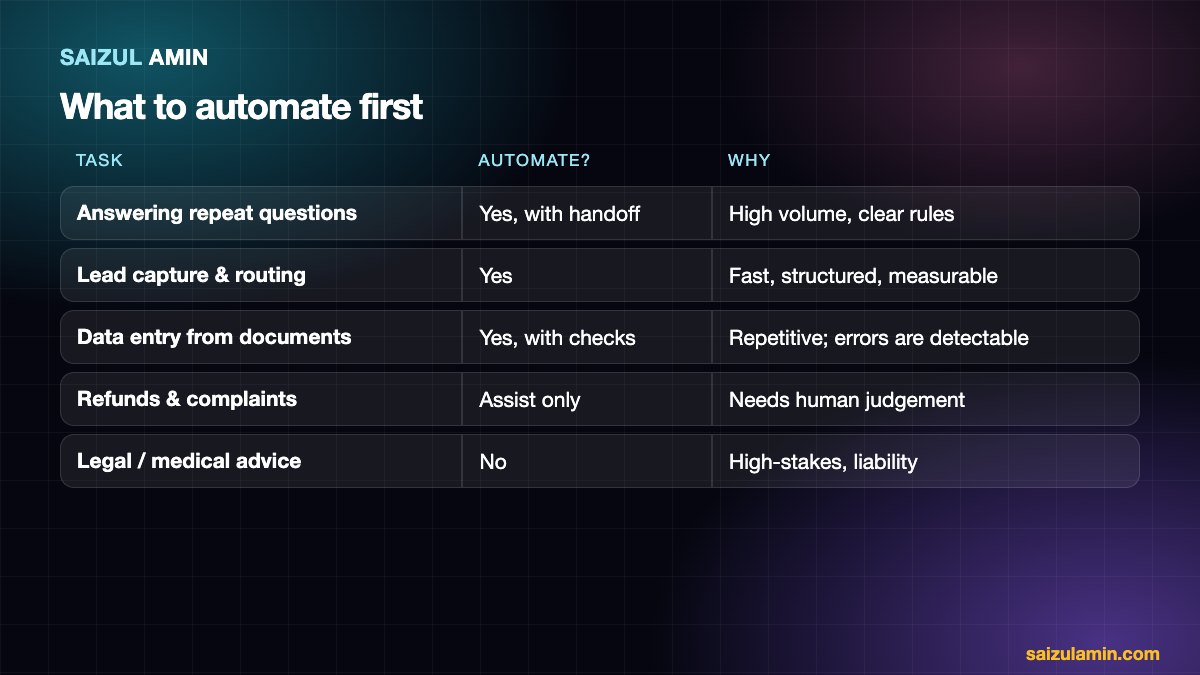
Tasks with a high total are your first candidates. Tasks with a high cost of mistakes should keep a human approving the result.
Practical use cases that usually pay off
1. First-line customer conversations
One of my live agents answers on Facebook Messenger in Bangla, remembers the conversation, writes lead details to Google Sheets and hands over to a person on request. A WhatsApp agent can answer pricing questions, check availability and confirm a booking. The value is replying in seconds at any hour, not replacing the team.
2. Lead capture and routing
Enquiries from forms, ads and chats go into one place, are tagged by service and budget, and the right person is notified. A simple workflow often beats a sophisticated one.
3. Document and data handling
Reading invoices, forms or emails and putting clean rows into a sheet or accounting tool, flagging anything uncertain for review.
4. Scheduled research and reporting
A morning brief that gathers competitor changes, price moves or new leads into one short summary instead of an hour of manual checking.
5. Content operations
Research, outlines, repurposing and scheduling can be assisted; final editing and fact-checking should stay human.
Tool types and when to use them
| Need | Typical choice |
|---|---|
| Connect apps with simple logic | Zapier or Make |
| Complex logic, AI agents, data control, high volume | n8n (self-hosted or cloud) |
| Chat channels (WhatsApp, Messenger, Telegram) | Channel APIs plus a workflow tool; see Meta’s Cloud API docs |
| Answers from your own documents | A retrieval-based (RAG) assistant |
| Custom, product-like systems | Custom code with an AI model API |
My comparison of the three main workflow tools is in n8n vs Zapier vs Make, and a build walk-through is in how to build an AI agent with n8n.
Risks to manage
- Wrong answers: ground the AI in your own data and give it a safe “I don’t know” path to a human.
- Privacy: know which provider sees which data; minimise personal data in prompts.
- Cost control: cap iterations and tokens, and monitor usage.
- Silent failure: add error alerts and logging so you notice broken automations.
- Channel rules: for example, WhatsApp limits free-form messages to a customer-service window and requires approved templates outside it.
A 30-day plan
- Week 1: map tasks and score them; pick one.
- Week 2: build the smallest useful version with a human approval step.
- Week 3: test with real past examples; fix failures.
- Week 4: launch to a limited group, measure time saved and errors, then decide the next task.
Need a second pair of eyes?
If you would like help applying this to your own website, send me a message with your site address and goal. I will tell you honestly what I would do first.
Frequently asked questions
What is the first process a small business should automate?
Usually enquiry handling: instant acknowledgement, capturing details and routing to the right person.
Do I need developers?
For simple automations, no-code tools are enough. For custom channels, integrations and AI agents, an experienced builder saves time and avoids costly mistakes.
How much does AI automation cost?
Costs include tool or server fees, model usage and build and maintenance time. A focused first workflow is far cheaper than a broad “transformation” project.
Will customers accept automated replies?
Generally yes, if the answer is quick, accurate and a person is easy to reach.
Sources and further reading
How this article was written
I wrote this guide from hands-on experience with websites, SEO and automation. Technical and policy details were checked against the official sources above in October 2026. Tools, policies and prices change; if you notice something out of date, email info@saizul.com and I will correct it. Examples reflect my own projects and will vary on yours.


Saizul Amin is a digital growth strategist and SEO consultant specialising in search engine optimisation, web development, AI-powered automation, and online income systems. With 8 years of hands-on experience helping businesses and individual creators grow their online presence, Saizul combines technical expertise with practical, results-driven strategy.
Experience & Background
Saizul started his digital career in 2017, initially working with Bioscope Limited to build and optimise websites for organic search traffic. Over the years, he has worked across industries including DGHS, NAVANA, UNICampus, UNIPathways, UniqueMark, developing a deep understanding of what it takes to rank, convert, and grow sustainably online.
His work spans the full digital stack — from technical SEO audits and content strategy to WordPress development, marketing automation, and AI tool integration for small businesses and startups.
What He Covers on This Blog
Every article on SaizulAmin.com is written from direct experience. Saizul does not publish theoretical content — every guide, tool recommendation, and strategy shared here has been tested and applied in real projects. Topics include:
- Search engine optimisation (on-page, technical, and content SEO)
- Digital marketing strategy and growth systems
- AI tools and automation for business productivity
- Web development, WordPress, and website building
- Making money online through freelancing and affiliate marketing
Why Trust This Content
All recommendations on this site reflect tools and strategies Saizul actively uses or has personally evaluated. Where affiliate relationships exist, they are clearly disclosed. Content is regularly reviewed and updated to reflect current best practices and algorithm changes.


