





Updated October 2026. I’m Saizul Amin, a digital growth and web systems professional working on websites and SEO since 2017. I have rewritten this guide from scratch with practical steps, tested advice and sources, and I will keep it current. Last reviewed: October 2026.
Every business is being sold “AI productivity tools”. Most teams do not need more tools; they need to know which task to speed up, which tool fits, and how to use it without leaking customer data or publishing nonsense. This guide gives you a practical way to decide.
I build AI automations and agents for businesses, so I see the same mistakes repeatedly: buying subscriptions before choosing a task, pasting confidential data into public chatbots, and trusting outputs without checking them.

The main categories of AI productivity tools
| Category | What it helps with | Typical risk |
|---|---|---|
| General assistants (ChatGPT, Claude, Gemini and similar) | Drafting, summarising, brainstorming, analysing documents | Wrong or invented facts; confidential data sent to a third party |
| Meeting and transcription tools | Notes, action items, searchable recordings | Recording consent; storing sensitive discussions |
| Writing and editing aids | Grammar, tone, translation, repurposing content | Generic, repetitive text if used without editing |
| Research and search assistants | Finding and summarising sources | Hallucinated citations; outdated information |
| Design and media tools | Images, presentations, video clean-up | Copyright and brand-consistency questions |
| Workflow automation (n8n, Zapier, Make) | Connecting apps and automating repetitive steps | Mistakes run at machine speed if untested |
| AI agents | Multi-step tasks using your tools and data | Over-permissioned access; see my guide to AI agents |
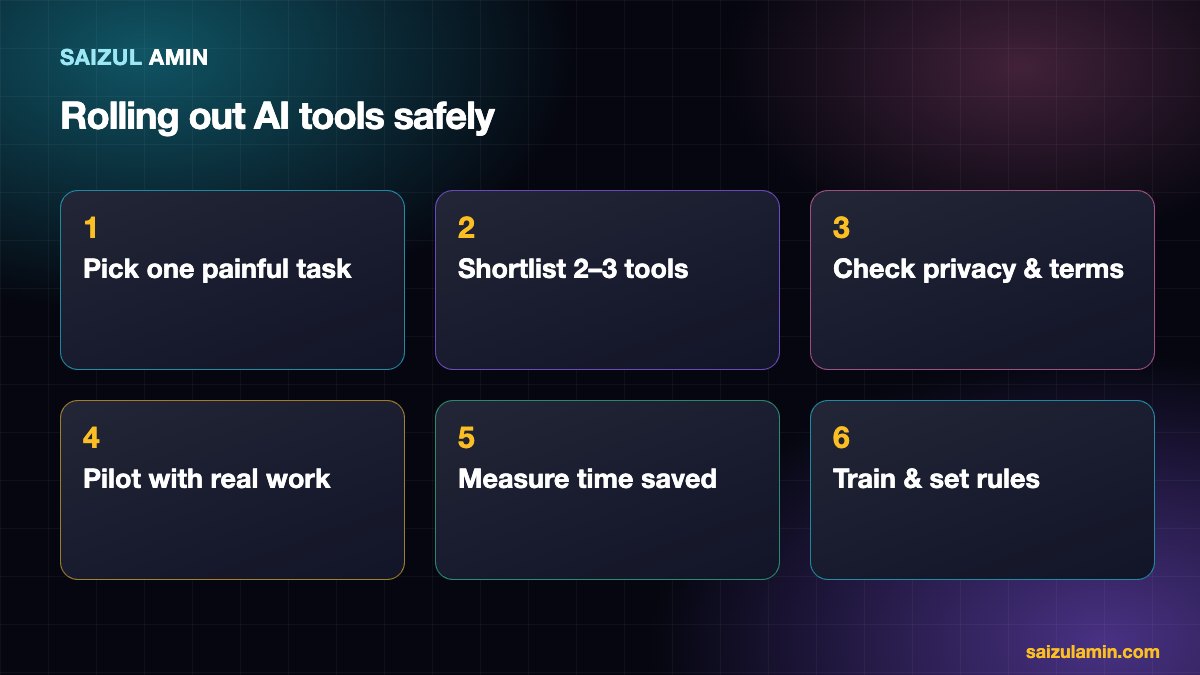
Step 1: Start with a painful, repeatable task
Good candidates are tasks that are frequent, rule-like and low-risk if the first draft is imperfect: drafting replies to common enquiries, summarising meetings, turning notes into reports, extracting data from documents. Avoid starting with decisions that affect people’s money, health, employment or legal position.
Step 2: Evaluate tools with five questions
- Does it do the specific task well? Test with your own real examples, not the vendor’s demo.
- What happens to our data? Check whether your inputs are used to train models, where data is stored, retention periods and whether a business plan offers stronger controls.
- Does it integrate with what we already use? Email, calendar, CRM, drive, chat.
- What does it really cost? Per-seat fees, usage limits, and the time needed to review outputs.
- What is the exit plan? Can you export your data if you leave?
Step 3: Pilot for two weeks
Choose two or three people and one task. Measure the time the task took before, the time it takes now (including checking the output), and the quality. If review time cancels out the savings, drop the tool.
Step 4: Set simple team rules
- Never paste passwords, customer personal data, contracts or unpublished financials into tools that are not approved for it.
- Always verify facts, numbers, names and citations before they go to a customer or are published.
- Disclose where required (for example AI-generated media or customer chat bots).
- A human owns every output that leaves the company.
A note on content marketing
AI can speed up research and first drafts, but publishing unedited, mass-produced pages is risky: Google’s guidance on AI-generated content says content produced primarily to manipulate rankings breaks its spam policies. Use AI as an assistant, and add real experience, expert review and original data.
When to go beyond chat tools
If your team repeats the same multi-step process daily (collect an enquiry, check a spreadsheet, send a reply, log it), a chat assistant is not enough. That is the point to automate with a workflow tool or a custom agent. I compare the tools in n8n vs Zapier vs Make, and cover business use cases in AI automation tools for business.
Mistakes to avoid
- Buying five tools at once, then using none well.
- Measuring “AI usage” instead of time saved or quality.
- Skipping training; most poor results come from poor prompts and no review process.
- Treating confident answers as correct answers.
Need a second pair of eyes?
If you would like help applying this to your own website, send me a message with your site address and goal. I will tell you honestly what I would do first.
Frequently asked questions
Which AI tool is best for business?
There is no single best tool. The right choice depends on the task, your data sensitivity and your existing software. Test two or three on your own examples.
Is it safe to put company data into AI tools?
Only if the tool’s terms, data controls and plan fit your sensitivity requirements. When in doubt, anonymise the data or keep it out.
Will AI replace my team?
In most cases it speeds up repetitive parts of the job. The people who benefit most are those who learn to direct and check it.
How do I measure ROI?
Track hours saved per task (after review), error rates and the cost of the tool, over a pilot of a few weeks.
Sources and further reading
- NIST AI Risk Management Framework
- Google: Search guidance on AI-generated content
- n8n documentation: Advanced AI
How this article was written
I wrote this guide from hands-on experience with websites, SEO and automation. Technical and policy details were checked against the official sources above in October 2026. Tools, policies and prices change; if you notice something out of date, email info@saizul.com and I will correct it. Examples reflect my own projects and will vary on yours.


Saizul Amin is a digital growth strategist and SEO consultant specialising in search engine optimisation, web development, AI-powered automation, and online income systems. With 8 years of hands-on experience helping businesses and individual creators grow their online presence, Saizul combines technical expertise with practical, results-driven strategy.
Experience & Background
Saizul started his digital career in 2017, initially working with Bioscope Limited to build and optimise websites for organic search traffic. Over the years, he has worked across industries including DGHS, NAVANA, UNICampus, UNIPathways, UniqueMark, developing a deep understanding of what it takes to rank, convert, and grow sustainably online.
His work spans the full digital stack — from technical SEO audits and content strategy to WordPress development, marketing automation, and AI tool integration for small businesses and startups.
What He Covers on This Blog
Every article on SaizulAmin.com is written from direct experience. Saizul does not publish theoretical content — every guide, tool recommendation, and strategy shared here has been tested and applied in real projects. Topics include:
- Search engine optimisation (on-page, technical, and content SEO)
- Digital marketing strategy and growth systems
- AI tools and automation for business productivity
- Web development, WordPress, and website building
- Making money online through freelancing and affiliate marketing
Why Trust This Content
All recommendations on this site reflect tools and strategies Saizul actively uses or has personally evaluated. Where affiliate relationships exist, they are clearly disclosed. Content is regularly reviewed and updated to reflect current best practices and algorithm changes.


