





From my own work: I’m Saizul Amin, a digital growth and web systems professional. I have worked on websites and SEO since 2017, and the examples below come from sites I run and maintain myself, not from theory. Last reviewed: October 2026.
Getting a WordPress blog approved for Google AdSense is less about tricks and more about showing Google a real, useful, policy-compliant website. I manage AdSense across several of my own and client sites, so this checklist comes from practice: what a reviewer needs to see, how I set ads up so readers are not annoyed, and the troubleshooting problems that surprised me.
A reality check first: nobody can guarantee approval. Google makes the decision, review times vary, and I will not promise a specific number of posts, visitors or income. What I can give you is a way to remove the common reasons for rejection.
What AdSense wants to see
In short: a real site, with original and helpful content, that is easy to navigate, safe for advertisers and compliant with the AdSense Program policies. Work through the checklist below before you apply.

1. Original, genuinely helpful content
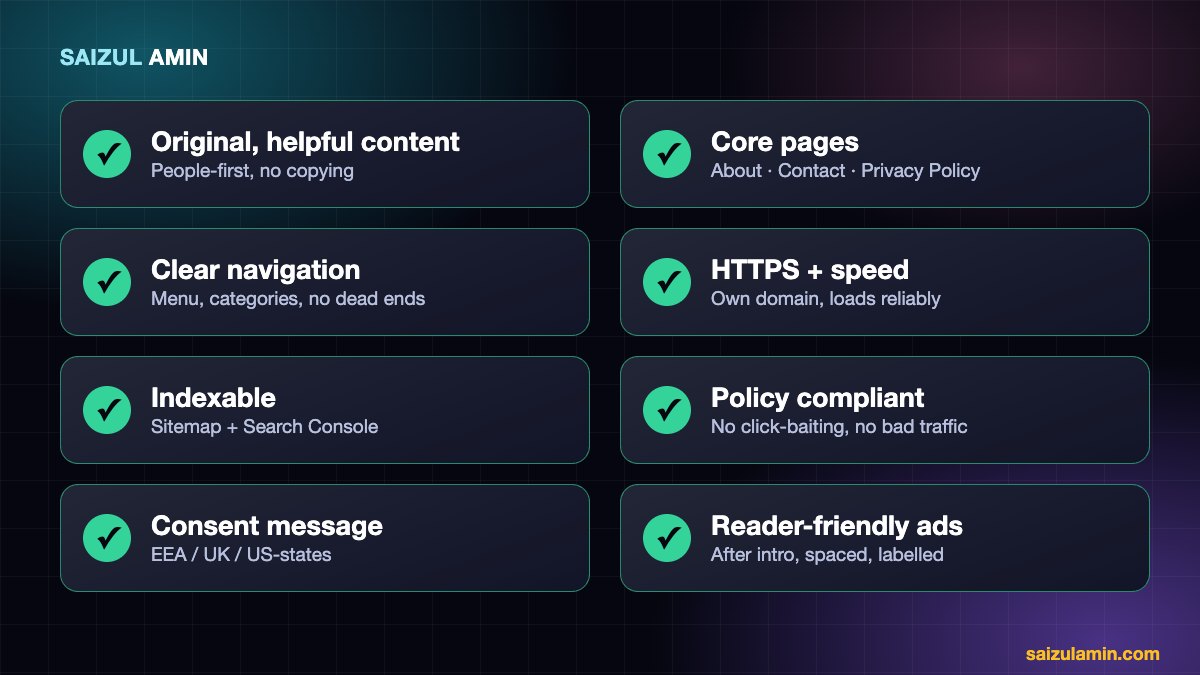
- Write for people first. Google’s guidance on helpful, people-first content is the standard: answer a real question better than the next page does.
- Do not copy, spin or scrape. Copied or lightly rewritten content is a common reason sites are refused or later disabled.
- Be careful with AI-written content. Using AI is not banned by itself, but mass-produced, unedited, low-value pages break Google’s spam policies. Add real experience, accurate facts, your own examples and editing.
- Google does not publish a minimum number of posts. Aim for a solid base of in-depth articles on a clear topic rather than hitting a magic number with thin posts.
- Avoid prohibited or sensitive content (adult, illegal, hateful, dangerous or misleading material, copyrighted downloads).
2. The pages every legitimate site has
- About: who runs the site and why you are qualified to write about it.
- Contact: a working email or form so people can reach a real person.
- Privacy Policy: it must explain how you collect and use data, and, once you use AdSense, disclose that third-party vendors including Google use cookies to serve ads, with links to opt-out options.
- Cookie policy, Terms and Disclaimer: not always mandatory, but they signal a properly run site.
3. Navigation and design
- A clear menu, categories that make sense and no dead-end or broken pages.
- A mobile-friendly, readable layout. No “coming soon” or “under construction” pages.
- No pop-ups or overlays that cover content, and no deceptive buttons.
4. Technical basics
- Your own domain with HTTPS, and the site loads reliably.
- Reasonable speed. See my guide to WordPress speed optimization.
- Indexable: no accidental “discourage search engines” setting, an XML sitemap (an SEO plugin can create one), and the site verified in Google Search Console.
5. Policy compliance, including traffic quality
- Never click your own ads and never ask others to click or “support the site”. This is the fastest route to a disabled account.
- Do not buy low-quality or bot traffic.
- Do not place ads on pages with little or no original content, or on error and navigation-only pages.
6. Connecting AdSense to WordPress
Create the AdSense account, add your site and then either paste the verification code into your site header or use the Google Site Kit plugin, which can add the AdSense code for you and shows reports in the dashboard. While you wait for the review, keep improving the content.
After approval, upload the ads.txt file (AdSense shows the exact line, which looks like google.com, pub-XXXXXXXXXXXXXXXX, DIRECT, f08c47fec0942fa0) to the root of your domain.
7. Consent for visitors in Europe and the UK
If your site gets visitors from the European Economic Area, the United Kingdom or Switzerland, Google requires a consent message for personalised ads. In AdSense, open Privacy & messaging and publish a European regulations message for each site, and a US-states message if you serve US visitors. Without it, ad serving to those regions can be limited.
8. Placing ads without annoying readers
Once you are approved, you can use Auto ads (Google decides placement), manual ad units, or both. The rules I use on my own blogs:
- Put the first in-article ad after the introduction, not in the first screen. Readers came for the answer.
- Keep paragraphs of real content between ads. For a 1,000-to-2,000-word article, two or three ads is plenty.
- Never split a sentence from the list or table it introduces, and never place ads inside tables, quotes or code blocks.
- Label ads clearly and make sure they cannot be mistaken for navigation buttons.
- Do not show ads to yourself while logged in, to avoid accidental clicks.
- Remove any ad unit that is unfilled, so it does not leave empty gaps.
Troubleshooting: ads show on the home page but not on posts
This puzzled me on one of my own sites. The home page had the AdSense script; the blog posts did not. The cause was a custom single-post template that rendered the page and stopped before the plugin that adds the AdSense and analytics tags had run. If you see this:
- View the source of a post and search for
adsbygoogle. If it is missing, the tag is not being output on that template. - Check custom templates, snippets and page-builder single-post layouts that exit early or skip the normal page hooks.
- Remember cache plugins and script-delay settings can postpone or remove the script, so test as a logged-out visitor in a private window.
- New ad units take a little while to start filling, so wait before concluding something is broken.
If you are rejected
- Read the reason shown in AdSense. It is often about content value, navigation or policy.
- Fix the specific issue: improve or remove weak pages, add the missing required pages, fix broken navigation.
- Wait until you have really improved the site, then request a new review. Repeatedly submitting an unchanged site will not help.
Need help with this on your own site?
I work with businesses and creators on WordPress performance, technical SEO, hosting migrations and monetisation. If you would rather have an experienced person do it (or review what you have done), send me a message with your website address and what you want to achieve, and I will tell you honestly what I would change first.
Frequently asked questions
How many posts do I need for AdSense approval?
Google does not state a number. Quality and usefulness matter more than quantity. A smaller site of thorough, original articles is better than a large site of thin ones.
Do I need a minimum amount of traffic?
There is no official minimum traffic requirement for applying. You do need a real, working site with content people can visit, and you should never use artificial traffic.
Can I use AI to write my blog posts?
You can use AI as a tool, but publishing unreviewed, mass-produced content is risky. Make sure every post is accurate, edited and contains your own knowledge or experience.
How long does AdSense take to approve a site?
Reviews can take from a few days to a couple of weeks, sometimes longer. Do not keep changing the site’s structure during the review.
How much can I earn?
It depends on your topic, audience location, traffic, ad placement and seasonality. I do not make earnings promises, and anyone who does is selling something.
Sources and further reading
- Google AdSense Program policies
- Google: Creating helpful, reliable, people-first content
- Google Search spam policies
How this article was written
I wrote this from hands-on experience with my own websites. Technical details were checked against the official documentation linked above in October 2026. Tools, policies and prices change, so if you notice something out of date, email info@saizul.com and I will correct it. Results mentioned are from my own sites and will vary on yours.


Saizul Amin is a digital growth strategist and SEO consultant specialising in search engine optimisation, web development, AI-powered automation, and online income systems. With 8 years of hands-on experience helping businesses and individual creators grow their online presence, Saizul combines technical expertise with practical, results-driven strategy.
Experience & Background
Saizul started his digital career in 2017, initially working with Bioscope Limited to build and optimise websites for organic search traffic. Over the years, he has worked across industries including DGHS, NAVANA, UNICampus, UNIPathways, UniqueMark, developing a deep understanding of what it takes to rank, convert, and grow sustainably online.
His work spans the full digital stack — from technical SEO audits and content strategy to WordPress development, marketing automation, and AI tool integration for small businesses and startups.
What He Covers on This Blog
Every article on SaizulAmin.com is written from direct experience. Saizul does not publish theoretical content — every guide, tool recommendation, and strategy shared here has been tested and applied in real projects. Topics include:
- Search engine optimisation (on-page, technical, and content SEO)
- Digital marketing strategy and growth systems
- AI tools and automation for business productivity
- Web development, WordPress, and website building
- Making money online through freelancing and affiliate marketing
Why Trust This Content
All recommendations on this site reflect tools and strategies Saizul actively uses or has personally evaluated. Where affiliate relationships exist, they are clearly disclosed. Content is regularly reviewed and updated to reflect current best practices and algorithm changes.


