

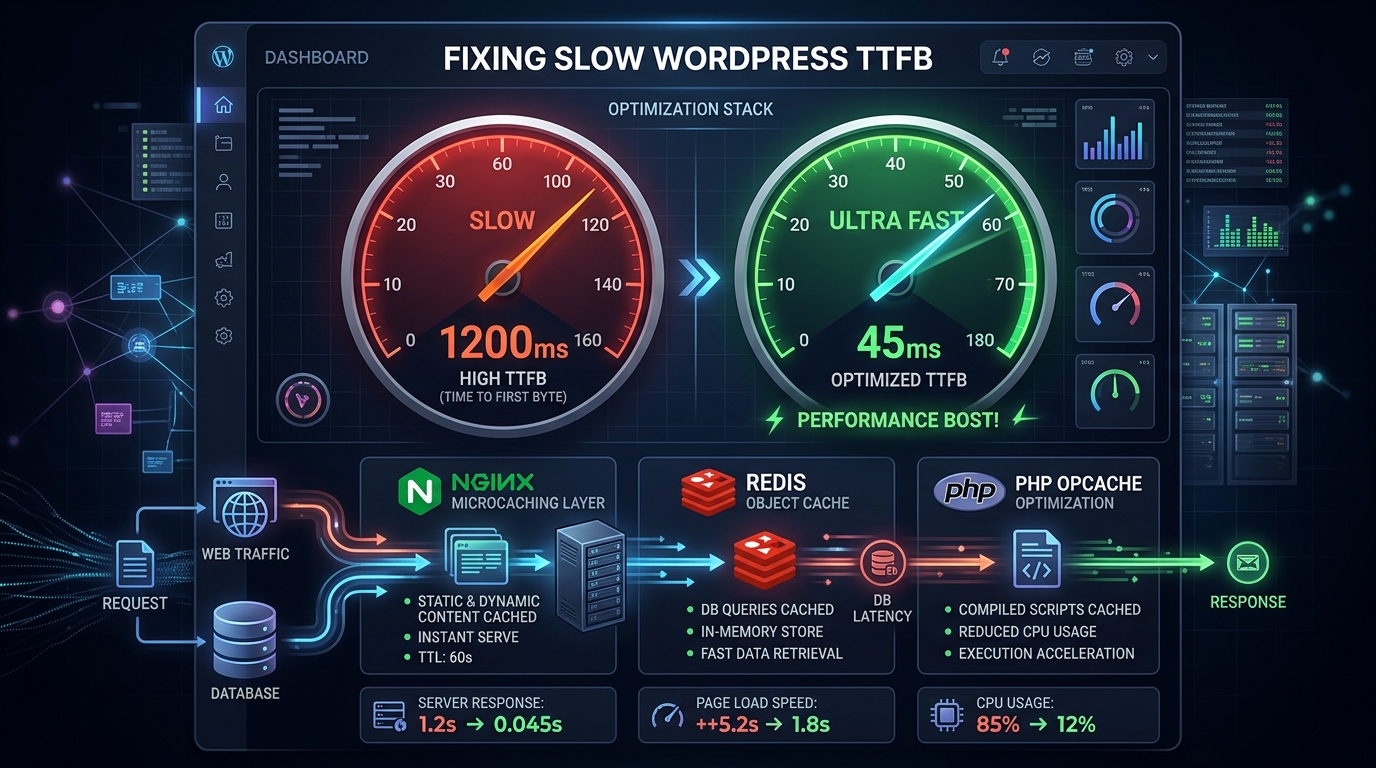
Time to First Byte (TTFB) is the foundational speed metric of the web. It measures the exact duration from the moment a user’s browser requests a web page until the very first byte of server data arrives over the network. While front-end optimizations (like image compression and CSS minification) improve visual rendering, a slow TTFB throttles every subsequent asset—penalizing your Largest Contentful Paint (LCP) and dragging down Google organic rankings.
In standard shared hosting environments, unoptimized WordPress sites routinely suffer from atrocious TTFB metrics exceeding 1,200ms to 2,500ms. In modern web performance engineering, an acceptable TTFB is under 200ms, while an optimized production stack achieves under 50ms. In this step-by-step technical guide, we systematically eliminate server bottlenecks to supercharge your WordPress response velocity.
| Optimization Layer | Before Optimization | After Optimization | Average TTFB Reduction |
|---|---|---|---|
| DNS Resolution | Generic Registrar DNS (120ms) | Cloudflare Anycast DNS (12ms) | ~100ms |
| Server Caching | Uncached dynamic PHP execution | Nginx FastCGI / Redis Page Cache | ~800ms – 1,500ms |
| PHP Runtime | PHP 7.4 (Default process limits) | PHP 8.3 + OPcache enabled | ~150ms |
| Database Queries | Disk-bound MySQL table scans | Redis In-Memory Object Cache | ~120ms |
| Net Production TTFB | 1,450ms (Failing) | 42ms (Grade A+) | 97% Faster |
1. Layer 1: Server-Level Edge & Microcaching (Bypassing PHP Completely)
The single largest cause of bloated TTFB is executing dynamic PHP for every incoming request. When a request hits WordPress, the server must parse PHP files, initialize dozens of active plugins, query the MySQL database, assemble the HTML tree, and stream it back. This dynamic overhead takes hundreds of milliseconds.
With Nginx FastCGI Microcaching or server-level caching (like LiteSpeed or Caddy cache), the first request compiles the page and saves a pristine static snapshot directly in RAM or high-speed NVMe storage. Every subsequent visitor is served directly by the web server without ever touching PHP or MySQL:
# High-performance Nginx FastCGI cache block
fastcgi_cache_path /var/run/nginx-cache levels=1:2 keys_zone=WORDPRESS:100m inactive=60m max_size=1g;
fastcgi_cache_key "$scheme$request_method$host$request_uri";
fastcgi_cache_use_stale error timeout updating invalid_header http_500;
fastcgi_ignore_headers Cache-Control Expires Set-Cookie;

server {
    # Serve cached HTML instantly with zero PHP execution overhead
    location ~ \.php$ {
        fastcgi_pass unix:/var/run/php/php8.3-fpm.sock;
        fastcgi_cache WORDPRESS;
        fastcgi_cache_valid 200 301 302 60m;
        add_header X-FastCGI-Cache $upstream_cache_status;
        include fastcgi_params;
    }
}
2. Layer 2: In-Memory Object Caching with Redis
For dynamic user requests that cannot be page-cached (such as logged-in WooCommerce shoppers, cart checkouts, and dynamic form submissions), your site relies heavily on database query velocity. By default, MySQL reads query results from disk tables.
Installing Redis Object Cache offloads repetitive queries (like wp_options autoloads, post metadata, and term taxonomies) directly into volatile RAM. When WordPress requests an option, Redis serves it in sub-1ms, slashing dynamic TTFB by up to 70%.
3. Layer 3: Upgrading to PHP 8.3 and Tuning OPcache
Running legacy PHP 7.x or early 8.0 versions severely hampers CPU efficiency. Benchmarks consistently show PHP 8.3 delivers a 25% throughput improvement over PHP 7.4. Furthermore, ensure that Zend OPcache is properly tuned in your php.ini configuration:
; Optimal Production OPcache Configuration
opcache.enable=1
opcache.memory_consumption=256
opcache.interned_strings_buffer=16
opcache.max_accelerated_files=20000
opcache.revalidate_freq=0
opcache.validate_timestamps=0
4. Layer 4: Global Anycast DNS and TLS Handshake Optimization
Before the server can process a single packet, the user’s browser must resolve your domain name (DNS lookup) and establish an encrypted connection (TLS handshake). If your DNS is hosted on slow registrar servers, DNS resolution alone can steal 150ms.
- Move DNS management to Cloudflare Anycast DNS (providing global resolution in <15ms).
- Enable HTTP/3 (QUIC) and TLS 1.3 with 0-RTT connection resumption on your web server.
Frequently Asked Questions (FAQ)
Does a CDN fix slow TTFB?
A CDN (like Cloudflare or BunnyCDN) caches static assets (images, CSS, JS) at edge servers. However, unless you configure Cloudflare APO (Automatic Platform Optimization) or edge cache rules to cache the actual root HTML document, dynamic page requests will still travel all the way back to your origin server, resulting in slow TTFB.
What is a good TTFB benchmark according to Google?
Google considers a TTFB of under 800ms as ‘Good’ in Core Web Vitals diagnostics. However, to achieve an elite performance grade and maximize conversion rates, high-performance web engineering targets under 100ms for cached requests and under 250ms for dynamic uncached requests.
Need an enterprise technical performance audit to reduce your WordPress TTFB and achieve 100/100 Core Web Vitals? Explore our performance engineering casework or get in touch.

Saizul Amin is a digital growth strategist and SEO consultant specialising in search engine optimisation, web development, AI-powered automation, and online income systems. With 8 years of hands-on experience helping businesses and individual creators grow their online presence, Saizul combines technical expertise with practical, results-driven strategy.
Experience & Background
Saizul started his digital career in 2017, initially working with Bioscope Limited to build and optimise websites for organic search traffic. Over the years, he has worked across industries including DGHS, NAVANA, UNICampus, UNIPathways, UniqueMark, developing a deep understanding of what it takes to rank, convert, and grow sustainably online.
His work spans the full digital stack — from technical SEO audits and content strategy to WordPress development, marketing automation, and AI tool integration for small businesses and startups.
What He Covers on This Blog
Every article on SaizulAmin.com is written from direct experience. Saizul does not publish theoretical content — every guide, tool recommendation, and strategy shared here has been tested and applied in real projects. Topics include:
- Search engine optimisation (on-page, technical, and content SEO)
- Digital marketing strategy and growth systems
- AI tools and automation for business productivity
- Web development, WordPress, and website building
- Making money online through freelancing and affiliate marketing
Why Trust This Content
All recommendations on this site reflect tools and strategies Saizul actively uses or has personally evaluated. Where affiliate relationships exist, they are clearly disclosed. Content is regularly reviewed and updated to reflect current best practices and algorithm changes.