

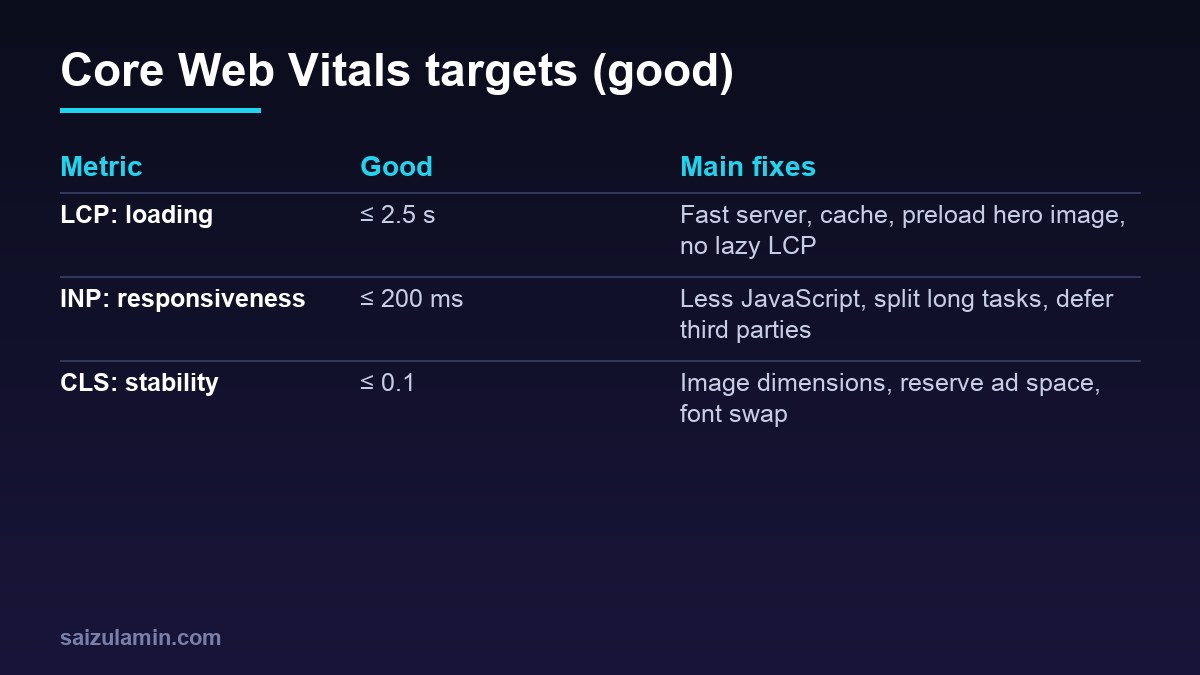
Core Web Vitals are Google’s three measures of real-world page experience: how fast the main content loads, how quickly the page responds to input, and how stable the layout is. They are one signal among many for search, but they are also the clearest description of what makes a site feel fast to a person. Here is what each means and what I do to fix it.
LCP: Largest Contentful Paint (loading)
LCP measures when the biggest visible element (usually a hero image or headline) finishes rendering. Aim for 2.5 seconds or less for most visitors. See Google’s LCP guide.
- Server response time: use page caching and decent hosting; slow TTFB caps everything else.
- Do not lazy-load the LCP image. WordPress and many themes lazy-load automatically; mark the hero image eager and high priority.
- Right-size and compress images, use modern formats and
srcset. - Preload the hero image or font if it is discovered late (for example a CSS background).
- Remove render-blocking CSS and fonts: self-host fonts, use
font-display: swap.
INP: Interaction to Next Paint (responsiveness)
INP replaced First Input Delay and measures how long the page takes to respond visually across all interactions. Aim for 200 ms or less. See the INP guide.
- Ship less JavaScript: remove unused plugins and widgets.
- Delay third-party scripts (ads, analytics, chat) until first interaction or idle time.
- Break up long tasks: yield to the main thread in heavy handlers.
- Avoid layout thrashing and expensive animations on interaction.
- Test on a mid-range phone, not your laptop.
CLS: Cumulative Layout Shift (visual stability)
CLS adds up unexpected movement of content. Aim for 0.1 or less. See the CLS guide.
- Set width and height (or aspect-ratio) on images and embeds.
- Reserve space for ads, banners and consent bars.
- Render main content on the server, not injected late by JavaScript (a grid filled by script was one of the biggest shifts I fixed).
- Avoid inserting content above existing content after load.
- Use font fallbacks with similar metrics.
Measure the right way
| Data | Tool | Use |
|---|---|---|
| Field (real users) | Search Console Core Web Vitals report, PageSpeed Insights field data | What Google evaluates |
| Lab (simulated) | Lighthouse, PageSpeed Insights lab section | Find and test fixes |
Lab scores vary by a few points each run and by your network; field data needs enough visitors and updates over weeks. Use lab tests to diagnose and field data to judge.
What to fix first
- Hosting and caching (biggest, cheapest win).
- The LCP image and fonts.
- Third-party scripts.
- Layout shift from images and ads.
- JavaScript weight and long tasks.
For the WordPress-specific checklist and measured results, read WordPress speed optimization.
Need help applying this to your site?
I work on technical SEO, performance and web systems for businesses and product teams. Send me your site address and goal and I will tell you what I would fix first.
FAQ
Do Core Web Vitals affect rankings?
They are part of Google’s page-experience signals, and relevance and content quality still come first. Poor vitals also hurt conversions directly.
Is a 100 Lighthouse score required?
No. Aim for “good” field metrics and a fast real experience.
How long until improvements show in Search Console?
Field data is a rolling 28-day window, so expect a few weeks.
Sources
- web.dev: Largest Contentful Paint
- web.dev: Interaction to Next Paint
- web.dev: Cumulative Layout Shift
- Google: Page experience

Saizul Amin is a digital growth strategist and SEO consultant specialising in search engine optimisation, web development, AI-powered automation, and online income systems. With 8 years of hands-on experience helping businesses and individual creators grow their online presence, Saizul combines technical expertise with practical, results-driven strategy.
Experience & Background
Saizul started his digital career in 2017, initially working with Bioscope Limited to build and optimise websites for organic search traffic. Over the years, he has worked across industries including DGHS, NAVANA, UNICampus, UNIPathways, UniqueMark, developing a deep understanding of what it takes to rank, convert, and grow sustainably online.
His work spans the full digital stack — from technical SEO audits and content strategy to WordPress development, marketing automation, and AI tool integration for small businesses and startups.
What He Covers on This Blog
Every article on SaizulAmin.com is written from direct experience. Saizul does not publish theoretical content — every guide, tool recommendation, and strategy shared here has been tested and applied in real projects. Topics include:
- Search engine optimisation (on-page, technical, and content SEO)
- Digital marketing strategy and growth systems
- AI tools and automation for business productivity
- Web development, WordPress, and website building
- Making money online through freelancing and affiliate marketing
Why Trust This Content
All recommendations on this site reflect tools and strategies Saizul actively uses or has personally evaluated. Where affiliate relationships exist, they are clearly disclosed. Content is regularly reviewed and updated to reflect current best practices and algorithm changes.