





Updated October 2026. I’m Saizul Amin, a digital growth and web systems professional working on websites and SEO since 2017. I have rewritten this guide from scratch with practical steps, tested advice and sources, and I will keep it current. Last reviewed: October 2026.
The hardest part of learning web development is not any single language; it is knowing what to learn next. This roadmap gives a clear order, what “good enough” looks like at each stage, and where AI coding assistants help or hurt. It is based on how I build and review web projects, from small business sites to custom applications.

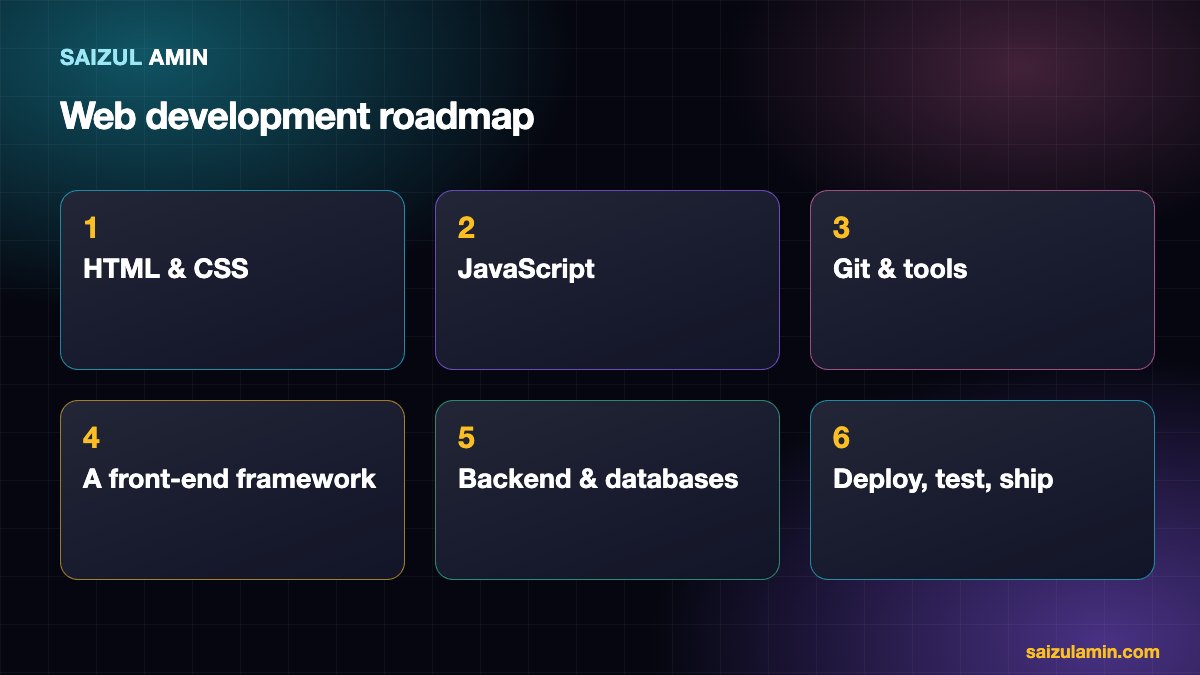
Stage 1: HTML and CSS (2–6 weeks)
Learn semantic HTML, the box model, Flexbox, Grid, responsive design and basic accessibility. Goal: build a responsive multi-section page from a design, without a framework. My tutorial how to create a website with HTML and CSS is a good start, and MDN’s Learn web development is the best free reference.
Stage 2: JavaScript (6–10 weeks)
Variables, functions, arrays and objects, DOM manipulation, events, fetch and asynchronous code (promises, async/await), modules. Goal: build an interactive app that calls a public API, such as a weather or search tool, and handles errors.
Stage 3: Developer tools (ongoing, start early)
- Git and GitHub: commits, branches, pull requests.
- The terminal, package managers (npm) and a code editor you know well.
- Browser DevTools: inspect, network, performance, Lighthouse.
Stage 4: A front-end framework (4–8 weeks)
Pick one, learn it properly: React is the most widely used (often with Next.js), with Vue and Svelte as capable alternatives. Learn components, state, routing and data fetching. Goal: rebuild your Stage 2 project as a component-based app. Do not hop between frameworks; the concepts transfer.
Stage 5: Backend and databases (6–12 weeks)
- A server language and framework: Node.js with Express, or Python with Django or FastAPI, or PHP with Laravel.
- HTTP, REST APIs, authentication and sessions, and security basics (validation, hashing passwords, SQL injection, XSS, CSRF).
- A database: learn SQL with PostgreSQL or MySQL first; add a NoSQL store later if needed.
Goal: a full-stack app with accounts and saved data.
Stage 6: Deployment, testing and quality
- Deploy to a host or a cloud platform, add HTTPS and a custom domain.
- Automated tests for important logic, and basic CI.
- Performance and accessibility checks; see web.dev’s Learn courses.
- Understand hosting options. When you outgrow shared hosting, read how I migrate sites to a VPS.
Where WordPress fits
Many client projects are WordPress or similar content systems. Knowing HTML, CSS, PHP basics and the theme and plugin structure makes you far more employable and lets you deliver business sites quickly. See my guides on creating a site with WordPress and WordPress for business.
Using AI coding assistants wisely
- Use them to explain errors, generate boilerplate and suggest tests; never to replace understanding.
- Read and understand every line you commit. Generated code can be insecure or subtly wrong.
- Learn the fundamentals first; otherwise you cannot judge what the tool gives you.
- Do not paste secrets or private code into tools without understanding their data policies.
Build projects at every stage
Tutorials teach syntax; projects teach problem-solving. After each stage, build something real and publish it. Ideas and how to present them are in portfolio projects for web developers.
How long does it take?
With consistent study of 10 to 15 hours a week, many people reach job-ready or freelance-ready level in roughly 9 to 18 months, but it varies widely with background, focus and practice. Treat any specific promise (“become a developer in 12 weeks”) with suspicion.
Need a second pair of eyes?
If you would like help applying this to your own website, send me a message with your site address and goal. I will tell you honestly what I would do first.
Frequently asked questions
Should I learn front-end or back-end first?
Front-end first: it gives immediate visual feedback and teaches the web’s foundations.
Which language should I learn first?
HTML and CSS, then JavaScript. It is the language of the browser and also runs on servers.
Do I need a degree?
No, but you need proof of skill: projects, code and clear explanations of your work.
Is web development still worth learning with AI?
Yes. AI speeds up routine work, but employers and clients still need people who understand systems, security and users.
Sources and further reading
How this article was written
I wrote this guide from hands-on experience with websites, SEO and automation. Technical and policy details were checked against the official sources above in October 2026. Tools, policies and prices change; if you notice something out of date, email info@saizul.com and I will correct it. Examples reflect my own projects and will vary on yours.


Saizul Amin is a digital growth strategist and SEO consultant specialising in search engine optimisation, web development, AI-powered automation, and online income systems. With 8 years of hands-on experience helping businesses and individual creators grow their online presence, Saizul combines technical expertise with practical, results-driven strategy.
Experience & Background
Saizul started his digital career in 2017, initially working with Bioscope Limited to build and optimise websites for organic search traffic. Over the years, he has worked across industries including DGHS, NAVANA, UNICampus, UNIPathways, UniqueMark, developing a deep understanding of what it takes to rank, convert, and grow sustainably online.
His work spans the full digital stack — from technical SEO audits and content strategy to WordPress development, marketing automation, and AI tool integration for small businesses and startups.
What He Covers on This Blog
Every article on SaizulAmin.com is written from direct experience. Saizul does not publish theoretical content — every guide, tool recommendation, and strategy shared here has been tested and applied in real projects. Topics include:
- Search engine optimisation (on-page, technical, and content SEO)
- Digital marketing strategy and growth systems
- AI tools and automation for business productivity
- Web development, WordPress, and website building
- Making money online through freelancing and affiliate marketing
Why Trust This Content
All recommendations on this site reflect tools and strategies Saizul actively uses or has personally evaluated. Where affiliate relationships exist, they are clearly disclosed. Content is regularly reviewed and updated to reflect current best practices and algorithm changes.


