


A bundle size budget is a limit on how much JavaScript and CSS your app may ship, checked automatically on every pull request. Without one, bundles grow quietly: a date library here, a second icon set there, and six months later the homepage downloads twice as much code as it did at launch. This guide sets up a budget that CI enforces for a Vite app: what to measure, size-limit configuration, a dependency-free Node.js script that budgets the real initial load from the Vite manifest, a GitHub Actions workflow with pull request comments, webpack’s built-in hints, and how to find out what grew when the check fails.
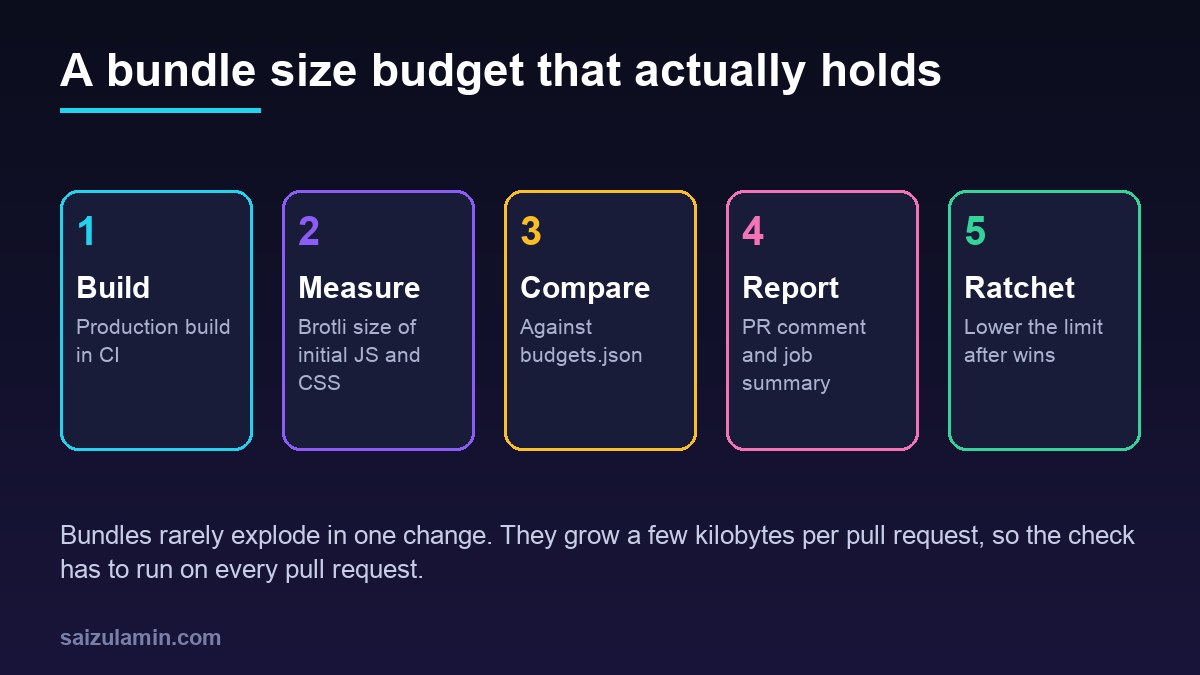
From my own work: The biggest single jump I have caught with a size check was a one-line import of a utility from a large library’s main entry, which pulled the whole library into the first chunk. The code review looked harmless; the size comment on the pull request did not. Changing it to a direct import of the one function brought the chunk back down before the change was ever deployed.
What a bundle size budget should measure
Pick a few numbers that track user experience, not every file. Measure them compressed, because that is what travels over the network, but remember that the browser still has to parse and execute the uncompressed code.
| Metric | What it tells you | Good starting limit |
|---|---|---|
| Initial JS (brotli) | Code needed before the first page works | Current size plus 10 percent |
| Initial CSS (brotli) | Render-blocking styles | Current size plus 10 percent |
| Largest chunk (brotli) | One dependency taking over a chunk | Current largest plus 10 percent |
| All JS (brotli) | Total weight, including lazy routes | Current total plus 15 percent |
| Uncompressed initial JS | Parse and execution cost on slow phones | Optional, warn only |
Start from what you ship today, not from an ideal number. A budget that fails on day one gets disabled on day two. Tighten it later, after each improvement. For why initial JavaScript matters to interaction metrics, see the INP and long animation frames guide.
Option 1: size-limit for a Vite app
size-limit is a small tool that measures files and fails when they exceed a limit. The @size-limit/file plugin measures already-built files, which is what you want for an app, and since recent versions it reports brotli size by default (size-limit).
npm install --save-dev size-limit @size-limit/file
npm run build
npx size-limit
{
"scripts": {
"build": "vite build",
"size": "npm run build && size-limit"
},
"size-limit": [
{ "name": "Entry JS", "path": "dist/assets/index-*.js", "limit": "120 kB" },
{ "name": "All JS", "path": "dist/assets/*.js", "limit": "400 kB" },
{ "name": "CSS", "path": "dist/assets/*.css", "limit": "30 kB",
"message": "CSS grew. Check for a new component library or unpurged utility classes." }
]
}Each entry takes a path glob (needed because Vite adds content hashes to file names), a limit such as 120 kB, an optional name and an optional message shown when the limit is exceeded. Set "gzip": true on an entry to measure gzip instead of brotli, if that is what your server sends. Run npx size-limit once, note the current numbers, and set each limit a little above them.
One limitation: index-*.js is only the entry file. Shared vendor chunks that the entry imports are also part of the first load, and a glob cannot tell which chunks those are. The next option solves that.
Option 2: a dependency-free budget script using the Vite manifest
With build.manifest enabled, Vite writes dist/.vite/manifest.json, which maps each entry to its output file, the chunks it statically imports and its CSS (Vite: backend integration). Following those imports gives the exact set of files a visitor downloads before the page works. Lazy routes appear under dynamicImports and are deliberately left out of the initial budget.
// vite.config.js
import { defineConfig } from 'vite';

export default defineConfig({
  build: {
    manifest: true,   // writes dist/.vite/manifest.json
  },
});
{
"initialJs": "170 kB",
"initialCss": "30 kB",
"largestChunk": "150 kB",
"totalJs": "400 kB"
}// scripts/check-budgets.mjs (Node.js 20+, no dependencies)
import { readFileSync, readdirSync, appendFileSync } from 'node:fs';
import { join } from 'node:path';
import { brotliCompressSync, gzipSync, constants } from 'node:zlib';
const DIST = process.argv[2] || 'dist';
const budgets = JSON.parse(readFileSync('budgets.json', 'utf8'));
const manifest = JSON.parse(readFileSync(join(DIST, '.vite/manifest.json'), 'utf8'));
const UNITS = { B: 1, kB: 1000, KiB: 1024, MB: 1e6 };
const toBytes = (s) => { const [n, u = 'B'] = String(s).split(' '); return Number(n) * UNITS[u]; };
const fmt = (b) => (b / 1000).toFixed(1) + ' kB';
const cache = new Map();
function sizes(file) {
if (!cache.has(file)) {
const buf = readFileSync(join(DIST, file));
cache.set(file, {
raw: buf.length,
gzip: gzipSync(buf, { level: 9 }).length,
brotli: brotliCompressSync(buf, {
params: { [constants.BROTLI_PARAM_QUALITY]: 11 },
}).length,
});
}
return cache.get(file);
}
const sum = (files, key = 'brotli') => files.reduce((t, f) => t + sizes(f)[key], 0);
// Initial load = every entry chunk plus its static imports, recursively
const seen = new Set();
(function visit(keys) {
for (const k of keys) {
if (seen.has(k)) continue;
seen.add(k);
visit(manifest[k].imports || []);
}
})(Object.keys(manifest).filter((k) => manifest[k].isEntry));
const initial = [...seen].map((k) => manifest[k]);
const initialJs = [...new Set(initial.map((c) => c.file).filter((f) => f.endsWith('.js')))];
const initialCss = [...new Set(initial.flatMap((c) => c.css || []))];
const allJs = readdirSync(join(DIST, 'assets'), { recursive: true })
.filter((f) => f.endsWith('.js'))
.map((f) => join('assets', f));
const largest = allJs.reduce((a, f) => (sizes(f).brotli > sizes(a).brotli ? f : a), allJs[0]);
const results = [
['initialJs', 'Initial JS', sum(initialJs)],
['initialCss', 'Initial CSS', sum(initialCss)],
['largestChunk', `Largest chunk (${largest})`, sizes(largest).brotli],
['totalJs', 'All JS', sum(allJs)],
].map(([key, label, actual]) => ({ label, actual, limit: toBytes(budgets[key]) }));
let failed = false;
const rows = results.map(({ label, actual, limit }) => {
const ok = actual <= limit;
failed ||= !ok;
return `| ${label} | ${fmt(actual)} | ${fmt(limit)} | ${ok ? 'OK' : 'OVER'} |`;
});
const table = ['| Budget (brotli) | Actual | Limit | Status |', '|---|---|---|---|', ...rows].join('n');
console.log(table);
if (process.env.GITHUB_STEP_SUMMARY) appendFileSync(process.env.GITHUB_STEP_SUMMARY, table + 'n');
if (failed) {
console.error('nBundle size budget exceeded. Run the visualizer to see what grew.');
process.exit(1);
}Save the limits as budgets.json in the project root and the script as scripts/check-budgets.mjs. It compresses each file at brotli quality 11, which is close to what a static host or CDN serves for pre-compressed assets, prints a Markdown table, appends it to the GitHub job summary when it runs in Actions, and exits with code 1 when any budget is exceeded. If your server only uses gzip, change the default key in sum() to 'gzip'. The Brotli compression levels guide explains why the level your server uses can differ from what you measure.
npm run build && node scripts/check-budgets.mjs
# | Budget (brotli) | Actual | Limit | Status |
# |---|---|---|---|
# | Initial JS | ... | 170.0 kB | OK |
# ...
Enforce the bundle size budget in GitHub Actions
Run the check on every pull request and make it a required status check. This workflow runs both options; keep the one you prefer:
# .github/workflows/bundle-size.yml
name: bundle-size

on:
  pull_request:

permissions:
  contents: read

jobs:
  budget:
    runs-on: ubuntu-latest
    steps:
      - uses: actions/checkout@v7
      - uses: actions/setup-node@v7
        with:
          node-version: 24
          cache: npm
      - run: npm ci
      - run: npm run build
      - name: Budget (manifest script)
        run: node scripts/check-budgets.mjs
      - name: Budget (size-limit)
        run: npx size-limit
To get a comment on each pull request that compares the branch with the base, use size-limit’s companion action. It installs, builds and measures both the pull request and the base branch, then posts the difference (size-limit-action):
# .github/workflows/size-comment.yml
name: size-comment

on:
  pull_request:

permissions:
  contents: read
  pull-requests: write

jobs:
  size:
    runs-on: ubuntu-latest
    env:
      CI_JOB_NUMBER: 1
    steps:
      - uses: actions/checkout@v7
      - uses: actions/setup-node@v7
        with:
          node-version: 24
      - uses: andresz1/size-limit-action@v1
        with:
          github_token: ${{ secrets.GITHUB_TOKEN }}
          build_script: build
The comment matters more than it looks. A failing check tells the author they crossed a line; a comment showing +38 kB on a pull request that only added a date picker tells the reviewer exactly what to ask about, even when the total is still under budget.
Built-in limits in Vite and webpack
Bundlers have their own size warnings. They measure uncompressed output, so treat them as a second line of defence rather than the budget itself. Vite’s build.chunkSizeWarningLimit (in kB, default 500) only prints a warning (Vite: build options). webpack can fail the build with performance.hints: 'error' (webpack: performance):
// webpack.config.js (excerpt)
module.exports = {
  mode: 'production',
  performance: {
    hints: 'error',               // fail the build instead of warning
    maxEntrypointSize: 400_000,   // bytes, uncompressed, all assets of an entry
    maxAssetSize: 250_000,        // bytes, uncompressed, any single emitted file
    assetFilter: (file) => file.endsWith('.js') || file.endsWith('.css'),
  },
};
When the budget fails: find what grew
A failing budget is only useful if the author can find the cause quickly. Add a visual report to the build:
npm install --save-dev rollup-plugin-visualizer// vite.config.js
import { defineConfig } from 'vite';
import { visualizer } from 'rollup-plugin-visualizer';
export default defineConfig({
build: { manifest: true },
plugins: [
visualizer({
filename: 'stats.html', // open it after a build
template: 'treemap',
gzipSize: true,
brotliSize: true,
}),
],
});Build the base branch and the pull request branch, open both reports and compare the largest boxes. The usual causes are predictable:
- Importing from a package’s main entry when the package does not tree-shake well. Import the specific function or switch to a modular package.
- A heavy component on the first route that is not needed for the first view, such as a chart, editor or map. Load it with a dynamic
import()so it moves into a lazy chunk. - Duplicate dependencies, two versions of the same library pulled in by different packages.
npm ls <package>shows where they come from. - Polyfills for old browsers that your browser targets no longer need.
- Locale or icon data imported in full instead of one locale or a few icons.
For Next.js projects the same thinking applies at the route level, as covered in the Next.js dynamic imports guide.
Keep the budget honest: ratchet it down
A budget set once and never touched slowly becomes meaningless, because every pull request can spend the remaining headroom. Two habits keep it useful:
- Ratchet after wins. When a change removes 20 kB, lower the limit in the same pull request. The budget then protects the improvement.
- Raise it on purpose only. When a feature genuinely needs more code, raise the limit in the same pull request, with a sentence in the description saying why. The reviewer approves the cost explicitly instead of discovering it later.
Size is a proxy. Confirm with field data that smaller bundles actually improved the experience, using the checks in the Core Web Vitals fixes guide or your own real-user monitoring.
Bundle size budget checklist
- Budgets for initial JS, initial CSS, the largest chunk and total JS, measured compressed.
- Limits set from current sizes plus a small margin.
- The check runs on every pull request and is a required status check.
- Pull request comments that show the size difference against the base branch.
- A visualizer report available to find what grew.
- Limits lowered after improvements, raised only with a written reason.
Want this done on your own server or site?
I am Saizul Amin, a web developer and technical SEO consultant. I set up and harden VPS servers, migrate WordPress sites, fix indexing problems and build automations. See my portfolio or get in touch.
FAQ
What is a bundle size budget?
It is a maximum size for the JavaScript and CSS your app ships, such as 170 kB of brotli-compressed initial JavaScript, checked automatically in CI so a pull request that exceeds it fails.
Should I measure gzip or brotli size?
Measure the compression your server or CDN actually uses. Most modern hosts serve brotli to browsers that support it, which is why size-limit uses brotli by default; switch to gzip if that is what you serve.
How do I set the first budget?
Build the current production version, measure it, and set each limit about 10 percent above the current size. Lower the limits as you remove code, so the budget protects each improvement.
Does Vite have a bundle size limit?
Vite has build.chunkSizeWarningLimit, which warns when an uncompressed chunk is larger than the limit, 500 kB by default. It does not fail the build, so use size-limit or a budget script for enforcement.
Why is my bundle under budget but the site still slow?
Size is only one factor. Execution time, render-blocking resources, images, fonts and server response time also matter, so check Core Web Vitals with field data as well.
Sources
- size-limit on GitHub
- size-limit-action on GitHub
- Vite: Build options
- Vite: Backend integration (manifest)
- webpack: Performance

Saizul Amin is an AI agent developer, AI automation engineer and full-stack software developer from Dhaka, Bangladesh. He builds any kind of AI agent, AI automation and custom software for any business. Portfolio: https://saizul.com