


Agent Skills are folders of instructions, scripts and reference files that AI coding agents load when a task needs them. Instead of pasting the same release checklist or deployment steps into every prompt, you write them once in a SKILL.md file, commit it to the repository, and any agent that supports the open format can pick it up. This guide covers the format end to end: the frontmatter rules, how to write a description that actually triggers, a complete example skill with a script and a reference file, where agents look for skills, how to validate them in CI, and how to review skills you did not write.
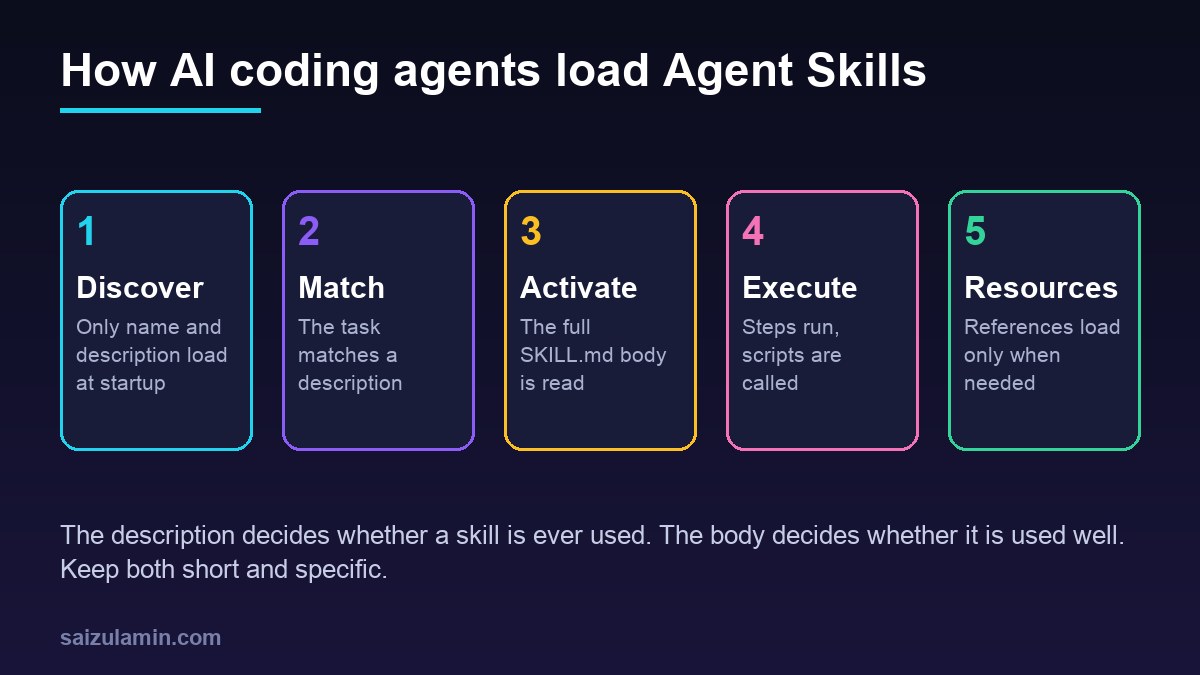
From my own work: The first skills I wrote were too long and too vague. A 600-line SKILL.md with a description like helps with WordPress either never activated or filled the context with steps the task did not need. Splitting it into one short skill per job, with the detail moved into reference files, made the agent follow the steps far more reliably.
What Agent Skills are and how agents load them
A skill is a directory that contains, at minimum, a SKILL.md file: YAML frontmatter followed by Markdown instructions. It can also bundle scripts/, references/ and assets/ folders (Agent Skills specification). The key design idea is progressive disclosure: the agent does not read every skill up front. It loads detail in three stages.
| Stage | What the agent loads | Guidance from the spec |
|---|---|---|
| Discovery | name and description of every installed skill |
About 100 tokens per skill |
| Activation | The full SKILL.md body of the matching skill |
Under 5,000 tokens recommended; keep the file under 500 lines |
| Execution | Files in scripts/, references/ or assets/ |
Only when a step asks for them |
That has two practical consequences. You can install many skills without paying a large context cost, and the description is the only thing the agent sees when it decides whether to use a skill. A skill with a weak description is a skill that never runs.
Skills, instruction files, MCP tools or plain scripts?
Skills overlap with other ways of steering coding agents, so pick the one that matches the job:
| Mechanism | Best for | Loaded |
|---|---|---|
Repository instruction file (such as AGENTS.md) |
Always-true facts: build commands, code style, folder layout | Every session |
| Agent Skill | A repeatable procedure: release a plugin, review an Nginx config, write a migration | Only when the task matches |
| MCP server | Live access to an external system or API | Tools are listed; calls happen at runtime |
| Script or Makefile target | Deterministic steps that need no judgement | When someone runs it |
The best skills often combine the last two: the skill explains when and why, and calls a script for the parts that must be exact. If you are building agents yourself rather than configuring existing ones, the guide to building autonomous agents with local LLMs covers the runtime side.
Where agents look for skills
The format is shared, but each agent documents its own search folders. GitHub Copilot, for example, reads project skills from .github/skills/ and personal skills from ~/.copilot/skills/ (GitHub Docs: agent skills), and VS Code lists the project and personal folders each supported agent reads, including .agents/skills/ (VS Code: Agent Skills). Check the documentation of the agents your team uses, commit project skills to the repository so everyone gets the same version, and keep personal skills for habits that are yours alone.
Step 1: create the skill folder
The example in this guide is a skill that prepares a WordPress plugin release: it checks that version numbers agree, runs the coding standards, and builds a zip. Create the folder in the location your agent reads:
mkdir -p .github/skills/wp-plugin-release/{scripts,references}
cd .github/skills/wp-plugin-release

# final layout
# wp-plugin-release/
#   SKILL.md                    required: frontmatter + instructions
#   scripts/check-versions.sh   exact checks the agent runs
#   references/readme-rules.md  detail loaded only when needed
Step 2: frontmatter rules
Only two fields are required. The spec sets these constraints (Agent Skills: frontmatter):
| Field | Required | Rules |
|---|---|---|
name |
Yes | 1 to 64 characters; lowercase letters, numbers and hyphens; no leading, trailing or double hyphens; must match the folder name |
description |
Yes | 1 to 1,024 characters; what the skill does and when to use it |
license |
No | A license name or a bundled license file |
compatibility |
No | Up to 500 characters on environment needs, such as required tools or network access |
metadata |
No | String keys to string values, such as author and version |
allowed-tools |
No | Space-separated pre-approved tools; experimental and not supported everywhere |
Step 3: write a description that triggers
Write the description for the moment of choice: the agent has a user request and a list of short descriptions, and must pick one. A good description names the task, the inputs, and the words a user would actually type.
- Weak:
Helps with plugins. - Better:
Prepares a WordPress plugin release. - Good:
Prepares a WordPress plugin release: checks that the plugin header Version, readme.txt Stable tag and changelog agree, runs PHPCS and builds an installable zip. Use when the user asks to release, tag, bump the version of, or package a WordPress plugin.
Two habits help: say what the skill does in the first sentence and when to use it in the second, and avoid overlapping descriptions between skills, because two skills that both claim deployment make activation unpredictable.
Step 4: the complete SKILL.md
The body has no required structure. Numbered steps, explicit commands and a clear definition of done work best, because the agent follows them literally.
---
name: wp-plugin-release
description: Prepares a WordPress plugin release. Checks that the plugin header Version, readme.txt Stable tag and changelog agree, runs PHPCS and builds an installable zip. Use when the user asks to release, tag, bump the version of, or package a WordPress plugin.
license: MIT
compatibility: Requires bash, git, php, composer and zip.
metadata:
  author: example-team
  version: "1.2"
---

# WordPress plugin release

## Before you start
- Work on a clean branch. Run `git status --porcelain`; stop and ask if it is not empty.
- Ask for the new version number if the user did not give one. Use SemVer (1.4.0).

## Steps
1. Update the version in three places:
   - the `Version:` line in the main plugin file
   - `Stable tag:` in `readme.txt`
   - a new `= 1.4.0 =` entry at the top of `== Changelog ==` in `readme.txt`
2. Run `bash .github/skills/wp-plugin-release/scripts/check-versions.sh`.
   Fix every mismatch it reports before continuing.
3. Run `composer run phpcs`. Fix errors; do not add ignore comments.
4. Build the zip:
   `git archive --format=zip --prefix=my-plugin/ -o my-plugin.zip HEAD`
5. Show the user the diff and the zip size. Do not push or tag unless asked.

## Rules
- If readme.txt fields are unclear, read `references/readme-rules.md`.
- Never edit files in `vendor/` or `node_modules/`.

## Done when
- check-versions.sh exits 0, PHPCS passes, and my-plugin.zip exists.
Step 5: bundle a script for the exact parts
Anything that must be exact belongs in a script, not in prose. The spec asks that scripts be self-contained or document their dependencies, print helpful errors and handle edge cases (Agent Skills: scripts).
#!/usr/bin/env bash
# scripts/check-versions.sh: compare plugin header, readme Stable tag and changelog
set -euo pipefail

main=$(grep -l -m1 '^[[:space:]]**?[[:space:]]*Plugin Name:' ./*.php | head -n1 || true)
[ -n "$main" ] || { echo "ERROR: no main plugin file with a Plugin Name header"; exit 2; }
[ -f readme.txt ] || { echo "ERROR: readme.txt not found"; exit 2; }

header=$(grep -m1 -i '^[[:space:]]**?[[:space:]]*Version:' "$main" | sed -E 's/.*[Vv]ersion:[[:space:]]*//' | tr -d 'r ')
stable=$(grep -m1 -i '^Stable tag:' readme.txt | sed -E 's/^[Ss]table [Tt]ag:[[:space:]]*//' | tr -d 'r ')
changelog=$(awk '/^== Changelog ==/{f=1;next} f && /^= /{gsub(/[= r]/,"");print;exit}' readme.txt)

echo "header=$header stable=$stable changelog=$changelog"
fail=0
[ "$header" = "$stable" ]    || { echo "MISMATCH: $main Version ($header) != Stable tag ($stable)"; fail=1; }
[ "$header" = "$changelog" ] || { echo "MISMATCH: newest changelog entry ($changelog) != $header"; fail=1; }
[ "$fail" -eq 0 ] && echo "OK: versions agree"
exit $fail
Step 6: move detail into references
Detail the agent needs only sometimes goes in references/, linked from SKILL.md with a relative path. The spec recommends keeping references one level deep from SKILL.md and keeping each file focused, since agents load them on demand (Agent Skills: file references). A good reference is a short list of rules, not a copy of a handbook.
# references/readme-rules.md

- Stable tag must equal the Version header in the main plugin file. Never use "trunk".
- Tested up to: major.minor of the newest WordPress tested, numbers only (7.1).
- Short description: one line under the header block, 150 characters or fewer, no markup.
- Tags: at most 5, comma separated, no competitor names.
- Keep only recent changelog entries in readme.txt; move older ones to changelog.txt.
The rules in that file come from the WordPress.org readme standard, checked again at release time in the WordPress.org plugin deploy guide.
Step 7: validate Agent Skills locally and in CI
The reference library skills-ref checks frontmatter and naming rules. Its README describes it as a demonstration library, so treat it as a linter, not a gate on its own (agentskills/agentskills on GitHub).
python3 -m venv .venv && . .venv/bin/activate
pip install "git+https://github.com/agentskills/agentskills.git#subdirectory=skills-ref"
skills-ref validate .github/skills/wp-plugin-release
For CI, a small dependency-light check catches the mistakes that break discovery: a name that does not match its folder, a missing or oversized description, or a body that has grown too long.
# scripts/lint_skills.py  -  usage: python3 scripts/lint_skills.py .github/skills
import pathlib, re, sys
import yaml  # pip install pyyaml

NAME = re.compile(r'^[a-z0-9]+(-[a-z0-9]+)*$')
errors = 0
for skill in sorted(pathlib.Path(sys.argv[1]).glob('*/SKILL.md')):
    text = skill.read_text(encoding='utf-8')
    m = re.match(r'^---n(.*?)n---n(.*)$', text, re.S)
    if not m:
        print(f'{skill}: missing YAML frontmatter'); errors += 1; continue
    meta, body = yaml.safe_load(m.group(1)) or {}, m.group(2)
    name, desc = str(meta.get('name', '')), str(meta.get('description', '')).strip()
    checks = [
        (NAME.match(name) and len(name) <= 64, 'name must be lowercase, digits and single hyphens, max 64'),
        (name == skill.parent.name, f'name "{name}" must match folder "{skill.parent.name}"'),
        (0 < len(desc) <= 1024, 'description must be 1-1024 characters'),
        (len(body.splitlines()) <= 500, 'body over 500 lines: move detail to references/'),
    ]
    for ok, msg in checks:
        if not ok:
            print(f'{skill}: {msg}'); errors += 1
sys.exit(1 if errors else 0)
# .github/workflows/skills.yml
name: Lint agent skills
on:
pull_request:
paths: ['.github/skills/**']
permissions:
contents: read
jobs:
lint:
runs-on: ubuntu-latest
steps:
- uses: actions/checkout@v7
- uses: actions/setup-python@v7
with:
python-version: '3.13'
- run: pip install pyyaml
- run: python3 scripts/lint_skills.py .github/skills
- run: shellcheck .github/skills/*/scripts/*.shStep 8: test that the skill triggers and finishes
Validation proves the file is well formed, not that it works. Keep a short list of prompts next to each skill and try them after every change to the description or steps:
- Should trigger: release version 1.4.0 of this plugin, bump the plugin version and build a zip.
- Should not trigger: fix this PHP warning, deploy the theme to staging.
Watch whether the agent activated the skill, followed the steps in order, ran the script and stopped at the Done when line. If it skips a step, make the step a command. If it activates for unrelated work, narrow the description.
Review third-party skills like code
A skill can tell an agent to run its scripts, so installing someone else’s skill is closer to adding a dependency than to reading a blog post. Before you add one:
- Read every file, including scripts and references, and look for network calls,
curl | shpatterns and writes outside the project. - Pin it: vendor a reviewed copy into the repository rather than pulling a moving branch.
- Never put secrets in a skill. Read them from the environment or a secret manager at runtime.
- Treat
allowed-toolsas a convenience, not a security boundary; support varies between agents, and your agent’s own permission settings still decide what runs.
Skills shared with outside contributors deserve the same review rules as the rest of the repository, as described in the contributor-friendly open source guide, and generated docs such as a skill index can be kept current the same way as a Markdown table of contents.
Agent Skills checklist
- One skill per job, with a folder name that equals the
namefield. - A description that says what it does and when to use it, with the words users type.
- Numbered steps, explicit commands and a Done when line.
- Exact checks in
scripts/with clear exit codes and messages. - Detail in
references/, one level deep;SKILL.mdunder 500 lines. - Linted in CI and tested with prompts that should and should not trigger it.
- Third-party skills read, pinned and free of secrets.
Want this done on your own server or site?
I am Saizul Amin, a web developer and technical SEO consultant. I set up and harden VPS servers, migrate WordPress sites, fix indexing problems and build automations. See my portfolio or get in touch.
FAQ
What is a SKILL.md file?
It is the required file of an Agent Skill: YAML frontmatter with at least a name and a description, followed by Markdown instructions. The folder around it can also hold scripts, reference documents and assets that the agent loads when a step needs them.
Which fields are required in Agent Skills frontmatter?
Only name and description. The name must be lowercase letters, numbers and single hyphens, at most 64 characters and equal to the folder name. The description can be up to 1,024 characters.
Why does my skill never activate?
Usually the description is too vague or overlaps with another skill. Agents only see names and descriptions when choosing, so describe the task, the trigger phrases and the inputs specifically, and test with real prompts.
How long should a SKILL.md be?
The specification recommends keeping the body under about 5,000 tokens and under 500 lines. Move detailed rules, examples and schemas into files in a references folder and link to them.
Are Agent Skills safe to install from the internet?
Only after review. A skill can instruct an agent to run its bundled scripts, so read every file, pin a reviewed copy in your repository and keep secrets out of it, just as you would with any code dependency.
Sources
- Agent Skills: Specification
- Agent Skills: Overview
- Agent Skills reference repository and skills-ref validator
- GitHub Docs: About agent skills
- Visual Studio Code Docs: Use Agent Skills

Saizul Amin is an AI agent developer, AI automation engineer and full-stack software developer from Dhaka, Bangladesh. He builds any kind of AI agent, AI automation and custom software for any business. Portfolio: https://saizul.com