


Next.js generateMetadata is the App Router function that builds the title, description, canonical URL, Open Graph tags and robots rules for each dynamic page, on the server, from the same data the page renders. Together with the sitemap.ts and robots.ts file conventions it covers most of the technical SEO a content or product site needs, without a plugin. This guide sets up root metadata with a title template, writes generateMetadata for a blog post with canonicals and Open Graph, handles noindex pages and hreflang, generates sitemaps with real modification dates, splits large sitemaps with generateSitemaps, adds JSON-LD, and verifies the output. Code targets Next.js 16.
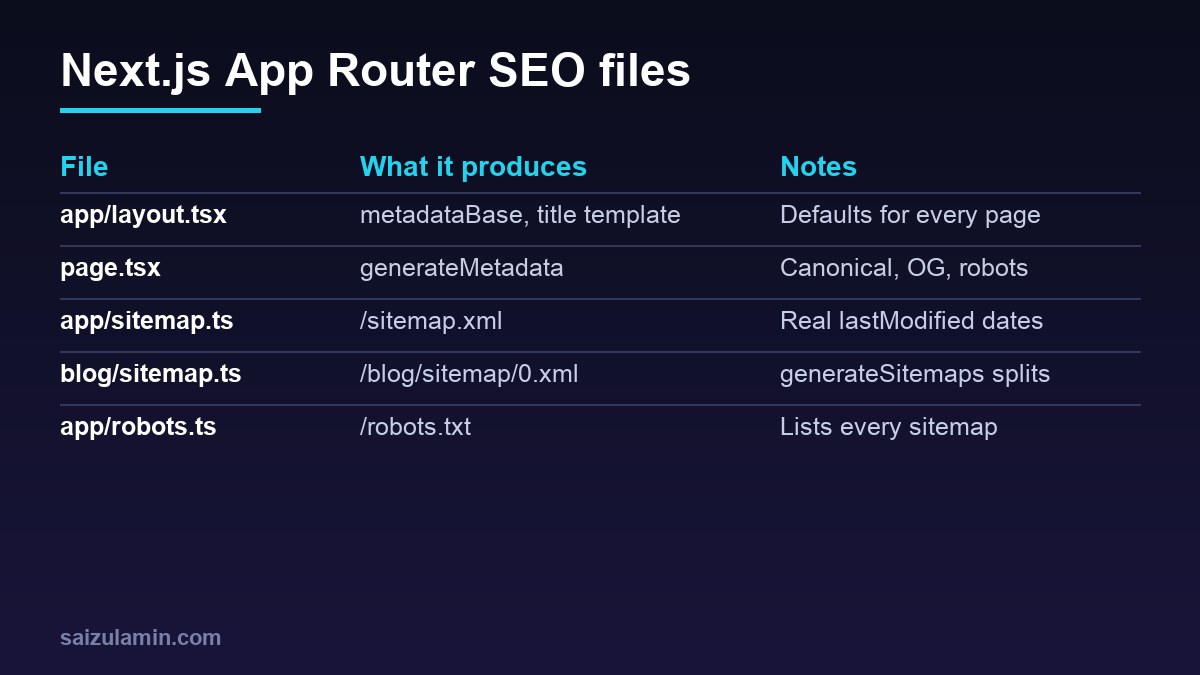
From my own work: When I audit Next.js sites, the same three problems come up again and again: every page has the home page canonical because it was set once in the root layout, Open Graph images vanish on pages that set only an Open Graph title, and the sitemap lists every URL with today’s date. All three are small fixes once you know how metadata merging works.
Step 1: root metadata in app/layout.tsx
Set the defaults once in the root layout. metadataBase lets every other URL field be relative, and a title template saves repeating the site name (Next.js: generateMetadata).
// app/layout.tsx
import type { Metadata } from 'next'

export const metadata: Metadata = {
  metadataBase: new URL('https://www.example.com'),
  title: {
    default: 'Example Studio: Web Development and SEO',
    template: '%s | Example Studio',
  },
  description: 'Web development, technical SEO and hosting for growing businesses.',
  openGraph: {
    siteName: 'Example Studio',
    type: 'website',
    locale: 'en_US',
    images: [{ url: '/og/default.png', width: 1200, height: 630 }],
  },
  twitter: { card: 'summary_large_image' },
}

export default function RootLayout({ children }: { children: React.ReactNode }) {
  return (
    <html lang="en">
      <body>{children}</body>
    </html>
  )
}
Do not put alternates.canonical in the root layout unless you mean it: a canonical of / inherited by every page tells search engines that all pages are duplicates of the home page. Set canonicals per page instead, as explained in the canonical tags guide.
Step 2: Next.js generateMetadata for dynamic pages
For a route like app/blog/[slug]/page.tsx, export an async generateMetadata. Since Next.js 15, params is a Promise and must be awaited. Wrap the data loader in React cache so the page and the metadata share one database call per request.
// lib/posts.ts
import { cache } from 'react'
import { db } from './db'

export const getPost = cache(async (slug: string) => {
  return db.post.findUnique({ where: { slug, status: 'published' } })
})
// app/blog/[slug]/page.tsx
import type { Metadata } from 'next'
import { notFound } from 'next/navigation'
import { getPost } from '@/lib/posts'
type Props = { params: Promise<{ slug: string }> }
export async function generateMetadata({ params }: Props): Promise<Metadata> {
const { slug } = await params
const post = await getPost(slug)
if (!post) notFound()
const url = `/blog/${post.slug}`
return {
title: post.seoTitle ?? post.title, // becomes "Title | Example Studio"
description: post.excerpt,
alternates: { canonical: url },
robots: post.noindex ? { index: false, follow: true } : undefined,
openGraph: {
type: 'article',
url,
title: post.title,
description: post.excerpt,
publishedTime: post.publishedAt.toISOString(),
modifiedTime: post.updatedAt.toISOString(),
images: [{ url: post.coverUrl ?? '/og/default.png', width: 1200, height: 630, alt: post.title }],
},
}
}
export default async function PostPage({ params }: Props) {
const { slug } = await params
const post = await getPost(slug)
if (!post) notFound()
return <article><h1>{post.title}</h1>{/* ... */}</article>
}Use title: { absolute: '...' } when a page must skip the template, such as a landing page whose title already contains the brand.
The shallow merge trap
Metadata from layouts and pages is merged from the root down, but the merge is shallow: if a page sets openGraph, its object replaces the layout’s whole openGraph object, including images and siteName (the Next.js docs show this inheritance behaviour in their merging examples, generateMetadata: merging). Share the defaults explicitly:
// lib/seo.ts
export const baseOpenGraph = {
  siteName: 'Example Studio',
  locale: 'en_US',
  images: [{ url: '/og/default.png', width: 1200, height: 630 }],
}

// in a page
openGraph: { ...baseOpenGraph, type: 'article', title: post.title, url },
Check the result in a link preview tool after deploying; the Open Graph link preview debugging guide lists the validators and cache refresh steps for each network.
| Metadata field | HTML output | SEO note |
|---|---|---|
title |
<title> |
Template applies to child segments, not the segment that defines it |
description |
<meta name="description"> |
Write one per page; a shared description wastes the snippet |
alternates.canonical |
<link rel="canonical"> |
Resolved against metadataBase; set per page |
alternates.languages |
<link rel="alternate" hreflang> |
Include every language version and x-default |
robots |
<meta name="robots"> |
Use for noindex; robots.txt cannot remove pages from the index |
openGraph, twitter |
og:* and twitter:* meta tags |
Shallow merged; repeat images when you override |
Streaming metadata and crawlers
Since Next.js 15.2, metadata from generateMetadata can be streamed: the page shell is sent first and the tags follow when the data resolves. For bots that only read static HTML, Next.js detects the user agent and blocks until metadata is ready so the tags are in the head. The htmlLimitedBots option in next.config.ts overrides the default list; setting it to /.*/ disables streaming metadata completely (generateMetadata: streaming metadata). Keep generateMetadata fast anyway, because slow data delays both the metadata and the page.
Step 3: sitemap.ts with real lastModified dates
An app/sitemap.ts that default-exports a function returning MetadataRoute.Sitemap is served at /sitemap.xml. It is a special route handler and is cached by default unless it uses a request-time API (Next.js: sitemap.xml):
// app/sitemap.ts
import type { MetadataRoute } from 'next'

const BASE = 'https://www.example.com'

export default async function sitemap(): Promise<MetadataRoute.Sitemap> {
  const res = await fetch(`${process.env.CMS_URL}/api/posts?fields=slug,updatedAt`, {
    next: { revalidate: 3600 },                    // refresh at most hourly
  })
  const posts: { slug: string; updatedAt: string }[] = await res.json()

  const pages: MetadataRoute.Sitemap = [
    { url: `${BASE}/`, lastModified: new Date('2026-11-01') },
    { url: `${BASE}/services`, lastModified: new Date('2026-10-15') },
  ]
  return [
    ...pages,
    ...posts.map((p) => ({ url: `${BASE}/blog/${p.slug}`, lastModified: new Date(p.updatedAt) })),
  ]
}
Three rules keep the sitemap useful: list only canonical, indexable URLs that return 200; use the real modification date rather than new Date() for every entry; and leave out priority and changeFrequency unless you have a reason, since Google says it ignores them. The general rules are in the XML sitemap best practices guide.
Step 4: split large sitemaps with generateSitemaps
Google limits a sitemap to 50,000 URLs or 50 MB uncompressed (Google: build a sitemap). In Next.js, export generateSitemaps next to a nested sitemap.ts; each returned id becomes /blog/sitemap/[id].xml. Since Next.js 16 the id reaches the sitemap function as a Promise that resolves to a string (Next.js: generateSitemaps).
// app/blog/sitemap.ts
import type { MetadataRoute } from 'next'
import { countPosts, listPosts } from '@/lib/posts'

const BASE = 'https://www.example.com'
const PER_FILE = 45000                      // stay safely under the 50,000 limit

export async function generateSitemaps() {
  const total = await countPosts()
  return Array.from({ length: Math.ceil(total / PER_FILE) }, (_, i) => ({ id: i }))
}

export default async function sitemap(props: { id: Promise<string> }): Promise<MetadataRoute.Sitemap> {
  const id = Number(await props.id)
  const posts = await listPosts({ offset: id * PER_FILE, limit: PER_FILE })
  return posts.map((p) => ({ url: `${BASE}/blog/${p.slug}`, lastModified: p.updatedAt }))
}
Next.js does not create a sitemap index for these files, so tell crawlers about each one in robots.ts (next step) or submit them in Search Console. If you prefer a single index URL, serve one from a route handler:
// app/sitemap-index.xml/route.ts
import { generateSitemaps } from '../blog/sitemap'

const BASE = 'https://www.example.com'

export async function GET() {
  const ids = await generateSitemaps()
  const urls = [`${BASE}/sitemap.xml`, ...ids.map(({ id }) => `${BASE}/blog/sitemap/${id}.xml`)]
  const body = `<?xml version="1.0" encoding="UTF-8"?>
<sitemapindex xmlns="http://www.sitemaps.org/schemas/sitemap/0.9">
${urls.map((u) => `  <sitemap><loc>${u}</loc></sitemap>`).join('n')}
</sitemapindex>`
  return new Response(body, { headers: { 'Content-Type': 'application/xml' } })
}
Step 5: robots.ts
app/robots.ts returns rules and sitemap URLs and is served at /robots.txt; sitemap accepts a string or an array (Next.js: robots.txt).
// app/robots.ts
import type { MetadataRoute } from 'next'
import { generateSitemaps } from './blog/sitemap'

const BASE = 'https://www.example.com'

export default async function robots(): Promise<MetadataRoute.Robots> {
  const ids = await generateSitemaps()
  const isProduction = process.env.VERCEL_ENV === 'production' || process.env.APP_ENV === 'production'
  return {
    rules: isProduction
      ? [{ userAgent: '*', allow: '/', disallow: ['/api/', '/search'] }]
      : [{ userAgent: '*', disallow: '/' }],          // keep previews and staging out
    sitemap: [`${BASE}/sitemap.xml`, ...ids.map(({ id }) => `${BASE}/blog/sitemap/${id}.xml`)],
  }
}
Disallowing a URL stops crawling, not indexing; pages you want out of the index need robots: { index: false } in their metadata and must stay crawlable so the tag can be seen. The robots.txt guide for SEO covers the details.
Step 6: hreflang alternates and JSON-LD
// app/[lang]/blog/[slug]/page.tsx (inside generateMetadata)
alternates: {
  canonical: `/${lang}/blog/${slug}`,
  languages: {
    en: `/en/blog/${slug}`,
    bn: `/bn/blog/${slug}`,
    'x-default': `/en/blog/${slug}`,
  },
},

// in the page component: structured data rendered as a script tag
const jsonLd = {
  '@context': 'https://schema.org',
  '@type': 'BlogPosting',
  headline: post.title,
  datePublished: post.publishedAt.toISOString(),
  dateModified: post.updatedAt.toISOString(),
  author: { '@type': 'Person', name: post.authorName },
  image: post.coverUrl,
}
return (
  <article>
    <script
      type="application/ld+json"
      dangerouslySetInnerHTML={{ __html: JSON.stringify(jsonLd).replace(/</g, '\u003c') }}
    />
    {/* ... */}
  </article>
)
The replace call escapes < so content from your CMS cannot close the script tag, as the Next.js JSON-LD guide recommends. Each language version must list all the others for hreflang to work, as explained in the hreflang guide, and the JSON-LD schema guide covers which types are worth adding.
Step 7: verify the output
npm run build && npm run start

# title, canonical and robots meta on a post
curl -s http://localhost:3000/blog/my-post | grep -oE '<title>[^<]*</title>|<link rel="canonical"[^>]*>|<meta name="robots"[^>]*>'

# Open Graph tags
curl -s http://localhost:3000/blog/my-post | grep -oE '<meta property="og:[^>]*>'

# sitemaps and robots.txt
curl -s http://localhost:3000/robots.txt
curl -s http://localhost:3000/sitemap.xml | head -n 20
curl -s -o /dev/null -w '%{http_code}n' http://localhost:3000/blog/sitemap/0.xml
After deploying, inspect a few URLs with the URL Inspection tool in Search Console and submit the sitemaps there.
Next.js generateMetadata and sitemap checklist
metadataBase, title template and default Open Graph image in the root layout; no global canonical.generateMetadataon every dynamic route, with awaitedparams, a cached data loader andnotFound().- A self-referencing canonical, unique description and Open Graph object per page, spreading shared defaults.
- Noindex through the
robotsmetadata field, not robots.txt. sitemap.tswith real dates;generateSitemapsabove 50,000 URLs; every sitemap listed inrobots.ts.- Staging and preview deployments disallowed.
- Output verified with curl and Search Console.
Want this done on your own server or site?
I am Saizul Amin, a web developer and technical SEO consultant. I set up and harden VPS servers, migrate WordPress sites, fix indexing problems and build automations. See my portfolio or get in touch.
FAQ
What is generateMetadata in Next.js?
It is an async function exported from a page or layout in the App Router that returns a Metadata object. Next.js uses it to render the title, description, canonical, Open Graph, robots and other head tags for dynamic routes on the server.
Why does my Next.js page lose its Open Graph image?
Metadata merging is shallow. When a page defines its own openGraph object, it replaces the layout openGraph object entirely, including images. Spread shared defaults into the page object or repeat the images field.
How do I add a canonical URL in the Next.js App Router?
Set alternates.canonical in the page metadata or in generateMetadata, using a relative path resolved against metadataBase from the root layout. Avoid setting a canonical in the root layout, because every page would inherit it.
How do I create multiple sitemaps in Next.js?
Export generateSitemaps from a nested sitemap.ts to return a list of ids, and read the id in the sitemap function. In Next.js 16 the id is passed as a Promise, so await it. Each file is served at a path like /blog/sitemap/0.xml.
Does robots.ts noindex pages in Next.js?
No. robots.txt controls crawling, not indexing. To keep a page out of search results, set robots with index false in its metadata and leave it crawlable so search engines can read the tag.
Sources
- Next.js Docs: generateMetadata
- Next.js Docs: sitemap.xml file convention
- Next.js Docs: generateSitemaps
- Next.js Docs: robots.txt file convention
- Google Search Central: Build and submit a sitemap

Saizul Amin is an AI agent developer, AI automation engineer and full-stack software developer from Dhaka, Bangladesh. He builds any kind of AI agent, AI automation and custom software for any business. Portfolio: https://saizul.com