


Person schema is JSON-LD markup that tells search engines and AI answer tools who you are: your name, photo, job title and, through sameAs, the profiles that belong to you. For a personal brand, the goal is one consistent entity: the same name, image and links on your site and your profiles, your About page marked up as a ProfilePage, and every article byline pointing back to it. This guide covers the markup, the WordPress and Yoast settings that produce it, and how to check the result.
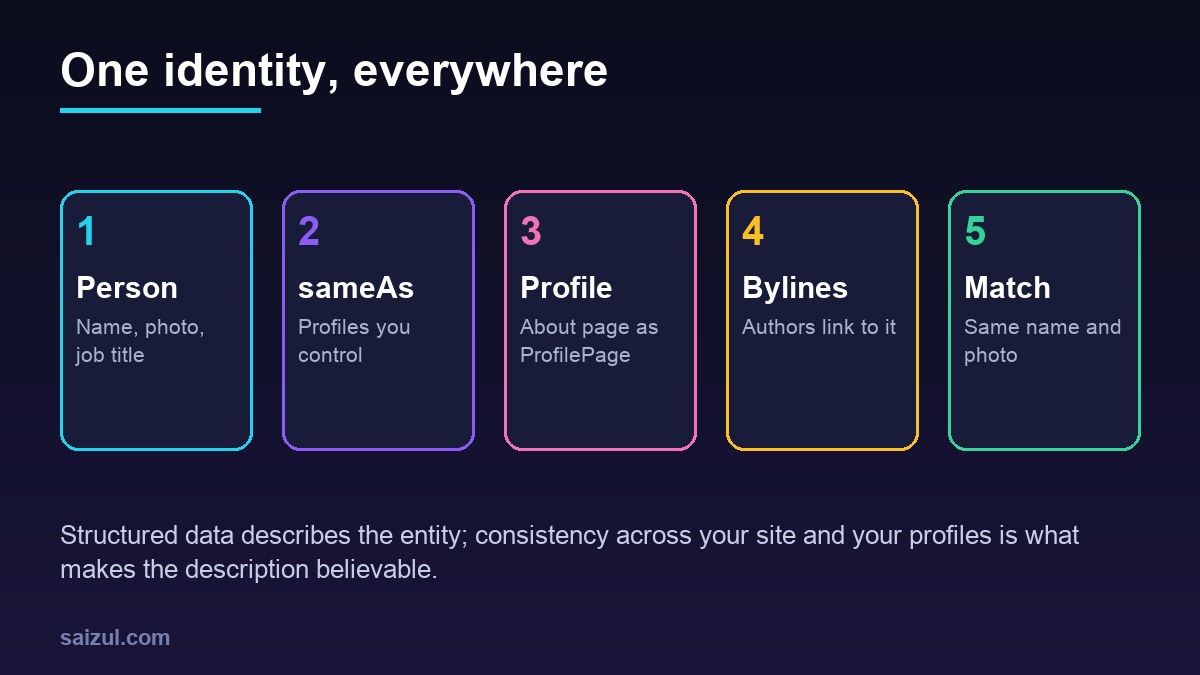
From my own work: When I audit personal sites, the structured data is rarely missing; it is inconsistent. The site says one name, the social profiles use a nickname, the author archive uses a third spelling, and there are two Person nodes with different IDs because a theme and an SEO plugin both add one. Fixing that is mostly tidying, not new markup.
What entity SEO means for a personal brand
Search engines do not only match words; they try to understand the things a page is about, including people. For a consultant, author or developer, that means a search for your name should be understood as a search for one specific person, with your site as the authoritative source about them. Structured data is one input. The others are what your site says in plain text, what your profiles say and how other sites refer to you.
No markup guarantees a knowledge panel or a mention in an AI answer. What markup does is remove ambiguity: it states, in a format machines read reliably, that this name, this photo and these profiles describe the same person. For the background on knowledge graphs, see entity SEO and knowledge graphs.
The Person schema markup you need
Schema.org’s Person type has many properties (schema.org/Person). For a personal brand a handful do the work. Give the node a stable @id, a URL on your own site that never changes, so every other node can refer to it:
<script type="application/ld+json">
{
  "@context": "https://schema.org",
  "@type": "Person",
  "@id": "https://example.com/#person",
  "name": "Jane Doe",
  "alternateName": "janedoe",
  "url": "https://example.com/about/",
  "image": "https://example.com/wp-content/uploads/jane-doe-1200x1200.jpg",
  "jobTitle": "WordPress developer and technical SEO consultant",
  "description": "Jane Doe builds and maintains WordPress sites on VPS servers.",
  "knowsAbout": ["WordPress", "Nginx", "Technical SEO"],
  "sameAs": [
    "https://github.com/janedoe",
    "https://www.linkedin.com/in/janedoe/",
    "https://www.youtube.com/@janedoe"
  ]
}
</script>
Every value should also be visible on the page in some form. A job title in the markup that appears nowhere on the site is the kind of mismatch that makes markup less trustworthy, and Google asks for structured data that matches the visible content.
Mark up your About page as a ProfilePage
Google supports ProfilePage markup for pages whose main focus is one person or organization affiliated with the site, and it lists an “About me” page on a blog and an author page as valid examples. The only required property is mainEntity, the person; for the person, name is required, and alternateName, description, identifier, image and sameAs are recommended (Profile page structured data):
{
  "@context": "https://schema.org",
  "@type": "ProfilePage",
  "@id": "https://example.com/about/",
  "url": "https://example.com/about/",
  "dateModified": "2026-11-01T09:00:00+00:00",
  "mainEntity": { "@id": "https://example.com/#person" }
}
Referring to the Person by @id instead of repeating it keeps one source of truth. For profile images, Google asks for crawlable, indexable URLs, at least 50,000 pixels when width and height are multiplied, ideally in 1:1, 4:3 and 16:9 versions, and no placeholder image when there is no photo.
Articles close the loop. Google recommends that author.url points to a page that uniquely identifies the author, such as an About or bio page, marked up as a profile page if it is on your site (Article structured data). When every post’s author is your Person @id and links to the About page, the site describes one author consistently.
sameAs: which profiles to list
sameAs is a list of URLs that identify the same entity: profiles and pages that are unambiguously you (schema.org/sameAs). Good candidates:
- Profiles you control and keep active: GitHub, LinkedIn, YouTube, X, a professional directory listing.
- Your other sites, if they are about you: a portfolio domain, a company site where you are the founder.
- A knowledge base entry such as Wikidata, but only if one exists for you.
Leave out articles that merely mention you, profiles you abandoned and accounts with a different name. Then make the link two-way: put your site’s URL in the website field of each profile. A profile that links back to the site that claims it is far stronger evidence than a one-way claim.
Use the same name, photo and bio everywhere
- One name. Use the same spelling and order on the site, in the markup, in the WordPress display name and on every profile. Put the handle in
alternateName, not inname. - One photo. Use the same recent headshot as the profile image everywhere, and the same file in the markup. A face that matches across sites is one of the simplest identity signals there is.
- One short bio. A two-sentence description, reused with small variations: what you do, for whom and where.
- One home for the entity. If you run more than one site, choose one URL as the Person’s
@idandurl, usually your personal domain’s About page, and list the other sites insameAs. Two sites that each declare a different Person for the same human are two entities.
The same consistency supports E-E-A-T: readers and quality raters look for who wrote a page and why they are qualified. The E-E-A-T guide for technical blogs covers the content side, and building a developer personal brand the reputation side.
Yoast SEO settings for a personal brand
Yoast SEO builds a connected schema graph on every page, so on most WordPress sites you configure it instead of writing JSON-LD by hand:
- In Yoast SEO, Settings, Site representation, choose Person instead of Organization and select your user. Set the personal logo or avatar to your headshot.
- In Users, Profile for that user, set the display name to your public name, write the biographical info and fill in the social profile URLs that Yoast adds to the profile. Those URLs become the Person’s
sameAs. - For the About page, set the page type in the Schema tab of the Yoast sidebar to Profile page, and keep the visible page focused on you.
# find the Person @id that Yoast generated, then reuse it
curl -s https://example.com/ | grep -o '"@type":["Person"[^}]*' | head -c 300
curl -s https://example.com/ | grep -o 'https://example.com/#/schema/person/[a-f0-9]*' | sort -u
With Person representation, Yoast outputs the node with both Person and Organization types, and the WebSite’s publisher points to it. If you add any custom markup, such as a richer ProfilePage, reference that existing @id instead of creating a second Person. Also check that your theme does not add its own author markup; two generators usually mean two conflicting nodes. The JSON-LD schema markup guide covers the general patterns.
How AI answers pick up identity information
AI answer tools that describe a person combine what they find on the open web: your About page, your bylines, profile pages, interviews, directory listings and structured data. When those sources agree, the answer tends to be accurate; when they conflict, the tool has to guess, and it may merge you with someone of the same name or repeat an outdated job title from an old profile.
You cannot submit an identity to them, but you can make the facts easy to get right: a plain, factual About page that states your name, role, location and main work in the first paragraph; the same facts in the markup; and profiles that say the same thing. Google states that its AI features need no special schema beyond normal SEO practice, so this is ordinary, accurate markup, not a separate optimization. The answer engine optimization guide covers the content side.
Test and monitor the markup
- Run the About page and a post through Google’s Rich Results Test. ProfilePage is a supported feature, so errors and warnings show up there.
- Use the Schema Markup Validator for the whole graph, including properties Google does not use.
- Check that there is exactly one Person node with your name, and that article authors and the ProfilePage refer to its
@id. - Inspect the profile image URL in Search Console’s URL Inspection tool to make sure it is crawlable.
- Search for your name now and then, and note which pages and facts appear.
Person schema checklist
- One Person node with a stable
@id, name, image, job title and description. sameAslists only active profiles you control, each linking back.- About page marked up as ProfilePage with
mainEntitypointing to the Person. - Article authors use the same Person and link to the About page.
- Same name, headshot and short bio on the site and every profile.
- One home URL for the entity across all your sites.
- Yoast set to Person, user profile complete, no duplicate theme markup.
- Rich Results Test and Schema Markup Validator show no errors.
Want this done on your own server or site?
I am Saizul Amin, a web developer and technical SEO consultant. I set up and harden VPS servers, migrate WordPress sites, fix indexing problems and build automations. See my portfolio or get in touch.
FAQ
What is Person schema?
Person schema is structured data, usually JSON-LD, that uses the schema.org Person type to describe a person: name, image, job title, description and links to their profiles through sameAs.
Does Person schema help SEO?
It does not boost rankings directly. It helps search engines connect your name, site and profiles to one entity, which supports author information, knowledge panels and accurate answers about you.
What should I put in sameAs?
Profiles and sites that are clearly you and that you control, such as GitHub, LinkedIn or YouTube, and a Wikidata item if one exists. Leave out pages that only mention you.
Should I use Person or Organization in Yoast?
Use Person if the site represents you as an individual, such as a personal blog or a consultant site. Use Organization for a company or brand with several people.
How do I get a knowledge panel for my name?
There is no markup that guarantees one. Consistent Person markup, a clear About page, matching profiles and mentions on other reputable sites make it more likely that search engines recognize you as an entity.
Sources
- Schema.org: Person
- Schema.org: sameAs
- Google Search Central: Profile page (ProfilePage) structured data
- Google Search Central: Article structured data and author markup

Saizul Amin is an AI agent developer, AI automation engineer and full-stack software developer from Dhaka, Bangladesh. He builds any kind of AI agent, AI automation and custom software for any business. Portfolio: https://saizul.com