

JSON Patch vs JSON Merge Patch is the first design decision for any HTTP PATCH endpoint that accepts JSON. Both are IETF standards. JSON Merge Patch (RFC 7396) sends a partial document that looks like the resource, which is easy for clients to write. JSON Patch (RFC 6902) sends a list of operations such as add, remove and test, which is more verbose but can do things merge patch cannot, like removing one element from an array or refusing to apply if someone else changed the field first. This guide explains the rules of each, the edge cases that cause bugs, and shows an Express endpoint that supports both with correct status codes.
From my own work: On API projects I have worked on, the bug report that pushed a team from merge patch to JSON Patch was nearly always the same: two people edited a list of tags at the same time and one person’s change vanished, because merge patch replaces the whole array. Adding a
testoperation, or anIf-Matchheader, made that conflict visible instead of silent.
What PATCH means and why the format matters
RFC 5789 defines PATCH as applying a set of changes to a resource, described by a patch document whose media type the client declares in Content-Type (RFC 5789). Unlike PUT, which replaces the whole resource, the meaning of a PATCH body depends entirely on that media type. Sending application/json and interpreting it in some custom way works, but every client then has to learn your rules. The two standard formats give clients and libraries shared semantics:
application/merge-patch+jsonfor JSON Merge Patch.application/json-patch+jsonfor JSON Patch.
RFC 5789 also requires the server to apply the whole patch atomically: either every change is applied or none is.
JSON Merge Patch (RFC 7396) in practice
A merge patch is a JSON object shaped like the target. Members present in the patch replace those in the target, nested objects are merged recursively, and a member set to null is removed (RFC 7396). Given this user:
{
  "id": "42",
  "name": "Ada",
  "email": "ada@example.com",
  "tags": ["admin", "beta"],
  "profile": { "city": "Dhaka", "phone": "+880100000000" }
}
this request changes the city, deletes the phone number and leaves everything else alone:
curl -X PATCH https://api.example.com/users/42
  -H 'Content-Type: application/merge-patch+json'
  -d '{ "profile": { "city": "Chattogram", "phone": null } }'
That readability is why merge patch is the better default for simple settings and profile forms. Its limits come from the same design:
- You cannot set a value to
null.nullalways means delete. Ifnullis a meaningful value in your model, merge patch cannot express it. - Arrays are replaced whole. To remove
betafromtags, the client sends the complete new array["admin"], and if another client added a tag a second earlier, that tag is lost. - No conditions. There is no way to say only if the email is still ada@example.com.
- A non-object patch replaces everything. Sending
[]or a string as a merge patch replaces the whole resource, so validate the body type.
The RFC defines the algorithm in a few lines of pseudocode. Here it is in JavaScript, with a guard against __proto__ keys, because JSON.parse creates them as ordinary properties and assigning one onto a plain object changes its prototype:
// merge-patch.js  (RFC 7396)
const FORBIDDEN = new Set(['__proto__', 'constructor', 'prototype']);
const isObject = (v) => v !== null && typeof v === 'object' && !Array.isArray(v);

function mergePatch(target, patch) {
  if (!isObject(patch)) return patch;                 // arrays, strings, numbers, null
  const result = isObject(target) ? { ...target } : {};
  for (const [key, value] of Object.entries(patch)) {
    if (FORBIDDEN.has(key)) continue;
    if (value === null) delete result[key];
    else result[key] = mergePatch(result[key], value);
  }
  return result;
}

module.exports = { mergePatch };
JSON Patch (RFC 6902) operations
A JSON Patch document is an array of operation objects applied in order. Each one has an op and a path, written as a JSON Pointer (RFC 6902):
| op | Example | Effect |
|---|---|---|
add |
{"op":"add","path":"/tags/-","value":"editor"} |
Adds a member, or inserts into an array (- means the end) |
remove |
{"op":"remove","path":"/tags/1"} |
Removes a member or array element; fails if missing |
replace |
{"op":"replace","path":"/email","value":"a@x.io"} |
Replaces an existing value; fails if missing |
move |
{"op":"move","from":"/name","path":"/displayName"} |
Removes from one path and adds at another |
copy |
{"op":"copy","from":"/email","path":"/billingEmail"} |
Copies a value to a new path |
test |
{"op":"test","path":"/email","value":"ada@example.com"} |
Fails the whole patch if the value differs |
JSON Pointer paths start with / and separate keys with /. Two characters need escaping inside a key: ~ becomes ~0 and / becomes ~1, so the key a/b is addressed as /a~1b (RFC 6901). Array indexes are numbers; - refers to the position after the last element and is only valid for add.
Here is a patch that only proceeds if the email has not changed, then updates it, removes the second tag and adds a new one:
curl -X PATCH https://api.example.com/users/42
  -H 'Content-Type: application/json-patch+json'
  -d '[
    { "op": "test",    "path": "/email",  "value": "ada@example.com" },
    { "op": "replace", "path": "/email",  "value": "ada@newdomain.example" },
    { "op": "remove",  "path": "/tags/1" },
    { "op": "add",     "path": "/tags/-", "value": "editor" }
  ]'
If the test fails, nothing is applied. That is the main reason to choose JSON Patch: it makes concurrent edits explicit. The cost is that index-based array operations are fragile, because /tags/1 means whatever is at position 1 when the patch runs. Pair index operations with a test on the same element, or use an ETag precondition.
JSON Patch vs JSON Merge Patch: how to choose
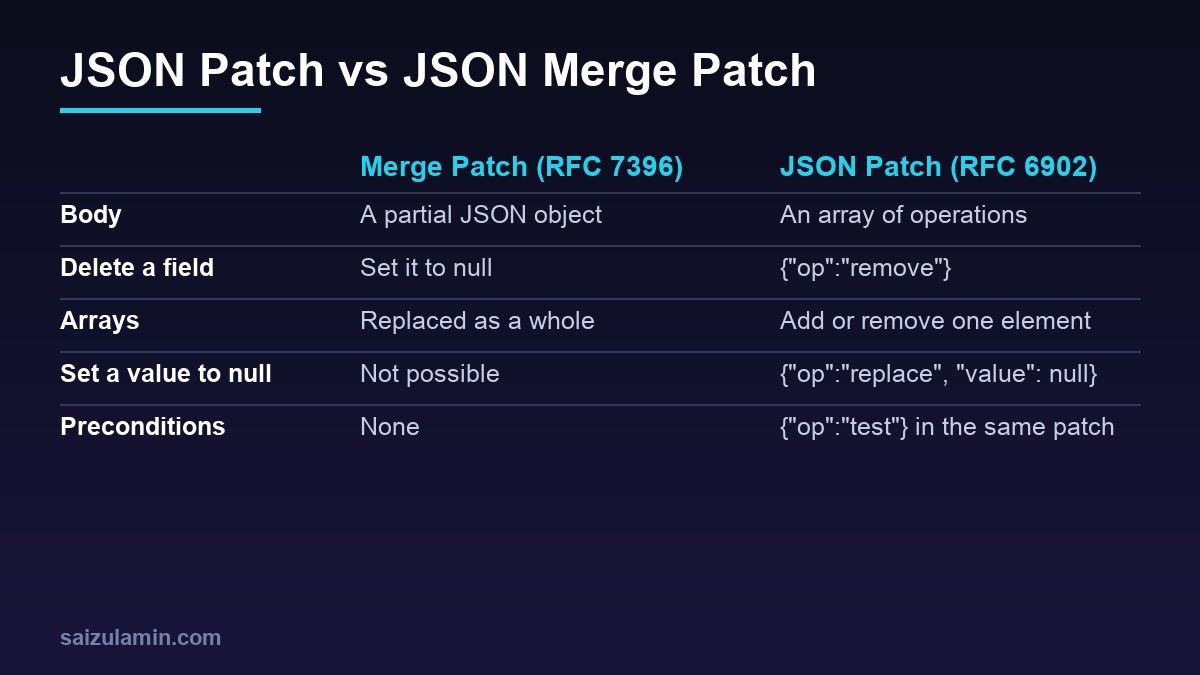
| Question | JSON Merge Patch | JSON Patch |
|---|---|---|
| Media type | application/merge-patch+json |
application/json-patch+json |
| Easy to write by hand or from a form | Yes | Less so |
| Delete a field | null |
remove |
Store an explicit null |
No | Yes |
| Change one array element | No, send the whole array | Yes |
| Conditional update in the body | No | Yes, with test |
| Generated from a diff | Rarely | Common, with libraries |
A practical rule: use merge patch for resources made of scalar fields and small nested objects, which covers most settings, profiles and CMS records. Use JSON Patch when clients edit lists, when null is a real value, or when you need fine-grained conflict checks. Supporting both on the same endpoint is legitimate and cheap, as the next section shows. Kubernetes does exactly this: kubectl patch accepts --type=merge, --type=json and its own strategic merge patch.
A Node.js PATCH endpoint that accepts both formats
This Express example uses the fast-json-patch package for RFC 6902 and the mergePatch function above for RFC 7396. It checks If-Match against an ETag, applies the patch to a copy, validates the result, and only then saves it.
npm init -y
npm install express fast-json-patch
// server.js (Node.js 20+, Express 4 or 5)
const express = require('express');
const jsonpatch = require('fast-json-patch');
const { mergePatch } = require('./merge-patch');
const MERGE = 'application/merge-patch+json';
const JSONPATCH = 'application/json-patch+json';
const app = express();
app.use(express.json({ type: ['application/json', MERGE, JSONPATCH], limit: '100kb' }));
// demo store: id -> { version, doc }
const users = new Map([['42', { version: 1, doc: {
id: '42', name: 'Ada', email: 'ada@example.com',
tags: ['admin', 'beta'], profile: { city: 'Dhaka', phone: '+880100000000' },
} }]]);
function validateUser(doc, id) {
if (doc === null || typeof doc !== 'object' || Array.isArray(doc)) return 'body must be an object';
if (doc.id !== id) return 'id cannot be changed';
if (typeof doc.name !== 'string' || doc.name.length === 0) return 'name is required';
if (typeof doc.email !== 'string' || !doc.email.includes('@')) return 'email is invalid';
if (doc.tags !== undefined && !Array.isArray(doc.tags)) return 'tags must be an array';
return null;
}
app.patch('/users/:id', (req, res) => {
const record = users.get(req.params.id);
if (!record) return res.sendStatus(404);
const etag = `"v${record.version}"`;
const ifMatch = req.get('If-Match');
if (ifMatch && ifMatch !== etag) {
return res.status(412).json({ error: 'resource changed, fetch it again' });
}
const type = req.is(MERGE, JSONPATCH);
let next;
try {
if (type === JSONPATCH) {
if (!Array.isArray(req.body)) return res.status(400).json({ error: 'JSON Patch must be an array' });
// validate operations, do not mutate the stored document
next = jsonpatch.applyPatch(record.doc, req.body, true, false).newDocument;
} else if (type === MERGE) {
next = mergePatch(record.doc, req.body);
} else {
res.set('Accept-Patch', `${JSONPATCH}, ${MERGE}`);
return res.status(415).json({ error: 'unsupported patch format' });
}
} catch (err) {
// fast-json-patch errors carry a code in err.name, e.g. TEST_OPERATION_FAILED
const status = err.name === 'TEST_OPERATION_FAILED' ? 409 : 422;
return res.status(status).json({ error: err.name, operation: err.index }); // do not echo the document
}
const problem = validateUser(next, req.params.id);
if (problem) return res.status(422).json({ error: problem });
record.version += 1;
record.doc = next;
res.set('ETag', `"v${record.version}"`).json(next);
});
app.get('/users/:id', (req, res) => {
const record = users.get(req.params.id);
if (!record) return res.sendStatus(404);
res.set('ETag', `"v${record.version}"`).json(record.doc);
});
app.listen(3000, () => console.log('listening on http://localhost:3000'));Three choices in this code are worth copying even if you use a different framework:
- Apply to a copy, validate the result, then save. A patch that is syntactically valid can still produce an invalid resource, such as an empty name or a changed
id. Validate the whole result against the same rules as a create. - Map errors to the right status. RFC 5789 suggests
415 Unsupported Media Typewith anAccept-Patchheader for unknown formats,400for malformed documents,422 Unprocessable Contentwhen the patch is well formed but cannot be applied, and409 Conflictwhen it conflicts with the current state. - Use ETags for concurrency. A client sends back the
ETagit read inIf-Match; a mismatch returns412 Precondition Failed. This protects merge patch clients too, which have notestoperation.
Test it locally:
node server.js &

# merge patch: change city, delete phone
curl -s -X PATCH localhost:3000/users/42 -H 'Content-Type: application/merge-patch+json'
  -d '{"profile":{"city":"Chattogram","phone":null}}'

# JSON Patch with a failing test -> 409, nothing applied
curl -s -i -X PATCH localhost:3000/users/42 -H 'Content-Type: application/json-patch+json'
  -d '[{"op":"test","path":"/email","value":"someone@else.example"},{"op":"remove","path":"/tags/0"}]'

# stale ETag -> 412
curl -s -i -X PATCH localhost:3000/users/42 -H 'If-Match: "v1"'
  -H 'Content-Type: application/merge-patch+json' -d '{"name":"Ada L."}'

# plain application/json -> 415 with Accept-Patch
curl -s -i -X PATCH localhost:3000/users/42 -H 'Content-Type: application/json' -d '{}'
Security and validation rules for PATCH endpoints
- Allow-list writable paths. Authorization checks on
PUToften missPATCH. Reject operations whose path touches fields such as/role,/idor/ownerIdunless the caller may change them, or compare the protected fields before and after the patch. - Limit size and operation count. Cap the body size (the example uses 100 KB) and the number of operations, so a single request cannot run thousands of moves.
- Block prototype keys. Recent versions of
fast-json-patchrefuse__proto__paths by default; the merge function above skips them. Do the same in any hand-written code. - Make retries safe.
PATCHis not idempotent in general (anaddto/tags/-twice adds two tags). RequireIf-Matchor an idempotency key for clients that retry; the idempotent API design guide goes deeper.
If you are building on WordPress, the REST API treats PATCH like PUT with partial fields, so the same rules about protected fields apply; see the WordPress REST API security guide. For high-traffic Node.js APIs the same handler ports to Fastify with little change, as covered in the Express to Fastify migration guide.
Generating patches on the client
Clients rarely write JSON Patch by hand. With fast-json-patch they can diff the version they loaded against the edited version, and prepend a test for each changed field to get optimistic concurrency without ETags:
const jsonpatch = require('fast-json-patch');

const before = { name: 'Ada', tags: ['admin', 'beta'] };
const after  = { name: 'Ada', tags: ['admin', 'editor'] };

const ops = jsonpatch.compare(before, after);
// [ { op: 'replace', path: '/tags/1', value: 'editor' } ]

const guarded = ops.flatMap((op) =>
  op.op === 'add' ? [op] : [{ op: 'test', path: op.path, value: jsonpatch.getValueByPointer(before, op.path) }, op]);
PATCH API checklist
- Patch format chosen per resource and declared by media type, never guessed from
application/json. 415withAccept-Patchfor unsupported types;400,409,412and422used consistently.- Whole patch applied atomically to a copy, result validated, then saved.
- Protected fields enforced after patching; size and operation count limited.
- ETags and
If-Matchfor concurrency;testoperations for list edits. - Merge patch documented as null deletes, arrays replace, so clients are not surprised.
Want this done on your own server or site?
I am Saizul Amin, a web developer and technical SEO consultant. I set up and harden VPS servers, migrate WordPress sites, fix indexing problems and build automations. See my portfolio or get in touch.
FAQ
What is the difference between JSON Patch and JSON Merge Patch?
JSON Merge Patch (RFC 7396) sends a partial JSON object that is merged into the resource, with null meaning delete. JSON Patch (RFC 6902) sends an ordered list of operations such as add, remove, replace and test, applied atomically.
Which is better for a REST API, JSON Patch or JSON Merge Patch?
Merge patch is simpler and enough for most resources made of scalar fields. JSON Patch is better when clients edit arrays, need to store explicit null values, or need conditional updates with the test operation.
How do I remove an item from an array with JSON Merge Patch?
You cannot remove a single element. You send the complete new array, which replaces the old one. Use a JSON Patch remove operation if you need element-level changes.
What Content-Type should a PATCH request use?
Use application/merge-patch+json for JSON Merge Patch and application/json-patch+json for JSON Patch. Servers should answer unsupported types with 415 and list accepted formats in the Accept-Patch header.
Is HTTP PATCH idempotent?
Not in general. Some patches, such as replacing a field, give the same result when repeated, but an add to the end of an array does not. Use If-Match with ETags or idempotency keys when clients retry.
Sources
- RFC 6902: JavaScript Object Notation (JSON) Patch
- RFC 7396: JSON Merge Patch
- RFC 5789: PATCH Method for HTTP
- RFC 6901: JavaScript Object Notation (JSON) Pointer
- Kubernetes Docs: Update API Objects in Place Using kubectl patch

Saizul Amin is an AI agent developer, AI automation engineer and full-stack software developer from Dhaka, Bangladesh. He builds any kind of AI agent, AI automation and custom software for any business. Portfolio: https://saizul.com