


An AndroidManifest permission audit before each Play Store release catches the problems that otherwise surface as a rejected update, a policy email or a one-star review asking why a shopping app wants the call log. The manifest you edit in src/main is not the manifest you ship. The Android Gradle plugin merges in the manifests of every library and SDK, and each of them can add permissions, exported receivers and application flags. This guide shows how to read the merged manifest from a release bundle, trace each permission to the dependency that added it, remove the ones you do not need, check the permissions that require Google Play declarations, review exported components and risky flags, and automate the whole check with a Python script that fails CI when a new permission appears.
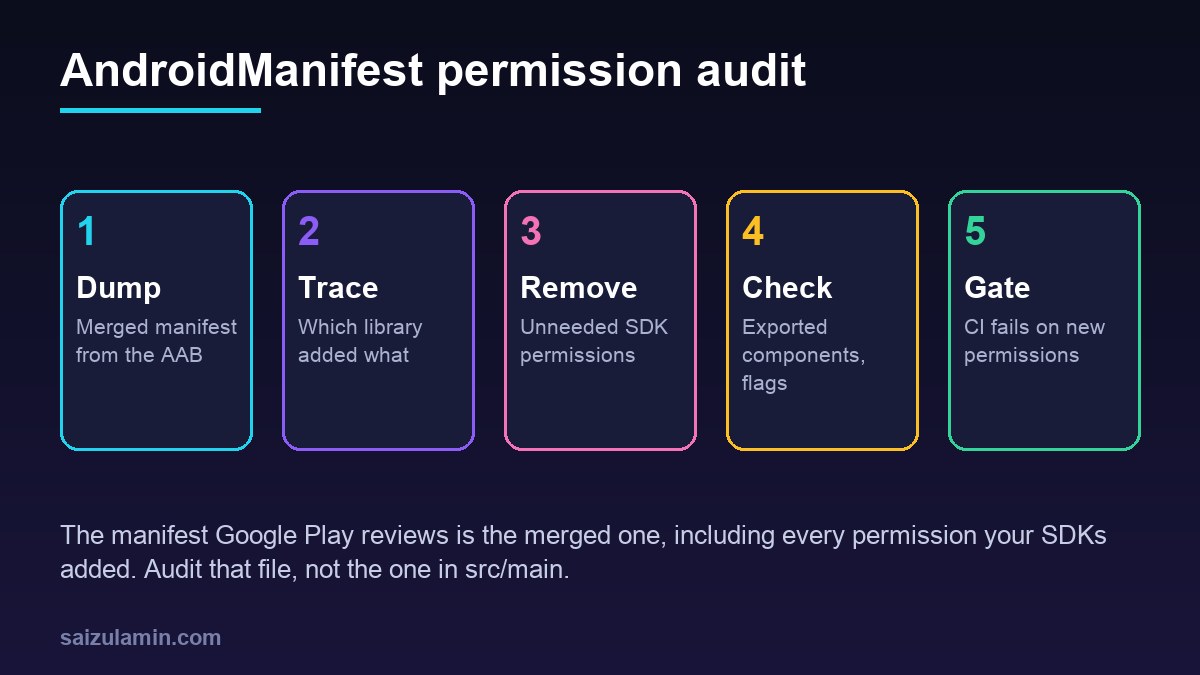
From my own work: On the Android projects I help ship, the surprise permissions almost always come from SDKs rather than the app team: an ads or analytics library adding the advertising ID permission, a push SDK adding an exported receiver, or an old library pulling in broad storage access. Nobody added them on purpose, which is exactly why the check has to be automatic.
Why you must audit the merged manifest
Gradle merges manifests in priority order: the build variant, then the main module, then each library in dependency order (Android: manage manifest files). Elements from libraries are added unless a higher-priority manifest says otherwise, and the merger can even add implicit system permissions when a library targets a very old SDK. The result is the only manifest that Google Play, users and security scanners see.
There are three ways to look at it:
- Android Studio: open
AndroidManifest.xmland click the Merged Manifest tab. Clicking an element shows which file it came from. - Merger report: after a build,
app/build/outputs/logs/manifest-merger-release-report.txtlogs every merge decision, including the source of each permission. - From the artifact you upload: dump the manifest from the signed release bundle or APK, which is the most reliable because it is exactly what you ship.
# Build the release bundle
./gradlew :app:bundleRelease

# Dump the merged manifest from the AAB (bundletool from github.com/google/bundletool/releases)
java -jar bundletool-all-1.18.3.jar dump manifest
  --bundle=app/build/outputs/bundle/release/app-release.aab > merged.xml

# Only the permissions, using an XPath query
java -jar bundletool-all-1.18.3.jar dump manifest
  --bundle=app/build/outputs/bundle/release/app-release.aab
  --xpath=/manifest/uses-permission/@android:name

# For an APK, use the SDK build tools or cmdline-tools
aapt2 dump permissions app-release.apk
apkanalyzer manifest permissions app-release.apk
Find which library added a permission
Search the merger report for the permission name. Each entry shows the manifest it came from, including the library coordinates:
grep -n -A2 "uses-permission#" app/build/outputs/logs/manifest-merger-release-report.txt

# Example of what you are looking for:
# uses-permission#com.google.android.gms.permission.AD_ID
# ADDED from [com.google.android.gms:play-services-ads-identifier:18.x.x] .../AndroidManifest.xml:23:5-79

# Then see why that library is on the classpath
./gradlew :app:dependencies --configuration releaseRuntimeClasspath | grep -B3 ads-identifier
The dependency tree often reveals that the permission arrives transitively, for example an analytics SDK depending on the advertising ID library. That tells you whether to remove the permission, configure the SDK differently, or replace the dependency.
Remove unneeded permissions with tools:node
Merge rule markers in the app’s own manifest override what libraries declare. tools:node="remove" deletes a matching element from the merged result (Android: merge rule markers). Declare the tools namespace first:
<manifest xmlns:android="http://schemas.android.com/apk/res/android"
    xmlns:tools="http://schemas.android.com/tools">

    <!-- Not used by this app: added by an SDK -->
    <uses-permission android:name="com.google.android.gms.permission.AD_ID"
        tools:node="remove" />
    <uses-permission android:name="android.permission.READ_PHONE_STATE"
        tools:node="remove" />

    <!-- Legacy storage access only on old Android versions -->
    <uses-permission android:name="android.permission.READ_EXTERNAL_STORAGE"
        android:maxSdkVersion="32"
        tools:replace="android:maxSdkVersion" />

    <application>
        <!-- An SDK receiver that should not be callable by other apps -->
        <receiver android:name="com.vendor.sdk.PushReceiver"
            android:exported="false"
            tools:replace="android:exported" />
    </application>
</manifest>
Removing a permission does not remove the code that uses it. Test the features that depend on the SDK after the change: a library that calls a protected API without the permission will get a SecurityException or an empty result. Removing AD_ID, for instance, means the advertising ID returns zeros on recent Android versions, which is fine for an app that does not use it for ads or attribution, and it changes your Data safety answers.
Permissions that trigger Google Play declarations
Runtime (dangerous) permissions need an in-context request in the app (Android: permissions overview). A smaller set goes further: Google Play restricts them to specific core use cases and requires a declaration form in Play Console before the release can go out (Play: permissions and APIs that access sensitive information). The table lists the ones that most often surprise teams; the policy pages are the authority and change over time:
| Permission | Play requirement | Usual alternative |
|---|---|---|
READ_SMS, RECEIVE_SMS, READ_CALL_LOG |
SMS and Call Log permissions policy; only default handlers and listed exceptions | SMS Retriever or User Consent API for one-time codes |
ACCESS_BACKGROUND_LOCATION |
Location permissions declaration and review | Foreground location while the feature is in use |
MANAGE_EXTERNAL_STORAGE |
All files access declaration; file managers, backup and similar apps | Storage Access Framework, MediaStore |
QUERY_ALL_PACKAGES |
Package visibility declaration | <queries> element listing the packages or intents you need |
READ_MEDIA_IMAGES, READ_MEDIA_VIDEO |
Photo and video permissions policy; broad access only for core use | Android photo picker |
USE_EXACT_ALARM |
Limited to alarm clock and calendar apps | Inexact alarms or WorkManager |
REQUEST_INSTALL_PACKAGES |
Declaration of core purpose | Open the Play Store listing instead |
| Foreground service type permissions | Declaration of each foreground service type used | WorkManager for deferrable work |
com.google.android.gms.permission.AD_ID |
Advertising ID declaration in App content and Data safety | Remove it if the app does not use the advertising ID |
For QUERY_ALL_PACKAGES, Google explicitly expects most apps to use targeted package visibility instead (Play: QUERY_ALL_PACKAGES policy):
<manifest ...>
    <queries>
        <!-- Only the apps or intents this app actually needs to see -->
        <package android:name="com.whatsapp" />
        <intent>
            <action android:name="android.intent.action.SEND" />
            <data android:mimeType="text/plain" />
        </intent>
    </queries>
</manifest>
Android’s own guidance is to request the minimum and prefer system pickers and intents that need no permission at all, such as the photo picker, the document picker or a camera intent (Android: minimize permission requests).
Check exported components and risky flags
Permissions are half of the audit. The other half is what your app exposes. For apps targeting Android 12 (API level 31) or higher, any activity, service or receiver with an intent filter must declare android:exported explicitly, and the build fails without it (Android: activity element). An exported component without a protecting permission can be started or called by any app on the device, so it must validate everything it receives. Review these in the merged manifest:
| Item | Risk | What to do |
|---|---|---|
exported="true" without android:permission |
Other apps can launch or bind it with crafted intents | Set exported="false", or protect it with a signature permission |
Content providers with exported="true" |
Data readable or writable by other apps | Keep them private; use FileProvider with grantUriPermissions |
android:debuggable="true" |
Debugger can attach in production | Never set it by hand; release builds set it to false |
usesCleartextTraffic="true" |
HTTP traffic allowed for all domains | Use a network security config with per-domain exceptions |
allowBackup without rules |
Tokens and caches included in device backups | Add dataExtractionRules excluding secrets, or disable backup |
Automate the AndroidManifest permission audit in CI
A reviewed allowlist turns the audit into a test. The script below reads the dumped merged manifest, fails on any permission not in the allowlist, warns on Play-sensitive permissions and on exported components without protection, and flags risky application attributes. It uses only the Python standard library:
"""Audit a merged AndroidManifest.xml before a Play Store release.

Usage:
  bundletool dump manifest --bundle=app-release.aab > merged.xml
  python manifest_audit.py merged.xml allowed_permissions.txt
"""
import sys
import xml.etree.ElementTree as ET

A = "{http://schemas.android.com/apk/res/android}"

# Permissions that need a Play Console declaration, a core-use-case review,
# or careful Data safety answers. Not exhaustive: check the current policy.
PLAY_SENSITIVE = {
    "android.permission.READ_SMS": "SMS and Call Log policy",
    "android.permission.SEND_SMS": "SMS and Call Log policy",
    "android.permission.RECEIVE_SMS": "SMS and Call Log policy",
    "android.permission.RECEIVE_MMS": "SMS and Call Log policy",
    "android.permission.READ_CALL_LOG": "SMS and Call Log policy",
    "android.permission.WRITE_CALL_LOG": "SMS and Call Log policy",
    "android.permission.PROCESS_OUTGOING_CALLS": "SMS and Call Log policy",
    "android.permission.ACCESS_BACKGROUND_LOCATION": "Location permissions declaration",
    "android.permission.MANAGE_EXTERNAL_STORAGE": "All files access declaration",
    "android.permission.QUERY_ALL_PACKAGES": "Package visibility declaration",
    "android.permission.REQUEST_INSTALL_PACKAGES": "Request install packages declaration",
    "android.permission.READ_MEDIA_IMAGES": "Photo and video permissions policy",
    "android.permission.READ_MEDIA_VIDEO": "Photo and video permissions policy",
    "android.permission.USE_EXACT_ALARM": "Exact alarm policy",
    "android.permission.USE_FULL_SCREEN_INTENT": "Full-screen intent declaration",
    "android.permission.BIND_ACCESSIBILITY_SERVICE": "Accessibility API declaration",
    "android.permission.BIND_VPN_SERVICE": "VpnService policy",
    "com.google.android.gms.permission.AD_ID": "Advertising ID declaration",
}

DANGEROUS_HINTS = (
    "CAMERA", "RECORD_AUDIO", "LOCATION", "CONTACTS", "READ_PHONE", "CALL_PHONE",
    "BODY_SENSORS", "ACTIVITY_RECOGNITION", "READ_MEDIA", "READ_EXTERNAL_STORAGE",
    "WRITE_EXTERNAL_STORAGE", "CALENDAR", "NEARBY_WIFI", "BLUETOOTH_SCAN",
    "BLUETOOTH_CONNECT", "POST_NOTIFICATIONS",
)

COMPONENTS = ("activity", "activity-alias", "service", "receiver", "provider")


def load_allowlist(path):
    with open(path, encoding="utf-8") as fh:
        return {line.strip() for line in fh if line.strip() and not line.startswith("#")}


def audit(manifest_path, allowlist):
    root = ET.parse(manifest_path).getroot()
    findings = []

    for tag in ("uses-permission", "uses-permission-sdk-23"):
        for el in root.iter(tag):
            name = el.get(A + "name", "")
            max_sdk = el.get(A + "maxSdkVersion")
            if name not in allowlist:
                findings.append(("FAIL", f"Unexpected permission {name}"))
            if name in PLAY_SENSITIVE:
                findings.append(("WARN", f"{name}: {PLAY_SENSITIVE[name]}"))
            elif any(h in name for h in DANGEROUS_HINTS) and not max_sdk:
                findings.append(("INFO", f"{name}: runtime permission, confirm it is requested in context"))

    app = root.find("application")
    if app is not None:
        if app.get(A + "debuggable") == "true":
            findings.append(("FAIL", "android:debuggable=true in release manifest"))
        if app.get(A + "usesCleartextTraffic") == "true":
            findings.append(("WARN", "usesCleartextTraffic=true: prefer a network security config"))
        if app.get(A + "allowBackup", "true") == "true" and not app.get(A + "dataExtractionRules"):
            findings.append(("INFO", "allowBackup is on without dataExtractionRules"))

        for tag in COMPONENTS:
            for el in app.iter(tag):
                name = el.get(A + "name", "?")
                exported = el.get(A + "exported")
                has_filter = el.find("intent-filter") is not None
                protected = el.get(A + "permission")
                if has_filter and exported is None:
                    findings.append(("FAIL", f"{tag} {name} has an intent-filter but no android:exported"))
                if exported == "true" and not protected and not is_launcher(el):
                    findings.append(("WARN", f"{tag} {name} is exported without a permission"))

    return findings


def is_launcher(el):
    for f in el.iter("intent-filter"):
        cats = {c.get(A + "name") for c in f.iter("category")}
        if "android.intent.category.LAUNCHER" in cats:
            return True
    return False


if __name__ == "__main__":
    results = audit(sys.argv[1], load_allowlist(sys.argv[2]))
    for level, message in sorted(results):
        print(f"{level:4}  {message}")
    sys.exit(1 if any(level == "FAIL" for level, _ in results) else 0)
# allowed_permissions.txt: reviewed and committed next to the app module
android.permission.INTERNET
android.permission.CAMERA
android.permission.READ_EXTERNAL_STORAGE
com.google.android.gms.permission.AD_IDAgainst a test manifest in which an SDK added QUERY_ALL_PACKAGES and an exported push receiver, the output looks like this, and the script exits with status 1:
$ python manifest_audit.py merged.xml allowed_permissions.txt
FAIL  Unexpected permission android.permission.QUERY_ALL_PACKAGES
INFO  allowBackup is on without dataExtractionRules
INFO  android.permission.CAMERA: runtime permission, confirm it is requested in context
WARN  android.permission.QUERY_ALL_PACKAGES: Package visibility declaration
WARN  com.google.android.gms.permission.AD_ID: Advertising ID declaration
WARN  receiver com.vendor.sdk.PushReceiver is exported without a permission
WARN  usesCleartextTraffic=true: prefer a network security config
In CI, run it after the release bundle is built. Changes to the allowlist then show up in code review like any other change, and a dependency update that adds a permission fails the build instead of reaching users:
#!/usr/bin/env bash
# ci/manifest-audit.sh
set -euo pipefail

BUNDLETOOL_VERSION=1.18.3
curl -fsSL -o bundletool.jar
  "https://github.com/google/bundletool/releases/download/${BUNDLETOOL_VERSION}/bundletool-all-${BUNDLETOOL_VERSION}.jar"

./gradlew :app:bundleRelease
java -jar bundletool.jar dump manifest
  --bundle=app/build/outputs/bundle/release/app-release.aab > merged.xml

python3 ci/manifest_audit.py merged.xml app/allowed_permissions.txt
If the pipeline runs on GitHub Actions, apply the same supply-chain care to the workflow itself: pinned actions, a read-only token and signing keys kept out of pull request jobs. Signing keystores and Play service account keys are secrets; store and rotate them as described in .env file and secrets best practices. Treat the manifest audit like any other release gate alongside your tests; if those tests are unreliable, finding flaky tests from JUnit XML helps keep the pipeline trustworthy. For apps that sign users in through a browser flow, the redirect and PKCE details in OAuth 2.1 and PKCE apply to app links and custom schemes as well, and those intent filters show up in the same exported component review.
AndroidManifest permission audit checklist
- Merged manifest dumped from the signed release AAB, not read from
src/main. - Every permission traced to its source in the merger report and justified.
- Unneeded SDK permissions removed with
tools:node="remove"; storage permissions capped withmaxSdkVersion. - Play-sensitive permissions either removed or covered by a Play Console declaration, and Data safety answers updated.
- Runtime permissions requested in context, with the feature working when the user declines.
- No exported component without a reason; providers private; no debuggable or blanket cleartext flags.
- Allowlist committed and the audit script running in CI on every release build.
Want this done on your own server or site?
I am Saizul Amin, a web developer and technical SEO consultant. I set up and harden VPS servers, migrate WordPress sites, fix indexing problems and build automations. See my portfolio or get in touch.
FAQ
Why does my app have permissions I never added?
Gradle merges the manifests of all libraries into your app manifest, so SDKs for ads, analytics, push or payments can add permissions. Check the Merged Manifest tab or the manifest-merger report to see which library added each one.
How do I remove a permission added by a library?
Declare the same uses-permission element in your app manifest with tools:node=”remove”, after adding the tools namespace. Then test the features that rely on that library, because its code may expect the permission.
Which Android permissions need a Google Play declaration?
Permissions such as SMS and call log access, background location, all files access, QUERY_ALL_PACKAGES, broad photo and video access, exact alarms, install packages and foreground service types require declarations or are limited to specific core use cases. Check the current Play policy pages before each release.
How can I see the permissions in an AAB file?
Run bundletool dump manifest with the –bundle option on the AAB, optionally with an XPath query for uses-permission names. For APK files, aapt2 dump permissions or apkanalyzer manifest permissions list them directly.
Do I need android:exported on every component?
On apps targeting Android 12 or later, every activity, service and receiver with an intent filter must set android:exported explicitly, or the build fails. Setting it explicitly on all components is good practice anyway.
Sources
- Android Developers: Manage manifest files (merging and merge rule markers)
- Android Developers: Permissions on Android
- Android Developers: Minimize your permission requests
- Play Console Help: Permissions and APIs that access sensitive information
- Play Console Help: Use of the broad package visibility (QUERY_ALL_PACKAGES) permission

Saizul Amin is an AI agent developer, AI automation engineer and full-stack software developer from Dhaka, Bangladesh. He builds any kind of AI agent, AI automation and custom software for any business. Portfolio: https://saizul.com