

Google Merchant Center feed errors decide whether your products appear in Shopping ads and free listings at all. Almost every disapproval comes down to one of three things: an attribute that is missing or badly formatted, a disagreement between the feed and what Googlebot sees on the landing page, or a page or image Google is not allowed to crawl. This guide explains how Google checks your data, how to fix the errors that affect most stores, and a Python feed checker that finds problems before Google does.
From my own work: On the store feeds I have fixed, the biggest disapproval waves came from systems around the feed rather than the feed itself: a page cache serving last week’s sale price, a currency switcher choosing a currency by visitor IP, and a theme that rendered the price with JavaScript. Each looked like a feed problem in Merchant Center and was solved on the website.
How Google checks your product data
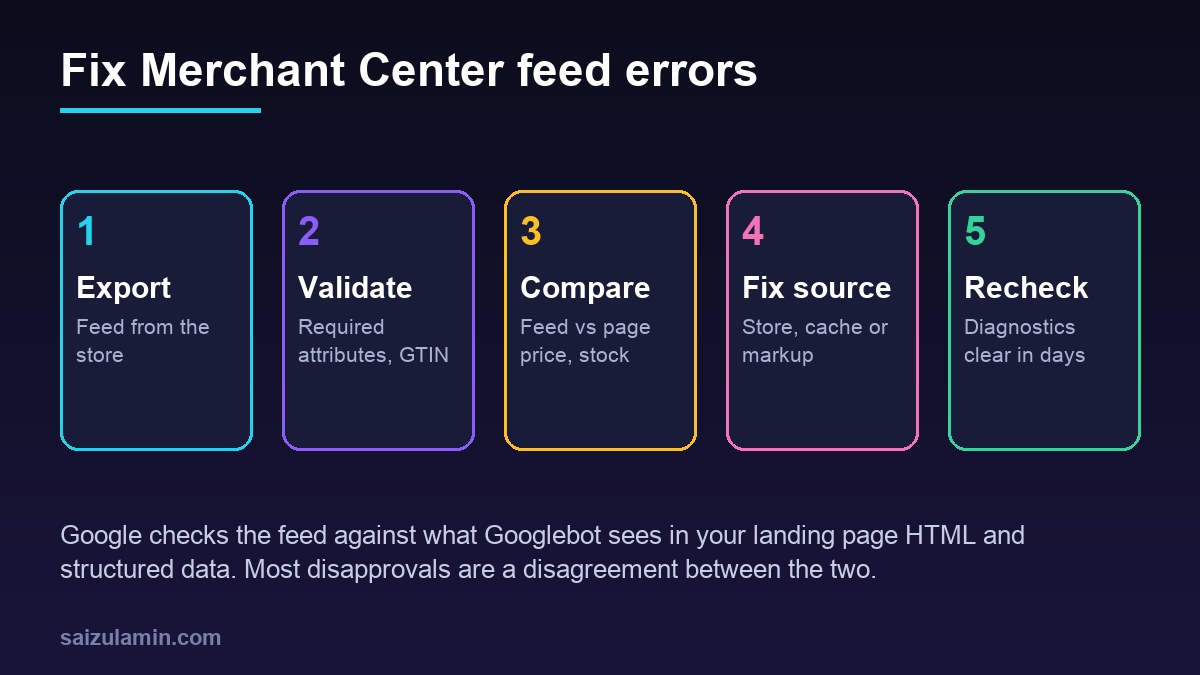
Merchant Center validates every item twice. First, it checks the feed against the product data specification: required attributes, allowed values and formats (Google: product data specification). Second, Googlebot crawls the landing pages and compares price and availability with the page HTML and its structured data. Google states that it compares against the HTML returned by your server, so a price that only appears after JavaScript runs triggers a mismatch, and that disapproved items are recrawled over the following hours or days (Google: how to fix mismatched product price).
That second check is why the fastest fix is often on the website. In Merchant Center’s product diagnostics, sort issues by the number of affected items, so you fix patterns rather than individual products.
Common Merchant Center feed errors and fixes
| Issue | Usual cause | Fix |
|---|---|---|
| Mismatched price | Tax or currency differs, cached page, sale ended, JavaScript-rendered price | Make feed, page HTML and structured data show the same amount and currency |
| Mismatched availability | Stock changed after the feed was fetched; cached page | Fetch the feed more often; purge product pages on stock change |
| Missing or invalid GTIN | Internal SKU in the gtin field, wrong check digit, made-up codes |
Use real manufacturer GTINs; leave it empty and use identifier_exists only where none exists |
| Missing brand or identifiers | Brand not mapped from the store | Map brand; add mpn where there is no GTIN |
| Image problems | Small, placeholder or watermarked images, images blocked by robots.txt or a CDN | Real product photos, no overlays, crawlable image URLs |
| Landing page unavailable or not crawlable | 404s, redirects to the home page, robots.txt rules, bot protection blocking Googlebot | Return 200 on the final URL; allow Googlebot and Googlebot-Image |
| Invalid attribute values | In Stock instead of in_stock, $9.99 instead of 9.99 USD |
Use the exact supported values and formats |
Fix price mismatches
Price mismatches are the most common and the most damaging error because they tend to hit whole catalogues at once. Work through these causes in order:
- Tax display. The specification says: for the US and Canada, do not include tax in
price; for all other countries, include VAT or GST. If WooCommerce shows prices one way and the feed exports them the other way, every item mismatches. - Currency switching by location. Googlebot crawls mostly from the US. A geo-IP currency switcher shows it dollars while the feed says euros. Serve the currency from the URL or a default, never only from the visitor’s IP, and use explicit symbols where the dollar sign is ambiguous.
- Page caching. A full-page cache or CDN keeps serving the old price after a change. Purge product URLs whenever price or stock changes; the rules in Cloudflare cache rules for WordPress and WooCommerce cover the purge side.
- Scheduled sales. Send
sale_price_effective_datewith a timezone offset so Google knows when a sale ends. - JavaScript-rendered prices. Variable products often show a price range until a variation is chosen. Link each variant to a URL that preselects it and renders its price server-side, grouped with
item_group_id. - Membership pricing. The feed price must be available to any customer without signing up.
Make structured data match too. Product markup with offers.price, priceCurrency and availability is what Google reads most reliably, and the product schema markup guide shows a complete JSON-LD example. Google’s merchant listing documentation lists the properties it uses (Google: merchant listing structured data).
<script type="application/ld+json">
{
  "@context": "https://schema.org",
  "@type": "Product",
  "sku": "SKU-1",
  "gtin13": "3234567890126",
  "name": "Organic Cotton Polo",
  "image": "https://example.com/images/polo-red.jpg",
  "brand": { "@type": "Brand", "name": "Acme" },
  "offers": {
    "@type": "Offer",
    "url": "https://example.com/p/organic-cotton-polo?color=red",
    "price": "25.00",
    "priceCurrency": "USD",
    "availability": "https://schema.org/InStock",
    "itemCondition": "https://schema.org/NewCondition"
  }
}
</script>
Once markup is accurate, consider automatic item updates for price and availability. With them enabled, Merchant Center can use your landing page structured data to update items instead of disapproving them while the feed catches up (Google: automatic item updates). They reduce disapprovals between fetches; they do not replace a correct feed.
Fix availability mismatches
Availability errors usually mean the feed is older than the stock level. Fetch the feed more often or push changes through the API, and keep out-of-stock pages returning 200 with the price visible, as the specification requires. Use only the four supported values: in_stock, out_of_stock, preorder and backorder, and add availability_date for the last two.
GTIN, brand and identifier errors
The GTIN is the barcode number assigned by the manufacturer: UPC (12 digits) in North America, EAN (13) in Europe, JAN (8 or 13), ISBN-13 for books, or ITF-14 for multipacks. Google uses it to match your offer to the right product, so invalid or invented GTINs cause disapprovals (Google: about unique product identifiers). Common mistakes:
- Putting your own SKU into
gtin. SKUs belong inidormpn. - Leading zeros lost in a spreadsheet: a UPC exported as a number drops them. Format the column as text.
- A wrong check digit from a typo. The last digit is a checksum, so a script can catch it (see below).
- Setting
identifier_existstonofor branded products that do have barcodes. Use it only for custom, handmade or vintage items without manufacturer identifiers, and still send brand or MPN if you have them.
Image and crawl errors
Images must show the product accurately, without promotional text, watermarks or borders, and must not be placeholders or upscaled thumbnails. The specification also announces a minimum of 500 x 500 pixels for all product images, enforced from January 31, 2027, so check older catalogues now (Google: product data specification). Both the landing page and the image URL must be crawlable: robots.txt has to allow Googlebot and Googlebot-Image, and firewall or bot-protection rules must not challenge them. The robots.txt guide for SEO explains how crawler groups match.
# robots.txt: never block product pages or the image path for Google's crawlers
User-agent: *
Disallow: /cart/
Disallow: /checkout/
Disallow: /my-account/

User-agent: Googlebot-Image
Allow: /wp-content/uploads/
Check with the URL Inspection tool in Search Console: a firewall that challenges bots can block Googlebot even when robots.txt allows it.
Check your feed before Google does
This script reads an RSS 2.0 feed with the g: namespace, checks required attributes, formats, lengths, duplicate IDs and GTIN check digits, and optionally crawls the first landing pages to compare price, currency and availability with the page’s JSON-LD and to test robots.txt rules for Googlebot and Googlebot-Image. It uses only the standard library plus defusedxml.
#!/usr/bin/env python3
"""Check a Google Merchant Center RSS product feed before Google does.

usage: python3 feed_check.py feed.xml [--crawl 25]
"""
import json, re, sys, urllib.request, urllib.robotparser
from collections import Counter
from urllib.parse import urlsplit

try:
    from defusedxml.ElementTree import parse as parse_xml   # pip install defusedxml
except ImportError:
    from xml.etree.ElementTree import parse as parse_xml

G = "{http://base.google.com/ns/1.0}"
REQUIRED = ["id", "title", "description", "link", "image_link", "availability", "price"]
AVAILABILITY = {"in_stock", "out_of_stock", "preorder", "backorder"}
CONDITION = {"new", "refurbished", "used"}
PRICE_RE = re.compile(r"^d+(.d{1,2})? [A-Z]{3}$")
UA = "feed-check/1.0 (+https://example.com)"

def load(path):
    items = []
    for item in parse_xml(path).getroot().iter("item"):
        row = {}
        for child in item:
            key = child.tag.replace(G, "")
            row.setdefault(key, (child.text or "").strip())
        items.append(row)
    return items

def gtin_ok(value):
    digits = re.sub(r"[s-]", "", value)
    if not digits.isdigit() or len(digits) not in (8, 12, 13, 14):
        return False
    body, check = digits[:-1], int(digits[-1])
    total = sum(int(d) * (3 if i % 2 == 0 else 1) for i, d in enumerate(reversed(body)))
    return (10 - total % 10) % 10 == check

def check_item(p):
    issues = []
    for field in REQUIRED:
        if not p.get(field):
            issues.append(f"missing {field}")
    if p.get("availability") and p["availability"] not in AVAILABILITY:
        issues.append(f"invalid availability '{p['availability']}'")
    if p.get("condition") and p["condition"] not in CONDITION:
        issues.append(f"invalid condition '{p['condition']}'")
    for field in ("price", "sale_price"):
        if p.get(field) and not PRICE_RE.match(p[field]):
            issues.append(f"bad {field} format '{p[field]}', expected like '15.00 USD'")
    if len(p.get("id", "")) > 50:
        issues.append("id longer than 50 characters")
    if len(p.get("title", "")) > 150:
        issues.append("title longer than 150 characters")
    if len(p.get("description", "")) > 5000:
        issues.append("description longer than 5000 characters")
    if p.get("title", "").isupper():
        issues.append("title in all capitals")
    if p.get("gtin"):
        if not gtin_ok(p["gtin"]):
            issues.append(f"invalid GTIN check digit '{p['gtin']}'")
    elif p.get("identifier_exists", "").lower() != "no" and not (p.get("brand") and p.get("mpn")):
        issues.append("no gtin, no brand+mpn and identifier_exists not set to no")
    for field in ("link", "image_link"):
        if p.get(field) and not p[field].startswith(("http://", "https://")):
            issues.append(f"{field} is not an absolute URL")
    return issues

_robots = {}
def allowed(url, agent):
    parts = urlsplit(url)
    base = f"{parts.scheme}://{parts.netloc}"
    if base not in _robots:
        rp = urllib.robotparser.RobotFileParser(base + "/robots.txt")
        try:
            rp.read()
        except OSError:
            rp = None
        _robots[base] = rp
    rp = _robots[base]
    return True if rp is None else rp.can_fetch(agent, url)

def jsonld_offer(html_text):
    """Return (price, currency, availability) from the first Product in JSON-LD."""
    for block in re.findall(r'<script[^>]+application/ld+json[^>]*>(.*?)</script>', html_text, re.S | re.I):
        try:
            data = json.loads(block)
        except ValueError:
            continue
        stack = data if isinstance(data, list) else [data]
        while stack:
            node = stack.pop()
            if isinstance(node, list):
                stack.extend(node); continue
            if not isinstance(node, dict):
                continue
            stack.extend(node.get("@graph", []))
            types = node.get("@type", [])
            if "Product" in (types if isinstance(types, list) else [types]):
                offer = node.get("offers") or {}
                offer = offer[0] if isinstance(offer, list) and offer else offer
                price = offer.get("price", offer.get("lowPrice"))
                avail = str(offer.get("availability", "")).rsplit("/", 1)[-1]
                return price, offer.get("priceCurrency"), avail
    return None

SCHEMA_AVAILABILITY = {"InStock": "in_stock", "OutOfStock": "out_of_stock", "SoldOut": "out_of_stock",
                       "PreOrder": "preorder", "BackOrder": "backorder"}

def crawl(p):
    issues = []
    if not allowed(p["link"], "Googlebot"):
        issues.append("landing page blocked for Googlebot in robots.txt")
    if p.get("image_link") and not allowed(p["image_link"], "Googlebot-Image"):
        issues.append("image blocked for Googlebot-Image in robots.txt")
    req = urllib.request.Request(p["link"], headers={"User-Agent": UA})
    try:
        with urllib.request.urlopen(req, timeout=20) as r:
            page = r.read(3_000_000).decode("utf-8", "replace")
    except Exception as exc:
        return issues + [f"landing page error: {exc}"]
    offer = jsonld_offer(page)
    if not offer:
        return issues + ["no Product JSON-LD with offers on landing page"]
    price, currency, avail = offer
    feed_amount, feed_currency = p["price"].split() if PRICE_RE.match(p.get("price", "")) else (None, None)
    if price is not None and feed_amount and abs(float(price) - float(feed_amount)) > 0.009:
        issues.append(f"price mismatch: feed {p['price']}, page {price} {currency}")
    if currency and feed_currency and currency != feed_currency:
        issues.append(f"currency mismatch: feed {feed_currency}, page {currency}")
    if avail in SCHEMA_AVAILABILITY and SCHEMA_AVAILABILITY[avail] != p.get("availability"):
        issues.append(f"availability mismatch: feed {p.get('availability')}, page {avail}")
    return issues

def main():
    path = sys.argv[1]
    limit = int(sys.argv[sys.argv.index("--crawl") + 1]) if "--crawl" in sys.argv else 0
    items = load(path)
    ids = Counter(p.get("id") for p in items)
    summary, bad = Counter(), 0
    for n, p in enumerate(items):
        issues = check_item(p)
        if ids[p.get("id")] > 1:
            issues.append("duplicate id")
        if n < limit and p.get("link"):
            issues += crawl(p)
        if issues:
            bad += 1
            print(f"{p.get('id', '?')}: " + "; ".join(issues))
            summary.update(i.split(" '")[0].split(":")[0] for i in issues)
    print(f"n{len(items)} items, {bad} with issues")
    for issue, count in summary.most_common():
        print(f"{count:>6}  {issue}")

if __name__ == "__main__":
    main()
pip install defusedxml
curl -sS -o feed.xml https://example.com/feeds/google.xml
python3 feed_check.py feed.xml --crawl 50Run it after every catalogue import. The summary groups issues by type: twenty items with the same error almost always share one cause in the store or the feed plugin.
Keep feed errors from coming back
- Fix the source. Merchant Center attribute rules can transform values, but a rule that patches a tax mismatch hides a website problem that also affects shoppers.
- Fetch often enough. Daily fetches are too slow for stores whose stock changes hourly; schedule more frequent fetches or push updates programmatically. Google’s Content API for Shopping was sunset on August 18, 2026, so new integrations should use the Merchant API (Google: Merchant API).
- Handle discontinued products deliberately. Remove them from the feed before the page disappears, then follow the redirect strategy in e-commerce SEO for discontinued products.
Google Merchant Center feed errors checklist
- Feed passes the checker: required attributes, exact values, unique IDs, valid GTINs.
- Feed, server-rendered HTML and JSON-LD agree on price, currency and availability.
- Tax handled per the specification; no geo-IP currency on product URLs.
- Product pages purged from caches on price and stock changes.
- Pages and images crawlable; images at least 500 x 500 pixels without overlays.
- Automatic item updates enabled as a safety net.
Want this done on your own server or site?
I am Saizul Amin, a web developer and technical SEO consultant. I set up and harden VPS servers, migrate WordPress sites, fix indexing problems and build automations. See my portfolio or get in touch.
FAQ
Why does Google Merchant Center say my price is mismatched?
Googlebot found a different price or currency on your landing page or in its structured data than in your feed. Common causes are tax handling, location-based currency, cached pages and JavaScript-rendered prices.
How long does it take for Merchant Center errors to clear?
Google recrawls disapproved items over the following hours or days. Updating the feed speeds up the feed side; page-side issues clear when Googlebot sees the corrected page.
What should I do if my products have no GTIN?
If a product genuinely has no manufacturer identifier, such as handmade or custom items, set identifier_exists to no and still provide brand or MPN where available. Never invent GTINs or put internal SKUs in the gtin attribute.
Can structured data fix Merchant Center mismatches?
It helps. With automatic item updates enabled, Merchant Center can use accurate Product markup to update price and availability instead of disapproving items, but it does not replace an accurate feed.
Does blocking Googlebot-Image in robots.txt affect Merchant Center?
Yes. Product images must be crawlable by Googlebot-Image and landing pages by Googlebot. Blocked images or pages lead to image and landing page issues for the affected products.
Sources
- Google Merchant Center Help: Product data specification
- Google Merchant Center Help: How to fix mismatched product price
- Google Merchant Center Help: Automatic item updates
- Google Search Central: Merchant listing structured data
- Google for Developers: Merchant API

Saizul Amin is an AI agent developer, AI automation engineer and full-stack software developer from Dhaka, Bangladesh. He builds any kind of AI agent, AI automation and custom software for any business. Portfolio: https://saizul.com