


The core .env file best practices are short: never commit the real .env, commit a .env.example with names but no values, validate every required variable when the app starts, and keep production and CI secrets in a proper secret store rather than in files people pass around. If a key does leak, revoke and rotate it first and clean up Git second. This guide shows how to do all of that in Node, PHP and Python, with working code for each.
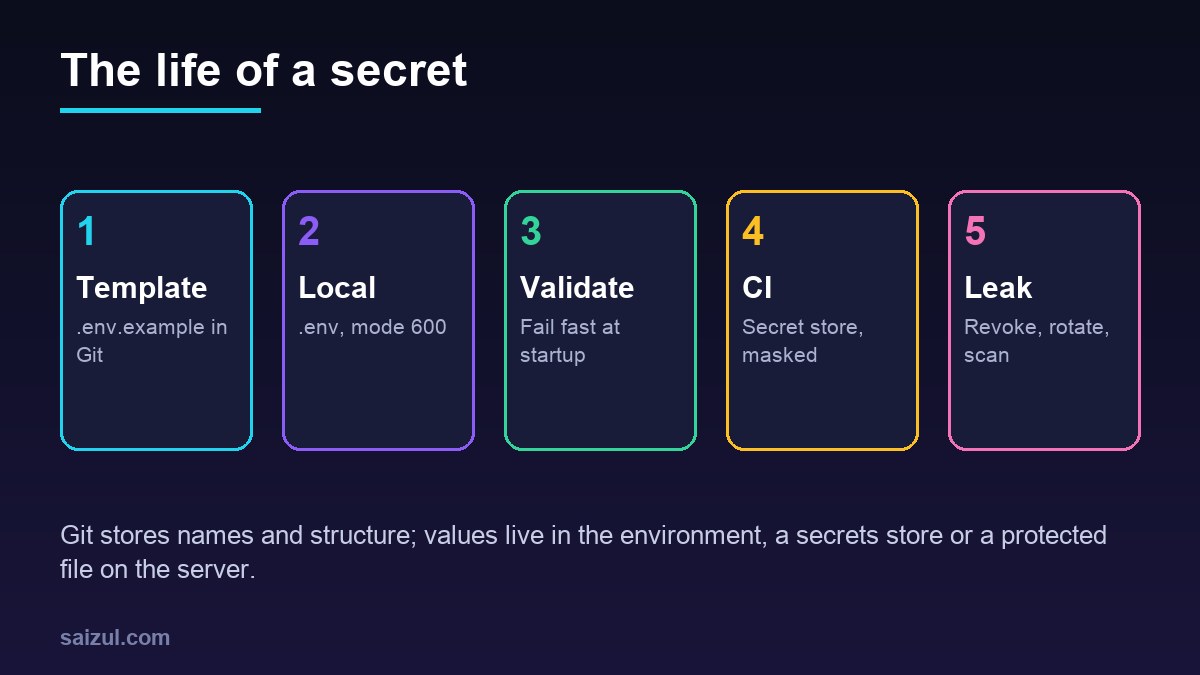
From my own work: Most leaked keys I have helped clean up were not in application code. They were in a
.env.backup, a.env.productionthat someone renamed to test something, or a Docker image that copied the whole project directory. A.gitignorethat only lists.envmisses all three.
What a .env file is for
The Twelve-Factor App defines config as everything that changes between deploys, such as database credentials, API keys and hostnames, and says it belongs in environment variables, not in code (Twelve-Factor: Config). A .env file is a convenience for that idea: a plain KEY=value list that a library or runtime loads into the environment, mostly on developer machines and simple servers.
A good test for what belongs in it: could you open-source the code right now without exposing anything? If yes, your secrets are where they should be. Constants that are the same everywhere, such as a page size or a feature list, belong in normal config files in the repository.
.gitignore and .env.example
Ignore every variant, then allow only the template back in:
# .gitignore
.env
.env.*
!.env.example
*.pem
*.key
git check-ignore -v .env .env.production # shows the rule that ignores each file
git ls-files | grep -E '(^|/).env' # anything listed here is already trackedThe .env.example file documents every variable the app reads, with safe placeholders and a comment where the value comes from. A new developer copies it to .env and fills in the blanks:
# .env.example  (committed; never put real values here)
APP_ENV=development
PORT=3000
# postgres://user:password@host:5432/dbname
DATABASE_URL=
# Payment provider dashboard, test mode key for local use
PAYMENT_API_KEY=
# Optional: defaults to info
LOG_LEVEL=info
Keep the example in sync with the code. The startup validation below makes that easy: if the app requires a variable the example does not mention, the first person to run it finds out immediately.
Node.js: load and validate .env at startup
Node.js 20.6 and later can load a file without any package: node --env-file=.env server.js. --env-file-if-exists does the same without failing when the file is missing, which suits production where variables come from the environment, and process.loadEnvFile() loads a file from code (Node.js –env-file). Loading is only half the job; validate the result in one module and import config from there:
// config.js
import { z } from 'zod';

const Env = z.object({
  APP_ENV: z.enum(['development', 'test', 'production']).default('development'),
  PORT: z.coerce.number().int().positive().default(3000),
  DATABASE_URL: z.string().min(1),
  PAYMENT_API_KEY: z.string().min(1),
  LOG_LEVEL: z.enum(['debug', 'info', 'warn', 'error']).default('info'),
});

const parsed = Env.safeParse(process.env);
if (!parsed.success) {
  // print names only, never values
  const names = parsed.error.issues.map((i) => i.path.join('.'));
  console.error('Invalid or missing environment variables:', names.join(', '));
  process.exit(1);
}
export const config = Object.freeze(parsed.data);
node --env-file-if-exists=.env server.jsThe app now refuses to start with a clear list of what is missing, instead of failing an hour later on the first payment. In front-end builds, remember that variables with a public prefix, such as VITE_ or NEXT_PUBLIC_, are compiled into JavaScript that every visitor downloads. Never give a secret one of those names.
PHP: phpdotenv with required variables
In plain PHP projects, vlucas/phpdotenv is the usual loader, and it has validation built in:
composer require vlucas/phpdotenv<?php
// bootstrap.php
require __DIR__ . '/vendor/autoload.php';
$dotenv = DotenvDotenv::createImmutable( __DIR__ );
$dotenv->safeLoad(); // no exception if .env is absent (production)
$dotenv->required( [ 'DB_HOST', 'DB_NAME', 'DB_USER', 'DB_PASSWORD' ] )->notEmpty();
$dotenv->required( 'APP_ENV' )->allowedValues( [ 'development', 'staging', 'production' ] );
$dotenv->ifPresent( 'DB_PORT' )->isInteger();
$db_host = $_ENV['DB_HOST'];Validation runs against the real environment as well as the file, so it also catches a production server where a variable was never set. createImmutable does not overwrite variables that already exist and does not call putenv(), so read values from $_ENV rather than getenv(). In Laravel, call env() only inside config files: after php artisan config:cache, the .env file is no longer loaded and env() elsewhere returns null. For WordPress, the same idea applies to wp-config.php; the wp-config.php hardening guide shows how to read credentials from the environment and lock the file down.
Python: python-dotenv and pydantic-settings
For scripts, python-dotenv loads the file into os.environ and by default does not override variables that are already set. For applications, pydantic-settings loads and validates in one step:
pip install pydantic-settings# settings.py
from pydantic import SecretStr
from pydantic_settings import BaseSettings, SettingsConfigDict
class Settings(BaseSettings):
model_config = SettingsConfigDict(env_file='.env', extra='ignore')
app_env: str = 'development'
database_url: str
payment_api_key: SecretStr
debug: bool = False
settings = Settings() # raises ValidationError at startup if a field is missingField names match environment variables case-insensitively, so database_url reads DATABASE_URL. Real environment variables take priority over the file. SecretStr prints as asterisks in logs and tracebacks; call settings.payment_api_key.get_secret_value() only where the key is actually used.
.env files in production
On a single VPS a protected file is acceptable, provided it is treated as a secret:
- Owner and mode: owned by the app user, mode
600, outside the web root so the web server can never serve it. - systemd:
EnvironmentFile=/etc/myapp/envin the unit loads it at start, with the file owned by root and mode 600. - Docker: pass it at runtime with
env_fileor, better for passwords, Compose secrets. NeverCOPYa.envinto an image, and add it to.dockerignore; the n8n setup in the self-hosted n8n guide follows this pattern. - No dumps: disable debug pages and remove
phpinfo()files in production; both print the environment.
As a team or the number of services grows, move to a secret manager with access control, audit logs and rotation. The OWASP Secrets Management Cheat Sheet is a good checklist for choosing and running one.
How to handle secrets in CI
In GitHub Actions, store values as repository or environment secrets and pass them only to the steps that need them. Secrets are masked in logs, and, apart from GITHUB_TOKEN, they are not passed to workflows triggered from forked repositories (Using secrets in GitHub Actions).
# add a secret from the terminal (prompts for the value)
gh secret set PAYMENT_API_KEY
gh secret set PAYMENT_API_KEY --env production
# .github/workflows/deploy.yml (excerpt)
jobs:
deploy:
runs-on: ubuntu-latest
environment: production # can require a reviewer before secrets are released
steps:
- uses: actions/checkout@v4
- name: Deploy
env:
PAYMENT_API_KEY: ${{ secrets.PAYMENT_API_KEY }}
run: ./scripts/deploy.shDo not echo secrets, write them into build artifacts or pass them on the command line, where they can appear in process lists. Prefer short-lived credentials where the provider supports OpenID Connect, so the workflow has no long-lived cloud key at all. The GitHub Actions deploy guide shows environment secrets and a restricted SSH key in a real workflow.
What to do when a secret is leaked
Order matters. Assume a key pushed to a remote repository has been copied, even if you delete the commit a minute later; public repositories are scanned by bots continuously.
- Revoke or rotate the key at the provider, and update it wherever it is used. This is the step that actually ends the exposure.
- Check the provider’s logs for use of the old key since the leak.
- Stop tracking the file:
git rm --cached .env, fix.gitignoreand commit. - Scan the whole history for other secrets, not just the one you know about.
- Rewrite history only if needed, for example with
git filter-repo, knowing that clones and forks keep the old commits. Rotation is never optional because of this.
# scan the full Git history, then the working directory
gitleaks git -v
gitleaks dir -v .
Prevent the next one with a pre-commit hook that runs gitleaks, and turn on secret scanning and push protection in the repository’s security settings, which blocks pushes that contain recognised key formats. The WordPress security automation guide adds secret scanning to a CI pipeline.
.env file best practices checklist
.envand.env.*ignored,.env.examplecommitted and current.git ls-filesshows no real env files, keys or certificates.- Every required variable validated at startup, with names (not values) in the error.
- No secrets behind public front-end prefixes such as
VITE_orNEXT_PUBLIC_. - Production env files mode 600, outside the web root, not copied into images.
- CI secrets scoped to environments and passed only to the steps that use them.
- gitleaks in pre-commit and CI; push protection enabled.
- A written rotation procedure: revoke, replace, check logs, then clean Git.
Want this done on your own server or site?
I am Saizul Amin, a web developer and technical SEO consultant. I set up and harden VPS servers, migrate WordPress sites, fix indexing problems and build automations. See my portfolio or get in touch.
FAQ
Should I commit my .env file to Git?
No. Commit a .env.example with the variable names and placeholder values, and keep the real .env on each machine. Ignore every variant such as .env.production as well.
Is it safe to use .env files in production?
On a single server, yes, if the file is owned by the app user, mode 600 and outside the web root. For teams and many services, a secret manager with access control and audit logs is safer.
What is the difference between .env and .env.example?
.env holds the real values and stays out of Git. .env.example lists the same variable names with empty or placeholder values, so new developers know what to set.
Does Node.js support .env files without dotenv?
Yes. Node.js 20.6 and later support node –env-file=.env, and newer versions add –env-file-if-exists and process.loadEnvFile(). You still need your own validation.
What should I do if I committed an API key to GitHub?
Revoke or rotate the key at the provider immediately, check its usage logs, then remove the file from Git and scan the history. Deleting the commit alone does not make the key safe.
How do I validate environment variables at startup?
Define a schema for every variable and check it before the app does anything else: zod in Node, phpdotenv required() in PHP, or pydantic-settings in Python. Exit with the names of missing variables.
Sources
- The Twelve-Factor App: III. Config
- OWASP Cheat Sheet Series: Secrets Management
- GitHub Docs: Using secrets in GitHub Actions
- Node.js Docs: Command-line options, –env-file
- vlucas/phpdotenv on GitHub

Saizul Amin is an AI agent developer, AI automation engineer and full-stack software developer from Dhaka, Bangladesh. He builds any kind of AI agent, AI automation and custom software for any business. Portfolio: https://saizul.com