

Every site needs HTTPS, and you don’t need to pay for a basic certificate. Let’s Encrypt issues free, trusted certificates that renew automatically. Here is the exact process I use on Ubuntu servers running Nginx.
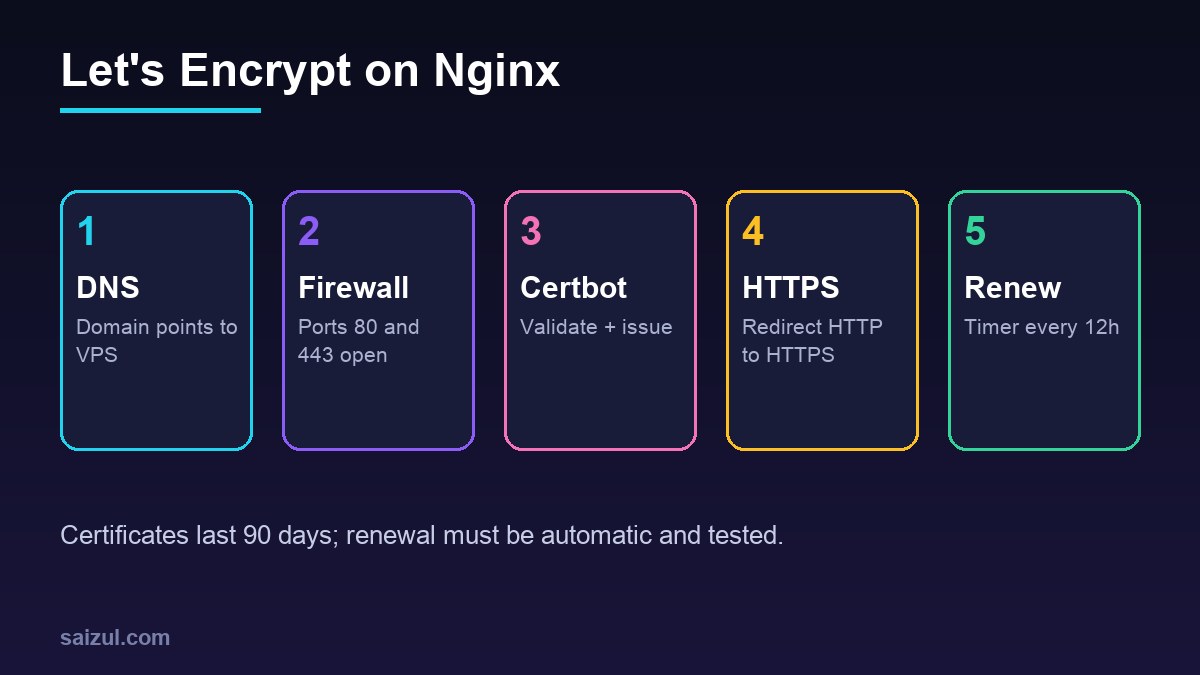
From my own work: I run several WordPress sites on an Ubuntu VPS. The two failures I see most are DNS not yet pointing to the new server and port 80 closed in the firewall, both of which break validation.
Before you start
- A domain whose A (and AAAA, if used) record points to your server. Check with
dig +short example.com. - Nginx serving the site on port 80 with the right
server_name. - Ports 80 and 443 open (e.g.
sudo ufw allow 'Nginx Full').
1. Install Certbot
The official Certbot instructions recommend snap:
sudo snap install --classic certbot
sudo ln -s /snap/bin/certbot /usr/bin/certbot
2. Issue the certificate
sudo certbot --nginx -d example.com -d www.example.comCertbot validates the domain, installs the certificate in your Nginx config and can add an HTTP→HTTPS redirect.
3. Confirm automatic renewal
Certificates are valid for 90 days. Certbot installs a timer; test it:
sudo certbot renew --dry-run
systemctl list-timers | grep certbot
4. Harden TLS settings
Use the Mozilla SSL Configuration Generator (“intermediate” profile) for protocols and ciphers, enable HTTP/2 and add HSTS once everything works. For advanced tuning see hardening Nginx TLS 1.3.
Common errors
| Error | Cause | Fix |
|---|---|---|
| Timeout during connect | Port 80 blocked | Open port 80 in firewall/provider panel |
| Unauthorized / 404 on challenge | DNS points elsewhere or wrong server block | Fix DNS, check server_name |
| Too many certificates | Hit rate limits | Use --dry-run; see rate limits |
| Redirect loop behind Cloudflare | SSL mode Flexible | Use Full (strict) |
Using a panel such as CloudPanel or cPanel? They wrap the same process in a button. Moving hosts? See migrating WordPress to a VPS.
Want this done on your own server or site?
I am Saizul Amin, a web developer and technical SEO consultant. I set up and harden VPS servers, migrate WordPress sites, fix indexing problems and build automations. See my portfolio or get in touch.
FAQ
Is Let’s Encrypt as secure as paid SSL?
For encryption, yes. Paid certificates mainly add organisation validation or warranties.
Does it work for wildcard domains?
Yes, using DNS-01 validation with a DNS provider plugin.
What happens if renewal fails?
Browsers show a security warning after expiry, so monitor renewals and expiry dates.
Sources
- Let's Encrypt: Getting started
- Certbot instructions (Nginx on Ubuntu)
- Let's Encrypt: Rate limits
- Mozilla SSL Configuration Generator

Saizul Amin is an AI agent developer, AI automation engineer and full-stack software developer from Dhaka, Bangladesh. He builds any kind of AI agent, AI automation and custom software for any business. Portfolio: https://saizul.com