


The robots.txt file tells crawlers which URLs they may request. It is small, powerful and easy to get wrong: one bad line can stop Google crawling your whole site. Here is how to use it safely.
From my own work: In audits I regularly find staging-site rules like Disallow: / left on a live site after launch. It is the first file I check when a site suddenly loses traffic.
What robots.txt does (and doesn’t)
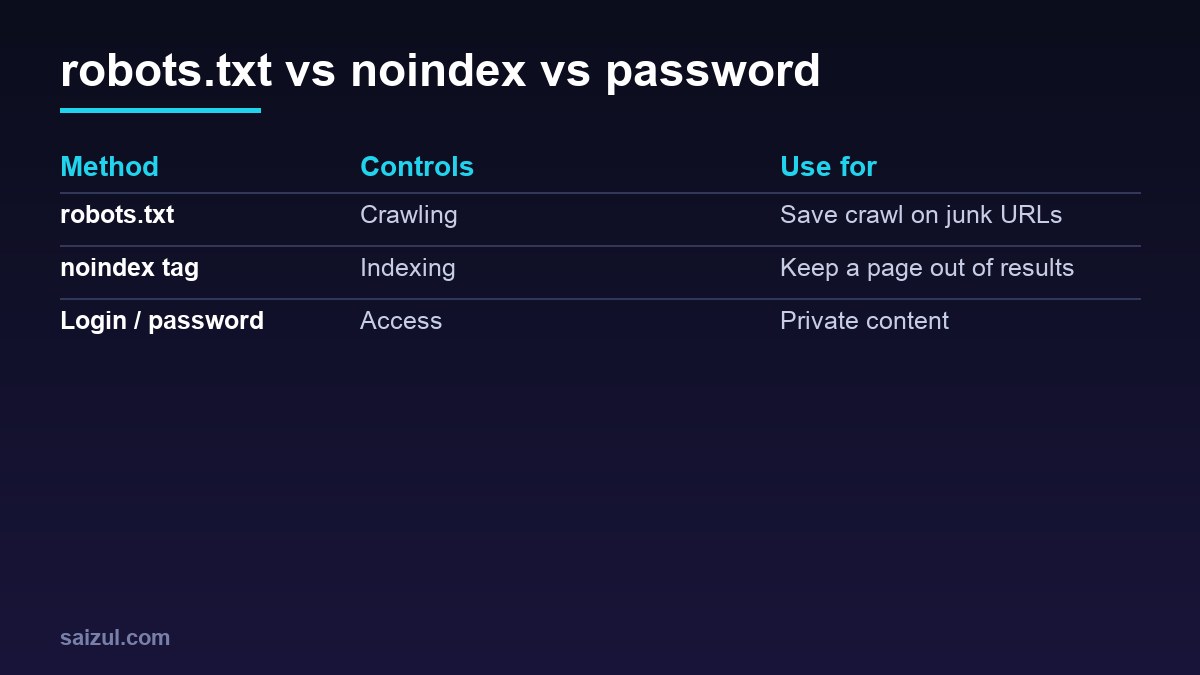
It sits at https://example.com/robots.txt and follows the Robots Exclusion Protocol. Google uses it to manage crawl traffic, not to keep pages out of results (Google intro). A blocked URL can still be indexed if other sites link to it. To keep a page out of Google, use noindex and allow crawling so Google can see that tag.
Syntax basics
User-agent: *          # which crawler the group applies to
Disallow: /private/    # do not crawl this path
Allow: /private/ok/    # exception inside a disallowed path
Sitemap: https://example.com/sitemap_index.xml
Rules are case-sensitive paths. Google supports * and $ wildcards and picks the most specific matching rule (details).
A safe WordPress example
User-agent: *
Disallow: /wp-admin/
Allow: /wp-admin/admin-ajax.php
Disallow: /?s=
Disallow: /search/

Sitemap: https://example.com/sitemap_index.xml
Don’t block /wp-content/ or /wp-includes/: Google needs CSS and JS to render pages.
AI crawlers
You can allow or block AI crawlers by user agent, for example GPTBot, ClaudeBot, CCBot or Google-Extended (which controls use in Google’s AI models, not Search). Blocking them does not affect Google Search rankings. Decide based on whether you want to appear in AI answers; see answer engine optimisation.
Common mistakes
Disallow: /left from staging.- Blocking CSS/JS so Google can’t render.
- Using robots.txt to “noindex” pages (unsupported).
- Blocking pages that carry a noindex tag, so Google never sees it.
- Wrong file location (must be at the root of each host and protocol).
Testing
Check the robots.txt report in Search Console, inspect important URLs and watch crawl stats after changes. For deeper crawl analysis, see crawl budget and server logs.
Want this done on your own server or site?
I am Saizul Amin, a web developer and technical SEO consultant. I set up and harden VPS servers, migrate WordPress sites, fix indexing problems and build automations. See my portfolio or get in touch.
FAQ
Does every site need robots.txt?
No, but a simple one with your sitemap is good practice.
Can robots.txt remove a page from Google?
No. Use noindex or remove the page; robots.txt only controls crawling.
Does blocking AI bots hurt SEO?
Blocking GPTBot or ClaudeBot does not affect Google Search; blocking Googlebot would.
Sources
- Google Search Central: Introduction to robots.txt
- Google Search Central: How Google interprets robots.txt
- RFC 9309: Robots Exclusion Protocol
- Google: Block Search indexing with noindex

Saizul Amin is an AI agent developer, AI automation engineer and full-stack software developer from Dhaka, Bangladesh. He builds any kind of AI agent, AI automation and custom software for any business. Portfolio: https://saizul.com