


Cache Enabler on Nginx is one of the lightest ways to cache WordPress pages: the plugin saves each page as a static HTML file, and a few lines of Nginx configuration serve that file straight from disk without starting PHP. When a page still feels slow, it is usually bypassing the cache because of a login cookie, an unknown query string, a non-200 response or a request whose Accept header does not include text/html. This guide covers how delivery works, the Nginx setup, how to test it with curl, every bypass rule and a cron job that warms the cache from your sitemap.
From my own work: The usual report I get is “the cache does not work”, backed by a curl test. In most of those cases the cache works fine: plain curl sends
Accept: */*, and Cache Enabler’s PHP engine deliberately skips requests that do not ask for HTML. Testing with the right headers is half the job.
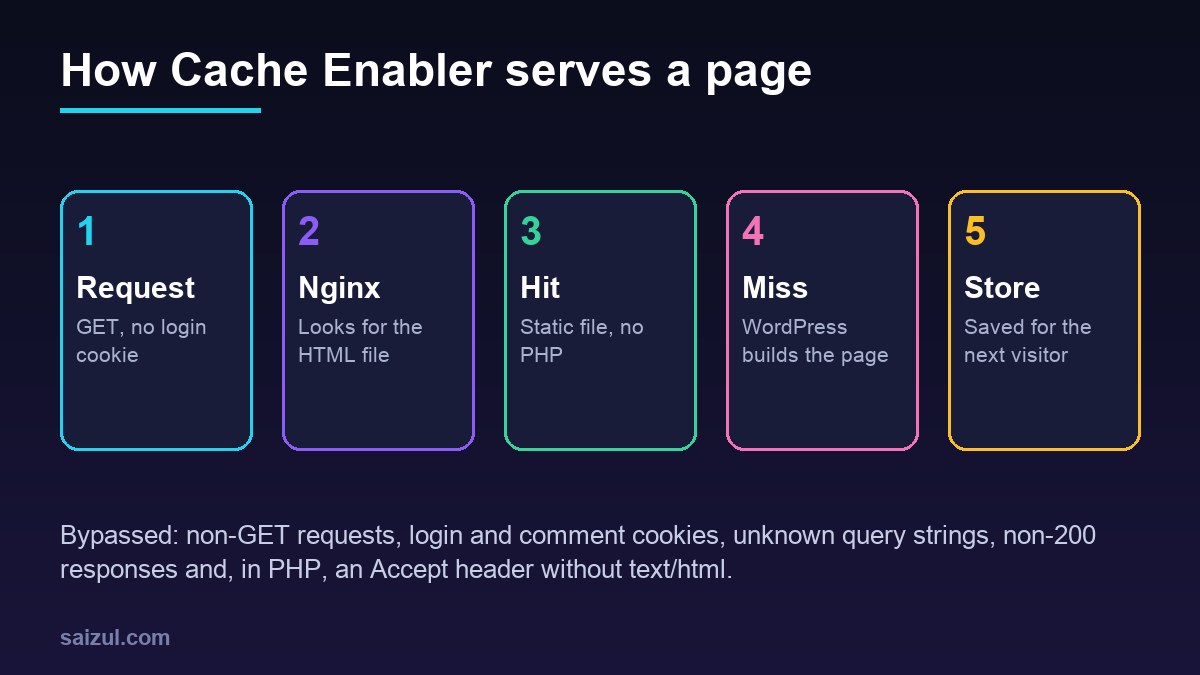
How Cache Enabler delivers cached pages
Cache Enabler captures the HTML of a front-end page at the end of the request and writes it to disk under wp-content/cache/cache-enabler/, in a directory named after the host and path. The file name encodes the version of the page:
wp-content/cache/cache-enabler/example.com/sample-post/https-index.html
                                                   https-index.html.gz        (pre-compressed)
                                                   https-index-webp.html      (WebP version)
                                                   https-index-mobile.html    (mobile version)
There are two ways those files reach a visitor:
- The PHP engine. On activation the plugin installs an
advanced-cache.phpdrop-in and setsWP_CACHEinwp-config.php. WordPress loads the drop-in very early, before plugins and the theme, and if a matching file exists it is sent with anX-Cache-Handler: cache-enabler-engineheader. PHP still starts, but WordPress barely runs. - Nginx directly. With the advanced configuration, Nginx builds the same file path itself and serves the file without touching PHP-FPM at all. This is the fastest option and the one this guide sets up (Cache Enabler documentation).
Every cached page ends with an HTML comment such as <!-- Cache Enabler by KeyCDN @ ... (https-index.html) -->, which names the file version that was served. Cache Enabler needs a custom permalink structure; with plain ?p=123 URLs it does not cache.
Install and configure Cache Enabler
cd /var/www/example.com/public          # as the site user
wp plugin install cache-enabler --activate
wp config get WP_CACHE                   # should print 1
ls -la wp-content/advanced-cache.php
In Settings, Cache Enabler, the settings that matter for an Nginx setup are:
- Expiration. Cached pages expire a set number of hours after they were created. Cache Enabler also clears the cache of a post when it is published, updated or trashed, along with related archives, so a long expiry such as 24 hours is usually fine.
- Mobile version. Leave it off if your theme is responsive. It doubles the files and the warming work for no benefit.
- WebP version. Only useful if WebP copies of your images already exist next to the originals.
- Pre-compression. Turn it off when Nginx serves the files. The file name depends on the visitor’s
Accept-Encodingheader, so with pre-compression on, browsers only ever create the.gzor.brversion and the plainhttps-index.htmlthat Nginx looks for may never exist. Let Nginx compress on the fly with its normalgzipsettings.
Serve the cache from Nginx without PHP
The plugin documentation offers a snippet built from if blocks. I prefer map blocks in the http context, which are evaluated only when used and keep the server block short (ngx_http_map_module). Each map mirrors one of the plugin’s own bypass rules, with its default regular expressions:
# /etc/nginx/conf.d/cache-enabler.conf
map $request_method $ce_method {
    GET     0;
    default 1;
}
map $http_cookie $ce_cookie {
    default 0;
    "~(wp-postpass|wordpress_logged_in|comment_author)_" 1;
}
map $args $ce_args {
    ""      0;
    "~^(fbclid|ref|mc_(cid|eid)|utm_(source|medium|campaign|term|content|expid)|gclid|fb_(action_ids|action_types|source)|age-verified|usqp|cn-reloaded|_ga|_ke)" 0;
    default 1;
}
map $http_accept $ce_accept {
    ""          0;
    "~text/html" 0;
    default     1;
}
map $request_uri $ce_path {
    "~^([^?]*)" $1;
}
map "$ce_method$ce_cookie$ce_args$ce_accept" $ce_file {
    "0000"  /wp-content/cache/cache-enabler/$host${ce_path}https-index.html;
    default /ce-bypass;
}
# in the HTTPS server block for example.com
location / {
try_files $ce_file $uri $uri/ /index.php?$args;
}When every check passes, $ce_file points to the cached file and try_files serves it if it exists (try_files). When any check fails, it points to a path that does not exist and the request falls through to WordPress as before. A few details are deliberate:
$ce_pathis the raw path from$request_uriwithout the query string. That matches the directory name Cache Enabler uses, including percent-encoded slugs, and ignored parameters such asutm_sourcestill find the file.- There is no slash between the path and the file name.
/sample-post/becomes.../sample-post/https-index.html, while/sample-postwithout the trailing slash finds nothing and WordPress redirects it, which is what the plugin does too. - The
https-prefix is fixed because this block is for the HTTPS server. Plain HTTP should only redirect. - If you enable the mobile or WebP versions in the plugin, Nginx must add the same
-mobileor-webppart to the file name, or it will serve the desktop file to everyone.
sudo nginx -t && sudo systemctl reload nginxNginx does not know when a file has expired. Cache Enabler schedules an hourly WP-Cron event that deletes expired files, so if you have replaced WP-Cron with a system cron job, make sure that job runs.
How to check that a page is served from the cache
Send the request a browser would send: logged out, no cookies and an Accept header that includes text/html.
URL=https://example.com/sample-post/
H='Accept: text/html'

# 1. first request may be a miss and creates the file
curl -s -o /dev/null -H "$H" -w '%{http_code} %{time_starttransfer}sn' "$URL"

# 2. the file should now exist
ls -l /var/www/example.com/public/wp-content/cache/cache-enabler/example.com/sample-post/

# 3. second request: fast, signature present, no X-Cache-Handler header
curl -s -H "$H" -w 'n%{time_starttransfer}sn' "$URL" | tail -c 160
curl -sI -H "$H" "$URL" | grep -i x-cache-handler
If the signature comment is there and X-Cache-Handler is missing, Nginx served the file. If the header is present, the PHP engine served it, which means the Nginx part is not matching; compare the file path in ls with what the map builds. If there is no signature at all, the page is not being cached, and the next section explains why.
Why pages bypass the cache
These rules come from the plugin’s engine. A page is not cached or not delivered from the cache when:
- The method is not GET. POST requests, form submissions and HEAD requests always go to WordPress.
- The Accept header lacks
text/html. The PHP engine skips such requests, which is why plain curl, uptime monitors and many bots never see a cached page through PHP. The Nginx maps above apply the same rule. - A bypass cookie is present. By default
wp-postpass_,wordpress_logged_in_andcomment_author_. Logged-in users and recent commenters always get fresh pages. For WooCommerce, the plugin’s own example addswoocommerce_items_in_cartandwp_woocommerce_session; add the same names to the Nginx cookie map. - There is a query string that does not start with one of the ignored marketing parameters such as
utm_,gclidorfbclid. Query strings are never cached as separate versions. - The response is not a 200. 404 pages, redirects and errors are not stored, so a broken page cannot be cached by accident.
- WordPress says no. Admin pages, feeds, previews, password-protected posts, search results, anything that defines
DONOTCACHEPAGE, and post IDs, paths or cookies you excluded in the settings. - The URL does not match the permalink structure, for example a missing trailing slash, or it ends in
.txt,.xml,.xslor.ico.
Whatever you exclude in the plugin settings, mirror in the Nginx maps. Otherwise Nginx keeps serving a file the plugin would have skipped until the file expires.
Warm the cache from the sitemap with cron
Cache Enabler has no preloading. A page is only cached after its first visit, so after an update or a full clear the first visitor to each page waits for WordPress. A small script that requests every URL in the sitemap fixes that:
#!/usr/bin/env bash
# /usr/local/bin/warm-cache.sh: request every sitemap URL once
set -u

HOST="example.com"
SITEMAP="https://$HOST/sitemap_index.xml"   # core WordPress: /wp-sitemap.xml
CURL=(curl -s --max-time 30 --resolve "$HOST:443:127.0.0.1" -A "cache-warmer")

"${CURL[@]}" "$SITEMAP" | grep -oP '(?<=<loc>)[^<]+' | while read -r map; do
  "${CURL[@]}" "$map" | grep -oP '(?<=<loc>)[^<]+'
done | grep -v '.xml$' | sort -u | while read -r url; do
  "${CURL[@]}" -o /dev/null -H 'Accept: text/html'
    -w '%{http_code} %{time_starttransfer}s %{url_effective}n' "$url"
  sleep 0.3
done
--resolve sends the requests to the local Nginx, so they do not leave the server or pass through a CDN. The Accept header is what makes Cache Enabler store the page. The sitemap index lists sub-sitemaps, and each sub-sitemap lists pages, which is why there are two loops. If you turned on the mobile version, run a second pass with a mobile user agent.
sudo install -m 755 warm-cache.sh /usr/local/bin/warm-cache.sh
/usr/local/bin/warm-cache.sh | head        # first run: misses, slower
/usr/local/bin/warm-cache.sh | head        # second run: hits, fast

# /etc/cron.d/warm-cache: every 6 hours, as an unprivileged user
17 */6 * * * www-data /usr/local/bin/warm-cache.sh > /dev/null 2>&1
Choose the interval from your expiry time: warming more often than pages expire only re-reads files that are already there. On a small VPS with thousands of URLs, raise the sleep so warming never competes with real visitors. If you prefer systemd, systemd timers give you logs and a randomised start for free.
Cache Enabler or Nginx FastCGI cache?
Both end with Nginx serving a stored page. Cache Enabler is managed from WordPress, clears related pages when you publish, and works the same on any host, which makes it a good fit for sites that move between servers. Nginx FastCGI cache lives entirely in Nginx, caches any PHP response and needs a purge mechanism of its own. Do not run both on the same pages. Neither replaces an object cache for logged-in users and the admin; that is what Redis object cache is for.
Cache Enabler on Nginx checklist
- Plugin active,
WP_CACHEset, custom permalinks in use. - Mobile and WebP versions off unless you need them; pre-compression off.
- Nginx maps mirror the plugin’s cookie, query string and Accept rules.
try_files $ce_filefirst inlocation /;nginx -tpasses.- Test with
Accept: text/html: signature present, noX-Cache-Handler. - WooCommerce cookies added to both the plugin and Nginx.
- WP-Cron or a system cron runs, so expired files are removed.
- Warm-up script in cron, paced for your server.
Want this done on your own server or site?
I am Saizul Amin, a web developer and technical SEO consultant. I set up and harden VPS servers, migrate WordPress sites, fix indexing problems and build automations. See my portfolio or get in touch.
FAQ
Does Cache Enabler work with Nginx?
Yes. The PHP engine works on any server. With the advanced configuration, Nginx serves the cached HTML files directly from wp-content/cache/cache-enabler without starting PHP.
Why does curl show that my page is not cached?
Plain curl sends Accept: */*, and the Cache Enabler engine skips requests without text/html in the Accept header. Add -H “Accept: text/html” to the curl command.
Does Cache Enabler preload or warm the cache?
No. Pages are cached on their first visit. A cron job that requests every URL in the sitemap with an Accept: text/html header warms the cache.
Does Cache Enabler cache pages with query strings?
No. Any query string bypasses the cache, except common marketing parameters such as utm_source, gclid and fbclid, which are ignored and still get the cached page.
Can I use Cache Enabler with WooCommerce?
Yes, but exclude cart, checkout and account pages and add the WooCommerce cart and session cookies to the excluded cookies, in the plugin and in Nginx.
Sources
- WordPress.org Plugins: Cache Enabler
- KeyCDN Support: Cache Enabler documentation
- nginx.org: Module ngx_http_map_module
- nginx.org: try_files directive

Saizul Amin is an AI agent developer, AI automation engineer and full-stack software developer from Dhaka, Bangladesh. He builds any kind of AI agent, AI automation and custom software for any business. Portfolio: https://saizul.com