

Docker gives every WordPress project the same PHP, database and tools on any machine, and lets you throw the environment away when you are done. Here is a compact setup I use for theme and plugin work.
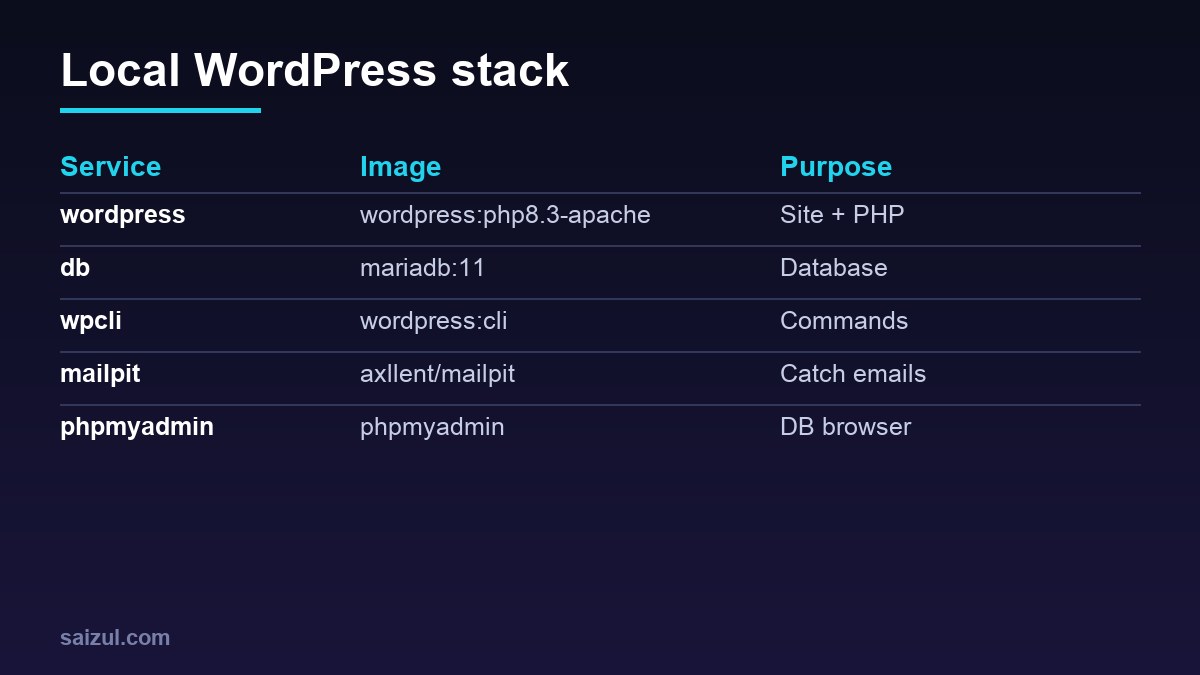
From my own work: I keep client and personal WordPress projects in separate Compose stacks so PHP versions and plugins never conflict, and I import production databases only after replacing URLs with WP-CLI.
compose.yaml
services:
  db:
    image: mariadb:11
    environment:
      MARIADB_DATABASE: wp
      MARIADB_USER: wp
      MARIADB_PASSWORD: wp
      MARIADB_ROOT_PASSWORD: root
    volumes: [db:/var/lib/mysql]

  wordpress:
    image: wordpress:php8.3-apache
    depends_on: [db]
    ports: ["8080:80"]
    environment:
      WORDPRESS_DB_HOST: db
      WORDPRESS_DB_USER: wp
      WORDPRESS_DB_PASSWORD: wp
      WORDPRESS_DB_NAME: wp
      WORDPRESS_DEBUG: 1
    volumes:
      - wp:/var/www/html
      - ./wp-content/themes/my-theme:/var/www/html/wp-content/themes/my-theme
      - ./wp-content/plugins/my-plugin:/var/www/html/wp-content/plugins/my-plugin

  wpcli:
    image: wordpress:cli
    depends_on: [db]
    volumes: [wp:/var/www/html]
    environment:
      WORDPRESS_DB_HOST: db
      WORDPRESS_DB_USER: wp
      WORDPRESS_DB_PASSWORD: wp
      WORDPRESS_DB_NAME: wp
    profiles: [tools]

  mailpit:
    image: axllent/mailpit
    ports: ["8025:8025"]

volumes: {db: {}, wp: {}}
See the official image and the Compose reference. Pin image tags in real projects.
Run it
docker compose up -d
docker compose run --rm wpcli wp core install --url=http://localhost:8080
  --title=Dev --admin_user=admin --admin_password=admin --admin_email=dev@example.com
docker compose run --rm wpcli wp plugin activate my-plugin
Catch emails
Point WordPress SMTP to mailpit:1025 (with an SMTP plugin) and read emails at localhost:8025 (Mailpit). No test email ever reaches a real customer.
Import a live site safely
docker compose exec -T db mariadb -uwp -pwp wp < production.sql
docker compose run --rm wpcli wp search-replace 'https://www.example.com' 'http://localhost:8080' --all-tables
Use search-replace for serialized data. Anonymise customer data before importing store databases.
Tips
- Commit only your theme/plugin, not WordPress core.
- Add Xdebug with a custom Dockerfile when you need step debugging.
- Match the PHP version to production.
More commands: WP-CLI cheat sheet.
Want this done on your own server or site?
I am Saizul Amin, a web developer and technical SEO consultant. I set up and harden VPS servers, migrate WordPress sites, fix indexing problems and build automations. See my portfolio or get in touch.
FAQ
Is Docker better than LocalWP?
Docker is more reproducible and scriptable; LocalWP is easier for non-developers.
Why is file access slow on macOS?
Bind mounts can be slow; mount only your theme/plugin and keep core in a volume.
Can I use this for production?
This setup is for development; production needs hardening, TLS, backups and monitoring.
Sources
- Docker Hub: Official WordPress image
- Docker Docs: Compose file reference
- Mailpit
- WP-CLI: search-replace

Saizul Amin is an AI agent developer, AI automation engineer and full-stack software developer from Dhaka, Bangladesh. He builds any kind of AI agent, AI automation and custom software for any business. Portfolio: https://saizul.com