

A WordPress.org plugin deploy with GitHub Actions lets you release by pushing a Git tag: the workflow checks the code, confirms the version numbers match, copies the plugin to SVN trunk, creates the matching folder under tags and attaches a clean zip to a GitHub release. No local SVN checkout, no forgotten Stable tag. This guide builds that pipeline step by step, with Plugin Check on the built files and a dry run before the first real release.
From my own work: The release mistakes I see most on WordPress.org plugins are not code bugs. They are a
Stable tagthat still points to the previous version, a main file header that was never bumped, and anode_modulesortestsfolder that ended up in the zip. All three can be caught by a script before anything reaches SVN.
How a WordPress.org plugin deploy with GitHub Actions works
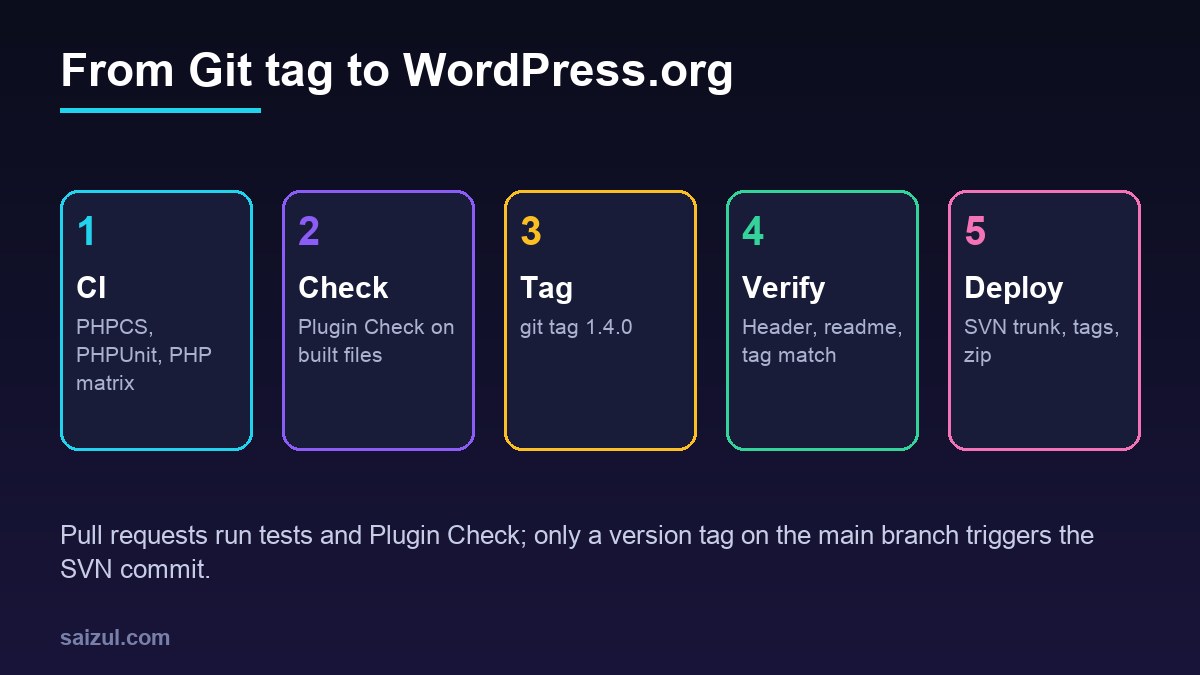
The setup uses two workflows. A CI workflow runs on every pull request and push to main. A release workflow runs only when you push a version tag:
- CI: PHP syntax and coding standards, unit tests across PHP versions, and Plugin Check on the files that will actually ship.
- Release: verify that the tag, the plugin header and the readme agree, build production dependencies, deploy to SVN and attach the zip to a GitHub release.
The PHP matrix, PHPCS with WordPress Coding Standards and PHPUnit setup are covered in detail in the GitHub Actions CI guide for WordPress plugins, so this post keeps that part short and focuses on the WordPress.org release.
SVN access and GitHub secrets
The deploy commits to your plugin’s SVN repository with your WordPress.org username, which is case-sensitive and is not your email address. WordPress.org lets you set an SVN-specific password in your account settings, separate from your login password; use that one (Using Subversion). Store both in a GitHub environment so the release job is the only job that can read them:
gh secret set SVN_USERNAME --env wordpress-org
gh secret set SVN_PASSWORD --env wordpress-org
In Settings, Environments, wordpress-org, add yourself as a required reviewer and limit deployments to tags. Each release then waits for one click of approval, which is a cheap safety net for a commit that ships to every user. If the SVN password is ever exposed, change it on WordPress.org first and update the secret second.
Repository layout and .distignore
my-plugin/
├── .github/workflows/ci.yml
├── .github/workflows/release.yml
├── .wordpress-org/            # banners, icons, screenshots (SVN /assets)
│   ├── banner-772x250.png
│   ├── banner-1544x500.png
│   ├── icon-128x128.png
│   ├── icon-256x256.png
│   └── screenshot-1.png
├── includes/
├── languages/
├── tests/
├── .distignore
├── composer.json
├── my-plugin.php
└── readme.txt
The deploy action copies the repository to trunk, excluding everything listed in .distignore, and moves .wordpress-org into the top-level SVN assets directory. Asset file names must be lowercase and follow the patterns in the plugin assets handbook. A typical .distignore:
# .distignore: files that must not ship to users
/.git
/.github
/.wordpress-org
/node_modules
/tests
/bin
/src
.distignore
.editorconfig
.gitattributes
.gitignore
composer.json
composer.lock
package.json
package-lock.json
phpcs.xml.dist
phpunit.xml.dist
README.md
Keep /vendor out of this list if the plugin needs Composer packages at runtime; the release job installs them without dev dependencies. Leave /src in the list only if it holds uncompiled assets and the built files live elsewhere, such as /build.
Run Plugin Check in CI on the built files
Plugin Check is the tool the WordPress.org review team uses, and the official action runs it in a temporary WordPress install and reports results as file annotations on the pull request (plugin-check-action). Point it at a copy of the plugin built with .distignore, otherwise it reports your tests and dev files as problems that users would never see:
# .github/workflows/ci.yml (Plugin Check job)
name: CI
on:
  pull_request:
  push:
    branches: [main]

jobs:
  plugin-check:
    runs-on: ubuntu-latest
    steps:
      - uses: actions/checkout@v4

      - name: Build the distributable copy
        run: |
          composer install --no-dev --prefer-dist --no-progress --optimize-autoloader
          mkdir -p dist/my-plugin
          rsync -a --exclude-from=.distignore ./ dist/my-plugin/

      - name: Run Plugin Check
        uses: wordpress/plugin-check-action@v1
        with:
          build-dir: dist/my-plugin
The action also accepts inputs such as exclude-checks, ignore-warnings and wp-version. Treat errors as blocking; review warnings and fix the ones that are real rather than silencing the whole category. Add your PHPCS and PHPUnit matrix jobs to the same file, and make all of them required status checks on main.
Check that the tag, header and readme agree
WordPress.org reads the version users get from the Stable tag in trunk/readme.txt, and WordPress itself reads Version: from the main plugin file. If either disagrees with the tag, users get the wrong code or update notices that never go away. Fail the release before it starts:
#!/usr/bin/env bash
# bin/check-version.sh
set -euo pipefail
TAG="${GITHUB_REF_NAME}"
HEADER=$(grep -m1 -E '^[[:space:]*]*Version:' my-plugin.php | awk '{print $NF}')
STABLE=$(grep -m1 -i '^Stable tag:' readme.txt | awk '{print $NF}')

if [ "$TAG" != "$HEADER" ] || [ "$TAG" != "$STABLE" ]; then
  echo "::error::Tag $TAG, plugin header $HEADER, readme Stable tag $STABLE must match"
  exit 1
fi
echo "Version $TAG is consistent"
exit 0
Use plain version tags such as 1.4.0, without a v prefix. The deploy action names the SVN tag after the Git tag by default, and plain numbers keep SVN, the readme and the header identical. If you also keep a version constant in PHP, add a third comparison for it.
The release workflow: deploy on tag
The workflow triggers on tags that look like a semantic version. GitHub’s filter patterns support + for one or more of the previous character, so [0-9]+.[0-9]+.[0-9]+ matches 1.4.0 and 2.10.3 but not test tags (filter pattern cheat sheet). The deploy step uses the widely used 10up action, which handles the SVN checkout, the copy to trunk, the svn cp to tags and the assets folder:
# .github/workflows/release.yml
name: Release to WordPress.org
on:
  push:
    tags:
      - "[0-9]+.[0-9]+.[0-9]+"

permissions:
  contents: write

jobs:
  release:
    runs-on: ubuntu-latest
    environment: wordpress-org
    steps:
      - uses: actions/checkout@v4

      - name: Check versions
        run: bash bin/check-version.sh

      - name: Install production dependencies
        run: composer install --no-dev --prefer-dist --no-progress --optimize-autoloader

      - name: Deploy to WordPress.org
        id: deploy
        uses: 10up/action-wordpress-plugin-deploy@stable
        with:
          generate-zip: true
        env:
          SVN_USERNAME: ${{ secrets.SVN_USERNAME }}
          SVN_PASSWORD: ${{ secrets.SVN_PASSWORD }}
          SLUG: my-plugin

      - name: Create GitHub release with the zip
        env:
          GH_TOKEN: ${{ github.token }}
        run: gh release create "$GITHUB_REF_NAME" "${{ steps.deploy.outputs.zip-path }}" --title "$GITHUB_REF_NAME" --generate-notes
A few details matter here:
SLUGdefaults to the GitHub repository name. Set it when the WordPress.org slug differs, including in capitalisation.- The zip is built from the SVN
trunkcontents, so it matches exactly what WordPress.org serves and unpacks to a folder without a version number. permissions: contents: writelets the built-in token create the release; nothing else in the job needs write access.- Build steps such as
npm ci && npm run buildgo before the deploy step if the plugin ships compiled JavaScript or CSS. - Pinning: for stricter supply-chain control, pin third-party actions to a full commit SHA instead of a moving tag.
To release, update the header, the Stable tag and the changelog in one pull request, merge it, then tag the merge commit:
git switch main && git pull
git tag 1.4.0
git push origin 1.4.0
Test with a dry run first
The deploy action accepts dry-run: true, which performs every step except the final SVN commit and does not need the SVN secrets. Run it once on a test tag in a fork or a branch copy of the workflow, read the log of the files it would add and delete, and download the generated zip to check its contents. It is far easier to fix a .distignore line at this stage than after users have received a 40 MB update full of test fixtures.
Before tagging a release that changes PHP requirements, also test the plugin on a copy of a real site; the WordPress staging site guide shows a quick clone, and the PHP upgrade guide helps when you raise the minimum PHP version.
Update the readme and assets between releases
Changing Tested up to or a screenshot should not require a new version. 10up publishes a companion action that pushes only readme.txt and .wordpress-org changes to trunk and assets:
# .github/workflows/assets.yml
name: Update readme and assets
on:
  push:
    branches: [main]

jobs:
  assets:
    runs-on: ubuntu-latest
    environment: wordpress-org
    steps:
      - uses: actions/checkout@v4
      - uses: 10up/action-wordpress-plugin-asset-update@stable
        env:
          SVN_USERNAME: ${{ secrets.SVN_USERNAME }}
          SVN_PASSWORD: ${{ secrets.SVN_PASSWORD }}
          SLUG: my-plugin
          IGNORE_OTHER_FILES: true
With IGNORE_OTHER_FILES: true it copies only the readme and assets and ignores code changes on main, so unreleased code never reaches trunk by this route. If your environment requires a reviewer, this workflow will wait for approval on every push; give it a separate environment without reviewers if that becomes noisy. Deploying code to your own servers, rather than to WordPress.org, is a different job, covered in the guide to deploying WordPress with GitHub Actions over SSH.
WordPress.org release checklist
- SVN username and SVN-specific password stored as environment secrets, with a required reviewer.
.distignoreexcludes tests, dev config, sources and Git files;vendorships if needed.- Assets in
.wordpress-orgwith lowercase handbook file names. - CI runs PHPCS, PHPUnit across your PHP versions and Plugin Check on the built copy.
- Tag, plugin header and
Stable tagchecked by script before deploy. - Release triggered only by version tags without a
vprefix. - A dry run done and the zip inspected before the first real release.
- Readme and asset updates handled by a separate workflow.
Want this done on your own server or site?
I am Saizul Amin, a web developer and technical SEO consultant. I set up and harden VPS servers, migrate WordPress sites, fix indexing problems and build automations. See my portfolio or get in touch.
FAQ
Can GitHub Actions deploy a plugin to WordPress.org?
Yes. A workflow triggered by a Git tag can copy the plugin to SVN trunk, create the tag folder and update assets, using your WordPress.org username and SVN password stored as GitHub secrets.
What is the SVN password for WordPress.org?
It is a separate password for SVN commits that you set in your WordPress.org account settings. Use it instead of your login password in CI, and change it there if it is ever exposed.
What does .distignore do?
It lists files and folders that must not be included in the distributed plugin, such as tests, Git files and build config. Deploy tools and wp dist-archive use it to build the release.
How do I run Plugin Check in GitHub Actions?
Use the official wordpress/plugin-check-action with build-dir pointing to a copy of your plugin built with .distignore. Results appear as annotations on the pull request.
Why does WordPress.org still show the old version after a release?
Usually the Stable tag in trunk/readme.txt still names the old version, or the tag folder is missing. A version check before deploy prevents both.
Sources
- WordPress Developer Resources: Using Subversion
- WordPress Developer Resources: Plugin assets
- GitHub: WordPress/plugin-check-action
- GitHub: 10up/action-wordpress-plugin-deploy
- GitHub Docs: Workflow syntax, filter patterns

Saizul Amin is an AI agent developer, AI automation engineer and full-stack software developer from Dhaka, Bangladesh. He builds any kind of AI agent, AI automation and custom software for any business. Portfolio: https://saizul.com