

A staging site is a private copy of production where you can update plugins, test a new PHP version or rebuild a template without visitors watching. Staging plugins exist, but on a VPS with shell access WP-CLI does the job in a handful of commands, and you understand every step. This is the workflow, including the two parts that cause real damage when skipped: keeping search engines out, and getting changes back without destroying live data.
From my own work: On my VPS each site runs under its own system user, and I create staging copies as separate sites with their own database and user. I always run search-replace with –dry-run first and read the table counts before letting it write anything.
1. Prepare the staging site
- Create a subdomain such as
staging.example.comwith an A record to the server (see DNS records explained). - Create a new vhost, a new empty database and a new database user. Never point staging at the production database.
- Issue a certificate for the subdomain (Let’s Encrypt on Nginx).
The paths below are examples; replace them with your own document roots. Run WP-CLI as the site’s system user, not as root.
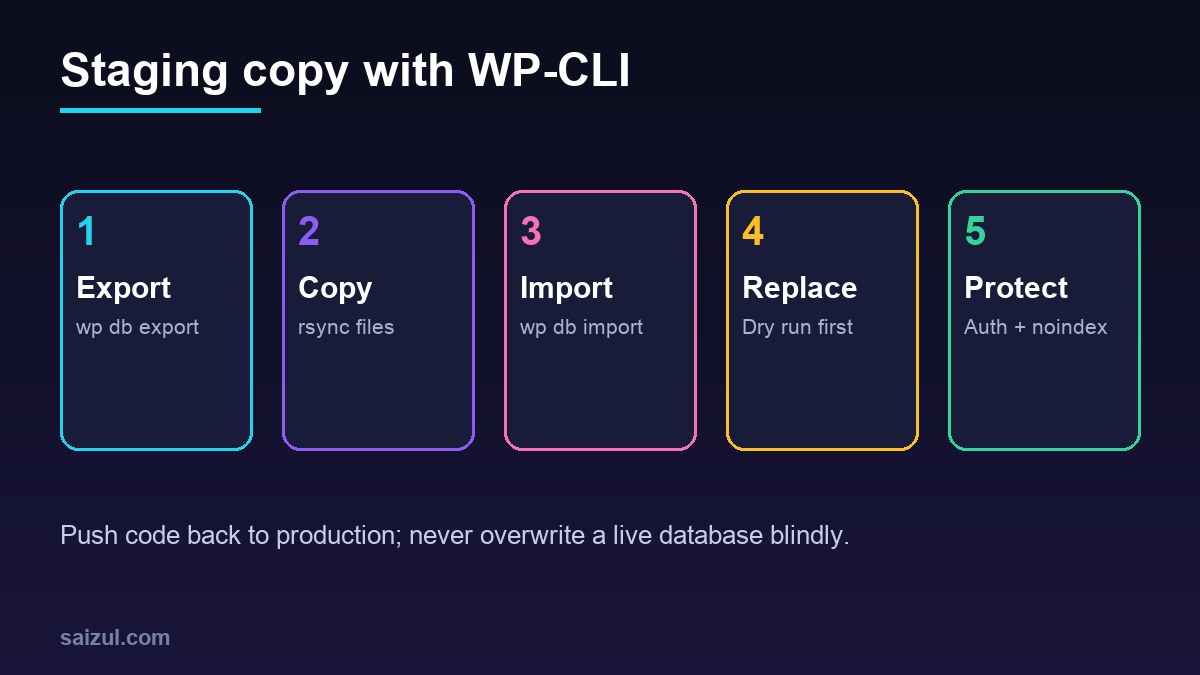
2. Export the production database and copy files
# on production
cd /var/www/example.com
wp db export /tmp/prod.sql --add-drop-table

# copy files, but keep staging's own wp-config.php
rsync -a --delete --exclude 'wp-config.php' --exclude 'wp-content/cache/'
  /var/www/example.com/ /var/www/staging.example.com/
wp db export runs mysqldump with the credentials from wp-config.php; --add-drop-table makes the dump safe to re-import over an older staging copy. The dump contains user data, so delete it afterwards and never leave it inside a web-accessible folder. If the staging directory has no wp-config.php yet, generate one with wp config create using the staging database credentials and the same table prefix as production.
3. Import and rewrite URLs
cd /var/www/staging.example.com
wp db import /tmp/prod.sql

# preview: nothing is written
wp search-replace 'https://example.com' 'https://staging.example.com'
  --all-tables-with-prefix --skip-columns=guid --report-changed-only --dry-run

# run it for real, then tidy up
wp search-replace 'https://example.com' 'https://staging.example.com'
  --all-tables-with-prefix --skip-columns=guid --report-changed-only
wp cache flush
wp rewrite flush
rm /tmp/prod.sql
Why wp search-replace and not a SQL REPLACE() or sed on the dump? WordPress stores many options as PHP-serialized strings that include their own length. Changing the URL length with a blind text replace corrupts them; WP-CLI unserializes, replaces and re-serializes correctly.
--dry-runprints a per-table count of replacements without touching the database. Zero replacements usually means the stored URL differs (http://, or awww.prefix); check withwp option get siteurl.--all-tables-with-prefixincludes plugin tables that are not registered with$wpdb.--skip-columns=guidleaves post GUIDs alone, as WordPress recommends for existing content.- If the site was once reachable under several hostnames, run additional passes for those variants.
4. Keep visitors and search engines out
An indexed staging copy is duplicate content of your whole site, and it tends to surface in search results at the worst moment. Protect it in layers.
HTTP basic authentication is the strongest layer because crawlers cannot fetch anything at all:
sudo apt install apache2-utils
sudo htpasswd -c /etc/nginx/.htpasswd-staging devuser

# inside the staging server { } block
auth_basic           "Staging";
auth_basic_user_file /etc/nginx/.htpasswd-staging;
add_header X-Robots-Tag "noindex, nofollow" always;
Then test and reload Nginx. Add WordPress-level signals as a second layer:
wp option update blog_public 0
wp config set WP_ENVIRONMENT_TYPE staging
blog_public 0 is the “Discourage search engines” checkbox; it makes WordPress output a noindex robots meta tag. Do not rely on a Disallow: / in robots.txt alone: Google explains in its noindex documentation that a page blocked by robots.txt can still be indexed from links, and the crawler never sees the noindex. Background: robots.txt guide.
5. Disable production side effects
A clone inherits everything that talks to the outside world. Before anyone tests on staging:
- Stop outgoing email (an SMTP plugin in test mode or a mail-catching service), so customers do not receive test order emails.
- Switch payment gateways to sandbox keys and disable webhooks that point at live systems.
- Deactivate plugins that push data out: analytics, ad pixels, feeds, auto-posting to social networks.
- Scheduled events are cloned too; review them with
wp cron event list.
6. Push changes back safely
The tempting move is the same procedure in reverse. On any site that changes between clone and launch (orders, comments, form entries, new users) that would overwrite live data with an old copy. A safer pattern:
- Code moves up, content moves down. Deploy themes, plugins and custom code from staging to production with rsync or Git. Refresh staging from production whenever you need current content.
- Replay database changes. Settings changes, new pages or plugin configuration are repeated on production by hand, or exported and imported with the tool’s own export feature.
- Back up first, always.
wp db exporton production immediately before deploying, plus a copy of the files being replaced. - Full database push only for sites with no live writes, such as a brochure site during a redesign. Use
wp maintenance-mode activate, import, run search-replace in the opposite direction with--dry-runfirst, setblog_publicback to1, and deactivate maintenance mode.
After any launch, confirm that production is indexable: no basic auth, no X-Robots-Tag, no leftover noindex. A forgotten noindex after a deploy is one of the classic causes covered in the migration SEO checklist. More commands are in the WP-CLI cheat sheet.
Want this done on your own server or site?
I am Saizul Amin, a web developer and technical SEO consultant. I set up and harden VPS servers, migrate WordPress sites, fix indexing problems and build automations. See my portfolio or get in touch.
FAQ
Can staging live in a subdirectory instead of a subdomain?
It can, but a subdomain with its own vhost, database and system user is cleaner and keeps staging from sharing cookies, cache rules and file permissions with production.
Why did search-replace report zero replacements?
The search string does not match what is stored. Check the exact siteurl and home values, including protocol and www, and run the dry run again.
Is the Discourage search engines setting enough?
It is a request, not access control. Use HTTP authentication so nothing on staging can be fetched, and keep noindex as a second layer.
Sources
- WP-CLI: wp search-replace
- WP-CLI: wp db export
- Google Search Central: Block Search indexing with noindex

Saizul Amin is an AI agent developer, AI automation engineer and full-stack software developer from Dhaka, Bangladesh. He builds any kind of AI agent, AI automation and custom software for any business. Portfolio: https://saizul.com