


The Laravel N+1 query problem is the most common reason an Eloquent page that felt instant with ten rows takes seconds with five hundred. Your code runs one query to fetch a list, then one more query for every row when a Blade template or API resource touches a relationship. Nothing errors, the page simply gets slower as the data grows. This guide shows what an N+1 query looks like, four ways to catch it before users do (lazy loading prevention, Laravel Debugbar, a query-counting middleware and a test that asserts the query count), and every eager loading tool Eloquent gives you to fix it. Examples target Laravel 13 on PHP 8.3 or later; almost everything works the same on Laravel 11 and 12.
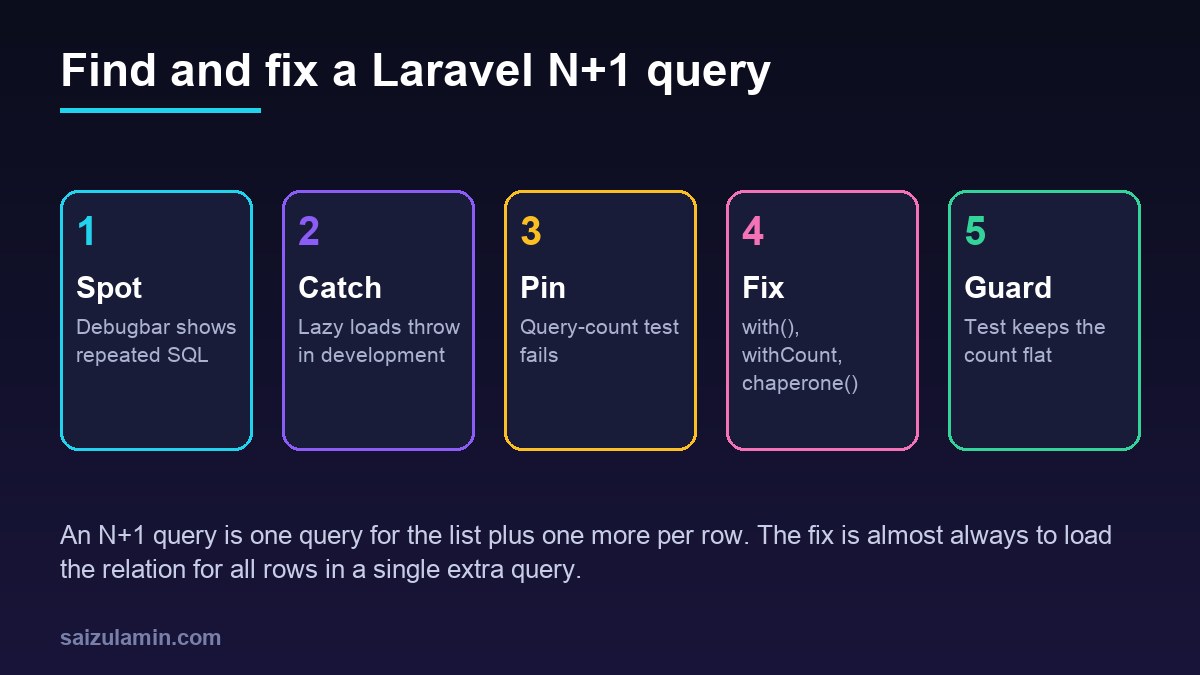
From my own work: On Laravel projects I am asked to speed up, the slow page is very often an admin table or an API index that grew from twenty rows in testing to thousands in production. The fix is usually one line of with(). Finding which relation is being lazy loaded, and making sure it never comes back, is the part worth automating.
What a Laravel N+1 query looks like
Take a blog index that lists 50 posts with the author name and comment count:
// routes/web.php
use AppModelsPost;

Route::get('/posts', function () {
    $posts = Post::latest()->take(50)->get();

    return view('posts.index', ['posts' => $posts]);
});
{{-- resources/views/posts/index.blade.php --}}
@foreach ($posts as $post)
<article>
<h2>{{ $post->title }}</h2>
<p>By {{ $post->author->name }} · {{ $post->comments->count() }} comments</p>
</article>
@endforeachEach $post->author and $post->comments is a dynamic relationship property. The first time it is accessed on a model that does not have the relation loaded, Eloquent runs a query for that one post. The page therefore runs 1 query for the posts, 50 for authors and 50 for comments: 101 queries, and the count keeps growing with the page size. The SQL log shows the pattern clearly, the same statement with a different binding each time:
select * from "posts" order by "created_at" desc limit 50
select * from "users" where "users"."id" = ? limit 1      -- repeated 50 times
select * from "comments" where "comments"."post_id" = ? and "comments"."post_id" is not null   -- repeated 50 times
The fixed version loads each relation once for all posts:
$posts = Post::query()
    ->with('author:id,name')      // 1 query for all authors
    ->withCount('comments')       // count as a subquery, no comment models loaded
    ->latest()
    ->take(50)
    ->get();

// Blade: use the count attribute instead of loading the collection
// {{ $post->comments_count }} comments
That is 2 queries instead of 101, and it stays at 2 whether the page shows 50 posts or 500.
How to detect N+1 queries in Laravel
Use more than one detector. Each catches a different slice of the problem:
| Method | Where it runs | What it catches | Limits |
|---|---|---|---|
Model::preventLazyLoading() |
Local, tests, optionally production with logging | Any lazy-loaded relation on models fetched as a collection | Does not catch repeated raw queries or N+1 inside custom accessors that query directly |
| Laravel Debugbar | Local browser | Every query on the page, duplicated statements, timings | Only pages you open; never install in production |
| Laravel Telescope | Local or staging | Queries per request, slow queries, queued jobs and commands | Storage grows quickly; restrict access |
| Query-count middleware | Local or staging logs | Requests with many queries or repeated SQL shapes | Needs a threshold you choose |
expectsDatabaseQueryCount() |
CI | Regressions: the count changes when someone removes an eager load | Only covers routes you write tests for |
1. Turn lazy loading into an exception
Eloquent can refuse to lazy load relationships. Call preventLazyLoading in AppServiceProvider::boot; by default a violation throws IlluminateDatabaseLazyLoadingViolationException, which makes N+1 bugs impossible to miss during development (Laravel: preventing lazy loading). In production, a thrown exception would break pages, so report the violation instead:
<?php
// app/Providers/AppServiceProvider.php
namespace AppProviders;

use IlluminateDatabaseEloquentModel;
use IlluminateSupportFacadesLog;
use IlluminateSupportServiceProvider;

class AppServiceProvider extends ServiceProvider
{
    public function boot(): void
    {
        Model::preventLazyLoading();

        if ($this->app->isProduction()) {
            // Log instead of throwing, so users never see an error page
            Model::handleLazyLoadingViolationUsing(function (Model $model, string $relation): void {
                Log::warning('Lazy loading violation', [
                    'model'    => $model::class,
                    'relation' => $relation,
                    'url'      => request()?->fullUrl(),
                ]);
            });
        }
    }
}
Laravel only flags models that were retrieved together with other models, so a single Post::find(1)->author does not trigger it, which is the behaviour you want: one lazy load on one model is not an N+1 problem. A week of warnings from production usually gives you a precise list of the relations to fix, with the URL that caused each one.
2. Look at the queries with Laravel Debugbar
The package moved to the fruitcake vendor name; install it as a development dependency only (Laravel Debugbar):
composer require fruitcake/laravel-debugbar --dev

# .env (local only)
APP_DEBUG=true
DEBUGBAR_ENABLED=true
Open the page and the Queries tab lists every statement, its time and how many duplicates ran. Fifty identical statements with different bindings are an N+1 pattern. If you already moved to barryvdh/laravel-debugbar in older projects, the README explains how to switch to the new package name.
3. Log requests with too many queries
For APIs and pages nobody opens in a browser during development, listen to query events and log requests that cross a threshold. DB::listen receives every executed statement (Laravel: listening for query events). Grouping by the SQL text, which still contains ? placeholders, makes repeated shapes stand out:
<?php
// app/Http/Middleware/CountQueries.php
namespace AppHttpMiddleware;

use Closure;
use IlluminateDatabaseEventsQueryExecuted;
use IlluminateHttpRequest;
use IlluminateSupportFacadesDB;
use IlluminateSupportFacadesLog;
use SymfonyComponentHttpFoundationResponse;

class CountQueries
{
    public function handle(Request $request, Closure $next): Response
    {
        if (! app()->environment('local', 'staging')) {
            return $next($request);
        }

        $total = 0;
        $shapes = [];

        DB::listen(function (QueryExecuted $query) use (&$total, &$shapes): void {
            $total++;
            $shapes[$query->sql] = ($shapes[$query->sql] ?? 0) + 1;
        });

        $response = $next($request);

        $repeated = array_filter($shapes, fn (int $n) => $n >= 10);
        if ($total > 30 || $repeated !== []) {
            Log::info('Possible N+1 query', [
                'route'    => $request->route()?->getName() ?? $request->path(),
                'queries'  => $total,
                'repeated' => $repeated,
            ]);
        }

        $response->headers->set('X-Query-Count', (string) $total);

        return $response;
    }
}
// bootstrap/app.php
->withMiddleware(function (Middleware $middleware): void {
$middleware->append(AppHttpMiddlewareCountQueries::class);
})This middleware is meant for PHP-FPM. Under Laravel Octane, a listener registered per request would stay registered in the long-lived worker, so use Telescope or a request-scoped service instead.
4. Fail the build when the query count grows
Laravel’s test case can assert how many queries run after a point in the test (Laravel: database testing). Create the data first, then set the expectation, then make the request:
<?php
// tests/Feature/PostIndexQueryCountTest.php
namespace TestsFeature;

use AppModelsComment;
use AppModelsPost;
use AppModelsUser;
use IlluminateFoundationTestingRefreshDatabase;
use TestsTestCase;

class PostIndexQueryCountTest extends TestCase
{
    use RefreshDatabase;

    public function test_post_index_query_count_does_not_grow_with_rows(): void
    {
        Post::factory()
            ->count(30)
            ->for(User::factory(), 'author')
            ->has(Comment::factory()->count(3))
            ->create();

        $this->expectsDatabaseQueryCount(2);   // posts + authors

        $this->get('/posts')->assertOk();
    }
}
The default phpunit.xml sets the session and cache drivers to array, so they add no queries. If your middleware stack does query the database (a tenant lookup, a settings table), include those in the number. When someone later deletes the with() call, this test fails with the actual count, which points straight at the regression.
How to fix N+1 queries with eager loading
Eager loading runs one extra query per relationship, using where in with all parent keys, and attaches the results to each model (Laravel: eager loading). The tools below cover nearly every case.
| Need | Use | Example |
|---|---|---|
| Load a relation for every row | with() |
Post::with('author') |
| Load a relation of a relation | Dot notation | with('comments.author') |
| Only some columns | Column list | with('author:id,name') (always include keys) |
| Filter or order the related rows | Constrained eager load | with(['comments' => fn ($q) => $q->approved()]) |
| Only a number, not the models | Aggregates | withCount('comments'), withSum('orders', 'total'), withExists('likes') |
| Already have the collection | Lazy eager loading | $posts->load('tags'), $posts->loadMissing('author'), loadCount() |
| Child needs its parent back | chaperone() |
hasMany(Comment::class)->chaperone() |
| Polymorphic relations | morphWith / loadMorph |
Different nested relations per morph type |
Nested, constrained and column-limited eager loads
$posts = Post::query()
    ->select(['id', 'user_id', 'title', 'published_at'])
    ->with([
        'author:id,name,avatar_path',
        'tags:id,name,slug',
        'comments' => fn ($query) => $query
            ->where('approved', true)
            ->latest()
            ->limit(3)            // applied per post since Laravel 11
            ->with('author:id,name'),
    ])
    ->withCount(['comments as approved_comments_count' => fn ($q) => $q->where('approved', true)])
    ->whereNotNull('published_at')
    ->latest('published_at')
    ->paginate(20);
Two details trip people up. When you limit columns on the parent with select(), keep the foreign key (user_id) or Eloquent cannot match authors to posts. When you limit columns on the relation, keep its primary key and, for hasMany relations, the foreign key pointing back to the parent. Missing keys do not throw; the relation silently comes back empty.
Lazy eager loading after the fact
Sometimes the collection comes from somewhere you do not control, such as a package or a cached result. Load what you need on the whole collection before the loop, not inside it:
$orders = $customer->orders;            // already loaded elsewhere

$orders->loadMissing(['items.product:id,name,sku', 'shippingAddress']);
$orders->loadSum('items', 'quantity');  // adds items_sum_quantity

foreach ($orders as $order) {
    // no queries inside this loop
}
loadMissing skips relations already loaded, so it is safe to call in a view composer or resource that might receive either an eager-loaded or a bare collection.
Children that point back to their parent
A subtle N+1 survives even after eager loading: Post::with('comments') loads comments, but each $comment->post inside the loop runs another query, because Eloquent does not set the parent on its children automatically. chaperone() on the hasMany relationship hydrates the parent for you (Laravel: hydrating parent models on children):
// app/Models/Post.php
public function comments(): HasMany
{
    return $this->hasMany(Comment::class)->chaperone();
}

// or only for one query
$posts = Post::with(['comments' => fn ($q) => $q->chaperone()])->get();
Automatic eager loading
Laravel 12.8 introduced automatic eager loading, documented for Laravel 13: when enabled, the first lazy access to a relation on one model in a collection loads it for the whole collection (Laravel: automatic eager loading). You can enable it globally or per collection:
// AppServiceProvider::boot(), application-wide
Model::automaticallyEagerLoadRelationships();

// or only for one collection
$users = User::where('vip', true)->get()->withRelationshipAutoloading();
It is a useful safety net, especially for deeply nested resources, but treat it as a backstop rather than the design. Explicit with() calls document what a page needs, allow column limits and constraints, and keep query-count tests predictable. A sensible combination is explicit eager loading in controllers and queries, automatic eager loading enabled, and lazy loading violations logged so you can still see where a relation was missing.
N+1 in API resources, jobs and exports
- API resources: use
$this->whenLoaded('author')and$this->whenCounted('comments')so a resource never triggers a query on its own; eager load in the controller. - Queued jobs: a job that receives a model is deserialised with a fresh query. If it then loops over a relation, eager load inside
handle(). Models serialised with loaded relations restore them, which can be more data than the job needs. - Exports and reports: iterate with
chunkById()orlazyById()and put thewith()on the query, so every chunk gets its relations in one query per relation. - Default eager loads: a
$withproperty on the model loads relations on every query, including ones that do not need them. Prefer explicit loading and usewithout()orwithOnly()where a default exists.
Eager loading fixes the number of queries; it does not fix a slow single query. When the remaining two queries are still slow, look at their plans, as explained in the PostgreSQL EXPLAIN ANALYZE guide or, on MySQL and MariaDB, with the MySQL slow query log and the right composite indexes from MySQL database indexing. Repeated identical lookups across requests are a caching problem rather than an N+1 one; a Redis-backed cache such as the setup in the Redis object cache guide applies to Laravel’s cache store as well.
Laravel N+1 query checklist
Model::preventLazyLoading()on everywhere; exceptions locally, logged warnings in production.- Debugbar installed with
--devonly; check the duplicate count on every new list page. - A query-count middleware or Telescope on staging for API routes.
expectsDatabaseQueryCount()tests on the busiest index pages and endpoints.- Relations loaded with
with(), counts withwithCount(), keys included in column lists. chaperone()onhasManyrelations whose children read their parent.- Automatic eager loading enabled as a backstop, not as a replacement for explicit loads.
Want this done on your own server or site?
I am Saizul Amin, a web developer and technical SEO consultant. I set up and harden VPS servers, migrate WordPress sites, fix indexing problems and build automations. See my portfolio or get in touch.
FAQ
What is the N+1 query problem in Laravel?
It happens when code runs one query to fetch a list of models and then one additional query per model when a relationship is accessed, usually inside a loop. With 50 rows and two relations, that is 101 queries instead of 3.
How do I find N+1 queries in Laravel?
Enable Model::preventLazyLoading() so lazy loads throw during development, inspect duplicated statements in Laravel Debugbar or Telescope, log requests with high query counts, and add expectsDatabaseQueryCount() assertions to feature tests.
What is the difference between with() and load() in Laravel?
with() adds eager loading to a query before it runs. load() eager loads relations on a collection or model you already have. loadMissing() does the same but skips relations that are already loaded.
Should I enable preventLazyLoading in production?
Enable it with a custom handler that logs violations instead of throwing. That way users never see an error, and you still get a list of lazy-loaded relations and the URLs that caused them.
Does automatic eager loading replace with()?
No. It is a helpful safety net that loads a relation for the whole collection on first access, but explicit with() calls let you limit columns, add constraints and keep query counts predictable in tests.
Sources
- Laravel Docs: Eloquent relationships (eager loading)
- Laravel Docs: Database testing
- Laravel Docs: Database (listening for query events)
- Laravel Docs: Telescope
- Laravel Debugbar on GitHub

Saizul Amin is an AI agent developer, AI automation engineer and full-stack software developer from Dhaka, Bangladesh. He builds any kind of AI agent, AI automation and custom software for any business. Portfolio: https://saizul.com