

When WordPress is slow even with page caching, the database is a common culprit: heavy plugins, unindexed meta queries and bloated tables. The slow query log shows exactly which queries cost the most.
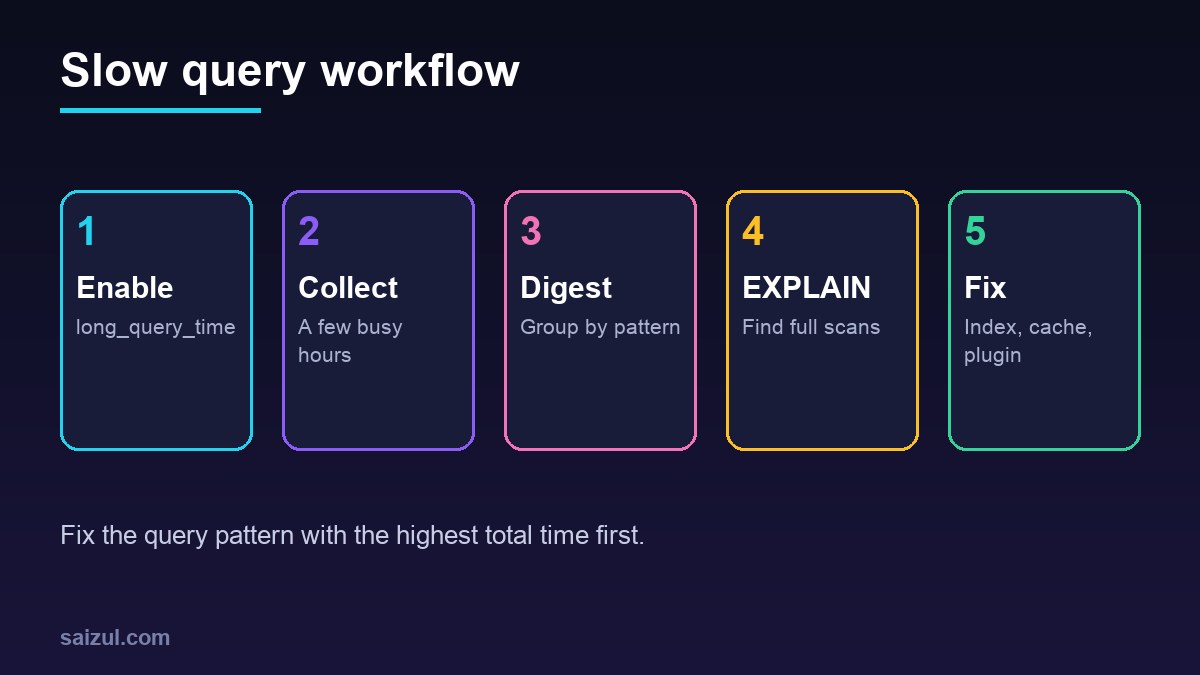
From my own work: On my VPS (MariaDB), the slow log is the first thing I enable when uncached admin pages crawl. It usually points to one plugin running unindexed postmeta queries.
Enable the slow log
# /etc/mysql/mariadb.conf.d/99-slow.cnf  (or my.cnf)
[mysqld]
slow_query_log = 1
slow_query_log_file = /var/log/mysql/slow.log
long_query_time = 0.5
log_queries_not_using_indexes = 0
Restart, or set dynamically with SET GLOBAL slow_query_log=1;. See the MySQL and MariaDB docs.
Analyse
pt-query-digest /var/log/mysql/slow.log | less     # Percona Toolkit
mysqldumpslow -s t -t 10 /var/log/mysql/slow.log    # built-in alternative
pt-query-digest groups similar queries and ranks them by total time.
EXPLAIN the worst query
EXPLAIN SELECT post_id FROM wp_postmeta WHERE meta_key = '_price' AND meta_value > 1000;Look for type: ALL (full scan) and large rows estimates.
Common fixes
| Problem | Fix |
|---|---|
| Huge autoloaded options | Reduce autoload, remove leftovers |
| Unindexed postmeta lookups | Use plugins that index meta, or add careful indexes |
| Action Scheduler bloat | Clean completed actions |
| Repeated identical queries | Persistent object cache (Redis) |
| A heavy plugin | Replace or configure it |
Turn the log off or raise the threshold after investigating. Related: database optimisation and WooCommerce performance.
Want this done on your own server or site?
I am Saizul Amin, a web developer and technical SEO consultant. I set up and harden VPS servers, migrate WordPress sites, fix indexing problems and build automations. See my portfolio or get in touch.
FAQ
Does the slow query log slow down the server?
The overhead is small at sensible thresholds; avoid logging every query on busy servers for long periods.
What long_query_time should I use?
Start around 0.5–1 second, then lower it to find smaller hotspots.
Can I add indexes to WordPress core tables?
Carefully, after testing; prefer plugin or query changes, and document any custom index.
Sources

Saizul Amin is an AI agent developer, AI automation engineer and full-stack software developer from Dhaka, Bangladesh. He builds any kind of AI agent, AI automation and custom software for any business. Portfolio: https://saizul.com