

Security headers are response headers that tell the browser how to treat your site: only over HTTPS, never inside someone else’s frame, without guessing file types, and with limits on where scripts may load from. They cost nothing in performance and close a handful of real attack paths, but on WordPress they are easy to get wrong. One misplaced add_header silently removes all of them from part of the site, and an over-strict Content-Security-Policy breaks the editor. This guide gives you a snippet for Nginx on Ubuntu 24.04, explains each header, and shows how to roll out the risky ones safely.
From my own work: On my own Ubuntu VPS every WordPress site includes the same small header snippet. The bug I find most often on servers I take over is not a missing header, it is a location block for static files with its own add_header line, which quietly drops every security header for images, CSS and JavaScript.
Which headers matter, and which to skip
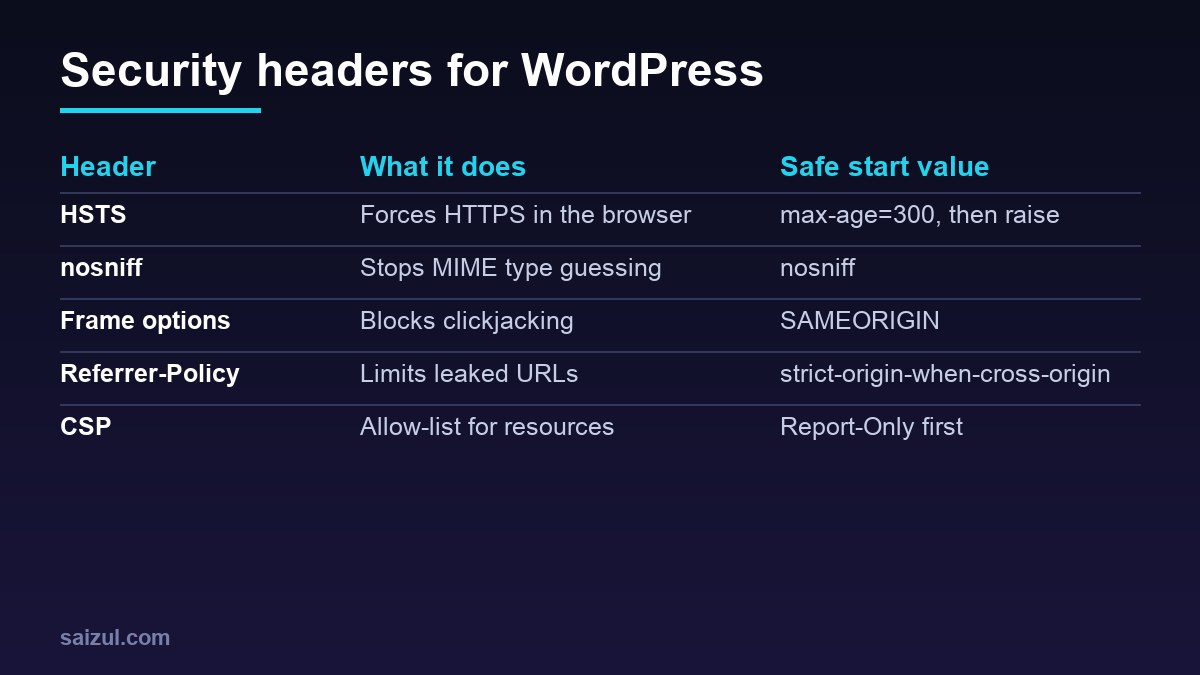
- Strict-Transport-Security (HSTS) tells the browser to use HTTPS for your domain for
max-ageseconds, even if someone typeshttp://. Browsers ignore it when it arrives over plain HTTP, so it only goes in the HTTPS server block (MDN on HSTS). - X-Content-Type-Options: nosniff stops browsers from treating an uploaded file as a script or stylesheet when its declared type says otherwise. Useful on any site that accepts uploads.
- X-Frame-Options: SAMEORIGIN prevents other sites from loading yours in a frame (clickjacking). The modern equivalent is the CSP directive
frame-ancestors 'self'; sending both is fine. - Referrer-Policy: strict-origin-when-cross-origin sends only your domain, not the full URL, to other sites. That keeps things like password reset links and search queries out of third-party logs.
- Permissions-Policy switches off browser features you do not use, such as camera, microphone and geolocation.
- Content-Security-Policy (CSP) is an allow-list of where scripts, styles, images and frames may come from. It is the most powerful header and the one most likely to break a WordPress site, so it gets its own section below.
Skip X-XSS-Protection. Current browsers have removed the filter it controlled, and MDN advises against relying on it; CSP is the replacement.
A reusable Nginx snippet
Put the headers in one file so every site and every location can include the same set:
# /etc/nginx/snippets/security-headers.conf
add_header Strict-Transport-Security "max-age=300" always;
add_header X-Content-Type-Options "nosniff" always;
add_header X-Frame-Options "SAMEORIGIN" always;
add_header Referrer-Policy "strict-origin-when-cross-origin" always;
add_header Permissions-Policy "camera=(), microphone=(), geolocation=()" always;
add_header Content-Security-Policy-Report-Only "default-src 'self' https: data: 'unsafe-inline'; object-src 'none'; base-uri 'self'; frame-ancestors 'self'; form-action 'self' https:; upgrade-insecure-requests" always;
The always parameter matters. Without it Nginx adds headers only to successful responses and redirects, so your 404 and 500 pages would go out without them (add_header documentation).
Include the snippet in the HTTPS server block of each site:
server {
    listen 443 ssl;
    http2 on;
    server_name example.com www.example.com;
    server_tokens off;

    include snippets/security-headers.conf;

    location ~* .(?:css|js|jpe?g|png|gif|webp|avif|svg|woff2?)$ {
        expires 30d;
        add_header Cache-Control "public";
        include snippets/security-headers.conf;   # needed again, see below
    }
    # ... PHP location, try_files and the rest of the site
}
server_tokens off removes the Nginx version from headers and error pages. While you are at it, set expose_php = Off in the PHP-FPM php.ini (or add fastcgi_hide_header X-Powered-By;) so responses stop advertising the PHP version.
The add_header inheritance trap
This is the part that breaks most setups. Nginx inherits add_header directives from the outer level only if the current level has no add_header of its own. The moment a location block adds a single header, such as Cache-Control for static files, it loses every header defined in the server block. That is why the example above includes the snippet a second time inside the static files location.
Search your configuration for every add_header with sudo grep -rn add_header /etc/nginx/ and make sure each location that has one also includes the snippet. Nginx 1.29.3 added an add_header_inherit merge directive that changes this behaviour, but Ubuntu 24.04 ships Nginx 1.24, so on the stock package you still have to repeat the include.
Roll out HSTS in steps
HSTS is cached by every visitor’s browser for the full max-age. If you later break HTTPS, or a subdomain has no certificate, those visitors cannot reach it until the time runs out. So start small:
- Begin with
max-age=300(five minutes) and browse the site, the admin area and any subdomains. - Raise it to a day, then a week, then
max-age=31536000(one year). - Add
includeSubDomainsonly when every subdomain, including old ones like mail or staging hosts, serves valid HTTPS. - Treat
preloadas permanent. Getting a domain off the browser preload list takes a long time, so add it only when you are sure.
Your certificate setup has to be reliable before the long value goes live; see free SSL with Let’s Encrypt on Nginx.
Content-Security-Policy on WordPress
WordPress core, themes and most plugins print inline scripts and styles, and many sites load fonts, analytics, maps or embeds from other domains. A textbook strict policy such as script-src 'self' therefore breaks the block editor, page builders and checkout pages straight away.
The practical route is the one in the snippet: send Content-Security-Policy-Report-Only first. The browser evaluates the policy and reports violations in the developer console without blocking anything (MDN on CSP). The starting policy above is deliberately loose. It still does useful work: object-src 'none' blocks old plugin content, base-uri 'self' stops injected base tags, frame-ancestors 'self' covers clickjacking, and upgrade-insecure-requests fixes stray http:// asset URLs.
Then tighten step by step. Open the front end, the editor, the checkout and the login page with the console open, list the domains that appear in violations, and replace the broad https: with those hosts. When a week goes by without new violations, rename the header to Content-Security-Policy to enforce it. Removing 'unsafe-inline' for scripts needs nonces or hashes, which most WordPress stacks cannot provide without extra work, so treat that as a separate project.
Test the result
sudo nginx -t && sudo systemctl reload nginx

# HTML page, a static file and an error page should all show the headers
curl -sI https://example.com/ | grep -iE 'strict|x-content|x-frame|referrer|permissions|content-security'
curl -sI https://example.com/wp-includes/css/dist/block-library/style.min.css | grep -i strict
curl -sI https://example.com/this-page-does-not-exist/ | grep -i x-frame
Check three things in the output. Every header should appear on all three responses. No header should appear twice with different values; security plugins and Cloudflare Transform Rules can add the same headers, so pick one place to manage them. And remember that WordPress itself sends X-Frame-Options: SAMEORIGIN on the login and admin screens, so you will see it there even before the snippet is active.
If you serve cached HTML through Nginx, confirm that cache hits carry the headers too; the setup in Nginx FastCGI cache for WordPress adds its own add_header, which is exactly the inheritance case above. For TLS settings beyond headers, see hardening Nginx TLS, and for login attacks, Fail2ban for WordPress on Nginx.
Want this done on your own server or site?
I am Saizul Amin, a web developer and technical SEO consultant. I set up and harden VPS servers, migrate WordPress sites, fix indexing problems and build automations. See my portfolio or get in touch.
FAQ
Should I set security headers in Nginx or with a WordPress plugin?
Nginx is the better place. It covers static files, error pages and cached responses that never reach PHP, and it keeps the configuration in one file per server.
Why do my headers disappear on images and CSS files?
A location block for static files has its own add_header line, so it no longer inherits headers from the server block. Include the header snippet in that location too.
Will a Content-Security-Policy break WordPress?
A strict one usually does, because WordPress relies on inline scripts. Start with Content-Security-Policy-Report-Only, read the violations, then tighten and enforce.
Sources
- nginx.org: ngx_http_headers_module (add_header)
- MDN: Strict-Transport-Security
- MDN: Content-Security-Policy

Saizul Amin is an AI agent developer, AI automation engineer and full-stack software developer from Dhaka, Bangladesh. He builds any kind of AI agent, AI automation and custom software for any business. Portfolio: https://saizul.com