


Many VPS images come with no swap at all. That is fine until a plugin update, a backup job and a traffic spike arrive at the same moment, memory runs out, and the kernel’s out-of-memory killer stops MySQL. A swap file gives the kernel somewhere to park memory pages that are rarely used, which turns a crash into a short slowdown. This guide adds a swap file on Ubuntu 24.04, makes it permanent, tunes how eagerly it is used, and explains how to tell when swap is hiding a real shortage of RAM.
From my own work: Every VPS I set up gets a modest swap file before anything else is installed. I treat swap as a safety buffer, not as extra memory: if I see it in constant use, I reduce PHP-FPM workers or move to a larger plan.
Check what you have
swapon --show
free -h
df -h /
findmnt -no FSTYPE /
If swapon --show prints nothing, there is no active swap. The last two commands tell you how much disk space is free and which filesystem the root disk uses, which matters below. On container-based VPS plans (OpenVZ or LXC) you often cannot enable swap at all; swapon then fails with “Operation not permitted”, and only the provider can change that. KVM plans, which most providers sell today, behave like a normal server.
How big should the swap file be?
For a web server, swap is an emergency buffer, not a place to run workloads. A practical rule: 1 GB of swap for servers with up to 2 GB of RAM, 2 GB for 4 to 8 GB of RAM, and rarely more than 4 GB. Servers do not hibernate, so the desktop advice of swap equal to RAM does not apply. Larger swap mostly means the server stays up longer while being very slow, which can be worse than a quick restart of one service.
Create and enable the swap file
sudo fallocate -l 2G /swapfile
sudo chmod 600 /swapfile
sudo mkswap /swapfile
sudo swapon /swapfile
swapon --show
chmod 600is required: swap can contain passwords and keys from memory, so only root may read it.swaponwarns about insecure permissions otherwise.fallocateis fast and works on ext4, the default on Ubuntu VPS images. The swapon(8) manual notes that on some filesystems preallocated files look like files with holes and are rejected, and thatddis the most portable method. Ifswaponcomplains about holes, recreate the file withsudo dd if=/dev/zero of=/swapfile bs=1M count=2048 status=progressand repeat the other steps.- On Btrfs, copy-on-write files cannot be used as swap. Create the file with
sudo btrfs filesystem mkswapfile --size 2G /swapfileinstead. mkswapwrites the swap signature (mkswap(8)). It does not need a reboot.
Make it permanent
The swap file is active now but will be gone after a reboot until you add it to /etc/fstab:
sudo cp /etc/fstab /etc/fstab.bak
echo '/swapfile none swap sw 0 0' | sudo tee -a /etc/fstab
sudo findmnt --verify
sudo swapoff /swapfile && sudo swapon -a && swapon --show
findmnt --verify checks the file for syntax errors, and the last line proves that swapon -a picks the entry up the same way the boot process will. A broken fstab can stop a server from booting, so keep the backup until you have rebooted once.
Tune swappiness
vm.swappiness tells the kernel how to weigh swapping out memory against dropping file cache. The kernel documentation describes it as a value from 0 to 200 with a default of 60, where lower values treat swap as more expensive. On a web server with swap on the same SSD as the site, a lower value keeps active PHP and database memory in RAM longer:
cat /proc/sys/vm/swappiness
echo 'vm.swappiness=10' | sudo tee /etc/sysctl.d/99-swappiness.conf
sudo sysctl --system
cat /proc/sys/vm/swappiness
There is no universally correct value. 10 is a common starting point for servers; measure before and after rather than copying numbers. Leave vm.vfs_cache_pressure at its default unless you have a specific reason to change it.
Watch swap use
free -h
vmstat 5 5                       # si/so columns: pages swapped in/out per second
sudo sh -c 'grep -H VmSwap /proc/[0-9]*/status | sort -k2 -n | tail -5'
sudo journalctl -k | grep -iE 'out of memory|killed process'
Some swap in use is normal; the kernel moves idle pages there and leaves them. What matters is activity. If the si and so columns in vmstat show steady non-zero values, the server is swapping in and out continuously, and page response times will suffer. The third command shows which processes hold the most swapped-out memory, and the last one shows whether the out-of-memory killer has already stepped in.
When swap is not the answer
Swap buys time; it does not create memory. On a WordPress server the usual causes of memory pressure are too many PHP-FPM workers for the available RAM, an oversized MySQL buffer pool, or a Redis instance without a memory limit. Fix the numbers first: PHP-FPM tuning for WordPress shows how to size pm.max_children, and Redis object cache for WordPress covers maxmemory. If the server still swaps constantly after that, it needs more RAM.
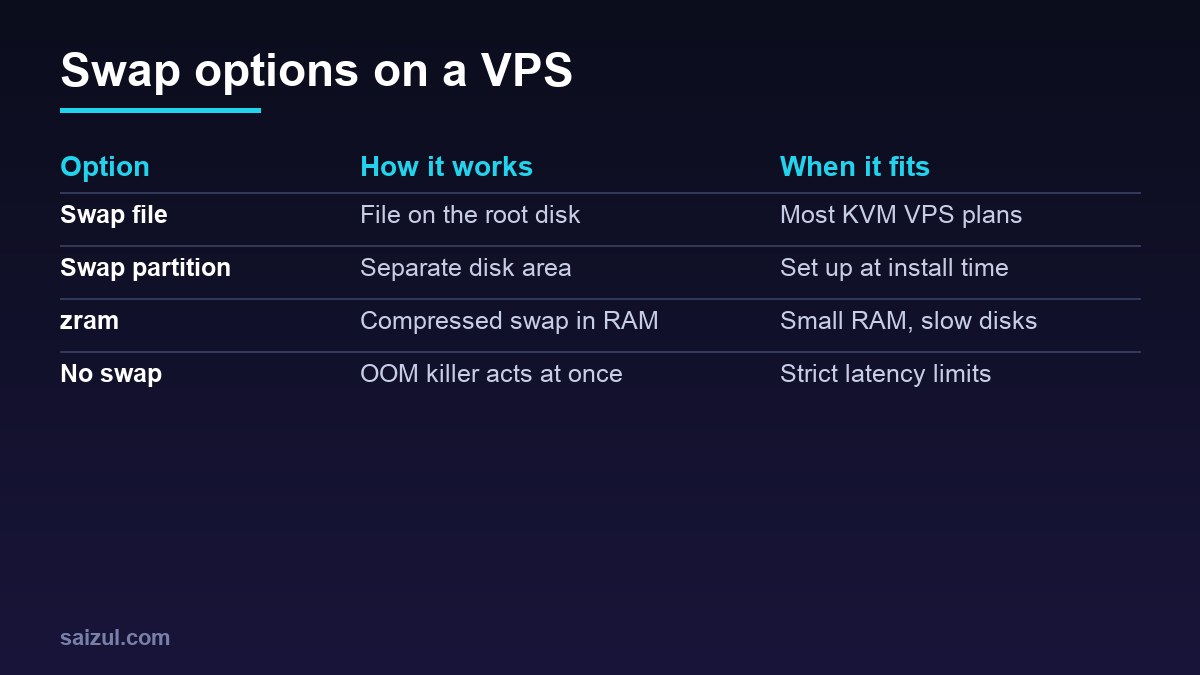
On very small plans with slow disks, zram (the zram-tools package) is an alternative or addition: it compresses swapped pages in RAM instead of writing them to disk. To resize the swap file later, run sudo swapoff /swapfile, recreate it at the new size with the steps above, and run sudo swapon /swapfile. If you are setting up a new server, add swap to the checklist in migrating WordPress to a VPS.
Want this done on your own server or site?
I am Saizul Amin, a web developer and technical SEO consultant. I set up and harden VPS servers, migrate WordPress sites, fix indexing problems and build automations. See my portfolio or get in touch.
FAQ
Does an Ubuntu VPS need swap?
It is strongly recommended for small and medium servers. Without swap, a short memory spike lets the out-of-memory killer stop a service such as MySQL; with a modest swap file the server slows down briefly instead.
Is a swap file slower than a swap partition?
On modern kernels and ext4, the difference is negligible for a server. A swap file is easier to create, resize and remove, which is why it is the usual choice on a VPS.
What swappiness value should I use on a web server?
The default is 60. Many server admins start at 10 so active memory stays in RAM longer, then check vmstat and response times. Measure on your own workload.
Sources
- Ubuntu manpage: swapon(8)
- Ubuntu manpage: mkswap(8)
- Linux kernel documentation: /proc/sys/vm (swappiness)

Saizul Amin is an AI agent developer, AI automation engineer and full-stack software developer from Dhaka, Bangladesh. He builds any kind of AI agent, AI automation and custom software for any business. Portfolio: https://saizul.com