

Most hostile traffic against a WordPress site is boring and repetitive: password guessing on wp-login.php, XML-RPC amplification, scanners looking for .env files and backups, and bots listing usernames. Every one of those requests that reaches the origin costs a PHP worker. Cloudflare custom rules stop them at the edge, before your server sees anything. The Free plan allows five custom rules, so this guide uses exactly five, plus one rate limiting rule.
From my own work: All my sites sit behind Cloudflare. These five rules removed most of the noise from my Nginx logs; what remained was mostly real visitors and verified crawlers. I still keep Fail2ban and an origin firewall, because edge rules only protect traffic that actually goes through Cloudflare.
How custom rules work
A custom rule is an expression plus an action. Rules run in the order listed. Block and the challenge actions stop evaluation for that request; Skip lets matching requests bypass the remaining custom rules and, optionally, other security products. Log is Enterprise only.
Plan limits matter when you design rules. According to the documentation, Free zones get 5 custom rules, Pro 20 and Business 100, and the regex matches operator needs Business or higher. Everything below uses eq, in, contains, wildcard and the starts_with() and ends_with() functions, which every plan supports (operator reference). Combine several conditions into one rule with or to stay within the limit.
Create rules under Security → WAF → Custom rules (named Security rules in the newer dashboard), choose Edit expression and paste the expression.
Rule 1: skip for trusted traffic
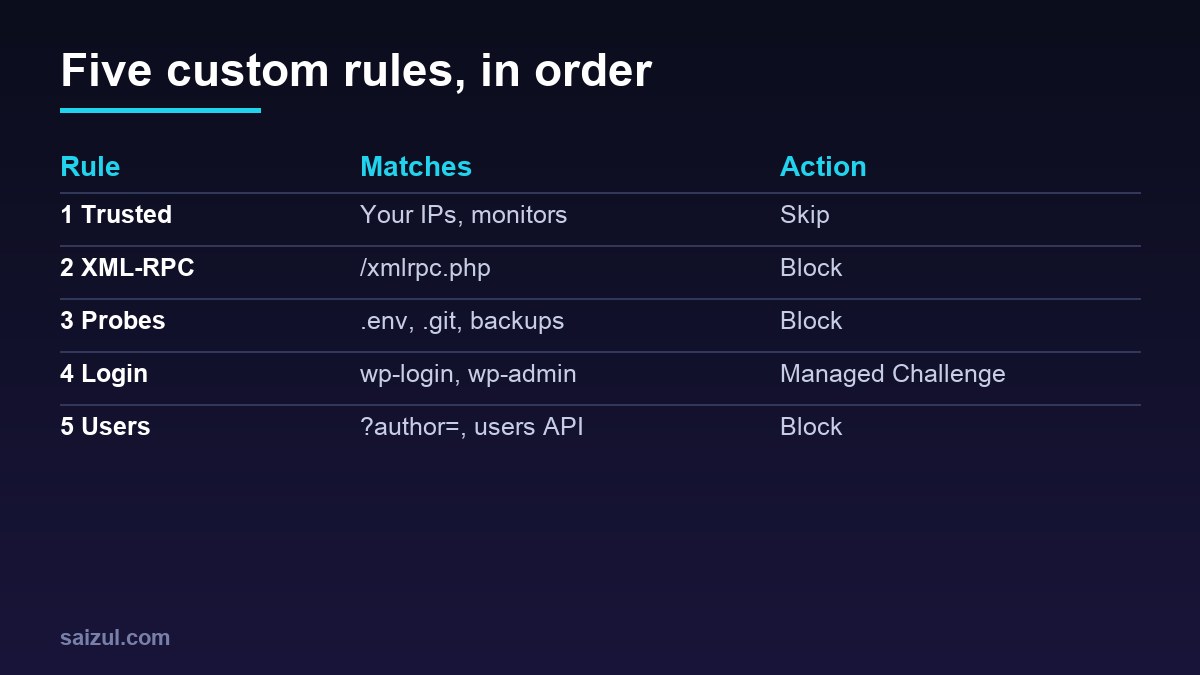
Put this first so the rules below never challenge you, your uptime monitor or a server that calls your site:
(ip.src in {203.0.113.10 2001:db8:1234::/48})Action: Skip, with “All remaining custom rules” selected. Replace the example addresses with your own, or reference an IP list. Use this sparingly: a skip rule is a hole in every rule after it, and it should never match by user agent alone.
Rule 2: block XML-RPC
(http.request.uri.path eq "/xmlrpc.php")Action: Block. XML-RPC accepts many password guesses in one request through system.multicall, and also serves pingbacks that can be abused. Before you block it, check whether you depend on it: Jetpack and some mobile and publishing apps use it. If you do, change the action to Managed Challenge or exempt the service’s published IP ranges in rule 1.
Rule 3: block probes for secrets and backups
(lower(http.request.uri.path) contains "/wp-config.php")
or (http.request.uri.path contains "/.env")
or (http.request.uri.path contains "/.git/")
or (ends_with(lower(http.request.uri.path), ".sql"))
or (ends_with(lower(http.request.uri.path), ".bak"))
or (lower(http.request.uri.path) eq "/wp-content/debug.log")
or (lower(http.request.uri.path) wildcard "/wp-content/uploads/*.php")
Action: Block. Nobody legitimate requests these paths. The last line blocks PHP execution attempts inside the uploads folder, a classic way to run a web shell uploaded through a vulnerable form. Note that wildcard must match the whole path, which is why the pattern starts with a slash and ends with .php. Keep the matching server-side rules too, as described in hardening wp-config.php, so a direct hit on the origin is refused as well.
Rule 4: challenge the login and admin area
(http.request.uri.path eq "/wp-login.php")
or (starts_with(http.request.uri.path, "/wp-admin/")
    and not http.request.uri.path in {"/wp-admin/admin-ajax.php" "/wp-admin/admin-post.php"})
Action: Managed Challenge. A real person passes once and gets a clearance cookie; scripts that never run JavaScript stop here. admin-ajax.php and admin-post.php are excluded because themes and plugins call them from public pages, for example contact forms and WooCommerce fragments.
- If nobody outside your country logs in, add
and not ip.src.country in {"BD"}to the login condition (use your own ISO country codes) and switch the action to Block. - Long editing sessions can hit an expired clearance in the middle of an autosave or media upload. Raise the Challenge Passage time in the security settings, or add your own IP to rule 1.
- Challenged responses carry the header
cf-mitigated: challenge, which makes them easy to spot in the browser’s network panel.
Rule 5: block username enumeration
(http.request.uri.query contains "author=")
or (starts_with(http.request.uri.path, "/wp-json/wp/v2/users")
    and not http.cookie contains "wordpress_logged_in_")
Action: Block. /?author=1 redirects to the author archive and reveals the login name, and the REST users endpoint lists authors to anonymous visitors. The block editor uses that endpoint for logged-in users, which is why the cookie condition is there. A cookie check is easy to fake, so treat this as noise reduction, not access control. The same endpoint is reachable as ?rest_route=/wp/v2/users; check your logs to see whether scanners use that form against your site.
The free rate limiting rule for wp-login.php
A challenge stops dumb bots; a rate limit also slows down tools that solve challenges. Free zones get one {A(‘https://developers.cloudflare.com/waf/rate-limiting-rules/’,’rate limiting rule’)} that can match on the path, with a 10-second counting period and a 10-second mitigation timeout:
Rule name:          wp-login flood
Expression:         (http.request.uri.path eq "/wp-login.php")
Characteristics:    IP (fixed on Free)
Requests / period:  5 requests per 10 seconds
Action:             Block
Duration:           10 seconds
Pro allows longer periods, and Business adds more fields, such as the request method, so you can count only POST requests. On Free, all requests to the path count, so set the threshold above what a person needs to load the form and log in.
Do not challenge verified crawlers
None of the rules above touch public content, so search engines are unaffected. If you later add a broad rule, such as challenging a whole country or a suspicious ASN with ip.src.asnum, add and not cf.client.bot so verified crawlers like Googlebot are not challenged. Challenging crawlers on public pages is a quick way to lose indexed pages.
Test and monitor
curl -s -o /dev/null -w '%{http_code}n' https://example.com/xmlrpc.php       # 403
curl -s -o /dev/null -w '%{http_code}n' https://example.com/.env             # 403
curl -sI https://example.com/wp-login.php | grep -i cf-mitigated            # challenge
curl -s -o /dev/null -w '%{http_code}n' "https://example.com/?author=1"      # 403
Then open Security → Events (Security Analytics on newer dashboards) and filter by rule. Watch for a day: if a rule matches traffic you recognise, such as a payment provider callback or a plugin endpoint, narrow it or add an exception before moving on.
Edge rules need a locked origin
All of this is bypassed by anyone who connects to the server IP directly. Allow ports 80 and 443 from Cloudflare ranges only, as described in UFW firewall setup, restore real visitor IPs, and keep Fail2ban for WordPress as the origin-side layer. Caching the rest is covered in Cloudflare Cache Rules for WordPress.
Want this done on your own server or site?
I am Saizul Amin, a web developer and technical SEO consultant. I set up and harden VPS servers, migrate WordPress sites, fix indexing problems and build automations. See my portfolio or get in touch.
FAQ
Do these rules work on the Cloudflare Free plan?
Yes. They use five custom rules and operators available on every plan, and the login rate limit fits the single Free rate limiting rule.
Will blocking xmlrpc.php break anything?
It breaks Jetpack and apps that publish through XML-RPC. If you use them, challenge instead of block, or exempt their IP ranges.
Does a Managed Challenge affect SEO?
Not when it is limited to wp-login.php and wp-admin, which search engines do not need. Avoid challenging public pages without excluding verified bots.
Sources
- Cloudflare Docs: Custom rules
- Cloudflare Docs: Rules language operators
- Cloudflare Docs: Rate limiting rules
- Cloudflare Docs: Configure a rule with the Skip action

Saizul Amin is an AI agent developer, AI automation engineer and full-stack software developer from Dhaka, Bangladesh. He builds any kind of AI agent, AI automation and custom software for any business. Portfolio: https://saizul.com