

Webhook signature verification is what stops anyone on the internet from posting a fake payment succeeded or push to main event to your endpoint. GitHub, Stripe and Shopify all sign their webhooks with HMAC-SHA256 and a shared secret, but each one puts the signature in a different header, signs slightly different content and encodes the result differently. This guide shows working verification code for all three in Node.js (Express) and Python (Flask and FastAPI), and explains the raw-body mistake behind most signature mismatch errors.
From my own work: Almost every broken webhook integration I have been asked to fix had the same bug: the framework parsed the JSON body before the verification code ran, and the code then signed
JSON.stringify(req.body). That string is never byte-for-byte identical to what the provider sent, so the check fails, and someone eventually comments it out to get payments working. Getting the raw body right is the whole job.
How webhook signature verification works
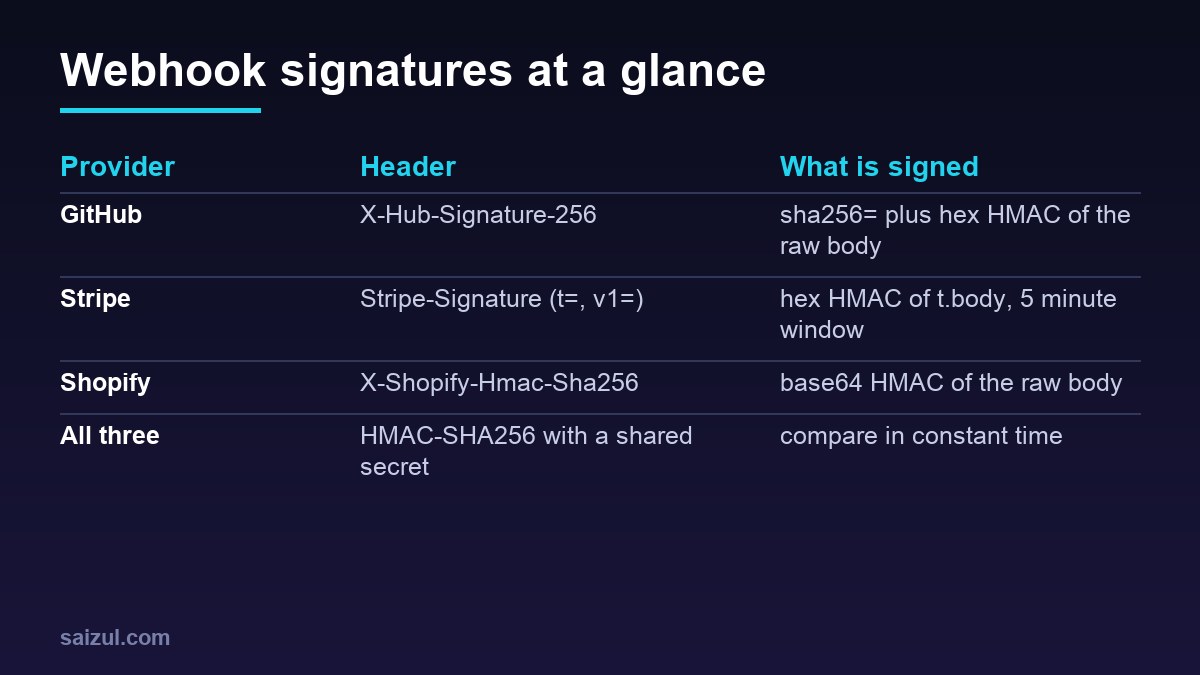
When you create a webhook, the provider gives you a secret, or lets you set one. For every delivery it computes an HMAC-SHA256 of the request body (Stripe adds a timestamp) using that secret, and sends the result in a header. Your server repeats the calculation over the bytes it received and compares the two values. If an attacker changes a single byte of the body, or does not know the secret, the values do not match.
Four rules apply to every provider:
- Sign the raw bytes. Compute the HMAC over the exact body you received, before any JSON parsing, re-encoding or whitespace changes.
- Compare in constant time. Use
crypto.timingSafeEqualin Node.js orhmac.compare_digestin Python, never===or==, so response timing does not leak how many characters matched. - Reject before you act. Return
401or400and do nothing else when the check fails. - Keep secrets out of code. Load them from the environment or a secret store, one secret per endpoint. The .env file best practices guide covers how to do that safely.
| Provider | Signature header | Signed content | Encoding | Delivery ID for deduplication |
|---|---|---|---|---|
| GitHub | X-Hub-Signature-256 |
Raw body | sha256= + hex |
X-GitHub-Delivery |
| Stripe | Stripe-Signature |
timestamp + "." + raw body |
Hex, in v1= |
Event id (evt_...) |
| Shopify | X-Shopify-Hmac-Sha256 |
Raw body | Base64 | X-Shopify-Webhook-Id |
Get the raw request body first
This is the step that breaks most integrations. Frameworks are helpful: they parse JSON for you and hand you an object. Re-serialising that object changes key order, spacing, Unicode escaping and number formatting, so the HMAC no longer matches. You need the body as bytes.
- Express: use
express.raw({ type: 'application/json' })on the webhook route, and register that route before any globalapp.use(express.json()). If the JSON parser runs first, the raw parser sees an already-consumed body. - Flask: read
request.get_data()before touchingrequest.json. - FastAPI and Starlette: declare the parameter as
request: Requestand useawait request.body(), not a Pydantic model.
Reverse proxies normally pass the body through untouched. If you run your app behind Nginx, the only setting that usually matters is client_max_body_size: GitHub caps payloads at 25 MB, and Nginx rejects anything over its 1 MB default with a 413. The Nginx reverse proxy guide for Docker apps shows a full proxy block.
Verify GitHub webhooks (X-Hub-Signature-256)
GitHub sends X-Hub-Signature-256: sha256=<hex>, an HMAC-SHA256 of the raw body using the secret you set on the webhook. The older X-Hub-Signature header uses SHA-1 and exists only for legacy compatibility; ignore it. Set the webhook’s content type to application/json so the body is JSON rather than form-encoded (GitHub: Validating webhook deliveries).
GitHub publishes a test vector you can use to prove your code works before you connect it: with the secret It's a Secret to Everybody and the body Hello, World!, the header must be sha256=757107ea0eb2509fc211221cce984b8a37570b6d7586c22c46f4379c8b043e17. You can reproduce it with OpenSSL:
printf '%s' 'Hello, World!'
  | openssl dgst -sha256 -hmac "It's a Secret to Everybody"
  | awk '{print "sha256=" $NF}'
# sha256=757107ea0eb2509fc211221cce984b8a37570b6d7586c22c46f4379c8b043e17
Here is a complete Express handler. It works with Node.js 20 or later and Express 4 or 5:
// server.js
import express from 'express';
import crypto from 'node:crypto';

const app = express();

// Constant-time compare that never throws on different lengths
function safeEqual(a, b) {
  const ab = Buffer.from(a, 'utf8');
  const bb = Buffer.from(b, 'utf8');
  return ab.length === bb.length && crypto.timingSafeEqual(ab, bb);
}

// Webhook routes go BEFORE app.use(express.json())
app.post('/webhooks/github',
  express.raw({ type: 'application/json', limit: '25mb' }),
  (req, res) => {
    const received = req.get('X-Hub-Signature-256') || '';
    const expected = 'sha256=' + crypto
      .createHmac('sha256', process.env.GITHUB_WEBHOOK_SECRET)
      .update(req.body)              // req.body is a Buffer here
      .digest('hex');

    if (!Buffer.isBuffer(req.body) || !safeEqual(received, expected)) {
      return res.status(401).send('invalid signature');
    }

    const event = req.get('X-GitHub-Event');        // e.g. push, pull_request
    const delivery = req.get('X-GitHub-Delivery');  // unique GUID per delivery
    const payload = JSON.parse(req.body.toString('utf8'));

    queueJob({ provider: 'github', id: delivery, event, payload });
    res.status(202).end();
  });

app.use(express.json()); // the rest of your API

app.listen(3000);
crypto.timingSafeEqual throws on buffers of different lengths, so the helper checks the length first and a bad header simply fails.
Verify Stripe webhooks (Stripe-Signature)
Stripe’s header looks like t=1731900000,v1=5257a8...,v0=.... The signed payload is the timestamp, a literal dot and the raw body. The key is the endpoint’s signing secret, the string that starts with whsec_, used exactly as shown. Stripe’s libraries also reject events whose timestamp is more than five minutes from your server’s clock, which is what protects you against replays (Stripe: webhook endpoints). Use the official library when you can:
// npm install stripe
import Stripe from 'stripe';
const stripe = new Stripe(process.env.STRIPE_SECRET_KEY);

app.post('/webhooks/stripe',
  express.raw({ type: 'application/json' }),
  (req, res) => {
    let event;
    try {
      event = stripe.webhooks.constructEvent(
        req.body,                         // raw Buffer
        req.get('Stripe-Signature'),
        process.env.STRIPE_WEBHOOK_SECRET // whsec_...
      );
    } catch (err) {
      return res.status(400).send(`Webhook Error: ${err.message}`);
    }

    queueJob({ provider: 'stripe', id: event.id, event: event.type, payload: event });
    res.json({ received: true });
  });
If you cannot use the library, for example in an edge function, the Python stripe_ok function further down shows the manual algorithm; it ports to JavaScript line for line. Accept a match on any v1 value, because the header can carry more than one while you roll a secret.
The timestamp check depends on your clock. On Ubuntu 24.04, timedatectl should show System clock synchronized: yes; if it does not, fix NTP before you blame the signature.
Verify Shopify webhooks (X-Shopify-Hmac-Sha256)
Shopify signs the raw body with HMAC-SHA256 and sends the result base64-encoded in X-Shopify-Hmac-Sha256. For app webhooks the key is your app’s client secret; for webhooks created under Settings, Notifications in the Shopify admin, the key is the signing secret shown on that page (Shopify: HTTPS webhooks). The most common Shopify bug is comparing a base64 header with a hex digest.
app.post('/webhooks/shopify',
  express.raw({ type: 'application/json' }),
  (req, res) => {
    const received = req.get('X-Shopify-Hmac-Sha256') || '';
    const expected = crypto
      .createHmac('sha256', process.env.SHOPIFY_API_SECRET)
      .update(req.body)
      .digest('base64');

    if (!safeEqual(received, expected)) return res.status(401).end();

    queueJob({
      provider: 'shopify',
      id: req.get('X-Shopify-Webhook-Id'),
      event: req.get('X-Shopify-Topic'),          // e.g. orders/create
      shop: req.get('X-Shopify-Shop-Domain'),
      payload: JSON.parse(req.body.toString('utf8')),
    });
    res.status(200).end();
  });
The same checks in Python (Flask and FastAPI)
Python’s standard library has everything you need. Compare bytes rather than strings: hmac.compare_digest raises TypeError if a string argument contains non-ASCII characters, and a hostile header can contain anything.
# webhooks.py  (Python 3.10+)
import base64, hashlib, hmac, os, time

def _eq(a: str, b: str) -> bool:
    return hmac.compare_digest(a.encode(), (b or "").encode())

def github_ok(body: bytes, header: str, secret: str) -> bool:
    expected = "sha256=" + hmac.new(secret.encode(), body, hashlib.sha256).hexdigest()
    return _eq(expected, header)

def shopify_ok(body: bytes, header: str, secret: str) -> bool:
    digest = hmac.new(secret.encode(), body, hashlib.sha256).digest()
    return _eq(base64.b64encode(digest).decode(), header)

def stripe_ok(body: bytes, header: str, secret: str, tolerance: int = 300) -> bool:
    pairs = [p.split("=", 1) for p in (header or "").split(",") if "=" in p]
    t = next((v for k, v in pairs if k == "t"), None)
    sigs = [v for k, v in pairs if k == "v1"]
    if not t or not t.isdigit() or not sigs or abs(time.time() - int(t)) > tolerance:
        return False
    signed = t.encode() + b"." + body
    expected = hmac.new(secret.encode(), signed, hashlib.sha256).hexdigest()
    return any(_eq(expected, s) for s in sigs)
In Flask, call these with request.get_data() as the body and return 401 when they fail, before you touch request.json.
In FastAPI the only difference is how you read the body: body = await request.body() in a route that takes request: Request. With the official Stripe library, pass that body to stripe.Webhook.construct_event(body, signature_header, secret) and catch ValueError and stripe.SignatureVerificationError.
Stop replays and duplicate deliveries
A valid signature proves the provider sent the body. It does not prove the provider sent it once. All three providers can deliver the same event more than once, and anyone who captures a signed request could resend it. Two defences cover both cases:
- Timestamps: Stripe’s timestamp is part of the signed content, so the five-minute window really limits replays. GitHub does not sign a timestamp, and Shopify’s
X-Shopify-Triggered-Atheader is not covered by the HMAC, so for those two deduplication is your main defence. - Deduplication: store each delivery ID and skip any you have already processed. A primary key makes this race-safe even with several workers.
-- PostgreSQL
CREATE TABLE webhook_events (
  provider    text        NOT NULL,
  event_id    text        NOT NULL,
  received_at timestamptz NOT NULL DEFAULT now(),
  PRIMARY KEY (provider, event_id)
);

-- returns one row the first time, zero rows on a duplicate
INSERT INTO webhook_events (provider, event_id)
VALUES ('stripe', 'evt_1QexampleABC')
ON CONFLICT DO NOTHING
RETURNING event_id;
Design the handlers themselves to be idempotent as well: set order status to paid is safe to run twice, add 10 credits is not. The idempotent API design guide goes deeper into idempotency keys and the trade-offs.
Respond fast and handle retries
Providers measure your endpoint by how quickly it returns a 2xx status. GitHub treats a delivery as failed if you do not respond within 10 seconds and does not automatically redeliver it; you redeliver from the webhook’s Recent Deliveries tab or the REST API (GitHub: webhook best practices). Stripe retries failed live-mode deliveries with exponential backoff for up to three days. Shopify retries too, and repeated failures can lead to the subscription being removed. The safe pattern is the same everywhere:
- Read the raw body and verify the signature.
- Insert the delivery ID; if it already exists, return
200and stop. - Put the payload on a queue (a database table, Redis, BullMQ, Celery).
- Return
2xximmediately. - Process the job in a worker that can retry on its own schedule.
Return 4xx only for requests that should never be retried, such as a bad signature. Return 5xx when your side is temporarily broken, for example the database is down, so the provider tries again later.
Debug a webhook signature mismatch
When verification fails for genuine deliveries, check these in order:
- Raw body: log
req.body.lengthand compare it with theContent-Lengthheader. Ifreq.bodyis an object rather than a Buffer, a JSON parser ran first. - Right secret: every Stripe endpoint has its own
whsec_secret, test and live mode secrets differ, andstripe listenprints yet another one for local forwarding. - Hidden whitespace: a secret copied with a trailing newline or space produces a completely different HMAC. Trim it when you store it, not in the hot path.
- Encoding: hex for GitHub and Stripe, base64 for Shopify. A base64 string will never equal a hex string.
- Clock: for Stripe, a server clock that is minutes off fails every event with a timestamp error.
You can test locally without exposing your laptop. Stripe’s CLI forwards real signed test events, and for GitHub or Shopify you can sign a sample body yourself:
# Stripe: forward signed test events to your local server
stripe listen --forward-to localhost:3000/webhooks/stripe
stripe trigger payment_intent.succeeded

# GitHub-style request signed with your own secret
BODY='{"zen":"Keep it logically awesome."}'
SIG=$(printf '%s' "$BODY" | openssl dgst -sha256 -hmac "$GITHUB_WEBHOOK_SECRET" | awk '{print $NF}')
curl -i http://localhost:3000/webhooks/github
  -H 'Content-Type: application/json'
  -H 'X-GitHub-Event: ping'
  -H "X-GitHub-Delivery: test-$(date +%s)"
  -H "X-Hub-Signature-256: sha256=$SIG"
  --data-binary "$BODY"

# Shopify-style base64 signature
printf '%s' "$BODY" | openssl dgst -sha256 -hmac "$SHOPIFY_API_SECRET" -binary | base64
Use --data-binary, not -d: -d strips newlines from files, which changes the body and the signature. Once it works, rate limit the endpoint like any other public route; the API rate limiting guide shows how.
Webhook security checklist
- Signature verified over the raw body before any parsing or side effects.
- Constant-time comparison with length handling.
- One secret per endpoint, stored outside the code, rotated if it ever appears in a log or repository.
- Stripe timestamp tolerance kept at the default five minutes or less, and NTP running.
- Delivery IDs stored with a unique constraint; handlers idempotent.
- Fast
2xxresponses, real work in a queue,5xxonly for temporary failures. - Alerts on a rising rate of
401or400responses, which mean either an attack or a broken secret.
Want this done on your own server or site?
I am Saizul Amin, a web developer and technical SEO consultant. I set up and harden VPS servers, migrate WordPress sites, fix indexing problems and build automations. See my portfolio or get in touch.
FAQ
Why does my webhook signature never match?
In most cases the body was parsed as JSON before verification and you are signing a re-serialised copy. Compute the HMAC over the raw request bytes. After that, check the secret, the encoding (hex or base64) and, for Stripe, the server clock.
Should I use the Stripe library or verify manually?
Use the official library when you can, because it handles multiple signatures, the timestamp tolerance and future format changes. Manual verification is fine in environments where the library is not available, as long as you check the timestamp too.
Do I still need deduplication if signatures are verified?
Yes. Providers can legitimately deliver the same event more than once, and a captured signed request can be replayed. Store the delivery or event ID with a unique constraint and make handlers idempotent.
Can I verify webhooks by allowing only the provider IP addresses?
IP allowlists can be an extra layer, and GitHub publishes its hook ranges through its meta API, but ranges change and are shared. Signature verification is the control that actually proves who sent the request.
Sources
- GitHub Docs: Validating webhook deliveries
- GitHub Docs: Best practices for using webhooks
- Stripe Docs: Receive Stripe events in your webhook endpoint
- Shopify Dev Docs: Deliver webhooks through HTTPS
- Node.js Docs: crypto.timingSafeEqual

Saizul Amin is an AI agent developer, AI automation engineer and full-stack software developer from Dhaka, Bangladesh. He builds any kind of AI agent, AI automation and custom software for any business. Portfolio: https://saizul.com