


WooCommerce does a lot of its work in the background: subscription renewals, emails, webhook deliveries, analytics imports, stock syncs and the jobs of dozens of extensions. All of it runs through Action Scheduler, a job queue bundled with WooCommerce and many other plugins. When it stops, nothing breaks loudly. Renewals are late, emails do not go out, and a notice about past-due actions appears in the admin. When it runs but nobody cleans up, its tables grow into millions of rows and slow the admin down. This guide explains how the queue runs, finds out why actions are stuck or failing, and cleans the tables without losing anything you need.
From my own work: On the stores I look after, Action Scheduler runs from WP-CLI on a timer, not from page loads. When a store owner tells me renewals or emails are late, the cause is almost always that WP-Cron was switched off without a replacement, or that one plugin’s action fails hundreds of times a day and nobody reads the log.
How Action Scheduler runs
Since version 3.0, Action Scheduler stores its data in custom tables with the prefix actionscheduler_: actions, logs, claims and groups (Action Scheduler FAQ). Each action has a hook, arguments, a scheduled time and a status. By default, the queue is started by WP-Cron at most once a minute, and an asynchronous request to the site itself keeps processing while actions are due.
The defaults are conservative so it works on any host: a batch of 25 actions, one concurrent batch, and at most 30 seconds of processing per request (Action Scheduler performance). That means two things. The queue only moves when WP-Cron fires, and WP-Cron only fires on page loads unless you replace it. And a store with thousands of actions a day can fall behind even when everything works.
You can see the queue under WooCommerce → Status → Scheduled Actions, or Tools → Scheduled Actions without WooCommerce. Each action has a log with its errors.
Past-due actions: the queue is not running
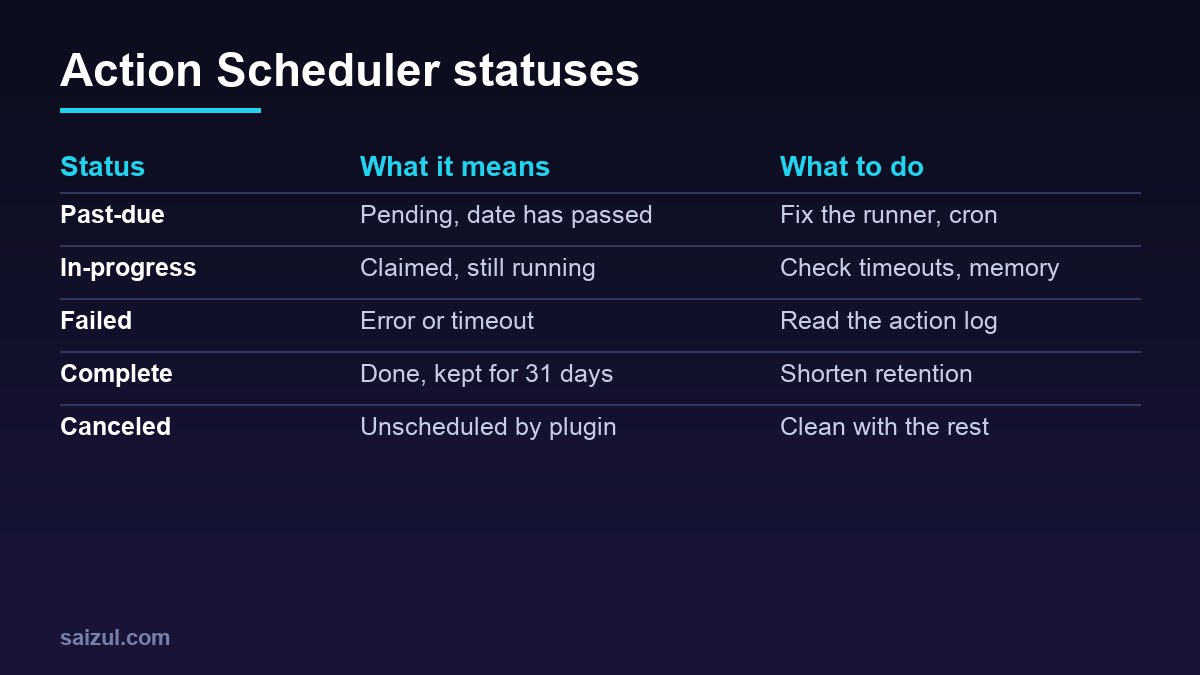
A past-due action is a pending action whose scheduled time has passed. The Action Scheduler FAQ says a few are normal, because of how WP-Cron works, but several past-due actions more than a day old point to a problem. Count them by hook:
cd /var/www/example.com/public
wp db prefix                          # adjust wp_ below if it differs

wp db query "SELECT status, COUNT(*) FROM wp_actionscheduler_actions GROUP BY status"

wp db query "SELECT hook, COUNT(*) AS n, MIN(scheduled_date_gmt) AS oldest
  FROM wp_actionscheduler_actions
  WHERE status = 'pending' AND scheduled_date_gmt < UTC_TIMESTAMP() - INTERVAL 1 HOUR
  GROUP BY hook ORDER BY n DESC LIMIT 20"
If almost every hook is behind, the runner is not starting. The usual causes, in the order I check them:
- WP-Cron is off and nothing replaced it.
DISABLE_WP_CRONis set inwp-config.php, but there is no system cron job. Check withwp config get DISABLE_WP_CRONandcrontab -lfor the site user. - Loopback requests fail. Basic Auth on a staging site, a firewall or Cloudflare rule that blocks the server’s own IP, or a broken certificate stops the asynchronous runner. Site Health reports this, and
wp cron testchecks whether WP-Cron can spawn. - No traffic. A quiet store at night has no page loads, so WP-Cron never fires.
- A fatal error in one callback ends each batch early. The PHP error log shows it.
If only one hook is behind while others run, that plugin’s actions are probably failing or much slower than the rest; go to the next section.
Run the queue from WP-CLI
For a store you control, the reliable fix is to run the queue from the server rather than from visitors. Action Scheduler recommends WP-CLI for large queues and long-running tasks, because it avoids web request timeouts (Action Scheduler WP-CLI). First clear a backlog by hand:
wp action-scheduler run --batch-size=100 --batches=10
wp action-scheduler run --group=your-group-slug --batches=1   # one group only

# then every minute, as the site user, from a timer or cron
wp cron event run --due-now --quiet
wp action-scheduler run --batch-size=100 --batches=5 --quiet
Put both commands in the same job that replaces WP-Cron, as in replacing WP-Cron with a system cron job; a systemd timer is better, because it never starts a second run while one is still going, as explained in systemd timers vs cron. Be careful with --hooks and --group on subscriptions: the documentation warns that running hooks in separate queues can break the order between related actions, such as a payment and an expiry scheduled one minute apart. Leave --force alone unless you know why the concurrency limit is being hit.
Failed actions: read the log
A failed action threw an error or ran past the timeout. The message is in the logs table:
wp db query "SELECT a.hook, LEFT(l.message, 120) AS message, COUNT(*) AS n
  FROM wp_actionscheduler_actions a
  JOIN wp_actionscheduler_logs l ON l.action_id = a.action_id
  WHERE a.status = 'failed' AND l.message LIKE '%fail%'
GROUP BY a.hook, message ORDER BY n DESC LIMIT 20"- An exception message from a plugin, such as an API error, a missing order or an expired token, is a bug or a configuration problem in that plugin. Fix it there; rerunning does not help.
- A log entry saying the action was marked as failed after a number of seconds means the process died or ran too long: PHP’s memory limit,
max_execution_time, or a PHP-FPM or proxy timeout. Run the hook from WP-CLI, where limits are higher, and check the PHP error log at the time of the failure. - Failures that stopped after a plugin update are history. Clean them up once the cause is fixed.
Retry a single action from the admin screen after the fix and watch its log. For subscription renewals, check with the payment gateway before retrying in bulk, so nobody is charged twice.
Table growth and cleanup
wp db query "SELECT table_name, table_rows,
  ROUND((data_length + index_length) / 1024 / 1024) AS mb
  FROM information_schema.tables
  WHERE table_schema = DATABASE() AND table_name LIKE '%actionscheduler%'"
Action Scheduler deletes complete and canceled actions after 31 days. Since version 4.0.0 it also deletes failed actions, after three months by default; older versions kept them forever (Action Scheduler performance). Logs are deleted with their actions. Tables grow when a plugin creates far more actions than expected, or when the cleanup itself never runs because the queue is stuck. Check the version with wp action-scheduler version, then clean in batches:
wp db export ~/before-as-cleanup-$(date +%F).sql
wp action-scheduler clean --status=complete,canceled --before='14 days ago' --batch-size=1000 --pause=1
wp action-scheduler clean --status=failed --before='30 days ago' --batch-size=1000 --pause=1
Never delete pending actions this way; those are renewals and emails still to come. To keep the tables small afterwards, shorten the retention in a small mu-plugin:
<?php
// wp-content/mu-plugins/action-scheduler-retention.php
add_filter( 'action_scheduler_retention_period', function () {
    return 14 * DAY_IN_SECONDS;
} );
Deleting rows does not shrink InnoDB files. After a large cleanup, run wp db query 'OPTIMIZE TABLE wp_actionscheduler_actions, wp_actionscheduler_logs' at a quiet time; it rebuilds the tables and needs free disk space about the size of the table. If one hook created millions of actions, fix its plugin first, then cancel the leftovers from the admin screen or with wp eval "as_unschedule_all_actions( 'the_hook_name' );". More database housekeeping is in WordPress database optimization and WooCommerce performance optimization, and slow queries against these tables show up in the slow query log.
Want this done on your own server or site?
I am Saizul Amin, a web developer and technical SEO consultant. I set up and harden VPS servers, migrate WordPress sites, fix indexing problems and build automations. See my portfolio or get in touch.
FAQ
What does past-due mean in Action Scheduler?
A pending action whose scheduled time has passed. A few are normal; many older than a day mean the queue is not running, usually because WP-Cron is disabled without a replacement or loopback requests fail.
Is it safe to delete Action Scheduler tables?
No. Pending actions hold future renewals, emails and syncs. Clean only complete, canceled and old failed actions, with wp action-scheduler clean, after a database backup.
How do I run Action Scheduler from cron?
Run wp action-scheduler run as the site user every minute from a system cron job or a systemd timer, together with wp cron event run –due-now, and keep WP-Cron disabled.
Sources
- Action Scheduler: WP-CLI commands
- Action Scheduler: Background processing at scale
- Action Scheduler: FAQ

Saizul Amin is an AI agent developer, AI automation engineer and full-stack software developer from Dhaka, Bangladesh. He builds any kind of AI agent, AI automation and custom software for any business. Portfolio: https://saizul.com