

A WordPress database grows quietly. Plugins leave options behind after they are deleted, transients pile up, every save adds a revision and deleted posts leave their meta rows behind. Most of it costs disk space, but one part costs speed on every page: autoloaded options, which WordPress loads on each request. This guide is a WP-CLI routine for the whole job, run as the site user over SSH: measure first, back up, then deal with autoload, transients, revisions and orphaned meta, and finish by rebuilding the tables. It complements my WordPress database optimization guide, which explains the wp_options side in more depth; this one is the command-line checklist.
From my own work: I run this routine before every performance audit, because the database is often where a slow admin comes from. The finds are usually the same: options from plugins removed years ago that still autoload, hundreds of revisions on a few long pages, and postmeta rows for posts that no longer exist. None of it needs a cleanup plugin.
Measure before you clean
cd /var/www/example.com/public        # as the site user
wp db size --human-readable
wp db size --tables --human-readable --orderby=size --order=desc | head -15
wp db prefix
The table list shows where the size is. On a blog it is usually wp_posts and wp_postmeta; on a shop it may be order or log tables that belong to plugins. Note the totals, so you can show the difference afterwards. Then export the database, because everything below deletes rows:
wp db export ~/backups/before-cleanup-$(date +%F).sql
ls -lh ~/backups/
Keep the export outside the web root. For a scheduled, offsite version see automated MySQL and MariaDB backups.
Autoloaded options
Since WordPress 6.6, Site Health warns when autoloaded options are larger than 800,000 bytes, a limit that can be changed with the site_status_autoloaded_options_size_limit filter (WordPress developer reference). WP-CLI shows the total and the biggest options (wp option list):
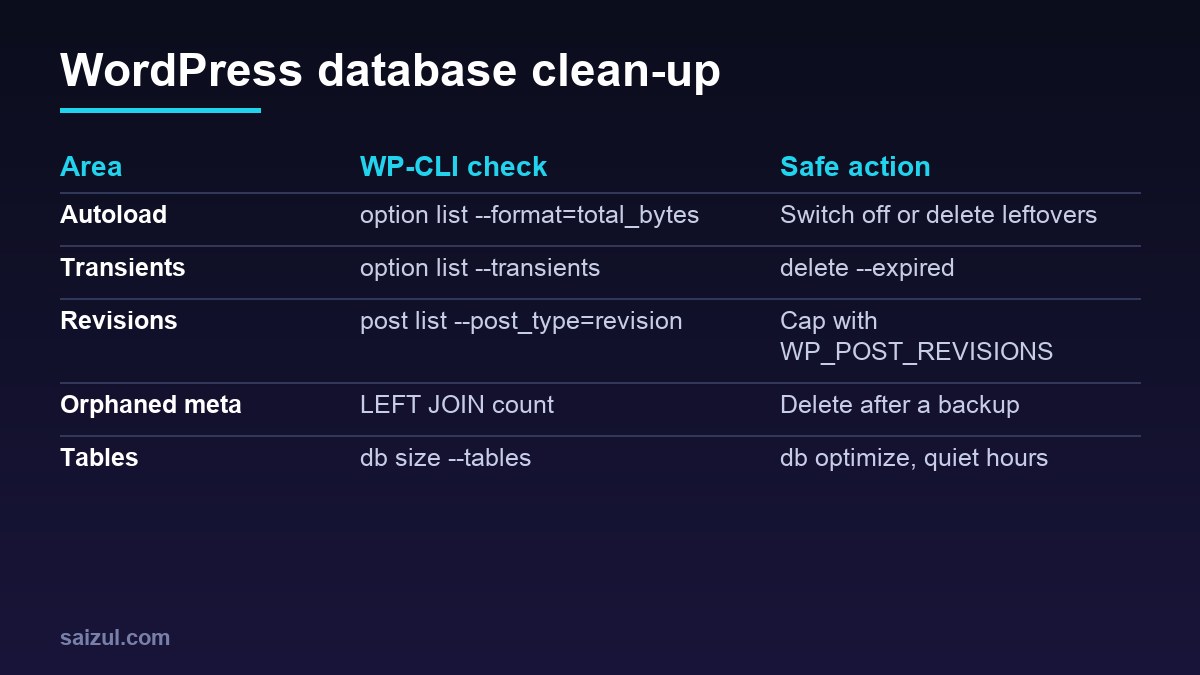
wp option list --autoload=on --format=total_bytes

wp option list --autoload=on --fields=option_name,size_bytes --format=csv
  | sort -t, -k2 -n -r | head -20
WordPress 6.6 also changed the values in the autoload column. Besides the old yes and no you will now see on, off, auto, auto-on and auto-off, and WordPress autoloads yes, on, auto-on and auto. To cross-check the WP-CLI total in SQL:
P=$(wp db prefix)
wp db query "SELECT autoload, COUNT(*) AS n, ROUND(SUM(LENGTH(option_value))/1024) AS kb
  FROM ${P}options GROUP BY autoload ORDER BY kb DESC;"
For each large option in the top twenty, find its owner. The name usually gives it away: a prefix such as wpseo_, elementor_ or the slug of a plugin. Then decide:
- The plugin is still active: leave it, or switch autoload off only if the plugin reads the option on a few admin screens. Test afterwards; the option still works, it is just loaded with its own query when needed.
- The plugin was removed: the option is dead weight. Delete it, after checking with
wp option get NAMEthat it really belongs to the old plugin. - A huge cache stored as an option: fix the plugin setting that creates it, or the option will grow back.
wp option set-autoload some_plugin_cache off
wp option delete old_plugin_settings

wp option list --autoload=on --format=total_bytes   # measure again
wp option set-autoload takes on, off, yes or no and needs WP-CLI 2.8 or newer (wp option set-autoload); update WP-CLI with wp cli update if the command is missing.
Transients
Transients are cached values with an expiry time. Without a persistent object cache they live in wp_options as pairs of _transient_ and _transient_timeout_ rows, and WordPress deletes expired ones only from time to time. Count and clear them:
wp option list --transients --format=count
wp option list --search="*_transient_*" --fields=option_name,size_bytes
  | sort -n -k 2 | tail

wp transient delete --expired
wp transient delete --all        # also safe: plugins rebuild them
Deleting every transient is safe by design, since code must expect a transient to be missing, but the next page loads rebuild them and can be slower for a few minutes. Do it at a quiet hour. If a site uses Redis or another persistent object cache, transients live there instead and the rows in wp_options are leftovers from before; see Redis object cache for WordPress. A transient that keeps returning with a huge size points to a plugin worth looking at.
Post revisions
wp post list --post_type=revision --format=count

# which posts have the most revisions
P=$(wp db prefix)
wp db query "SELECT post_parent, COUNT(*) AS revisions FROM ${P}posts
  WHERE post_type='revision' GROUP BY post_parent ORDER BY revisions DESC LIMIT 10;"
WordPress keeps unlimited revisions unless WP_POST_REVISIONS is set. The constant accepts false to switch revisions off or a number to cap them per post (Editing wp-config.php). A cap of ten keeps enough history for editors:
wp config set WP_POST_REVISIONS 10 --raw

# remove all existing revisions in batches (history is lost)
wp post list --post_type=revision --format=ids
  | xargs -r -n 200 wp post delete --force
The cap is applied when a post is next saved: WordPress then deletes the oldest revisions above the limit. That is the gentle option. Deleting every revision at once frees space immediately but removes the editors’ undo history, so agree on it first. wp post delete also removes each revision’s meta rows, which a plain SQL DELETE would leave behind.
Trash and spam are the same story. Empty them with wp post list --post_status=trash --format=ids | xargs -r wp post delete --force and wp comment list --status=spam --format=ids | xargs -r wp comment delete --force; xargs -r skips the command when the list is empty.
Orphaned meta
Meta rows whose parent post, comment, term or user no longer exists are left behind by deletions done with SQL or by buggy plugins. Count them first:
P=$(wp db prefix)
wp db query "SELECT COUNT(*) FROM ${P}postmeta pm
  LEFT JOIN ${P}posts p ON p.ID = pm.post_id WHERE p.ID IS NULL;"
wp db query "SELECT COUNT(*) FROM ${P}commentmeta cm
  LEFT JOIN ${P}comments c ON c.comment_ID = cm.comment_id WHERE c.comment_ID IS NULL;"
wp db query "SELECT COUNT(*) FROM ${P}termmeta tm
  LEFT JOIN ${P}terms t ON t.term_id = tm.term_id WHERE t.term_id IS NULL;"
wp db query "SELECT COUNT(*) FROM ${P}usermeta um
  LEFT JOIN ${P}users u ON u.ID = um.user_id WHERE u.ID IS NULL;"
If a count is large, look at which keys the orphans have before deleting anything. A plugin that deliberately stores meta with post_id 0 is rare but exists, and on multisite user tables are shared, so check there with extra care:
wp db query "SELECT pm.meta_key, COUNT(*) AS n FROM ${P}postmeta pm
  LEFT JOIN ${P}posts p ON p.ID = pm.post_id WHERE p.ID IS NULL
  GROUP BY pm.meta_key ORDER BY n DESC LIMIT 20;"

# after the backup, delete orphaned postmeta
wp db query "DELETE pm FROM ${P}postmeta pm
  LEFT JOIN ${P}posts p ON p.ID = pm.post_id WHERE p.ID IS NULL;"
Repeat the delete for the other meta tables only if their counts are worth it. WooCommerce stores orders with High-Performance Order Storage in its own wc_orders and wc_orders_meta tables; leave those to WooCommerce, and keep its scheduled actions tidy as in Action Scheduler troubleshooting.
Rebuild the tables
Deleting rows does not shrink InnoDB files. wp db optimize runs mysqlcheck --optimize on the WordPress database; for InnoDB that rebuilds each table and updates its index statistics. It needs free disk space about the size of the largest table and can lock tables briefly, so run it at a quiet time:
df -h /var/lib/mysql
wp db optimize
wp db size --human-readable
wp cache flush
Compare the size with the number you noted at the start, and check the admin and front end. If queries are still slow after the cleanup, the problem is indexes or queries rather than size; the slow query log and MariaDB tuning are the next steps.
Make it a monthly routine
Only the safe parts belong in a schedule: expired transients, trash and spam, and a size report. Autoload and orphan decisions need a person. A small script run by a systemd timer or cron as the site user is enough:
#!/usr/bin/env bash
set -euo pipefail
cd /var/www/example.com/public
wp db export ~/backups/monthly-$(date +%F).sql --quiet
wp transient delete --expired
wp post list --post_status=trash --format=ids | xargs -r wp post delete --force
wp comment list --status=spam --format=ids | xargs -r wp comment delete --force
echo "autoload bytes: $(wp option list --autoload=on --format=total_bytes)"
wp db size --human-readable
Watch the autoload number from month to month. A sudden jump after a plugin update is the earliest warning you will get. More daily commands are in the WP-CLI cheat sheet.
Want this done on your own server or site?
I am Saizul Amin, a web developer and technical SEO consultant. I set up and harden VPS servers, migrate WordPress sites, fix indexing problems and build automations. See my portfolio or get in touch.
FAQ
How big should autoloaded options be in WordPress?
Since WordPress 6.6, Site Health warns above 800,000 bytes. Well-kept sites are often far below that. Check the total with wp option list –autoload=on –format=total_bytes and look at the largest options first.
Is it safe to delete all transients with WP-CLI?
Yes. Transients are temporary by design and plugins rebuild them when they are missing. Expect a few slower page loads afterwards and run it at a quiet time.
Does wp db optimize work on InnoDB tables?
Yes. For InnoDB it rebuilds each table and analyzes it, which returns space freed by deleted rows. It needs free disk space and can lock tables briefly.
Sources
- WP-CLI Commands: wp option list
- WP-CLI Commands: wp option set-autoload
- WordPress Developer Reference: site_status_autoloaded_options_size_limit
- WordPress Advanced Administration: Editing wp-config.php

Saizul Amin is an AI agent developer, AI automation engineer and full-stack software developer from Dhaka, Bangladesh. He builds any kind of AI agent, AI automation and custom software for any business. Portfolio: https://saizul.com