

The database is the part of a WordPress site you cannot rebuild. Themes and plugins can be downloaded again, uploads are plain files, but posts, orders, users and settings live only in MySQL or MariaDB. Hosting panels often include backups; on your own VPS nobody does it for you. This guide builds a small backup job for Ubuntu 24.04 that dumps every database consistently, compresses and rotates the files, copies them off the server and gets tested. It works with MariaDB 10.11 and MySQL 8, the versions in the Ubuntu 24.04 repositories.
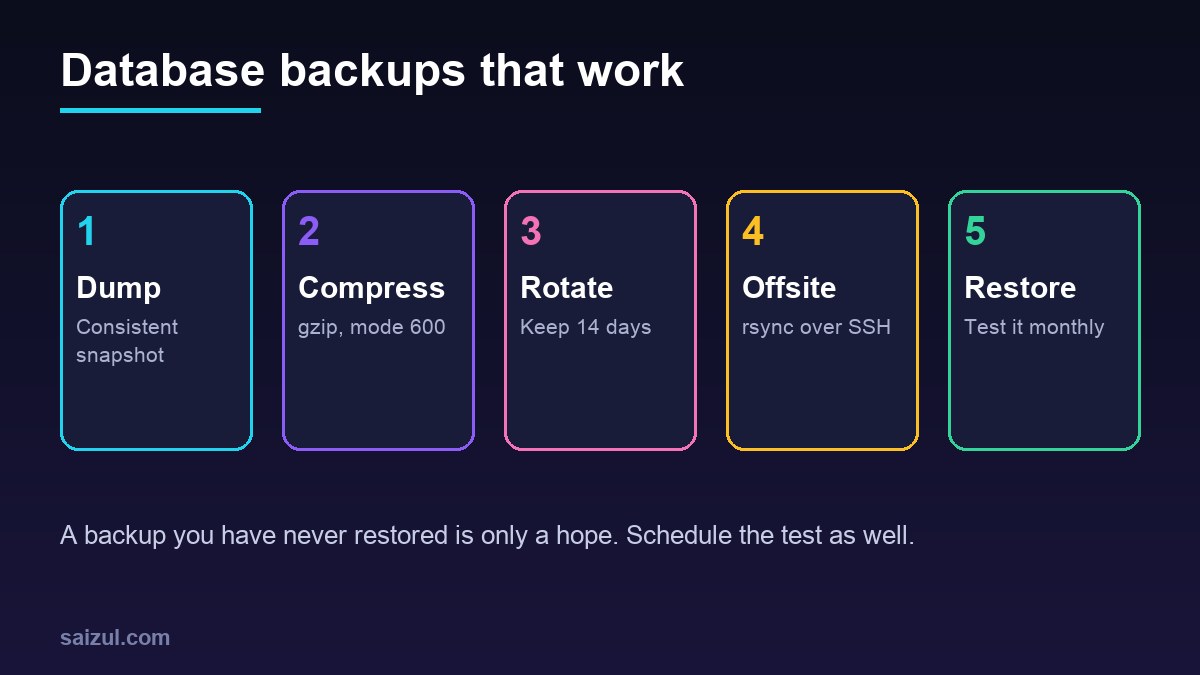
From my own work: I keep backups for every site on my VPS in two places: a short local history for quick rollbacks, and a longer offsite copy for the day the server itself is the problem. The step that has saved me more than once is the restore test, because it catches dumps that are empty or cut off long before I need them.
Create a least-privilege backup user
Do not put the root password or a site’s own database user in a backup script. Create a user that can read everything but change nothing:
sudo mariadb      # or: sudo mysql

CREATE USER 'backup'@'localhost' IDENTIFIED BY 'use-a-long-random-password';
GRANT SELECT, SHOW VIEW, TRIGGER, LOCK TABLES, EVENT, PROCESS ON *.* TO 'backup'@'localhost';
FLUSH PRIVILEGES;
Store the credentials in an option file instead of the command line, where they would show up in the process list:
sudo install -m 600 /dev/null /root/.backup.cnf
sudo nano /root/.backup.cnf

[client]
user=backup
password=use-a-long-random-password
The backup script
The script dumps each database into its own compressed file. One file per database makes it easy to restore a single site without touching the others.
#!/usr/bin/env bash
# /usr/local/sbin/db-backup.sh
set -euo pipefail
umask 077

BACKUP_DIR=/var/backups/mysql
KEEP_DAYS=14
CNF=/root/.backup.cnf
STAMP=$(date +%F_%H%M)
DUMP=$(command -v mariadb-dump || command -v mysqldump)
CLIENT=$(command -v mariadb || command -v mysql)

mkdir -p "$BACKUP_DIR"

for DB in $("$CLIENT" --defaults-extra-file="$CNF" -N -e 'SHOW DATABASES'
            | grep -Ev '^(information_schema|performance_schema|mysql|sys)$'); do
  OUT="$BACKUP_DIR/${DB}_${STAMP}.sql.gz"
  "$DUMP" --defaults-extra-file="$CNF" --single-transaction --routines --events
          --triggers --default-character-set=utf8mb4 "$DB" | gzip > "$OUT.part"
  mv "$OUT.part" "$OUT"
done

# delete local copies older than KEEP_DAYS
find "$BACKUP_DIR" -name '*.sql.gz' -mtime +"$KEEP_DAYS" -delete

# offsite copy (see below)
rsync -a -e 'ssh -i /root/.ssh/backup_ed25519' "$BACKUP_DIR/"
      backup@backup.example.net:mysql/"$(hostname)"/

echo "$(date -Is) backup OK"
Make it executable with sudo chmod 700 /usr/local/sbin/db-backup.sh. A few details are doing important work:
- –single-transaction takes a consistent snapshot of InnoDB tables without locking the site while the dump runs. WordPress tables use InnoDB by default; old MyISAM tables are not covered by the snapshot (mariadb-dump options).
- –routines and –events include stored procedures and scheduled events, which some plugins create and which are not dumped by default.
- –defaults-extra-file must be the first option on the command line, or the client ignores it.
- set -o pipefail makes the script stop when the dump fails, not only when gzip fails. The
.partfile is renamed only after a complete dump, so a half-written file never looks like a good backup. - umask 077 makes the dumps readable by root only. They contain password hashes and customer data.
Schedule it with cron
Use a file in /etc/cron.d/. Unlike a personal crontab, these lines include the user to run as (crontab(5)):
# /etc/cron.d/db-backup
SHELL=/bin/bash
PATH=/usr/local/sbin:/usr/local/bin:/usr/sbin:/usr/bin:/sbin:/bin
30 2 * * * root /usr/local/sbin/db-backup.sh >> /var/log/db-backup.log 2>&1
File names in /etc/cron.d/ must not contain dots, so call it db-backup, not db-backup.cron. Pick a quiet hour, and keep it away from other heavy jobs such as the WordPress tasks you may have moved to system cron (see replacing WP-Cron with system cron). Run the script once by hand and check the log before you trust the schedule.
A cron job that fails silently is the classic way to discover, months later, that there are no backups. Either make sure cron mail reaches you, or add a heartbeat at the end of the script: a curl -fsS call to an uptime monitor that alerts when the ping does not arrive.
Copy the backups off the server
Backups on the same disk do not survive a lost VPS, a compromised account or a provider problem. The script pushes the folder to another machine with rsync over SSH (rsync(1)). Set it up with a dedicated key:
sudo ssh-keygen -t ed25519 -f /root/.ssh/backup_ed25519 -N '' -C db-backup
sudo ssh-copy-id -i /root/.ssh/backup_ed25519.pub backup@backup.example.net
sudo ssh -i /root/.ssh/backup_ed25519 backup@backup.example.net 'mkdir -p mysql'- The rsync line deliberately has no
--delete. The offsite host keeps its own, longer history, and a mistake on the web server cannot wipe it. Prune old files with afind -mtimejob on the backup host instead. - The backup user on the remote host should own nothing else. Better still is a pull setup, where the backup host connects to the web server; then an attacker on the web server has no credentials for the backups at all.
- To use object storage instead of a second server,
rclone copyto an S3-compatible bucket does the same job. Encrypt the dumps first (for example withgpg --encrypt) if the storage is run by a third party.
Test the restore
Restore the newest dump into a scratch database and check that the content is there:
sudo mariadb -e 'CREATE DATABASE restore_test'
gunzip -c /var/backups/mysql/example_wp_2026-11-12_0230.sql.gz | sudo mariadb restore_test
sudo mariadb restore_test -e 'SELECT COUNT(*) FROM wp_posts; SELECT option_value FROM wp_options WHERE option_name="siteurl"'
sudo mariadb -e 'DROP DATABASE restore_test'
Do this once a month and after any change to the script. Adjust the wp_ prefix if your site uses another one. To rehearse a full site recovery, restore into a staging site built with WP-CLI.
What this does not cover
A database dump is half a WordPress backup. You also need wp-content/uploads, your wp-config.php and the server configuration under /etc/nginx and /etc/php. Add those paths to the same rsync job, or back them up with a tool that does versioned, deduplicated backups. For quick one-off copies before an update, wp db export from the WP-CLI cheat sheet is enough. Smaller databases also back up and restore faster, so it is worth reading WordPress database optimization as well.
Want this done on your own server or site?
I am Saizul Amin, a web developer and technical SEO consultant. I set up and harden VPS servers, migrate WordPress sites, fix indexing problems and build automations. See my portfolio or get in touch.
FAQ
Should I use mariadb-dump or mysqldump?
Use the tool that matches your server. On MariaDB 10.11 the binary is mariadb-dump, and mysqldump remains as a compatible name; on MySQL 8 use mysqldump. The script above picks whichever exists.
Does mariadb-dump lock my WordPress site?
With –single-transaction, InnoDB tables are dumped from a consistent snapshot without blocking reads and writes. MyISAM tables are not protected by that snapshot, so convert them to InnoDB.
How long should I keep database backups?
It depends on how quickly you would notice a problem. A common pattern is two weeks of daily copies on the server and a longer history offsite, for example weekly and monthly copies.
Sources
- MariaDB Knowledge Base: mariadb-dump
- Ubuntu manpage: crontab(5)
- Ubuntu manpage: rsync(1)
- WordPress Developer Resources: Backing up your database

Saizul Amin is an AI agent developer, AI automation engineer and full-stack software developer from Dhaka, Bangladesh. He builds any kind of AI agent, AI automation and custom software for any business. Portfolio: https://saizul.com