

On a small VPS, MariaDB shares the memory with Nginx, PHP-FPM, often Redis, and the operating system’s file cache. Most tuning guides are written for dedicated database servers and tell you to give InnoDB 70 to 80 percent of RAM, which on a 2 GB WordPress server leaves nothing for PHP and ends with the out-of-memory killer stopping the database. This guide tunes MariaDB 10.11, the version in Ubuntu 24.04, for a typical WordPress VPS with 2 to 4 GB of RAM. It changes a handful of settings, bases each one on numbers from your own server, and leaves the rest at the defaults.
From my own work: On my own VPS, MariaDB, PHP-FPM and Redis run side by side, and the database config file is about ten lines long. The servers I see in trouble usually have the opposite: a my.cnf copied from a dedicated database host, with a buffer pool and per-connection buffers that only fit if half the PHP workers are idle.
Start with a memory budget
MariaDB’s own guidance is to size it against the RAM that is actually available, not the total, and to use lower percentages on hosts under 4 GB (MariaDB memory allocation). Write the budget down before you change anything:
- Operating system, Nginx and file cache: keep at least 400 to 500 MB free for these.
- PHP-FPM:
pm.max_childrenmultiplied by the average worker size. Eight workers at 70 MB are about 560 MB; PHP-FPM tuning for WordPress shows how to measure it. - Redis: whatever
maxmemorysays, often 128 to 256 MB. - MariaDB: what is left, minus a margin for per-connection buffers.
On a 2 GB server this usually leaves 512 MB for the InnoDB buffer pool; on 4 GB, about 1 to 1.5 GB. Add a swap file as a safety net, as described in adding swap on an Ubuntu VPS, but do not plan to use it.
Measure before you tune
Let the server run under normal traffic for at least a day after a restart, then collect a few numbers:
sudo mariadb -e "
SELECT ROUND(SUM(data_length + index_length)/1024/1024) AS innodb_mb
  FROM information_schema.tables WHERE engine = 'InnoDB';
SHOW GLOBAL STATUS WHERE Variable_name IN
  ('Uptime','Max_used_connections','Threads_created','Connections',
   'Innodb_buffer_pool_read_requests','Innodb_buffer_pool_reads',
   'Created_tmp_tables','Created_tmp_disk_tables');
SHOW GLOBAL VARIABLES WHERE Variable_name IN
  ('innodb_buffer_pool_size','max_connections','tmp_table_size','max_heap_table_size');"
free -m
The first query is the size of your InnoDB data and indexes, the upper limit of what the buffer pool could usefully hold. The status values tell you how many connections you really use, how often InnoDB had to read from disk, and how many temporary tables spilled to disk.
A small configuration file
Do not edit 50-server.cnf. Add your own file that is read after it, and use the [mariadb] section, which only the MariaDB server reads:
# /etc/mysql/mariadb.conf.d/99-wordpress.cnf
[mariadb]
# memory
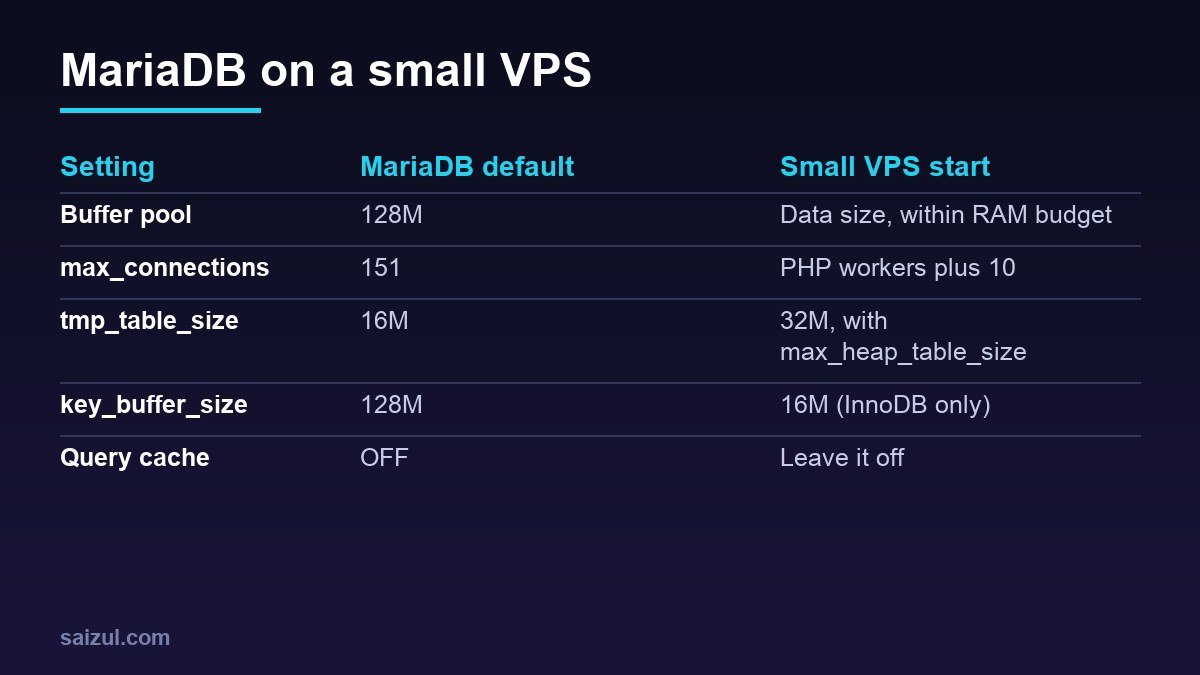
innodb_buffer_pool_size = 512M
key_buffer_size         = 16M

# connections: PHP-FPM workers on all pools plus a margin
max_connections         = 40

# in-memory temporary tables (the smaller of the two applies)
tmp_table_size          = 32M
max_heap_table_size     = 32M

# keep the query cache off (the default)
query_cache_type        = 0
query_cache_size        = 0
sudo systemctl restart mariadb
sudo mariadb -e "SELECT @@innodb_buffer_pool_size/1024/1024 AS pool_mb, @@max_connections, @@tmp_table_size"
innodb_buffer_pool_size
The buffer pool caches InnoDB data and index pages, and WordPress tables are InnoDB. The default is only 128 MB (InnoDB system variables). If your data is 300 MB, a pool of about 400 to 512 MB holds all of it with room to grow. If your data is 3 GB on a 2 GB server, give it what the budget allows; WordPress usually reads a small, hot part of the database, mainly autoloaded options, recent posts and their meta.
Compare Innodb_buffer_pool_reads (pages read from disk) with Innodb_buffer_pool_read_requests (all page reads). If disk reads stay well under one percent once the cache is warm, the pool is big enough. The variable is dynamic, so you can test a new size with SET GLOBAL innodb_buffer_pool_size = 768*1024*1024; and then write it into the file. For working-set calculations on larger databases, see InnoDB buffer pool tuning and working sets.
max_connections
The default of 151 does not allocate memory on its own, but it raises the worst case: every connection can claim sort, join and temporary table buffers. A WordPress site opens one database connection per PHP request, so the real ceiling is the sum of pm.max_children across all PHP-FPM pools, plus a few for cron jobs, WP-CLI and backups. With two pools of 12 workers, 40 is plenty.
Check Max_used_connections after a busy day. If it is close to your limit, the problem is usually slow queries holding connections open, not too few connections; the slow query log for WordPress shows which ones. MariaDB keeps one extra connection for an administrator, so you can still log in when the limit is reached.
Temporary tables
Queries with GROUP BY, DISTINCT or some sorts build internal temporary tables. They stay in memory up to the smaller of tmp_table_size and max_heap_table_size, both 16 MB by default, and are then converted to on-disk Aria tables (server system variables). Compare Created_tmp_disk_tables with Created_tmp_tables: a few percent on disk is normal.
Raising both to 32 or 64 MB helps if many temporary tables spill. Do not go much higher on a small server, because the limit applies per temporary table and several can exist at once. Also expect a floor you cannot tune away: the in-memory engine does not support TEXT and BLOB columns, and queries that carry post_content or meta_value into a temporary table go to disk regardless of these settings. That is fixed with better queries or indexes, not memory.
What to leave alone
- Query cache: off by default since MariaDB 10.1.7 and a source of lock contention on busy write workloads. Use a page cache and an object cache instead; see Redis object cache for WordPress.
- innodb_buffer_pool_instances: older guides set it, but MariaDB removed it in 10.6, so there is nothing to configure on 10.11.
- innodb_log_file_size: the 96 MB default is fine for a typical WordPress write load. From MariaDB 10.9 it can be changed at runtime if you ever need to.
- Large per-connection buffers such as
sort_buffer_sizeandjoin_buffer_size: raising them multiplies memory by the number of connections and rarely fixes a slow WordPress query.
key_buffer_size caches MyISAM indexes only. If every WordPress table is InnoDB, 16 MB is plenty, and MariaDB’s documentation suggests a small value for InnoDB-only servers. Check with SELECT table_name FROM information_schema.tables WHERE engine = 'MyISAM' AND table_schema NOT IN ('mysql','information_schema'); and convert stray tables with ALTER TABLE ... ENGINE=InnoDB after a backup.
Check the result
After a week, run the measurement block again and compare. Disk reads and disk temp tables should be lower, free -m should show memory available, and swap use should stay near zero. The mysqltuner package in Ubuntu gives a useful second opinion, but read its suggestions against your budget rather than applying them all. Make sure automated database backups are running before you change anything, and clean bloated tables first with the WordPress database optimization guide; a smaller database needs a smaller buffer pool.
Want this done on your own server or site?
I am Saizul Amin, a web developer and technical SEO consultant. I set up and harden VPS servers, migrate WordPress sites, fix indexing problems and build automations. See my portfolio or get in touch.
FAQ
How much RAM should MariaDB get on a 2 GB WordPress VPS?
Usually about 512 MB for innodb_buffer_pool_size, after PHP-FPM, Redis and the operating system have their share. Measure your data size and PHP worker memory to confirm.
Should I enable the MariaDB query cache for WordPress?
No. It is off by default, it can cause contention on sites that write often, and page caching plus a Redis object cache give better results.
Why do I still see temporary tables on disk after raising tmp_table_size?
Queries that include TEXT or BLOB columns, which WordPress uses for post content and meta values, cannot use in-memory temporary tables. Improve those queries or their indexes instead.
Sources
- MariaDB documentation: MariaDB Memory Allocation
- MariaDB documentation: InnoDB System Variables
- MariaDB documentation: Server System Variables

Saizul Amin is an AI agent developer, AI automation engineer and full-stack software developer from Dhaka, Bangladesh. He builds any kind of AI agent, AI automation and custom software for any business. Portfolio: https://saizul.com