

On most WordPress servers the uploads folder is the largest thing on the disk and the main source of outgoing traffic. It makes backups slow, fills small VPS disks and ties the site to one machine. Moving it to object storage fixes all three, and Cloudflare R2 is a natural fit when the domain already uses Cloudflare: it speaks the S3 API, it does not charge for egress, and a bucket can be served from your own subdomain through Cloudflare’s cache. This guide moves an existing site’s media to R2 on an Ubuntu 24.04 VPS, keeps a way back, and covers the details that break images after the move.
From my own work: I keep media on the VPS for small sites and move it to object storage once uploads are several gigabytes or backups start taking longer than the database dump. The failed migrations I have seen all deleted the local files on day one and then found missing thumbnail sizes or WebP copies that the plugin never uploaded.
When offloading is worth it
R2 does not charge for data transfer out of the bucket. The free tier covers 10 GB-month of standard storage, one million Class A (write) and ten million Class B (read) operations a month, and storage above that costs $0.015 per GB-month (R2 pricing). Check the current page before you plan around those numbers. A blog with 2 GB of images will not notice much. A shop or magazine with 50 GB of uploads gets a smaller disk, faster backups and a server that can be rebuilt without copying media. Offloading adds a plugin, an external dependency and a second place to back up, so do it for a reason.
Create the bucket and connect a custom domain
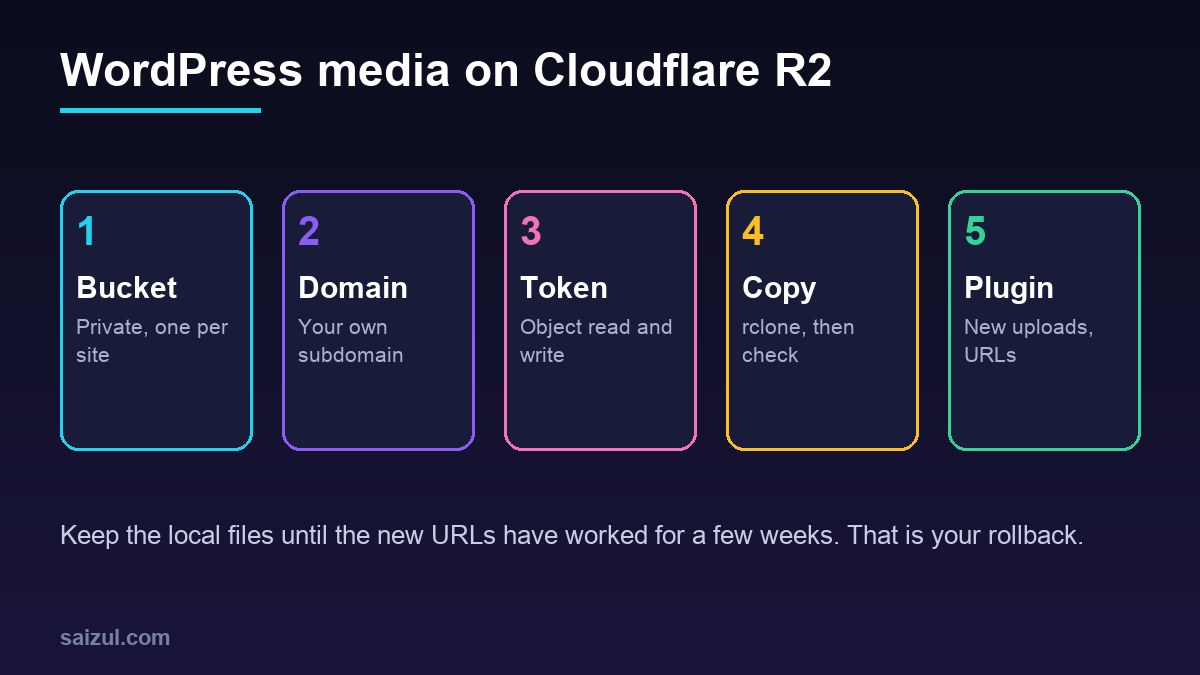
In the Cloudflare dashboard, open R2, create a bucket such as example-media, and leave it private. Then, under the bucket’s Settings, add a custom domain such as media.example.com. The domain must be a zone in the same Cloudflare account, and the status changes from Initializing to Active within a few minutes (R2 public buckets).
Do not use the r2.dev address for a live site. Cloudflare describes it as meant for development: it is rate limited, and caching, WAF rules and access controls only work on a custom domain. Leave it disabled, because if it is on, the bucket stays public through it even when the custom domain has rules in front.
Create a scoped API token
Under Manage API tokens, create a token with Object Read & Write permission and limit it to the one bucket. The Admin permissions work across the whole account, which a WordPress plugin never needs (R2 API tokens). Copy the Access Key ID and Secret Access Key immediately; the secret is shown only once. Note the S3 endpoint as well, https://<account-id>.r2.cloudflarestorage.com.
Keep the keys out of the database. Plugins that support it read them from constants in wp-config.php, which you should already protect as described in hardening wp-config.php.
Copy existing uploads with rclone
For a large uploads folder, a server-side copy with rclone is faster and easier to resume than a plugin running in browser batches. Ubuntu 24.04 ships rclone 1.60, which is new enough; Cloudflare asks for 1.59 or later (rclone with R2).
sudo apt install rclone
rclone version

# ~/.config/rclone/rclone.conf for the site user (chmod 600)
[r2]
type = s3
provider = Cloudflare
access_key_id = YOUR_ACCESS_KEY_ID
secret_access_key = YOUR_SECRET_ACCESS_KEY
endpoint = https://ACCOUNT_ID.r2.cloudflarestorage.com
acl = private
no_check_bucket = true
no_check_bucket = true is needed with a token limited to object permissions, because rclone otherwise tries to create the bucket and fails. Then copy, keeping WordPress’s year and month folders as object keys:
cd /var/www/example.com/public
rclone copy wp-content/uploads r2:example-media/wp-content/uploads
  --exclude '*.php' --exclude '.htaccess'
  --header-upload 'Cache-Control: public, max-age=31536000, immutable'
  --transfers 16 --progress

# compare sizes and names, without downloading
rclone check wp-content/uploads r2:example-media/wp-content/uploads --size-only --one-way
  --exclude '*.php' --exclude '.htaccess'
curl -sI https://media.example.com/wp-content/uploads/2026/01/photo.jpg | head -5
Keep the key prefix the plugin expects. Most offload plugins mirror the wp-content/uploads/ path, but some only use 2026/01/; check its settings first, or you will copy everything twice. Excluding PHP files is deliberate: nothing in uploads should be executable, and a stray backdoor should not be published to a CDN. If your uploads folder has ever been compromised, clean it first with this step-by-step guide.
An offload plugin for new uploads and URLs
rclone moves files, but WordPress still needs to upload new media to R2 and print R2 URLs. That is the plugin’s job. Pick one that lists Cloudflare R2 as a provider, reads credentials from constants, supports a custom domain, offloads every generated image size, and can keep local files. Advanced Media Offloader in the WordPress.org directory, for example, does all of this and has WP-CLI commands for bulk work. Configure it with the bucket, the endpoint, the token and https://media.example.com as the public URL, and keep the local copies at first.
Then upload a test image and check four things: the original and every size in srcset load from media.example.com; WebP or AVIF copies made by an image optimisation plugin are uploaded too; deleting the image in the media library removes it from the bucket; and old posts show R2 URLs. Plugins differ here, so test before you tell the plugin to remove local files.
Caching and headers
The Cache-Control header set by rclone is stored with each object and sent to browsers. WordPress file names do not change when content changes, except when you replace a file under the same name, so a one-year lifetime is safe for most sites. Cloudflare caches common image types on the custom domain by default; for fonts, PDFs or video, add a cache rule for the hostname, as in Cloudflare cache rules for WordPress. If a theme loads fonts from the media domain, add a CORS policy to the bucket that allows your site’s origin.
Rollback, backups and cleanup
As long as the local files exist, rollback is simple: switch the plugin off or back to local URLs, and the site serves media from the VPS again. Keep it that way for a few weeks while you watch the Nginx error log and Search Console for broken images. Image URLs change domain, so expect Google Images to recrawl them; keep the old paths working on the server for as long as you can.
Once you remove the local copies, the bucket is the only copy of your media. Back it up separately, for example with an rclone sync to another provider on a timer, and add it to the restore plan you already have for database backups. Media URLs in content stay correct only while the plugin and its metadata exist, so if you ever leave the plugin, replace the URLs with wp search-replace as shown in the WP-CLI cheat sheet. For faster pages overall, offloading pairs well with Nginx FastCGI cache.
Want this done on your own server or site?
I am Saizul Amin, a web developer and technical SEO consultant. I set up and harden VPS servers, migrate WordPress sites, fix indexing problems and build automations. See my portfolio or get in touch.
FAQ
Is Cloudflare R2 free for WordPress media?
Small sites often stay inside the free tier of 10 GB-month storage and the monthly operation limits, and R2 does not charge for egress. Larger libraries pay per GB-month of storage; check the current pricing page.
Can I use the r2.dev URL for my images?
Only for testing. Cloudflare rate limits r2.dev and does not offer caching or WAF rules on it. Connect a custom domain such as media.example.com for a live site.
Should I delete local media after offloading to R2?
Not straight away. Keep the local files for a few weeks so you can roll back, confirm every image size and format was uploaded, and set up a separate backup of the bucket first.
Sources
- Cloudflare Docs: R2 public buckets
- Cloudflare Docs: R2 API tokens
- Cloudflare Docs: Use rclone with R2
- Cloudflare Docs: R2 pricing

Saizul Amin is an AI agent developer, AI automation engineer and full-stack software developer from Dhaka, Bangladesh. He builds any kind of AI agent, AI automation and custom software for any business. Portfolio: https://saizul.com