


When WordPress password resets, WooCommerce order emails or contact form notifications go missing, the cause is rarely WordPress. It is almost always email authentication. Large mailbox providers now expect every sender to prove that it is allowed to use its domain, and they reject or junk mail that cannot. Three DNS records do that work: SPF, DKIM and DMARC. This guide sets them up for mail sent through a provider and for mail sent directly from an Ubuntu 24.04 server with Postfix. For DNS basics, see DNS records explained.
From my own work: On my own domains, all outgoing mail goes through providers, and the VPS itself never sends directly. The broken setups I fix most often have two SPF records after a provider change, or a transactional service that passes SPF for its own bounce domain while DMARC still fails, because nobody published its DKIM records.
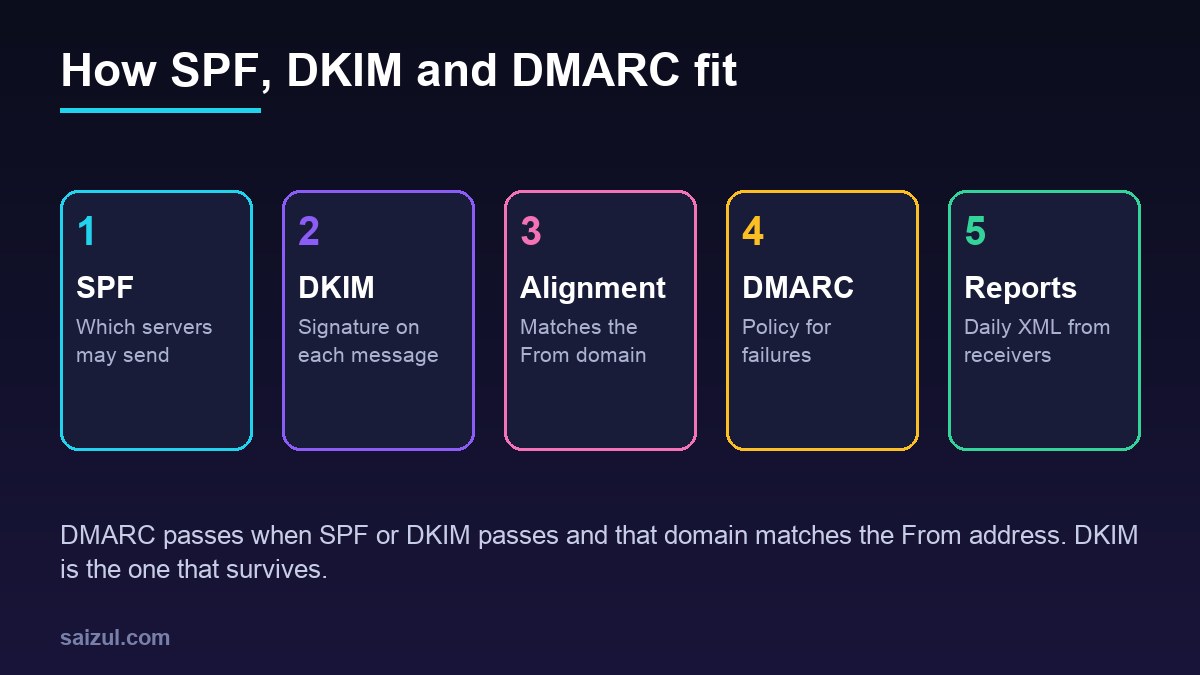
What each record proves
- SPF lists the servers allowed to send for a domain. Receivers check it against the envelope sender, the bounce address in
Return-Path, not theFromaddress people see (RFC 7208). - DKIM adds a cryptographic signature to each message. The public key lives in DNS under a selector, such as
mail._domainkey.example.com, and the signature names the signing domain in itsd=tag (RFC 6376). - DMARC ties the two to the visible
Fromdomain. A message passes when SPF or DKIM passes and the domain that passed matches theFromdomain. The record also says what receivers should do with failures and where to send reports.
That alignment rule explains most surprises. A transactional service usually uses its own bounce domain, so SPF passes for the service, not for you, and only DKIM signed with your domain makes DMARC pass. Forwarding also breaks SPF but keeps DKIM. Treat DKIM as the record that must always work.
Google’s sender guidelines require SPF or DKIM for every sender, valid forward and reverse DNS for the sending IP, and TLS. Anyone sending more than 5,000 messages a day to Gmail also needs SPF, DKIM and a DMARC record, which may be p=none (Google sender guidelines).
SPF: one record, every sender
List every service that sends as your domain: the mailbox provider, the newsletter tool, the transactional service and, if it sends directly, the VPS. Then publish exactly one TXT record at the domain:
; one TXT record at example.com
example.com.  3600  IN  TXT  "v=spf1 ip4:203.0.113.10 include:_spf.google.com include:spf.example-esp.net ~all"

; check what is published
dig +short TXT example.com | grep spf1- Only one SPF record. Two records starting with
v=spf1are a permanent error, and SPF then fails for every message. Merge them into one. - Ten lookups at most. Each
include,a,mx,existsandredirectcosts a DNS lookup, and includes inside includes count too. Above ten, the result is a permanent error. Remove services you no longer use, and replaceaandmxwith the server’sip4:andip6:, which cost nothing. - Do not use
ptr. The RFC says it should not be published. ~allor-all. With DMARC in place,~all(softfail) is the usual choice; DMARC makes the final decision either way.
Copy each provider’s include value from its own documentation; the Google Workspace one above is an example.
DKIM with a mail provider
Every serious provider signs with your domain once you publish its key. Google Workspace gives you a TXT record for the google selector; Microsoft 365 and most transactional services give you CNAME records, so they can rotate keys themselves. Publish them exactly as given, then switch signing on in the provider’s dashboard. Choose 2048-bit keys where you can; Google requires at least 1024.
dig +short TXT google._domainkey.example.com
dig +short CNAME s1._domainkey.example.com
For WordPress itself, send through the provider over authenticated SMTP or its API with an SMTP plugin, rather than PHP’s mail(), and set the From address to a mailbox on the signed domain.
DKIM on your own VPS with OpenDKIM
If Postfix on the server sends mail itself, it has to sign it. First make sure the basics are right: the server’s IP has a PTR record set at the VPS provider that points to a hostname such as mail.example.com, that hostname resolves back to the same IP, and outbound port 25 is open, which many providers block on new accounts. Then install OpenDKIM and create a 2048-bit key:
sudo apt install opendkim opendkim-tools
sudo mkdir -p /etc/opendkim/keys/example.com
sudo opendkim-genkey -b 2048 -d example.com -D /etc/opendkim/keys/example.com -s mail -v
sudo chown -R opendkim:opendkim /etc/opendkim/keys
sudo chmod 600 /etc/opendkim/keys/example.com/mail.private
sudo cat /etc/opendkim/keys/example.com/mail.txt     # the DNS record
On Ubuntu 24.04 the systemd service reads everything from /etc/opendkim.conf. Edit its Socket line and add the signing settings. A TCP socket on localhost avoids the permission problems of a Unix socket inside Postfix’s chroot:
# /etc/opendkim.conf (change Socket, add the rest)
Socket      inet:8891@localhost
Domain      example.com
Selector    mail
KeyFile     /etc/opendkim/keys/example.com/mail.private

# connect Postfix
sudo postconf -e 'milter_default_action = accept'
sudo postconf -e 'smtpd_milters = inet:localhost:8891'
sudo postconf -e 'non_smtpd_milters = inet:localhost:8891'
sudo systemctl restart opendkim postfix
Publish the contents of mail.txt as a TXT record at mail._domainkey.example.com. The file splits the long key into several quoted strings; most DNS dashboards accept the joined value. Check it with sudo opendkim-testkey -d example.com -s mail -vvv, which should end with key OK; a note that the key is not secure only means DNSSEC is not in use. non_smtpd_milters matters for WordPress, because mail submitted by PHP through the local sendmail binary does not pass through smtpd.
DMARC: start with reports, then enforce
Publish a TXT record at _dmarc.example.com. Start with a monitoring policy and an address for aggregate reports:
_dmarc.example.com.  3600  IN  TXT  "v=DMARC1; p=none; rua=mailto:dmarc@example.com"

; after 2 to 4 weeks of clean reports
_dmarc.example.com.  3600  IN  TXT  "v=DMARC1; p=quarantine; rua=mailto:dmarc@example.com"

; final
_dmarc.example.com.  3600  IN  TXT  "v=DMARC1; p=reject; rua=mailto:dmarc@example.com"
Receivers send daily XML reports listing every IP that sent mail as your domain and whether it passed. Find the legitimate senders that fail, fix them, and only then raise the policy. Alignment is relaxed by default, so mail signed by mg.example.com aligns with a From address at example.com.
DMARC was republished in May 2026 as a standards-track specification, RFC 9989, which replaces RFC 7489 (RFC 9989). Existing v=DMARC1 records keep working. Three changes matter: the pct tag is gone, so receivers following the new standard ignore percentage rollouts; a new t=y tag marks a policy as test mode; and np= sets a policy for subdomains that do not exist.
Domains and subdomains that never send
A domain without SPF or DMARC is easy to spoof, even if you never send mail from it. For parked domains and non-sending subdomains, publish a record that says so:
parked-example.com.          TXT  "v=spf1 -all"
_dmarc.parked-example.com.   TXT  "v=DMARC1; p=reject;"
Test the whole chain
dig +short TXT example.com
dig +short TXT mail._domainkey.example.com
dig +short TXT _dmarc.example.com
dig +short -x 203.0.113.10                 # PTR of the sending IP

# send a real message from WordPress
cd /var/www/example.com/public
wp eval 'var_dump( wp_mail( "you@gmail.com", "DMARC test", "Hello" ) );'
In Gmail, choose Show original. All three lines should read PASS, with your own domain on the DKIM line. If DKIM passes but DMARC fails, the signing domain does not match the From address. If nothing arrives, check sudo journalctl -u postfix -n 50 on a VPS, or the SMTP plugin’s log. For mail sent while you move servers, see migrating WordPress to a VPS, and keep the new server’s IP in SPF from the first day.
Want this done on your own server or site?
I am Saizul Amin, a web developer and technical SEO consultant. I set up and harden VPS servers, migrate WordPress sites, fix indexing problems and build automations. See my portfolio or get in touch.
FAQ
Do I need SPF, DKIM and DMARC for a small WordPress site?
Yes. Gmail requires SPF or DKIM from every sender, and without DMARC anyone can spoof your domain. All three are free DNS records and take less than an hour to set up.
Can I have two SPF records for one domain?
No. Two SPF records are a permanent error and SPF fails for all mail. Merge every sender into one record and keep it under ten DNS lookups.
Should DMARC be p=none, quarantine or reject?
Start with p=none and reports, fix every legitimate sender that fails, then move to quarantine and finally reject. The pct tag is gone in RFC 9989, so raise the policy in steps.
Sources
- RFC 7208: Sender Policy Framework (SPF)
- RFC 6376: DomainKeys Identified Mail (DKIM) Signatures
- RFC 9989: Domain-Based Message Authentication, Reporting, and Conformance (DMARC)
- Google Workspace Admin Help: Email sender guidelines

Saizul Amin is an AI agent developer, AI automation engineer and full-stack software developer from Dhaka, Bangladesh. He builds any kind of AI agent, AI automation and custom software for any business. Portfolio: https://saizul.com