

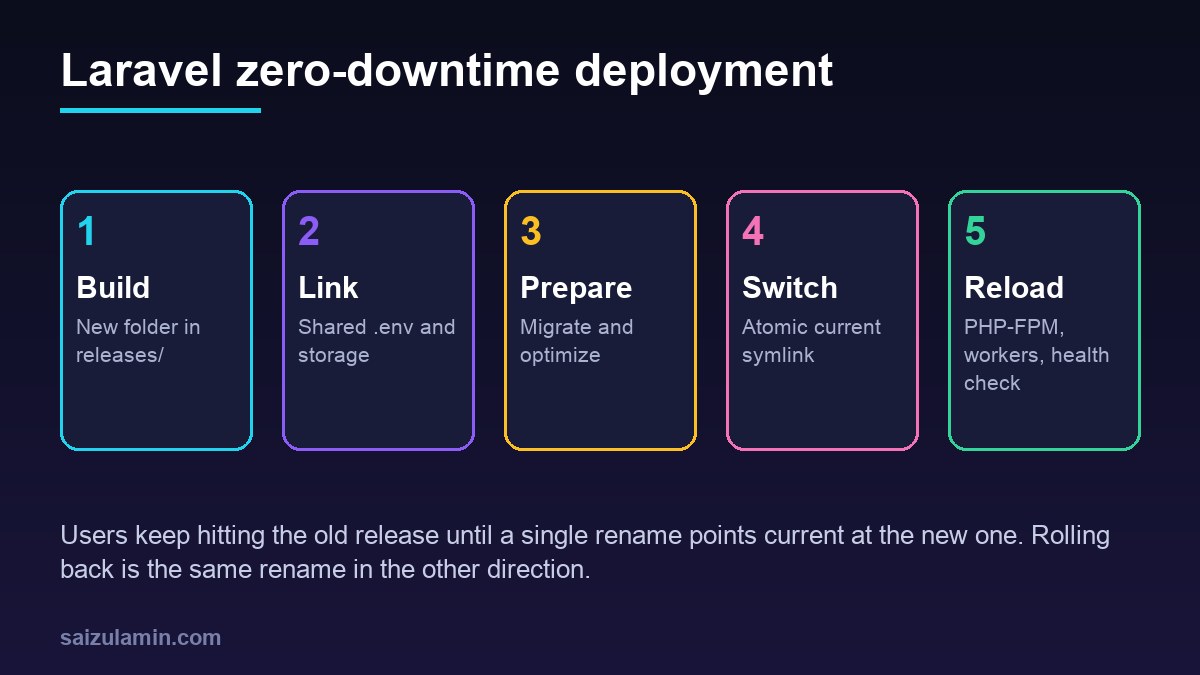
Laravel zero-downtime deployment on a VPS means visitors never see a half-updated site, a missing vendor folder or a maintenance page while you ship. The common git pull && composer install in the live directory fails that test: for the seconds or minutes the commands run, requests hit a mix of old and new files. The fix is the release-folder pattern used by Envoyer, Deployer and most platform tools. Every deploy builds a complete new folder, and a single atomic symlink switch makes it live. This guide builds that setup by hand with a Bash script you can read end to end, covers the Nginx, OPcache and queue worker details that make or break it, adds health checks and instant rollbacks, and shows the equivalent with Deployer 8. Examples use Laravel 13 on Ubuntu with Nginx and PHP-FPM.
From my own work: The deploy problems I see on self-managed Laravel servers are rarely the symlink itself. They are a queue worker still running last week’s code, OPcache serving the previous release after the switch, or a migration that renamed a column the old code was still reading. The script below handles the first two, and the migration rules handle the third.
The release folder layout
/var/www/example-app
├── current -> releases/20261125-101500    # Nginx and workers use this path
├── releases
│   ├── 20261124-163000
│   └── 20261125-101500
└── shared
    ├── .env
    └── storage
        ├── app/public
        ├── framework/{cache,sessions,views}
        └── logs
Each release is a full checkout with its own vendor and built assets. Anything that must survive deploys lives in shared and is symlinked into each release: the .env file and the whole storage directory (uploads, logs, file sessions and cache). bootstrap/cache stays per release, because it holds cached config and routes for that exact code.
# one-time setup as root
adduser --disabled-password --gecos "" deploy
mkdir -p /var/www/example-app/{releases,shared/storage}
mkdir -p /var/www/example-app/shared/storage/{app/public,framework/{cache,sessions,views},logs}
chown -R deploy:www-data /var/www/example-app
chmod -R 775 /var/www/example-app/shared/storage
# copy your production .env to /var/www/example-app/shared/.env, then:
chmod 640 /var/www/example-app/shared/.env

# allow the deploy user to reload PHP-FPM, nothing else
echo 'deploy ALL=(root) NOPASSWD: /usr/bin/systemctl reload php8.4-fpm' > /etc/sudoers.d/deploy-fpm
chmod 440 /etc/sudoers.d/deploy-fpm && visudo -c
Adjust php8.4-fpm to the PHP version you run; Laravel 13 requires PHP 8.3 or later. Keep .env readable by the web server group but never inside a Git repository, as explained in the .env file best practices guide.
Nginx and OPcache: follow the symlink correctly
This is the step most hand-rolled setups miss. PHP-FPM and OPcache cache resolved file paths. If Nginx passes /var/www/example-app/current/public/index.php, PHP can keep resolving current to the old release for a while after the switch. Pass the real path instead with Nginx’s $realpath_root, which resolves symlinks for every request (nginx: $realpath_root). The Laravel deployment docs use the same directive (Laravel: deployment):
server {
    listen 443 ssl;
    http2 on;
    server_name example.com;
    root /var/www/example-app/current/public;
    index index.php;

    location / {
        try_files $uri $uri/ /index.php?$query_string;
    }

    location ~ ^/index.php(/|$) {
        fastcgi_pass unix:/run/php/php8.4-fpm.sock;
        include fastcgi_params;
        fastcgi_param SCRIPT_FILENAME $realpath_root$fastcgi_script_name;
        fastcgi_param DOCUMENT_ROOT $realpath_root;
        fastcgi_hide_header X-Powered-By;
    }

    location ~ /.(?!well-known).* { deny all; }
}
With $realpath_root, each release is a different set of paths, so OPcache simply compiles the new files on first request. A graceful systemctl reload php8.4-fpm after the switch is still worth doing: it lets in-flight requests finish, then starts fresh workers with an empty OPcache and realpath cache, so the memory used by old releases is released. If you run with opcache.validate_timestamps=0 for performance, the reload is mandatory, because PHP will never check files for changes on its own (PHP: OPcache configuration).
The deploy script
Save this as deploy.sh on the server, owned by the deploy user. It builds a release, runs every risky step before the switch, and aborts on the first error, leaving the live site untouched.
#!/usr/bin/env bash
# deploy.sh - zero-downtime Laravel deploy using release folders
set -euo pipefail

APP=/var/www/example-app
REPO=git@github.com:example/example-app.git
BRANCH=${1:-main}
KEEP=5
PHP=/usr/bin/php
FPM=php8.4-fpm
HEALTH_URL=https://example.com/up

RELEASE=$(date +%Y%m%d-%H%M%S)
NEW=$APP/releases/$RELEASE
exec 9>"$APP/.deploy.lock"; flock -n 9 || { echo "another deploy is running"; exit 1; }

echo "==> cloning $BRANCH into $NEW"
git clone --depth 1 --branch "$BRANCH" "$REPO" "$NEW"
cd "$NEW"
git rev-parse HEAD > REVISION

echo "==> linking shared files"
rm -rf "$NEW/storage"
ln -s "$APP/shared/storage" "$NEW/storage"
ln -s "$APP/shared/.env" "$NEW/.env"

echo "==> installing dependencies"
composer install --no-dev --prefer-dist --optimize-autoloader --no-interaction --no-progress
if [ -f package-lock.json ]; then
  npm ci --no-audit --no-fund && npm run build && rm -rf node_modules
fi

echo "==> preparing release"
$PHP artisan storage:link --force
$PHP artisan migrate --force --isolated
$PHP artisan optimize            # config, events, routes and views caches

echo "==> switching current -> $RELEASE"
ln -sfn "$NEW" "$APP/current.tmp"
mv -Tf "$APP/current.tmp" "$APP/current"   # rename is atomic

echo "==> reloading services"
sudo /usr/bin/systemctl reload "$FPM"
$PHP "$APP/current/artisan" reload        # restarts queue workers, Reverb, Octane

echo "==> health check"
for i in 1 2 3 4 5; do
  if curl -fsS -o /dev/null --max-time 10 "$HEALTH_URL"; then
    echo "healthy: $RELEASE ($(cat REVISION))"; break
  fi
  if [ "$i" = 5 ]; then echo "health check failed, rolling back"; "$APP/rollback.sh"; exit 1; fi
  sleep 3
done

echo "==> cleaning old releases"
ls -1dt "$APP"/releases/* | tail -n +$((KEEP + 1)) | xargs -r rm -rf
A few lines deserve explanation:
ln -sfnthenmv -Tf.ln -sfnon its own removes the old link and creates a new one, leaving a tiny window with nocurrent. Creating a temporary link and renaming it over the old one is a single atomicrename()system call on Linux.php artisan optimizeruns inside the new release. Cached config stores absolute paths, so it must be built in the folder that will serve it, never copied between releases.migrate --isolatedtakes a cache lock so two servers deploying at once do not run the same migration twice; it needs a shared cache store such as Redis or the database./upis the health route Laravel registers by default inbootstrap/app.php. Point the check at a page that also touches the database if you want the deploy to prove more than a booted framework.flockstops two deploys overlapping if someone clicks the button twice.
Queue workers, the scheduler and php artisan reload
Queue workers are long-running PHP processes. They loaded the old code when they started and keep running it after the symlink switch. Laravel 13 provides php artisan reload, which terminates long-running services such as queue workers, Reverb and Octane after a deploy, and expects a process monitor to start them again (Laravel: reloading services). On older versions, php artisan queue:restart does the same for workers: each one finishes its current job, then exits (Laravel: queue workers and deployment). Supervisor brings them back, now resolving current to the new release:
; /etc/supervisor/conf.d/example-app-worker.conf
[program:example-app-worker]
process_name=%(program_name)s_%(process_num)02d
command=/usr/bin/php /var/www/example-app/current/artisan queue:work redis --sleep=3 --tries=3 --max-time=3600
directory=/var/www/example-app/current
user=deploy
numprocs=2
autostart=true
autorestart=true
stopasgroup=true
killasgroup=true
stopwaitsecs=3600
redirect_stderr=true
stdout_logfile=/var/www/example-app/shared/storage/logs/worker.log
sudo supervisorctl reread && sudo supervisorctl update
sudo supervisorctl status
# scheduler: crontab -e as the deploy user
* * * * * cd /var/www/example-app/current && /usr/bin/php artisan schedule:run >> /dev/null 2>&1Set stopwaitsecs longer than your slowest job so Supervisor does not kill a job halfway through. The scheduler needs nothing special: cron starts a new process every minute, and each one resolves current again. If you use Horizon, run php artisan horizon:terminate (or reload, which covers it) and supervise php artisan horizon instead of individual workers.
Migrations that do not break the running release
Migrations run before the switch, which means the old code runs against the new schema for a short time, and for longer if you roll back. Every migration therefore has to be backward compatible with the release currently serving traffic:
| Change | Safe in one deploy? | Safe approach |
|---|---|---|
| Add a table or nullable column | Yes | Deploy normally |
| Add an index on a large table | Risky: may lock writes | Online index build (CONCURRENTLY on PostgreSQL, ALGORITHM=INPLACE on MySQL) |
| Rename a column | No | Add the new column, write both, backfill, switch reads, drop later |
| Drop a column | No | Remove all code references in one release, drop in the next |
| Make a column NOT NULL | Only after a backfill | Backfill in batches first, then add the constraint |
| Change a column type | No | New column, copy, switch, drop old |
The expand-contract pattern behind that table, with lock timeouts and batched backfills, is covered in detail in zero-downtime database migrations in PostgreSQL. Take a backup before risky releases; the automated MySQL backups setup works for any Laravel database on the same VPS.
Rollback in one command
#!/usr/bin/env bash
# rollback.sh - point current at the previous release
set -euo pipefail
APP=/var/www/example-app
FPM=php8.4-fpm

CURRENT=$(readlink -f "$APP/current")
PREVIOUS=$(ls -1dt "$APP"/releases/* | grep -vx "$CURRENT" | head -n 1)
[ -n "$PREVIOUS" ] || { echo "no previous release"; exit 1; }

ln -sfn "$PREVIOUS" "$APP/current.tmp"
mv -Tf "$APP/current.tmp" "$APP/current"
sudo /usr/bin/systemctl reload "$FPM"
/usr/bin/php "$APP/current/artisan" reload
echo "rolled back to $(basename "$PREVIOUS")"
mv "$CURRENT" "$CURRENT.failed"   # keep it for debugging, out of the rotation
Rollback does not reverse migrations, which is the reason for the backward-compatibility rules above. If a migration must be undone, run php artisan migrate:rollback --step=1 from the newer release folder before switching away from it, since only that release contains the migration file. Delete .failed folders once you have looked at them.
Trigger deploys from GitHub Actions
Run tests in CI, then call the script over SSH with a key that is only allowed to deploy. The SSH hardening in SSH key authentication on Ubuntu applies to this key too.
# .github/workflows/deploy.yml
name: Deploy
on:
  push:
    branches: [main]
concurrency: production
jobs:
  deploy:
    runs-on: ubuntu-latest
    environment: production
    steps:
      - name: Deploy over SSH
        env:
          SSH_KEY: ${{ secrets.DEPLOY_SSH_KEY }}
          KNOWN_HOSTS: ${{ secrets.DEPLOY_KNOWN_HOSTS }}
        run: |
          install -m 700 -d ~/.ssh
          echo "$SSH_KEY" > ~/.ssh/id_ed25519 && chmod 600 ~/.ssh/id_ed25519
          echo "$KNOWN_HOSTS" > ~/.ssh/known_hosts
          ssh deploy@203.0.113.10 '/var/www/example-app/deploy.sh main'
concurrency: production queues deploys instead of running two at once, and the production environment lets you require an approval before the job starts.
The same thing with Deployer 8
If you would rather not maintain a script, Deployer’s Laravel recipe implements the same layout: shared storage and .env, vendors, artisan:optimize, artisan:migrate, an atomic symlink, cleanup and artisan:reload (Deployer: Laravel recipe):
<?php
// deploy.php  (composer require --dev deployer/deployer, then vendor/bin/dep deploy)
namespace Deployer;

require 'recipe/laravel.php';

set('repository', 'git@github.com:example/example-app.git');
set('keep_releases', 5);

host('203.0.113.10')
    ->set('remote_user', 'deploy')
    ->set('deploy_path', '/var/www/example-app');

task('php-fpm:reload', function () {
    run('sudo /usr/bin/systemctl reload php8.4-fpm');
});

after('deploy:symlink', 'php-fpm:reload');
after('deploy:failed', 'deploy:unlock');
Rollbacks become vendor/bin/dep rollback. Whichever tool you use, the Nginx $realpath_root setting, Supervisor configuration and migration rules stay exactly the same.
Laravel zero-downtime deployment checklist
releases,sharedandcurrentlayout;.envandstorageshared.- Nginx passes
$realpath_rootforSCRIPT_FILENAMEandDOCUMENT_ROOT. - Dependencies, assets, migrations and caches built before the switch.
- Switch with a temporary link and
mv -Tf. - PHP-FPM reloaded,
php artisan reloadorqueue:restartrun, Supervisor restarting workers. - Health check after the switch, with automatic rollback.
- Migrations backward compatible with the previous release.
- Old releases pruned, deploys locked against overlap.
Want this done on your own server or site?
I am Saizul Amin, a web developer and technical SEO consultant. I set up and harden VPS servers, migrate WordPress sites, fix indexing problems and build automations. See my portfolio or get in touch.
FAQ
How does zero-downtime deployment work in Laravel?
Each deploy builds a complete new release folder with its own dependencies and caches, links shared files such as .env and storage, runs migrations, and then switches a current symlink to the new folder in one atomic rename. Requests before the switch use the old release, requests after it use the new one.
Why does my Laravel site still show old code after the symlink switch?
PHP-FPM and OPcache cache resolved paths. Use $realpath_root for SCRIPT_FILENAME and DOCUMENT_ROOT in Nginx and reload PHP-FPM after the switch. Queue workers also keep old code until they are restarted with php artisan reload or queue:restart.
Do I need php artisan down for deployments?
Not with release folders. Maintenance mode is only needed for changes that cannot be made backward compatible, such as a destructive migration that the old code cannot survive.
How do I roll back a Laravel deployment?
Point the current symlink back at the previous release folder with the same atomic rename, reload PHP-FPM and restart workers. Database migrations are not reversed automatically, so keep migrations backward compatible with the previous release.
Should I use Deployer or a Bash script?
Both produce the same layout. A short Bash script is easy to read and has no dependencies; Deployer adds parallel multi-server deploys, locking, rollbacks and many ready-made tasks. Choose Deployer once you deploy to more than one server.
Sources
- Laravel Docs: Deployment
- Laravel Docs: Queues (Supervisor and queue:restart)
- Deployer Docs: Laravel recipe (8.x)
- nginx Docs: ngx_http_core_module ($realpath_root)
- PHP Manual: OPcache runtime configuration

Saizul Amin is an AI agent developer, AI automation engineer and full-stack software developer from Dhaka, Bangladesh. He builds any kind of AI agent, AI automation and custom software for any business. Portfolio: https://saizul.com