

Updated October 2026. I’m Saizul Amin, a digital growth and web systems professional working on websites and SEO since 2017. I have rewritten this guide from scratch with practical steps, tested advice and sources, and I will keep it current. Last reviewed: October 2026.
Marketing automation means using software to send the right message to the right person at the right time without doing it by hand every time. Done well, it improves response speed and consistency. Done badly, it spams people and damages your brand. This guide explains what to automate, how to choose tools and which rules to follow.
I build lead-capture and follow-up automations for businesses, including AI-assisted ones, and I use the same principles on my own sites.
What marketing automation can do
- Email and messaging sequences: welcome series, nurture emails, event reminders.
- Lead handling: capture from forms and ads, tag by interest, route to sales, alert instantly.
- Segmentation and scoring: group contacts by behaviour and prioritise the most engaged.
- Social and content operations: scheduling and repurposing.
- Reporting: pull numbers from several tools into one view.
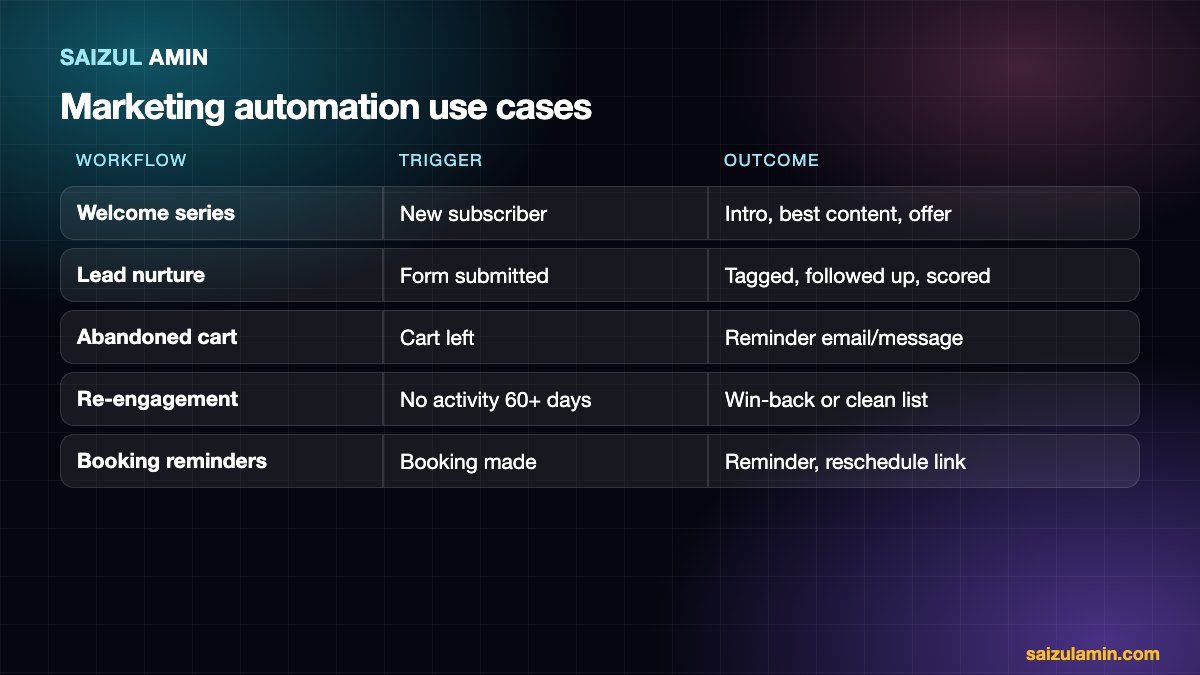
Five workflows to build first
- Instant acknowledgement and routing for new enquiries. A fast reply raises conversion more than any clever campaign.
- Welcome series for new subscribers: who you are, your best content, a gentle offer.
- Lead nurture for people not ready to buy: useful emails over a few weeks.
- Abandoned cart or incomplete booking reminders.
- Re-engagement: a win-back sequence, then remove people who never respond to keep your list healthy.
Types of tools
| Type | Examples | Good for |
|---|---|---|
| Email and marketing platforms | Mailchimp, Brevo, MailerLite, ActiveCampaign, Klaviyo | Email sequences, segmentation, forms |
| CRM with automation | HubSpot, Zoho CRM and others | Tracking leads and deals with workflows |
| Workflow connectors | n8n, Zapier, Make | Linking forms, sheets, chat, CRM and email; see n8n vs Zapier vs Make |
| Chat and messaging automation | WhatsApp, Messenger, Telegram APIs with a workflow tool | Instant replies and booking |
| AI agents | Custom builds | Conversations that need judgement; see what is an AI agent |
See also my comparison of email marketing platforms and email marketing automation software.
How to choose a tool
- Start from the workflows, not the feature list. Write the five you need, then check each tool can do them.
- Contact limits and pricing model. Costs often grow with the number of contacts or messages.
- Integrations with your website, forms, shop, CRM and calendar.
- Deliverability and compliance features: unsubscribe handling, consent records, authentication (SPF, DKIM, DMARC).
- Data export so you can leave.
- Ease of use for the person who will maintain it.
Compliance: do not skip this
- Consent and lawful basis: if you email people in the EU or UK, the GDPR (see the regulation text) requires a lawful basis, usually clear consent for marketing, and an easy way to withdraw it.
- US: the CAN-SPAM Act requires accurate headers, a clear opt-out and your physical address; see the FTC guide.
- Honour unsubscribes immediately.
- Keep your privacy policy accurate (see mine at privacy policy).
- Authenticate your sending domain with SPF, DKIM and DMARC, or your emails may be rejected by providers like Gmail.
Mistakes to avoid
- Automating a bad process: fix the process first.
- Buying a large platform before the workflows are clear.
- Sending too many emails and never pruning inactive contacts.
- No human follow-up for hot leads.
- Not testing: always send test messages and review the logic before activating.
Measure it
Track response time to new leads, open and click rates (as directional signals), reply and conversion rates, unsubscribe and spam-complaint rates, and revenue or bookings attributed to each workflow.
Need a second pair of eyes?
If you would like help applying this to your own website, send me a message with your site address and goal. I will tell you honestly what I would do first.
Frequently asked questions
Is marketing automation only for big companies?
No. Small businesses often benefit most from automating a few simple workflows.
Which tool is best?
The one that supports your workflows, fits your budget and that you will actually maintain.
Will automation make my marketing feel robotic?
Only if the messages are generic. Segment, personalise sensibly and make it easy to reach a person.
Can AI help?
Yes, for drafting, classifying and answering. Keep human review for important messages.
Sources and further reading
How this article was written
I wrote this guide from hands-on experience with websites, SEO and automation. Technical and policy details were checked against the official sources above in October 2026. Tools, policies and prices change; if you notice something out of date, email info@saizul.com and I will correct it. Examples reflect my own projects and will vary on yours.

Saizul Amin is a digital growth strategist and SEO consultant specialising in search engine optimisation, web development, AI-powered automation, and online income systems. With 8 years of hands-on experience helping businesses and individual creators grow their online presence, Saizul combines technical expertise with practical, results-driven strategy.
Experience & Background
Saizul started his digital career in 2017, initially working with Bioscope Limited to build and optimise websites for organic search traffic. Over the years, he has worked across industries including DGHS, NAVANA, UNICampus, UNIPathways, UniqueMark, developing a deep understanding of what it takes to rank, convert, and grow sustainably online.
His work spans the full digital stack — from technical SEO audits and content strategy to WordPress development, marketing automation, and AI tool integration for small businesses and startups.
What He Covers on This Blog
Every article on SaizulAmin.com is written from direct experience. Saizul does not publish theoretical content — every guide, tool recommendation, and strategy shared here has been tested and applied in real projects. Topics include:
- Search engine optimisation (on-page, technical, and content SEO)
- Digital marketing strategy and growth systems
- AI tools and automation for business productivity
- Web development, WordPress, and website building
- Making money online through freelancing and affiliate marketing
Why Trust This Content
All recommendations on this site reflect tools and strategies Saizul actively uses or has personally evaluated. Where affiliate relationships exist, they are clearly disclosed. Content is regularly reviewed and updated to reflect current best practices and algorithm changes.