


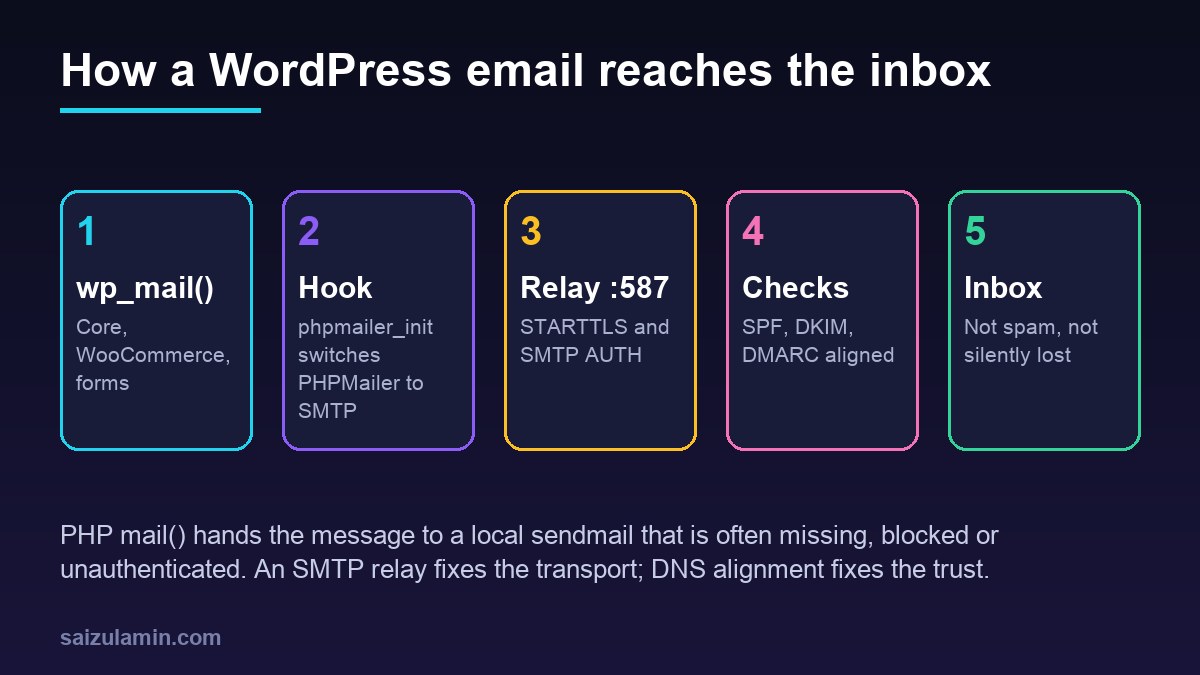
A proper WordPress SMTP setup is the fix for password reset emails that never arrive, WooCommerce order notices that land in spam and contact forms that silently drop messages. By default WordPress sends mail with PHP’s mail() function, which depends on a local mail program that many VPS images do not have, sends from an address like wordpress@example.com, and adds no DKIM signature. This guide routes wp_mail() through an authenticated SMTP relay with a small must-use plugin, keeps the credentials in wp-config.php, aligns the sender with SPF, DKIM and DMARC, and shows how to log failures and prove delivery.
From my own work: When a client tells me WordPress emails stopped working, the cause is almost never WordPress. It is usually a new VPS where outbound port 25 is blocked, or a contact form plugin setting the visitor’s Gmail address as the From header, which fails DMARC on arrival. Sending through an authenticated relay with one fixed From address on the site’s own domain has solved it every time.
Why WordPress email fails without SMTP
wp_mail() builds the message with the bundled PHPMailer library and, unless something changes it, hands it to PHP’s mail() (WordPress: wp_mail()). That causes three common failures:
- No mail transfer agent. A minimal Ubuntu 24.04 server has no Postfix or sendmail, so
mail()fails or the message disappears. - Blocked port 25. Many cloud and VPS providers block outbound port 25 by default to fight spam, so even an installed Postfix cannot deliver directly.
- No authentication. Even when mail leaves the server, it comes from an IP that is not in your SPF record and carries no DKIM signature, so Gmail, Outlook and Yahoo treat it with suspicion or reject it.
Google’s sender guidelines require every sender to Gmail accounts to use SPF or DKIM, valid forward and reverse DNS, and TLS, and bulk senders (more than 5,000 messages a day to Gmail) to use SPF, DKIM and DMARC together (Google: Email sender guidelines). An SMTP relay on your own domain covers the transport and makes alignment possible.
Choose an SMTP relay and port
You have three realistic options for WordPress SMTP:
- A transactional email service (for example Amazon SES, Postmark, Mailgun, Brevo or SendGrid). Built for application email, with DKIM on your domain, bounce handling and logs. This is the best fit for most sites and every store.
- Your mailbox provider’s SMTP (Google Workspace or Microsoft 365). Fine for low-volume sites, but these services increasingly require app passwords or OAuth, and they apply per-mailbox sending limits.
- Your own Postfix relay. Only worth it if you already run mail servers and manage IP reputation.
| Port | Encryption | PHPMailer SMTPSecure |
Use it for |
|---|---|---|---|
| 587 | STARTTLS (upgrade after connect) | tls |
Default choice for authenticated submission |
| 465 | Implicit TLS from the first byte | ssl |
When the provider recommends it, or 587 is blocked |
| 2525 | Usually STARTTLS | tls |
Provider-specific fallback when 587 and 465 are blocked |
| 25 | Optional STARTTLS | none or tls |
Server-to-server relay, not for WordPress submission |
Before touching WordPress, prove the server can reach the relay. On Ubuntu 24.04:
# Is the port reachable from the VPS?
nc -vz smtp.example-relay.com 587

# Does STARTTLS work and is the certificate valid? (type QUIT to exit)
openssl s_client -starttls smtp -connect smtp.example-relay.com:587 -crlf -quiet

# Implicit TLS on 465
openssl s_client -connect smtp.example-relay.com:465 -crlf -quiet
If nc times out, the block is in your provider’s network or your firewall. Check outbound rules in UFW and the provider panel before debugging PHP.
Store SMTP credentials in wp-config.php
Keep the settings out of the database, where every plugin and every database dump can read them. Add constants to wp-config.php, above the That’s all, stop editing line:
// SMTP relay settings
define( 'SMTP_HOST', 'smtp.example-relay.com' );
define( 'SMTP_PORT', 587 );
define( 'SMTP_SECURE', 'tls' );            // 'tls' = STARTTLS on 587, 'ssl' = implicit TLS on 465
define( 'SMTP_USER', 'smtp-username-or-api-key-id' );
define( 'SMTP_PASS', 'paste-the-smtp-password-here' );
define( 'SMTP_FROM', 'no-reply@example.com' ); // a real address on your own domain
define( 'SMTP_FROM_NAME', 'Example Store' );
define( 'SMTP_DEBUG', false );
Then tighten permissions so other system users cannot read it, for example chmod 640 wp-config.php with the file owned by the site user and the PHP-FPM group. If you prefer environment variables, set env[SMTP_PASS] = ... in the PHP-FPM pool file and use getenv( 'SMTP_PASS' ); PHP-FPM clears the environment by default, so a variable set in your shell will not reach WordPress. The wp-config.php hardening guide and the .env secrets guide cover both approaches.
WordPress SMTP setup with phpmailer_init (no plugin)
WordPress fires the phpmailer_init action just before sending, and passes the PHPMailer object by reference, so you can switch it to SMTP in a few lines (WordPress: phpmailer_init). A must-use plugin cannot be disabled from the admin by accident and loads before normal plugins. Create wp-content/mu-plugins/smtp-relay.php:
<?php
/**
 * Plugin Name: SMTP relay from wp-config constants
 * Description: Sends all wp_mail() through an authenticated SMTP relay.
 */

defined( 'ABSPATH' ) || exit;

add_action( 'phpmailer_init', function ( $phpmailer ) {
	if ( ! defined( 'SMTP_HOST' ) || ! defined( 'SMTP_PASS' ) ) {
		return; // not configured: leave WordPress defaults alone
	}

	$phpmailer->isSMTP();
	$phpmailer->Host       = SMTP_HOST;
	$phpmailer->Port       = (int) SMTP_PORT;
	$phpmailer->SMTPSecure = SMTP_SECURE;
	$phpmailer->SMTPAuth   = true;
	$phpmailer->Username   = SMTP_USER;
	$phpmailer->Password   = SMTP_PASS;
	$phpmailer->Timeout    = 15; // seconds; do not let a dead relay hang checkout

	// One fixed sender on your own domain keeps SPF, DKIM and DMARC aligned.
	$phpmailer->setFrom( SMTP_FROM, SMTP_FROM_NAME, false );
	$phpmailer->Sender = SMTP_FROM; // envelope sender, becomes Return-Path

	if ( defined( 'SMTP_DEBUG' ) && SMTP_DEBUG ) {
		$phpmailer->SMTPDebug   = 2;           // client and server conversation
		$phpmailer->Debugoutput = 'error_log'; // goes to the PHP error log
	}
} );

// Log every failure with enough context to act on it.
add_action( 'wp_mail_failed', function ( WP_Error $error ) {
	$data = (array) $error->get_error_data();
	error_log( sprintf(
		'[wp_mail_failed] %s | to: %s | subject: %s',
		$error->get_error_message(),
		implode( ',', (array) ( $data['to'] ?? array() ) ),
		$data['subject'] ?? ''
	) );
} );
Why force the From address? Contact form and membership plugins often set the visitor’s address as the sender. Your relay is not allowed to send for gmail.com, so that message fails DMARC at the receiver. Keep From on your domain and put the visitor’s address in Reply-To; most form plugins have a setting for this. If you only want to change the default sender and let plugins override it, use the wp_mail_from and wp_mail_from_name filters instead of setFrom().
The wp_mail_failed action fires whenever PHPMailer throws, with the error message and the recipient, subject and headers in the error data (WordPress: wp_mail_failed). Leave SMTP_DEBUG off in normal operation: at level 2 PHPMailer logs the full SMTP conversation, which includes the base64-encoded login. Turn it on to diagnose, then off, and delete those log lines.
Align SPF, DKIM and DMARC with your sender
SMTP gets the message out; DNS decides whether receivers believe it. DMARC passes when the domain in the visible From header matches either the domain that passed SPF (the Return-Path domain) or the d= domain in a passing DKIM signature. With a transactional provider that means:
- Verify your sending domain in the provider’s dashboard.
- Publish the DKIM records it gives you (usually two or three CNAME or TXT records).
- Add the provider to SPF only if it uses your domain as the Return-Path; many use their own bounce domain or a subdomain you point at them.
- Publish a DMARC record, starting with
p=noneand reports, then move toquarantineonce reports look clean.
; examples only - use the exact values your provider gives you
example.com.               TXT   "v=spf1 include:spf.example-relay.com ~all"
s1._domainkey.example.com. CNAME s1.dkim.example-relay.com.
_dmarc.example.com.        TXT   "v=DMARC1; p=none; rua=mailto:dmarc-reports@example.com"

# check what the world sees
dig +short TXT example.com
dig +short CNAME s1._domainkey.example.com
dig +short TXT _dmarc.example.com
Keep a single SPF record per domain and stay under its ten DNS lookup limit. The SPF, DKIM and DMARC setup guide explains each record in depth, and the DNS records guide covers the record types if you are new to them.
Test WordPress email delivery
Use WP-CLI, run as the site’s own system user so file permissions match PHP-FPM:
cd /var/www/example.com/htdocs

# true means PHPMailer accepted it; false means check the PHP error log
sudo -u www-data wp eval 'var_dump( wp_mail( "you@your-inbox.example", "SMTP test", "Sent at " . gmdate( "c" ) . " from " . home_url() ) );'

# watch for wp_mail_failed lines while you test
sudo tail -f /var/log/php8.3-fpm.log /var/www/example.com/htdocs/wp-content/debug.log 2>/dev/null
Adjust the user and log paths to your stack. A true result only proves the relay accepted the message. To prove delivery, send to a Gmail or Outlook address, open the message and choose Show original (Gmail) or view the headers (Outlook). You want three passes:
Authentication-Results: mx.google.com;
       dkim=pass header.i=@example.com header.s=s1;
       spf=pass smtp.mailfrom=bounces.example.com;
       dmarc=pass (p=NONE) header.from=example.com
Then test the real flows that matter: a password reset, a new WooCommerce order email, and each contact form. If one fails while the WP-CLI test works, that plugin is probably overriding the mailer or the From address.
Troubleshooting WordPress SMTP errors
| Error or symptom | Likely cause | Fix |
|---|---|---|
SMTP connect() failed |
Port blocked, wrong host or firewall | Test with nc and openssl; try 465 or 2525 |
Could not authenticate |
Wrong credentials, or the provider needs an app password | Regenerate SMTP credentials; check for trailing spaces |
| Certificate or TLS errors | Wrong SMTPSecure for the port, or an outdated CA bundle |
tls with 587, ssl with 465; apt install ca-certificates |
| Sent, but in spam | DKIM missing or From not aligned | Fix DNS; force a From address on your domain |
| Checkout or form submit is slow | wp_mail() is synchronous |
Short timeout; move bulk or slow mail to a queue |
Never disable certificate verification with SMTPOptions to make an error go away; fix the hostname or CA bundle instead. If email volume grows, take sending out of the request entirely: queue the message and send it from a worker, as in the asynchronous email delivery guide. And do not send newsletters through the same transactional stream; a marketing complaint spike should never block password resets.
Should you use an SMTP plugin instead?
An SMTP plugin is reasonable when non-technical editors need to change settings, when you want a built-in email log and resend button, or when you use a provider’s HTTP API instead of SMTP. Pick one that can read credentials from wp-config.php constants rather than storing them in plain text in wp_options. For a developer-managed site, the twenty-line must-use plugin above is easier to audit, has no settings page to misconfigure, and survives a plugin cleanup. Either way, run only one mail plugin: two plugins hooking phpmailer_init will fight over the configuration.
WordPress SMTP checklist
- Relay reachable from the server on 587 (or 465) with a valid certificate.
- Credentials in
wp-config.phpor the PHP-FPM environment, not in the database or Git. - One fixed From address on your own domain; visitor addresses only in
Reply-To. - DKIM published for the sending domain, SPF valid, DMARC at least
p=nonewith reports. wp_mail_failedlogged; debug output off in production.- Password reset, order and form emails tested, with
dkim=pass,spf=passanddmarc=passin the headers.
Want this done on your own server or site?
I am Saizul Amin, a web developer and technical SEO consultant. I set up and harden VPS servers, migrate WordPress sites, fix indexing problems and build automations. See my portfolio or get in touch.
FAQ
Do I need an SMTP plugin for WordPress?
No. WordPress exposes the phpmailer_init hook, so a short must-use plugin can switch PHPMailer to SMTP. A plugin is useful when you want a settings screen, an email log or an HTTP API integration.
Which port should I use for WordPress SMTP, 587 or 465?
Use 587 with STARTTLS (SMTPSecure tls) by default. Use 465 with implicit TLS (SMTPSecure ssl) when your provider recommends it or when 587 is blocked. Port 25 is for server-to-server relay.
Why do my WordPress emails still go to spam after setting up SMTP?
Usually the From domain is not aligned with a passing DKIM signature or SPF domain, or a plugin sets a visitor address as the sender. Check the Authentication-Results header for dkim, spf and dmarc results.
Can I use Gmail SMTP for WordPress?
For a small site, Google Workspace SMTP with an app password or OAuth can work, but per-mailbox limits apply. For stores and busy sites, a transactional email service is more reliable and gives you logs and bounce handling.
How do I see why wp_mail() returned false?
Hook the wp_mail_failed action and log the WP_Error message, as in the mu-plugin above. For a deeper look, temporarily enable SMTPDebug level 2 and read the PHP error log, then switch it off.
Sources
- WordPress Developer Resources: phpmailer_init hook
- WordPress Developer Resources: wp_mail()
- WordPress Developer Resources: wp_mail_failed hook
- PHPMailer on GitHub
- Google Workspace Admin Help: Email sender guidelines

Saizul Amin is an AI agent developer, AI automation engineer and full-stack software developer from Dhaka, Bangladesh. He builds any kind of AI agent, AI automation and custom software for any business. Portfolio: https://saizul.com