


Restic backups give a VPS what a plain file copy cannot: encrypted, deduplicated snapshots you can restore from any point in time, stored on S3-compatible storage or, through rclone, on Google Drive. This guide sets up restic on Ubuntu 24.04 from scratch: the repository, database dumps, a backup script, a retention policy, a systemd timer, integrity checks and, most importantly, a restore drill that proves the backups work.
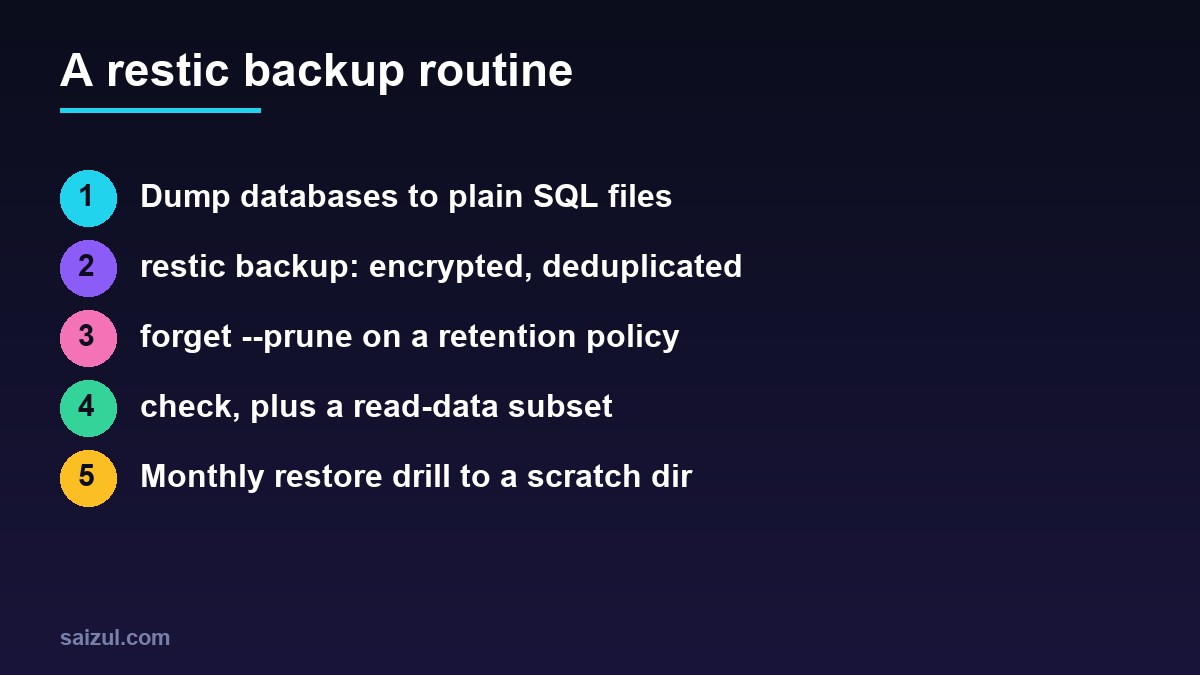
From my own work: I moved my own servers from nightly tar archives to restic because the archives kept growing and I never knew whether last month’s copy was usable. With restic, a night with few changes uploads only the changed chunks, and the monthly drill, restoring one site and importing its database into a scratch schema, takes about ten minutes. The drill has caught a broken dump script once, weeks before I would have needed it.
Why restic backups beat plain copies on a VPS
Restic splits files into content-defined chunks, encrypts each chunk with your repository password, and uploads only chunks the repository does not already have. Every run creates a snapshot that looks like a complete backup but costs only the changed data. It is a single binary, works the same on Linux, macOS and Windows, and supports many backends: local disks, SFTP, S3 and compatible services, Backblaze B2, Azure, Google Cloud Storage, its own REST server, and anything rclone can reach.
If you already sync files with rclone, the difference matters:
| restic | rclone sync | |
|---|---|---|
| History | Snapshots; restore any point in time | Mirror of the current state |
| Deleted or encrypted files on the server | Older snapshots keep the good copy | Changes propagate unless you use --backup-dir |
| Encryption | Always on | Optional, with a crypt remote |
| Deduplication | Yes, across files and snapshots | No |
| Restore | restic restore, dump or mount |
Plain files, readable directly |
The rclone offsite backups guide is a good fit when you want plain, browsable copies. Restic is the better choice when you need history and encryption by default.
Install restic on Ubuntu 24.04
sudo apt update
sudo apt install -y restic fuse3     # fuse3 is only needed for restic mount
restic version

# configuration lives in a root-only directory
sudo install -d -m 700 /etc/restic
sudo sh -c 'openssl rand -base64 32 > /etc/restic/password'
sudo chmod 600 /etc/restic/password
Ubuntu 24.04 packages a 0.16 release, which has everything in this guide, including compression. If you want the newest version, the official binaries are published on the restic GitHub releases page.
Store the password somewhere other than the server, for example in your password manager. Restic encrypts everything with it, and there is no recovery: if the server dies and the password was only on the server, the backups are unreadable.
Option A: a restic repository on S3 or S3-compatible storage
Create a bucket and an access key that can only reach that bucket. Restic reads the standard AWS variables, and the repository is written as s3: followed by the endpoint, bucket and an optional path (restic: preparing a repository). For other S3-compatible providers, such as Backblaze B2, Wasabi or Cloudflare R2, use the provider’s endpoint URL instead.
# /etc/restic/env   (chmod 600)
RESTIC_REPOSITORY=s3:s3.eu-central-1.amazonaws.com/example-vps-backups/vps1
RESTIC_PASSWORD_FILE=/etc/restic/password
AWS_ACCESS_KEY_ID=AKIAEXAMPLEKEYID
AWS_SECRET_ACCESS_KEY=replace-with-the-secret-key
# S3-compatible example:
# RESTIC_REPOSITORY=s3:https://<account-id>.r2.cloudflarestorage.com/example-vps-backups/vps1
sudo chmod 600 /etc/restic/env
sudo -i
set -a; . /etc/restic/env; set +a
restic init
restic cat config # shows the repository version (2 means compression is supported)set -a exports every variable the file defines, so restic sees them. Use this pattern whenever you run restic by hand.
Option B: Google Drive through rclone
Restic has no native Google Drive backend, but it can use any rclone remote: restic starts rclone serve restic --stdio in the background and talks to it. First create the remote as root, because the backup will run as root:
sudo apt install -y rclone
sudo rclone config
#  n) New remote   name> gdrive   Storage> drive
#  client_id / client_secret: your own OAuth client (recommended)
#  scope> drive.file
#  Use web browser to automatically authenticate? n   (headless server)
#  then on a desktop with rclone installed run:  rclone authorize "drive"
#  and paste the token back into the server prompt

sudo rclone lsd gdrive:          # should list folders without errors
rclone’s documentation recommends creating your own Google API client ID, because the shared default one is rate-limited across all users (rclone: Google Drive). The drive.file scope limits rclone to files it created, which is all restic needs. Then point restic at the remote:
# /etc/restic/env
RESTIC_REPOSITORY=rclone:gdrive:backups/restic-vps1
RESTIC_PASSWORD_FILE=/etc/restic/password
sudo -i
set -a; . /etc/restic/env; set +a
restic initGoogle Drive is convenient if you already pay for the storage, but it is slower than object storage and has per-user API limits. For servers with large or busy data sets, an S3-compatible bucket is the more predictable option.
Dump databases before each backup
Backing up the raw files of a running MySQL or PostgreSQL server can capture them mid-write. Dump each database to a plain SQL file first and let restic back up the dumps. Do not gzip them: restic compresses and deduplicates, and a compressed dump changes completely every night, which defeats deduplication.
#!/usr/bin/env bash
# /usr/local/sbin/db-dump.sh
set -euo pipefail
OUT=/var/backups/db
install -d -m 700 "$OUT"

# MySQL / MariaDB: one file per database (root uses socket auth on Ubuntu)
for db in $(mysql -NBe "SHOW DATABASES" | grep -Ev '^(information_schema|performance_schema|mysql|sys)$'); do
  mysqldump --single-transaction --quick --routines --events "$db" > "$OUT/$db.sql.tmp"
  mv "$OUT/$db.sql.tmp" "$OUT/$db.sql"
done

# PostgreSQL, if installed:
# sudo -u postgres pg_dumpall > "$OUT/postgres-all.sql.tmp" && mv "$OUT/postgres-all.sql.tmp" "$OUT/postgres-all.sql"
Writing to a .tmp file and renaming it means a failed dump never replaces yesterday’s good one, and set -euo pipefail stops the script at the first error. One file per database also makes restores safer: you can import a single site without touching the others. The automated MySQL backups guide covers dump options in more detail.
The backup script
#!/usr/bin/env bash
# /usr/local/sbin/restic-backup.sh
set -euo pipefail
set -a; . /etc/restic/env; set +a

/usr/local/sbin/db-dump.sh

restic backup
  --one-file-system
  --exclude-caches
  --exclude-file /etc/restic/excludes
  --tag nightly
  /etc /home /root /var/www /var/backups/db

restic forget --tag nightly
  --keep-daily 7 --keep-weekly 4 --keep-monthly 12
  --prune

# optional: tell a push monitor the run succeeded
[ -n "${PING_URL:-}" ] && curl -fsS -m 10 --retry 3 "$PING_URL" > /dev/null
exit 0
# /etc/restic/excludes
/var/www/*/public/wp-content/cache
/var/www/*/public/wp-content/upgrade
/home/*/.cache
*.tmp
node_modulessudo chmod 700 /usr/local/sbin/restic-backup.sh /usr/local/sbin/db-dump.sh
sudo /usr/local/sbin/restic-backup.sh
sudo -i bash -c 'set -a; . /etc/restic/env; set +a; restic snapshots'List only paths that exist: a missing path makes restic exit with an error, and the script stops. --one-file-system keeps restic from wandering into mounted volumes, and --exclude-caches skips any directory containing a standard CACHEDIR.TAG file (restic: backing up). Adjust the path list to your server; Docker volumes under /var/lib/docker/volumes belong in it only if the containers using them are stopped or the data is dumped first, as described in the Docker Compose production checklist.
For the optional PING_URL, an Uptime Kuma push monitor works well: if the URL is not called within the expected interval, you get an alert. That catches the silent failure where the timer stopped running. See the Uptime Kuma monitoring guide.
Retention with forget and prune
restic forget removes snapshots according to your policy, and --prune then deletes data no remaining snapshot needs. The policy above keeps the last seven daily, four weekly and twelve monthly snapshots (restic: forget). Preview a policy before applying it:
restic forget --tag nightly --keep-daily 7 --keep-weekly 4 --keep-monthly 12 --dry-runBy default, forget groups snapshots by host and path list. If you change the paths in the backup command, the new snapshots form a new group and the old group keeps its own retention, so the repository grows until the old group ages out. Keep the path list stable, or clean up old groups on purpose.
Schedule it with a systemd timer
# /etc/systemd/system/restic-backup.service
[Unit]
Description=restic backup
Wants=network-online.target
After=network-online.target

[Service]
Type=oneshot
ExecStart=/usr/local/sbin/restic-backup.sh
Nice=10
IOSchedulingClass=idle
# /etc/systemd/system/restic-backup.timer
[Unit]
Description=Nightly restic backup
[Timer]
OnCalendar=*-*-* 02:30:00
RandomizedDelaySec=20m
Persistent=true
[Install]
WantedBy=timers.targetsudo systemctl daemon-reload
sudo systemctl enable --now restic-backup.timer
systemctl list-timers restic-backup.timer
journalctl -u restic-backup.service -n 50 --no-pagerPersistent=true runs a missed backup after the server was off at 02:30, and the journal keeps the output of every run. The systemd timers vs cron guide explains these options if you have not used timers before.
Check repository integrity
restic check verifies the repository structure. Adding --read-data-subset downloads and verifies a part of the actual data, so over several months you read everything without downloading the whole repository each time:
restic check                              # weekly: structure and metadata
restic check --read-data-subset=10%       # monthly: also verify 10% of the data
restic stats --mode raw-data              # real stored size after dedupe and compression
restic unlock                             # only if a crashed run left a stale lock
Protect backups from a compromised server
The server holds credentials that can delete its own backups. If an attacker gets root, those credentials are theirs too. Reduce the risk with one of these:
- Bucket versioning: enable versioning on the S3 bucket with a lifecycle rule that expires old versions after, say, 30 days. Deleted or overwritten objects remain recoverable for that period.
- Append-only access: run restic’s
rest-serverwith--append-onlyon a separate machine, orrclone serve restic --append-only. The server can add snapshots but not delete them. - Prune elsewhere: with append-only access, run
forget --prunefrom a trusted machine with full credentials, not from the server being backed up.
Restore drills: prove the backups work
Once a month, restore something real into a scratch location and check it. These are the commands you will use (restic: restoring):
sudo -i
set -a; . /etc/restic/env; set +a

restic snapshots --tag nightly                  # pick a snapshot, or use "latest"
restic ls latest /var/www/example.com | head
restic find wp-config.php                       # which snapshots contain a file

# 1. restore one site's files to a scratch directory
restic restore latest --target /tmp/restore-test --include /var/www/example.com
diff -rq /var/www/example.com /tmp/restore-test/var/www/example.com | head

# 2. import one database into a scratch schema and count rows
mysql -e 'CREATE DATABASE restore_test'
restic dump latest /var/backups/db/example_wp.sql | mysql restore_test
mysql restore_test -e 'SELECT COUNT(*) FROM wp_posts'

# 3. clean up
mysql -e 'DROP DATABASE restore_test'
rm -rf /tmp/restore-test
diff will show files that changed since the snapshot, which is expected for logs and caches; what you are looking for is missing directories or empty files. Write down how long the restore took. That number is your real recovery time, and it is the first thing anyone asks during an outage.
For a single lost file, restic mount /mnt/restic lets you browse every snapshot as a normal directory tree and copy the file back. Stop the mount with Ctrl+C.
Restic backup checklist
- Repository password stored off the server;
/etc/resticmode 700, files 600. - A bucket-scoped access key, or an rclone remote with its own client ID.
- Databases dumped one file per database, uncompressed, with failures stopping the job.
- A stable path list with sensible excludes.
forget --prunewith a tested retention policy.- A systemd timer with
Persistent=trueand a push monitor for missed runs. - Weekly
restic check, monthly--read-data-subset. - Versioning or append-only access against deletion.
- A monthly restore drill with the time it took written down.
Want this done on your own server or site?
I am Saizul Amin, a web developer and technical SEO consultant. I set up and harden VPS servers, migrate WordPress sites, fix indexing problems and build automations. See my portfolio or get in touch.
FAQ
Is restic better than rclone for backups?
They solve different problems. Restic creates encrypted, deduplicated snapshots with history. rclone sync mirrors files. For server backups where you may need yesterday’s or last month’s version, restic is the better fit, and it can use rclone as a backend.
Can restic back up to Google Drive?
Yes, through rclone. Configure a Google Drive remote in rclone, then use a repository such as rclone:gdrive:backups/restic. Use your own Google API client ID and expect lower throughput than object storage.
What happens if I lose the restic password?
The data cannot be recovered. Restic encrypts everything with keys protected by that password. Keep a copy in a password manager, and consider adding a second key with restic key add.
How often should I run restic check?
A metadata check weekly and a check with –read-data-subset monthly is a reasonable routine. The subset option verifies part of the stored data on each run without downloading the whole repository.
Should I compress database dumps before restic backs them up?
No. Restic compresses data itself in repository version 2, and a gzipped dump changes completely every day, so deduplication stops working and every backup uploads the full file again.
Sources
- restic documentation: Preparing a new repository
- restic documentation: Backing up
- restic documentation: Restoring from backup
- restic documentation: Removing backup snapshots
- rclone documentation: Google Drive

Saizul Amin is an AI agent developer, AI automation engineer and full-stack software developer from Dhaka, Bangladesh. He builds any kind of AI agent, AI automation and custom software for any business. Portfolio: https://saizul.com