

n8n is an open-source workflow automation tool. Self-hosting it gives you unlimited workflows and full control of your data for the price of a small VPS. This guide sets it up the way I run client automations: Docker Compose, PostgreSQL, HTTPS and backups.
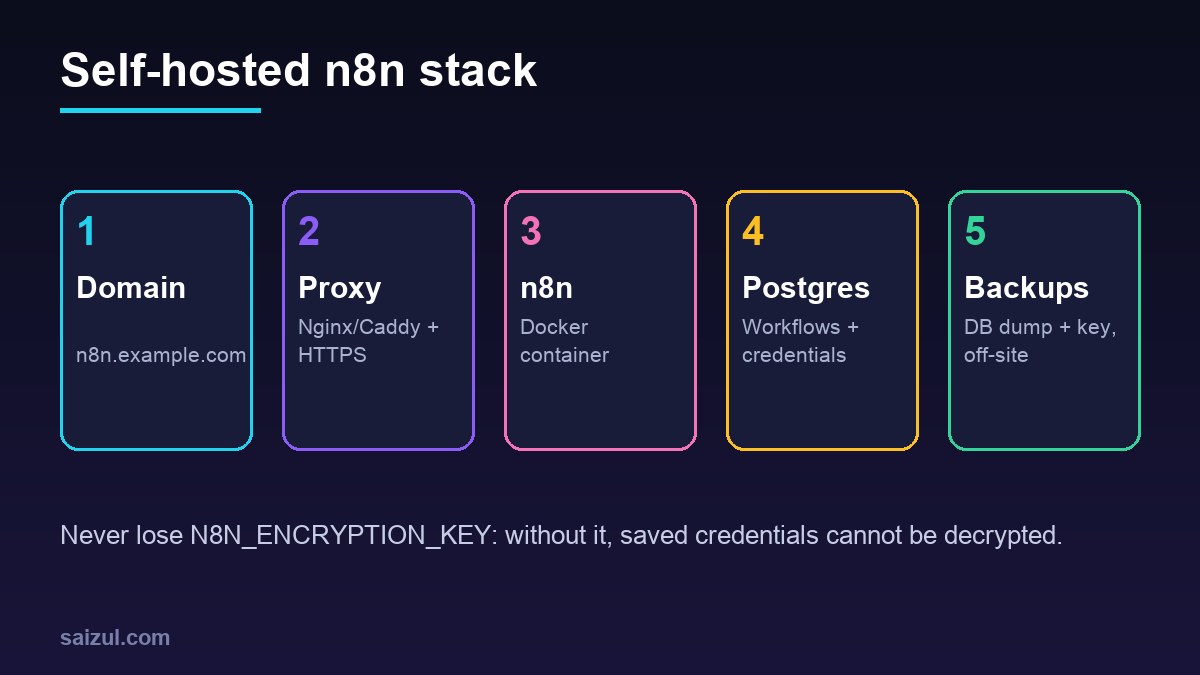
From my own work: I build n8n workflows for lead capture, WhatsApp and Messenger chatbots and reporting. The setup below is what I use for clients; the encryption key and backups are the parts people most often get wrong.
1. Prepare the server
A VPS with 2 vCPU and 4 GB RAM is plenty for most small teams. Install Docker Engine and the Compose plugin from the official Docker repository, and point n8n.example.com to the server.
2. Docker Compose file
services:
  postgres:
    image: postgres:16
    restart: unless-stopped
    environment:
      POSTGRES_USER: n8n
      POSTGRES_PASSWORD: ${POSTGRES_PASSWORD}
      POSTGRES_DB: n8n
    volumes: [pgdata:/var/lib/postgresql/data]

  n8n:
    image: docker.n8n.io/n8nio/n8n:latest
    restart: unless-stopped
    ports: ["127.0.0.1:5678:5678"]
    environment:
      DB_TYPE: postgresdb
      DB_POSTGRESDB_HOST: postgres
      DB_POSTGRESDB_DATABASE: n8n
      DB_POSTGRESDB_USER: n8n
      DB_POSTGRESDB_PASSWORD: ${POSTGRES_PASSWORD}
      N8N_HOST: n8n.example.com
      N8N_PROTOCOL: https
      WEBHOOK_URL: https://n8n.example.com/
      N8N_ENCRYPTION_KEY: ${N8N_ENCRYPTION_KEY}
      GENERIC_TIMEZONE: Asia/Dhaka
    volumes: [n8ndata:/home/node/.n8n]
    depends_on: [postgres]

volumes: {pgdata: {}, n8ndata: {}}
Put secrets in a .env file next to it (generate the key with openssl rand -hex 32) and keep that file out of Git. Variables are documented in the n8n environment variables reference. PostgreSQL is recommended over SQLite for production (databases).
3. HTTPS reverse proxy
n8n listens only on localhost; expose it through Nginx or Caddy with a Let’s Encrypt certificate (SSL guide). WebSocket headers must be forwarded for the editor to work.
location / {
    proxy_pass http://127.0.0.1:5678;
    proxy_http_version 1.1;
    proxy_set_header Upgrade $http_upgrade;
    proxy_set_header Connection "upgrade";
    proxy_set_header Host $host;
    proxy_set_header X-Forwarded-Proto $scheme;
}
4. Security checklist
- Create the owner account immediately after first start and enable 2FA.
- Keep port 5678 closed publicly; only 80/443 and SSH open.
- Use credentials in n8n’s credential store, never hard-coded in nodes.
- Review n8n’s security guidance for SSO, audit and disabling risky nodes.
5. Backups and updates
docker compose exec -T postgres pg_dump -U n8n n8n | gzip > n8n-$(date +%F).sql.gz
docker compose pull && docker compose up -d
Copy dumps and your .env (with the encryption key) off the server daily. Read release notes before major updates and test on a copy. For database backup verification ideas see PostgreSQL backup verification.
Want this done on your own server or site?
I am Saizul Amin, a web developer and technical SEO consultant. I set up and harden VPS servers, migrate WordPress sites, fix indexing problems and build automations. See my portfolio or get in touch.
FAQ
Is self-hosted n8n free?
The Community Edition is free to self-host under n8n’s Sustainable Use License; you pay only for the server.
SQLite or PostgreSQL?
SQLite is fine for testing; PostgreSQL is more reliable for production and larger execution history.
What if I lose the encryption key?
Saved credentials can’t be decrypted and must be re-entered, so back it up securely.
Sources
- n8n Docs: Docker installation
- n8n Docs: Environment variables
- n8n Docs: Supported databases
- n8n Docs: Security
- Docker Docs: Install Docker Engine on Ubuntu

Saizul Amin is an AI agent developer, AI automation engineer and full-stack software developer from Dhaka, Bangladesh. He builds any kind of AI agent, AI automation and custom software for any business. Portfolio: https://saizul.com