


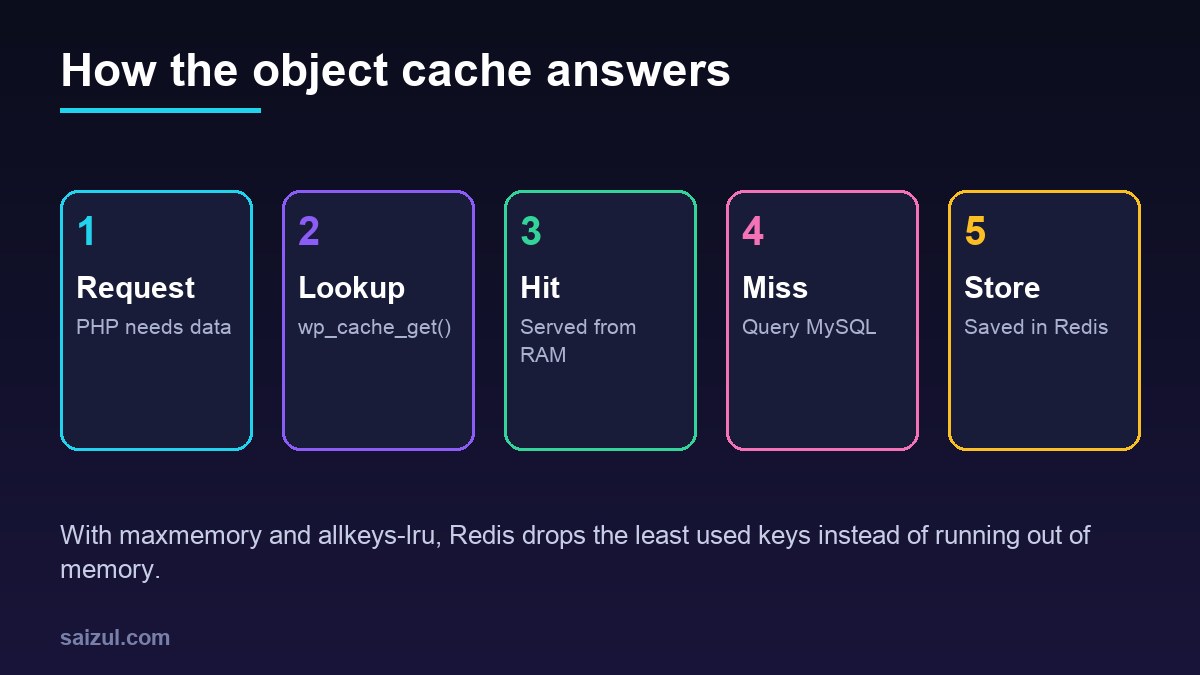
WordPress already has an object cache. Every time core or a plugin loads an option, a post or a user, the result is kept in memory so the same request does not ask the database twice. The catch is that this cache disappears at the end of each request. A persistent object cache stores the same data in Redis, so the next request finds it there instead of querying MySQL again. This guide sets up Redis on the same Ubuntu 24.04 VPS as WordPress, connects it with the free Redis Object Cache plugin, and shows how to check that it is helping.
From my own work: On my VPS each WordPress site has its own Redis key prefix, and Redis has a fixed memory limit. The gain shows up where page caching cannot help: the admin area, logged-in users and WooCommerce carts and checkouts.
What an object cache does, and does not do
WP_Object_Cache is the class behind wp_cache_get() and wp_cache_set(). By default it is non-persistent. When you drop an object-cache.php file into wp-content, WordPress uses that implementation instead, and the plugin below provides one that talks to Redis.
- It helps uncached requests: wp-admin, logged-in members, WooCommerce cart and checkout, search, REST API calls and sites with heavy option or meta lookups.
- It does not help pages already served from a full-page cache such as Nginx FastCGI cache; those never reach PHP. The two complement each other.
- It does not fix a single slow query that runs with different parameters every time. Find those with the MySQL slow query log.
Since WordPress 6.1, Site Health recommends a persistent object cache on sites where it detects enough data to benefit. Treat that as a hint, not a requirement.
Install Redis and the PHP extension
sudo apt update
sudo apt install redis-server php8.3-redis
sudo systemctl enable --now redis-server
redis-cli ping            # PONG
sudo systemctl restart php8.3-fpm
php -m | grep -i redis
Ubuntu 24.04 ships PHP 8.3; if you run another version from a third-party repository, install the matching phpX.Y-redis package. The extension (phpredis) is faster than the pure-PHP client the plugin can fall back to.
Configure Redis as a cache
Edit /etc/redis/redis.conf. Three settings matter for a WordPress cache:
# /etc/redis/redis.conf
bind 127.0.0.1 -::1
protected-mode yes
maxmemory 256mb
maxmemory-policy allkeys-lru

# optional: no snapshots to disk, the cache can be rebuilt at any time
save ""- bind and protected-mode: Redis must listen only on localhost. The Ubuntu default already does this; check it, and never open port 6379 in the firewall. The Redis security guide is clear that Redis is designed for trusted networks only.
- maxmemory: without a limit, Redis grows until the server runs short of RAM. Size it from what you can spare after PHP-FPM and MySQL; 128 to 256 MB is a reasonable start for a few sites, then watch actual usage.
- maxmemory-policy allkeys-lru: when the limit is reached, Redis removes the least recently used keys. The eviction documentation recommends allkeys-lru as a good default for this kind of access pattern. Do not leave the default
noeviction, which makes writes fail once memory is full.
Restart with sudo systemctl restart redis-server and confirm with redis-cli config get maxmemory-policy.
Optional: connect over a Unix socket
A Unix socket skips the TCP stack and can be locked down with file permissions. Add to redis.conf:
unixsocket /run/redis/redis-server.sock
unixsocketperm 770

sudo usermod -aG redis www-data      # or the user your PHP-FPM pool runs as
sudo systemctl restart redis-server php8.3-fpm
Connect WordPress
Add the connection settings to wp-config.php, above the line that says to stop editing. The constants are documented on the Redis Object Cache plugin page:
define( 'WP_REDIS_HOST', '127.0.0.1' );
define( 'WP_REDIS_PORT', 6379 );
define( 'WP_REDIS_DATABASE', 0 );
define( 'WP_REDIS_PREFIX', 'example.com:' );
define( 'WP_REDIS_TIMEOUT', 1 );
define( 'WP_REDIS_READ_TIMEOUT', 1 );

// for the Unix socket instead of TCP:
// define( 'WP_REDIS_SCHEME', 'unix' );
// define( 'WP_REDIS_PATH', '/run/redis/redis-server.sock' );
Then install the plugin and enable the drop-in with WP-CLI, run as the site’s own user:
wp plugin install redis-cache --activate
wp redis enable        # copies object-cache.php into wp-content
wp redis status
The status output should show Status: Connected and the client in use. If it says the drop-in is missing or outdated, another caching plugin may own object-cache.php; only one can be active.
Several sites on one Redis
Give every site a unique WP_REDIS_PREFIX, or a separate WP_REDIS_DATABASE number (0 to 15 by default). The prefix prevents keys from colliding. Note that a cache flush in one site clears the whole Redis database it uses, so if sites share a database number, a plugin update on one site empties the cache for all of them. Separate database numbers, or the plugin’s WP_REDIS_SELECTIVE_FLUSH option, avoid that.
Verify that it helps
redis-cli info stats | grep -E 'keyspace_hits|keyspace_misses|evicted_keys'
redis-cli info memory | grep used_memory_human
redis-cli --scan --pattern 'example.com:*' | head
Hits should climb much faster than misses once the cache is warm. A steadily rising evicted_keys means maxmemory is too small for your sites. For a page-level view, the Query Monitor plugin shows the number of database queries and object cache hits per request; compare an admin page before and after.
When content looks stale after you edited the database directly or ran a migration, run wp cache flush. For the rest of the performance picture, read how to fix slow WordPress TTFB and PHP-FPM tuning for WordPress.
Want this done on your own server or site?
I am Saizul Amin, a web developer and technical SEO consultant. I set up and harden VPS servers, migrate WordPress sites, fix indexing problems and build automations. See my portfolio or get in touch.
FAQ
Is Redis object cache the same as page caching?
No. A page cache stores finished HTML and skips PHP entirely. An object cache stores database results inside PHP requests that still run, such as admin pages and checkouts. Most busy sites use both.
How much memory should Redis get for WordPress?
Start with 128 to 256 MB for a few sites, set maxmemory-policy to allkeys-lru, and watch used memory and evicted keys. Raise the limit only if evictions keep climbing.
Can Redis object cache make WordPress slower?
It can if Redis runs on a distant host, if memory is full with the noeviction policy, or if a plugin stores huge values. On the same server with sensible limits, it usually reduces database load.
Sources
- WordPress Developer Resources: WP_Object_Cache
- Redis Docs: Key eviction
- Redis Docs: Security
- WordPress.org: Redis Object Cache plugin

Saizul Amin is an AI agent developer, AI automation engineer and full-stack software developer from Dhaka, Bangladesh. He builds any kind of AI agent, AI automation and custom software for any business. Portfolio: https://saizul.com