

On most WordPress sites there is no robots.txt file on disk at all. WordPress generates one on the fly, SEO plugins change it, and caches or a CDN may serve their own version. That is why the first robots.txt question on a WordPress site is not “what should it say?” but “where does the file I see actually come from?”. This guide covers the WordPress side; the general syntax is in my robots.txt guide for SEO.
From my own work: On my own WordPress sites I keep robots.txt short: the core admin rules, the sitemap and a few parameter patterns that only waste crawl. Most robots.txt damage I have cleaned up came from copying a long template that blocked wp-content or wp-includes.
How WordPress generates robots.txt
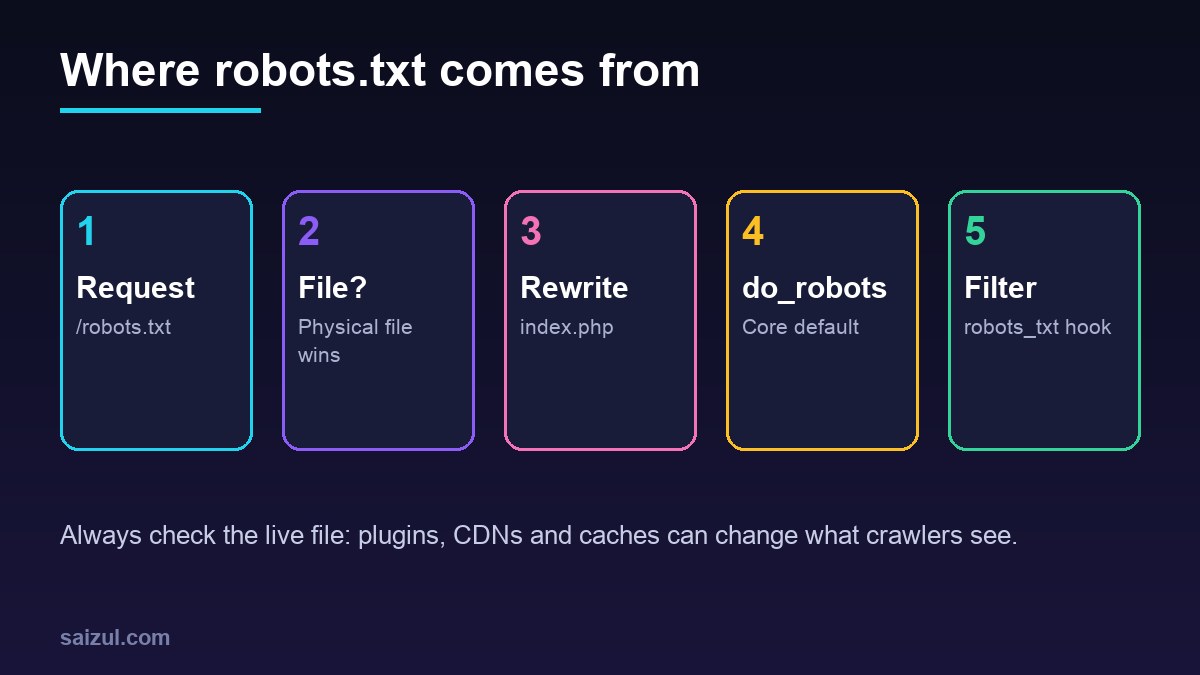
When no physical file exists, the request for /robots.txt falls through to index.php, and WordPress calls do_robots(). Its core output is three lines, followed by a sitemap line that WordPress 5.5 and later adds through a filter when the site is public:
User-agent: *
Disallow: /wp-admin/
Allow: /wp-admin/admin-ajax.php

Sitemap: https://example.com/wp-sitemap.xml
The Allow line exists because themes and plugins call admin-ajax.php from public pages. SEO plugins that ship their own sitemap swap the sitemap URL. Since WordPress 5.3, the “Discourage search engines” setting no longer adds Disallow: /; it outputs a noindex robots meta tag instead, and the sitemap line is dropped. That change was deliberate: a crawler blocked by robots.txt never sees a noindex.
Find out what is actually served
curl -sI https://example.com/robots.txt | grep -iE '^(HTTP|content-type|cache|cf-cache)'
curl -s  https://example.com/robots.txt
ls -l /var/www/example.com/robots.txt   # does a physical file exist?
A physical file in the web root is served directly by Nginx or Apache, and every WordPress setting and plugin editor is silently ignored. Some plugin editors write that file, others filter the virtual one. If the live output does not match what the plugin shows, look for a physical file, a page cache holding an old copy, or a CDN feature that adds its own lines, such as Cloudflare’s managed robots.txt for AI crawlers.
On Nginx the virtual file only works if the request reaches PHP. The usual WordPress configuration does that:
location = /robots.txt {
    try_files $uri /index.php?$args;
    access_log off;
    log_not_found off;
}
Changing it in code: the robots_txt filter
For sites you manage in Git, a small must-use plugin is more predictable than a settings screen. The robots_txt filter receives the output and whether the site is public. Returning a complete file avoids appending rules after the sitemap line:
<?php
// wp-content/mu-plugins/robots-txt.php
add_filter( 'robots_txt', function ( $output, $is_public ) {
    if ( ! $is_public ) {
        return $output;
    }
    $lines = [
        'User-agent: *',
        'Disallow: /wp-admin/',
        'Allow: /wp-admin/admin-ajax.php',
        'Disallow: /*?add-to-cart=',
        'Disallow: /*?orderby=',
        '',
        'Sitemap: ' . home_url( '/sitemap_index.xml' ),
    ];
    return implode( "n", $lines ) . "n";
}, 99, 2 );
Point the Sitemap line at the index your SEO plugin actually serves; with core sitemaps it is /wp-sitemap.xml. The two WooCommerce patterns stop crawlers from following add-to-cart and sort links, which create endless URL variants without new content. Delete them on sites without a shop.
How crawlers read the rules
- A crawler uses only the group that matches its user agent most specifically. A
User-agent: Googlebotgroup replaces the*group for Googlebot; rules are not merged, so repeat the core lines in every group you add. - Within a group, the longest matching path wins, as defined in RFC 9309. On a tie, Google applies the least restrictive rule.
*matches any sequence of characters and$anchors the end of the URL. Paths are case-sensitive.- Google ignores
crawl-delayand does not supportnoindexin robots.txt, according to its robots.txt specification. - Google enforces a 500 KiB size limit and generally caches the file for up to 24 hours, so changes are not instant.
What not to block on WordPress
- /wp-content/ and /wp-includes/: they hold the CSS, JavaScript and images Google needs to render pages. Blocking them was common advice years ago and now hurts rendering.
- /wp-content/uploads/: blocking it removes your images from image search.
- Pages you want removed from the index: use
noindexand let them be crawled. A disallowed URL can still be indexed from links, without a snippet. - Feeds, category and tag archives by reflex. If thin archives are a problem, noindex them in the SEO plugin, or improve them.
- Internal search needs a decision: WordPress already sends a noindex robots meta tag on search results, which only works if crawlers can fetch them. If spam links to search URLs flood your crawl stats, a
Disallow: /?s=plusDisallow: /search/stops the crawling instead.
Status codes matter more than syntax
RFC 9309 treats a robots.txt that returns 4xx as “unavailable”: crawlers may access everything. A 5xx response or a timeout means “unreachable”, and crawlers must assume everything is disallowed. Google stops crawling for the first 12 hours, then falls back to the last good copy for up to 30 days. A security plugin, a WAF rule or a firewall that blocks /robots.txt for bots can therefore stop crawling of the entire site. Make sure Cloudflare rules and rate limits never challenge it; see Cloudflare WAF custom rules for WordPress.
Staging and migrations
For staging sites, Disallow: / alone is not protection; use HTTP authentication, as described in creating a staging site with WP-CLI. After a launch or migration, the first check is that production robots.txt does not still carry the staging rule, and that the Discourage search engines box is unchecked. Both are on the website migration SEO checklist.
Test the file
In Search Console, the robots.txt report under Settings shows which robots.txt files Google found for your hosts, when they were last fetched and any parsing problems. It replaced the old robots.txt Tester. To check a single URL, run it through URL Inspection; a blocked URL is reported as “Blocked by robots.txt”. Keep the sitemap line in sync with your XML sitemap.
Want this done on your own server or site?
I am Saizul Amin, a web developer and technical SEO consultant. I set up and harden VPS servers, migrate WordPress sites, fix indexing problems and build automations. See my portfolio or get in touch.
FAQ
Where is the robots.txt file in WordPress?
Usually nowhere on disk. WordPress generates it when /robots.txt is requested. If a file exists in the web root, the server delivers that file instead and WordPress is bypassed.
Should I block wp-content in robots.txt?
No. Google needs the CSS, JavaScript and images in wp-content and wp-includes to render your pages. Block only specific URL patterns that waste crawl.
Why does my SEO plugin robots.txt editor not change anything?
A physical robots.txt file, a page cache or a CDN is serving a different version. Fetch the live file with curl and check the web root.
Sources
- RFC 9309: Robots Exclusion Protocol
- Google Search Central: How Google interprets the robots.txt specification
- WordPress Developer Resources: do_robots()

Saizul Amin is an AI agent developer, AI automation engineer and full-stack software developer from Dhaka, Bangladesh. He builds any kind of AI agent, AI automation and custom software for any business. Portfolio: https://saizul.com