


An XML sitemap is a machine-readable list of the URLs you want search engines to crawl and index. It does not guarantee indexing and it is not a ranking factor, but it is the clearest statement you can make about which URLs matter, and it gives you a matching report in Search Console. Most sitemap problems I see are not syntax errors; they are sitemaps that list the wrong URLs or lie about modification dates.
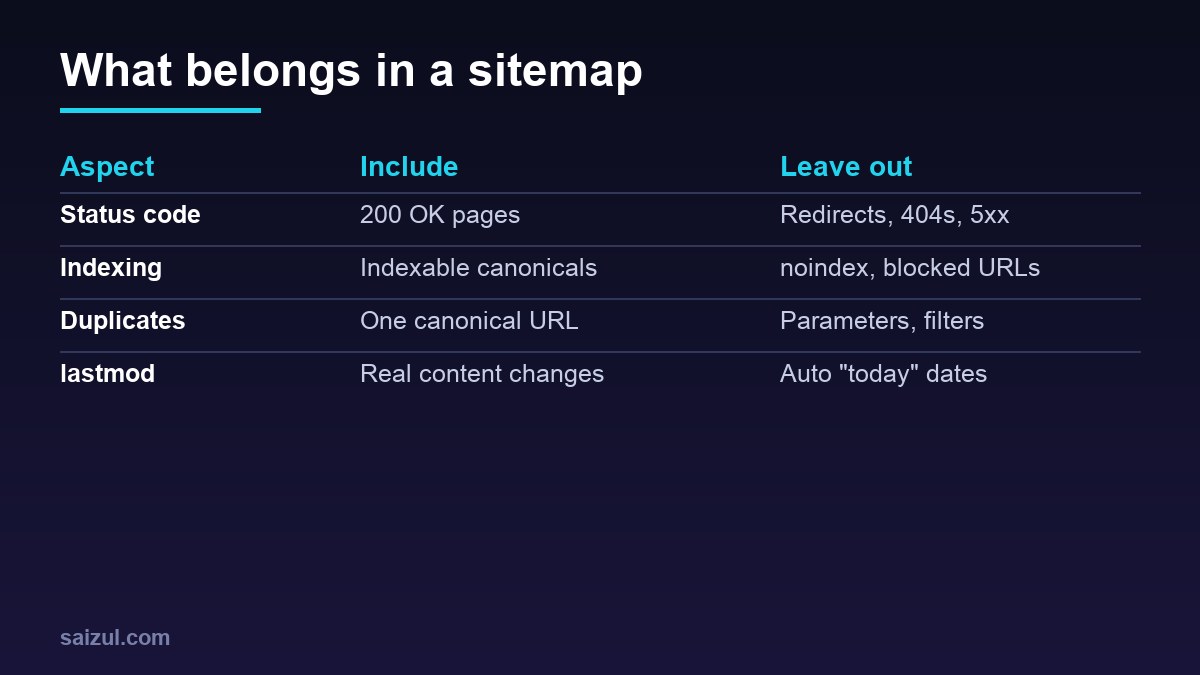
From my own work: On my WordPress sites the SEO plugin generates the sitemap, so my work is mostly subtraction: removing thin archives, checking that nothing noindexed or redirected is listed, and making sure lastmod only moves when the content does.
What to include and what to leave out
List only URLs that you would be happy to see in search results:
- Include: canonical, indexable URLs that return HTTP 200, with absolute addresses on the exact protocol and hostname you serve (
https://example.com/page/). - Exclude: redirects, 404/410 and error pages, URLs with a
noindexdirective, URLs disallowed in robots.txt, non-canonical duplicates (tracking parameters, filter and sort variants, print views), internal search results, cart, checkout and account pages.
Google treats sitemap inclusion as one of several canonicalisation signals, so listing a duplicate works against your own canonical tags. A sitemap full of non-indexable URLs also makes the Search Console data useless, because you can no longer tell real problems from noise.
Format and limits
<?xml version="1.0" encoding="UTF-8"?>
<urlset xmlns="http://www.sitemaps.org/schemas/sitemap/0.9">
<url>
<loc>https://example.com/blog/xml-sitemap-guide/</loc>
<lastmod>2026-11-02T09:30:00+00:00</lastmod>
</url>
<url>
<loc>https://example.com/shop/?colour=blue&size=m</loc>
</url>
</urlset>The second entry is there to show escaping, not as a recommendation to list parameter URLs. The rules from the sitemaps.org protocol and Google’s build and submit a sitemap guide:
- UTF-8 encoding; special characters in URLs must be entity-escaped (
&becomes&). - A single sitemap may contain at most 50,000 URLs and be at most 50 MB uncompressed. Gzip saves bandwidth, but the limit applies to the uncompressed size.
<loc>is the only required child of<url>.- A sitemap placed at
/blog/sitemap.xmlis by default only valid for URLs under/blog/; put sitemaps at the root unless you have a reason not to.
lastmod: accurate or absent
Google states that it uses <lastmod> when the value is consistently and verifiably accurate, and that it ignores <priority> and <changefreq>. In practice:
- Use W3C Datetime format:
2026-11-02or a full timestamp with timezone. - Update it only for meaningful changes to the main content, structured data or links, not for a changed copyright year or sidebar widget.
- Never stamp every URL with the generation time. If all dates always say “today”, the field carries no information and will be disregarded.
- If your system cannot produce a trustworthy date, omit the tag.
You can drop priority and changefreq entirely; they cost bytes and change nothing for Google.
Sitemap index files
When you exceed a limit, or simply want cleaner reporting, split the sitemap and list the parts in a sitemap index:
<?xml version="1.0" encoding="UTF-8"?>
<sitemapindex xmlns="http://www.sitemaps.org/schemas/sitemap/0.9">
  <sitemap>
    <loc>https://example.com/post-sitemap.xml</loc>
    <lastmod>2026-11-02T09:30:00+00:00</lastmod>
  </sitemap>
  <sitemap>
    <loc>https://example.com/product-sitemap.xml</loc>
  </sitemap>
</sitemapindex>
An index can reference up to 50,000 sitemaps, and it may not list other index files. Splitting by content type (posts, pages, products, categories) is worth doing even on small sites: Search Console reports each child sitemap separately, so you can see that, say, products index well while tag archives do not. WordPress core serves an index at /wp-sitemap.xml; SEO plugins replace it with their own, commonly /sitemap_index.xml. Make sure only one of them is active and submitted.
Image, video and news extensions
- Image: add
<image:image><image:loc>entries under a page’s<url>to help discovery of images that are loaded by JavaScript or otherwise hard to find. Google has deprecated the older caption, title and licence tags. - Video: describes videos embedded on a page (thumbnail, title, description, content or player location). Useful when video is a primary content type.
- News: for publishers; a news sitemap should contain only articles published in the last two days, with publication name, language, date and title.
- hreflang: alternate language versions can be declared in the sitemap with
<xhtml:link rel="alternate" hreflang="...">instead of in the HTML.
Each extension needs its XML namespace declared on the <urlset> element. Skip extensions you do not need; a plain URL sitemap is enough for most sites.
Reference it in robots.txt and submit it
# robots.txt (the directive is independent of User-agent groups)
Sitemap: https://example.com/sitemap_index.xml

# quick checks from the shell
curl -sI https://example.com/sitemap_index.xml | head -5
curl -s https://example.com/post-sitemap.xml | grep -c '<loc>'
The Sitemap: line must be a full absolute URL and can appear more than once; details are in the robots.txt guide. Then submit the index under Indexing → Sitemaps in Search Console. The old sitemap “ping” endpoint no longer works; Google retired it and relies on robots.txt, Search Console submission and an accurate lastmod.
The sitemap itself must return 200 with an XML content type, must not be blocked by robots.txt, and should not be served stale from a cache for days. If you cache HTML aggressively, exclude sitemap URLs or give them a short TTL.
Reading the Search Console Sitemaps report
- Success: the file was fetched and parsed. It says nothing about whether the URLs were indexed.
- Couldn’t fetch: Google could not retrieve the file. Check the status code with
curl, firewall or bot-protection rules, and robots.txt. It is sometimes shown for a while right after submitting; re-check before debugging for hours. - Has errors: parsing problems such as invalid XML, unescaped characters, URLs on a different host, or exceeding the size limits. The report lists the line.
- Discovered pages counts URLs read from the file, not indexed pages.
The useful step is the link from a sitemap row to the Page indexing report filtered to that sitemap. There you see why submitted URLs are not indexed: “Submitted URL marked noindex”, redirects, soft 404s or duplicates mean the sitemap lists URLs it should not; “Crawled – currently not indexed” points to content quality or duplication, covered in fixing crawled, currently not indexed.
Want this done on your own server or site?
I am Saizul Amin, a web developer and technical SEO consultant. I set up and harden VPS servers, migrate WordPress sites, fix indexing problems and build automations. See my portfolio or get in touch.
FAQ
Does a small site need an XML sitemap?
A small, well-linked site is usually crawled fine without one, but a sitemap is cheap, helps new pages get discovered and gives you per-sitemap indexing data in Search Console.
Does Google use priority and changefreq?
No. Google ignores both values. It may use lastmod when it is consistently accurate.
Should noindex pages be in the sitemap?
Not permanently. A sitemap should list URLs you want indexed; listing noindexed URLs produces report errors and mixed signals.
Sources
- Google Search Central: Build and submit a sitemap
- sitemaps.org: Sitemap protocol
- Google Search Central: Manage large sitemaps with a sitemap index

Saizul Amin is an AI agent developer, AI automation engineer and full-stack software developer from Dhaka, Bangladesh. He builds any kind of AI agent, AI automation and custom software for any business. Portfolio: https://saizul.com