

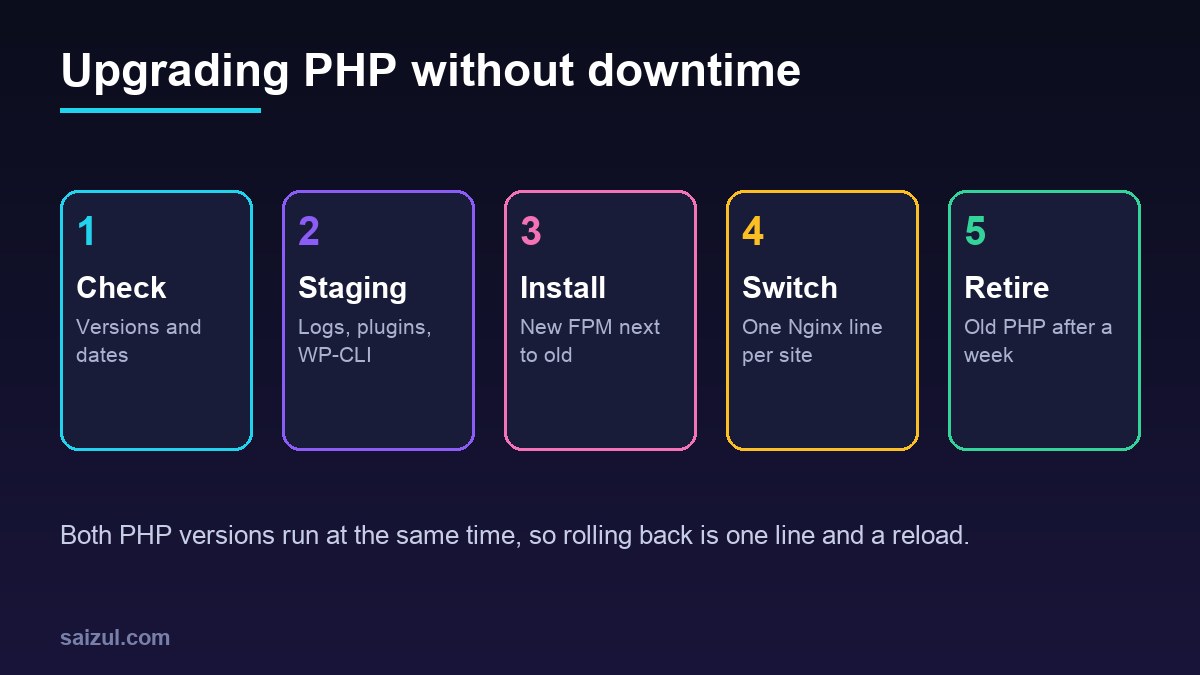
A PHP upgrade is the single biggest free speed and security improvement most WordPress servers can make, and the one people put off longest, because a fatal error in one old plugin takes the whole site down. On Ubuntu the risk is avoidable. PHP-FPM versions install side by side, each with its own socket, so you can move one site at a time by changing a single line in its Nginx configuration and move it back just as quickly. This guide checks which versions make sense in late 2026, tests the upgrade on staging, and switches a live site on Ubuntu 24.04 with a rollback that takes seconds.
From my own work: On my own VPS each site has its own PHP-FPM pool, and PHP upgrades happen one site at a time, starting with the simplest. The problems I meet are almost never WordPress core; they are an abandoned plugin, a theme with old custom code, or a WP-CLI cron job still running the previous PHP from the command line.
Which PHP version in late 2026
PHP branches get two years of active support followed by two years of security fixes. As of November 2026, php.net lists four supported branches (PHP supported versions):
- PHP 8.2: security fixes only, end of life on 31 December 2026.
- PHP 8.3: security fixes only, until 31 December 2027. This is the version in Ubuntu 24.04.
- PHP 8.4: active support until 31 December 2026, security fixes until 31 December 2028.
- PHP 8.5: active support until 31 December 2027, security fixes until 31 December 2029.
PHP 8.1 and older are end of life. WordPress 6.9, 7.0 and 7.1 all list PHP 8.4 and 8.5 as supported, and the old “beta support” label for new PHP versions was retired in May 2026 (PHP compatibility and WordPress versions). That covers core only; plugins and themes are your own test.
If the server runs Ubuntu’s own PHP 8.3, you are not in a hurry: Canonical patches the packages in the main archive for the life of the release. If it runs 8.1 or 8.2 from a PPA, perhaps left over from an older Ubuntu, upgrade now. Moving to 8.4 or 8.5 is a choice for newer features and performance, and needs a third-party repository.
Check what you are running
php -v                                    # CLI version (WP-CLI, cron)
ls /run/php/                              # FPM sockets that exist
grep -rn fastcgi_pass /etc/nginx/sites-enabled/
systemctl list-units 'php*-fpm.service'
cd /var/www/example.com/public && wp eval 'echo PHP_VERSION, PHP_EOL;'
The CLI and FPM versions are separate. A site can run on PHP 8.4 in FPM while its WP-CLI cron job still uses 8.3, which is fine, as long as you know it.
Test on staging first
Clone the site, as in creating a staging site with WP-CLI, point the staging server block at the new PHP socket, and turn on logging in staging’s wp-config.php:
define( 'WP_DEBUG', true );
define( 'WP_DEBUG_LOG', '/var/www/staging.example.com/logs/wp-debug.log' );
define( 'WP_DEBUG_DISPLAY', false );
Click through the front end, log in, edit and save a post, run a search, submit forms, and on a shop place a test order. Run the scheduled events with wp cron event run --due-now, since some plugins only fail in background jobs. Then read the log. Fatal errors are blockers. Deprecation notices are warnings about future versions: PHP 8.4 deprecates implicitly nullable parameter types and the E_STRICT constant, among others (PHP 8.4 deprecations), and PHP 8.5 adds new warnings, for example when a float that cannot fit is cast to an integer (PHP 8.5 incompatible changes). Update the plugins that cause them, or report them to their authors. For your own code, run the PHPCompatibilityWP ruleset in CI, as in GitHub Actions CI for WordPress plugins, and check that its release covers the version you target.
Install the new PHP next to the old one
Ubuntu 24.04 does not package PHP 8.4 or 8.5. The common source is the ppa:ondrej/php repository, maintained by Debian’s PHP packager. Adding it also replaces Ubuntu’s PHP 8.3 packages with the PPA’s builds on the next upgrade, so you now depend on that repository for security fixes on every PHP version on the server.
sudo add-apt-repository ppa:ondrej/php
sudo apt update

# install the same extensions you have now, for the new version
dpkg -l | awk '/^ii  php8.3-/{print $2}' | sed 's/php8.3-/php8.4-/' | xargs sudo apt install -y
php8.4 -m
The command mirrors your current extension list. Compare php8.3 -m with php8.4 -m and install anything missing, such as php8.4-redis or php8.4-imagick. For PHP 8.5, drop opcache from the list: it is built into PHP 8.5 and there is no separate package. Add the PPA to unattended-upgrades as shown in automatic security updates on Ubuntu, or its security fixes will not install by themselves.
Carry over the pool and php.ini settings
# copy the site's pool and give it a new socket
sudo cp /etc/php/8.3/fpm/pool.d/example.conf /etc/php/8.4/fpm/pool.d/
sudo sed -i 's#php8.3-fpm-example.sock#php8.4-fpm-example.sock#' /etc/php/8.4/fpm/pool.d/example.conf

# your own php.ini overrides
sudo cp /etc/php/8.3/fpm/conf.d/99-local.ini /etc/php/8.4/fpm/conf.d/ 2>/dev/null

sudo php-fpm8.4 -t && sudo systemctl restart php8.4-fpm
ls -l /run/php/php8.4-fpm-example.sock
If you edited php.ini directly, compare it with diff /etc/php/8.3/fpm/php.ini /etc/php/8.4/fpm/php.ini and move your changes into a 99-local.ini file this time. Check memory_limit, upload_max_filesize, post_max_size and the OPcache settings from PHP-FPM tuning for WordPress. While both versions run, two sets of pools use memory, so stop the default www pool of the new version if no site uses it.
Switch one site, and roll back if needed
# in the site's server block
fastcgi_pass unix:/run/php/php8.4-fpm-example.sock;

sudo nginx -t && sudo systemctl reload nginx
curl -sI https://example.com/ | head -1
sudo tail -f /var/log/nginx/example.com.error.log
The reload is graceful, so visitors see no interruption. If errors appear, change the socket back to 8.3 and reload; the old pool never stopped. If you use the FastCGI cache, purge it so pages are rendered by the new version. Update the PHP version in your fpm-reopenlogs logrotate lines, as in logrotate for Nginx and PHP-FPM, and switch the CLI when all sites have moved:
sudo update-alternatives --set php /usr/bin/php8.4
php -v
Retire the old version
After a week without errors on any site, stop and disable the old FPM service with sudo systemctl disable --now php8.3-fpm. Remove its packages only when nothing depends on them, and keep the old pool files in your configuration backups. Make sure a fresh database backup exists before each switch, so a plugin that changes data on its first run under the new PHP can be undone.
Want this done on your own server or site?
I am Saizul Amin, a web developer and technical SEO consultant. I set up and harden VPS servers, migrate WordPress sites, fix indexing problems and build automations. See my portfolio or get in touch.
FAQ
Which PHP version should WordPress use in 2026?
PHP 8.3 or newer. WordPress 6.9 and later support PHP 8.4 and 8.5, and PHP 8.2 reaches end of life on 31 December 2026. Your plugins and theme decide how far you can go, so test on staging.
Can I run two PHP versions on one Ubuntu server?
Yes. Each PHP-FPM version is a separate service with its own sockets, and each Nginx server block chooses one with fastcgi_pass. That is what makes per-site upgrades and instant rollback possible.
Does Ubuntu 24.04 include PHP 8.4?
No. Ubuntu 24.04 ships PHP 8.3 and patches it for the life of the release. PHP 8.4 and 8.5 come from a third-party repository such as ppa:ondrej/php.
Sources
- PHP.net: Supported Versions
- Make WordPress Core: PHP Compatibility and WordPress Versions
- PHP Manual: Deprecated features in PHP 8.4
- PHP Manual: Backward incompatible changes in PHP 8.5

Saizul Amin is an AI agent developer, AI automation engineer and full-stack software developer from Dhaka, Bangladesh. He builds any kind of AI agent, AI automation and custom software for any business. Portfolio: https://saizul.com