

Most compromised servers are not broken into with clever exploits. They run a package with a published vulnerability that was fixed weeks earlier. On Ubuntu, the unattended-upgrades package closes that gap by installing security updates every day without anyone logging in. It is installed and enabled by default on Ubuntu 24.04, which is good, but the defaults leave three gaps on a typical WordPress VPS: updates from PPAs such as the PHP repository are ignored, kernel updates wait for a reboot that never comes, and nobody is told what happened. This guide checks the setup, closes those gaps and shows where to look when something goes wrong.
From my own work: On my own VPS unattended-upgrades handles every security update, including the PHP PPA, and reboots happen at a fixed early-morning time when a kernel update asks for one. Before I set the reboot window, I regularly found servers that had installed three or four kernels and were still running the oldest.
Check that it is running
Two files control it. /etc/apt/apt.conf.d/20auto-upgrades switches it on and sets how often it runs, and /etc/apt/apt.conf.d/50unattended-upgrades holds the options (Ubuntu automatic updates).
cat /etc/apt/apt.conf.d/20auto-upgrades
# APT::Periodic::Update-Package-Lists "1";
# APT::Periodic::Unattended-Upgrade "1";

apt-config dump APT::Periodic::Unattended-Upgrade
systemctl list-timers 'apt-daily*'

# if the package is missing or switched off
sudo apt install unattended-upgrades
sudo dpkg-reconfigure -plow unattended-upgrades
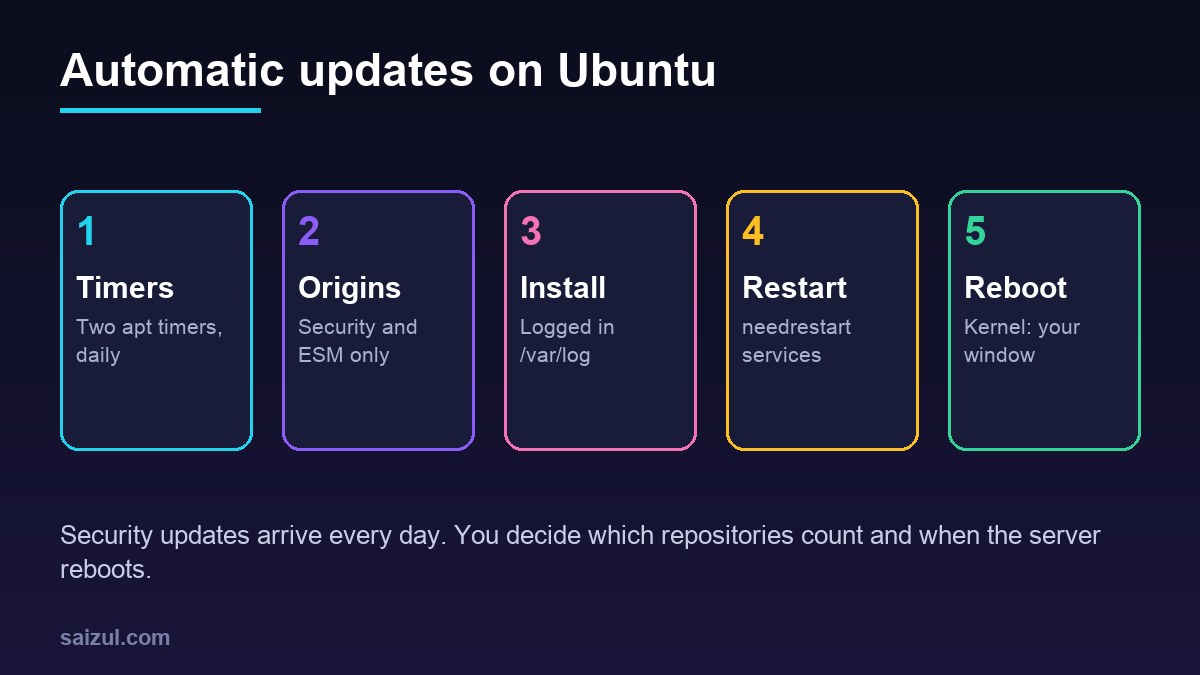
The values are in days, so "1" means daily and "0" means off. Two systemd timers do the work: apt-daily.timer refreshes package lists and apt-daily-upgrade.timer installs updates, each with a random delay so that thousands of servers do not hit the mirrors at once.
Keep your changes in a separate file
You can edit 50unattended-upgrades directly, but a later package update may then ask about the modified file. APT reads every file in apt.conf.d in order, so a file with a higher number overrides single values and adds to lists:
# /etc/apt/apt.conf.d/52unattended-upgrades-local
Unattended-Upgrade::Mail "you@example.com";
Unattended-Upgrade::MailReport "on-change";

Unattended-Upgrade::Remove-Unused-Kernel-Packages "true";

Unattended-Upgrade::Automatic-Reboot "true";
Unattended-Upgrade::Automatic-Reboot-WithUsers "true";
Unattended-Upgrade::Automatic-Reboot-Time "04:30";
Email reports need a working mail command on the server, for example a small relay set up with msmtp or ssmtp; without one the setting does nothing. on-change sends a report only when packages were installed. Remove-Unused-Kernel-Packages cleans up old kernels so /boot does not fill up.
Include PPAs and third-party repositories
Many WordPress servers get PHP from the ppa:ondrej/php repository or Nginx from nginx.org. Adding a repository does not make unattended-upgrades use it; by default only Ubuntu’s own security and ESM pockets are allowed. Find the repository’s o= (origin) value and add it:
apt-cache policy | grep -E 'o=' | sort -u
#  release v=24.04,o=LP-PPA-ondrej-php,a=noble,n=noble,l=***** The main PPA ...

# /etc/apt/apt.conf.d/52unattended-upgrades-local (continued)
Unattended-Upgrade::Allowed-Origins {
    "LP-PPA-ondrej-php:${distro_codename}";
};
The format is origin:suite. Launchpad PPAs always use LP-PPA-<user>-<name>. Because this list is added to the default list, the Ubuntu security entries stay in place. Do this only for repositories you trust to ship stable updates, since everything from that origin will now install automatically, not only security fixes.
Block packages you want to update by hand
Some admins prefer to update the database server during a maintenance window, because a MariaDB update restarts the service. The option takes regular expressions that match from the start of the package name:
Unattended-Upgrade::Package-Blacklist {
    "mariadb-";
};
Use this sparingly. Ubuntu’s documentation warns that a blocked package can hold back other updates that depend on it, and a blocked package with a known vulnerability is exactly the problem this tool exists to solve. If you block something, put a recurring reminder in your calendar to update it.
Service restarts and reboots
A library update only takes effect once the services using it restart. Ubuntu 24.04 runs needrestart after updates and, from this release on, restarts affected services automatically. To keep a critical service out of that, add a file under /etc/needrestart/conf.d/ instead of editing the main configuration:
# /etc/needrestart/conf.d/50-local.conf
$nrconf{override_rc}{qr(^mariadb.service$)} = 0;

# list services still running old code, without restarting anything
sudo needrestart -r l
Kernel updates need a full reboot. When one is pending, Ubuntu creates /var/run/reboot-required, and /var/run/reboot-required.pkgs lists the packages behind it. With Automatic-Reboot set to true the server reboots at Automatic-Reboot-Time, in the server’s local time zone. Pick a quiet hour, and make sure Nginx, PHP-FPM, MariaDB and Redis are all enabled to start at boot (systemctl is-enabled nginx php8.3-fpm mariadb redis-server). If you would rather reboot by hand, leave it off and check for the file in your login message or monitoring.
Two Ubuntu Pro features fit here. The ESM entries in the default origin list only deliver updates on a machine attached to Ubuntu Pro, so pro status shows whether they apply to you; without Pro, packages from the universe repository get fewer security fixes. Canonical Livepatch, enabled with sudo pro enable livepatch on an attached machine, applies many critical kernel fixes without a reboot. It makes reboots less urgent, but kernel updates still need one eventually.
Dry runs and logs
sudo unattended-upgrade --dry-run --debug

less /var/log/unattended-upgrades/unattended-upgrades.log
less /var/log/unattended-upgrades/unattended-upgrades-dpkg.log
grep -E 'install|upgrade' /var/log/dpkg.log | tail
The dry run prints the allowed origins, the blocked packages and what would be upgraded, which is the quickest way to confirm a new origin line works (unattended-upgrade(8)). The main log shows each run; the dpkg log shows the package manager output, including configuration file questions that stopped an upgrade.
What it does not cover
Unattended-upgrades handles operating system packages only. WordPress core, plugins and themes update through WordPress itself; minor core releases install automatically by default, and plugin auto-updates are a per-plugin choice. For a controlled process, see automating WordPress updates with CI/CD. Automatic updates are also not a reason to skip backups: an update that breaks something is far less stressful when automated database backups are in place. Together with SSH key authentication, a UFW firewall and rate-limited WordPress logins, this is the baseline I set on every new server.
Want this done on your own server or site?
I am Saizul Amin, a web developer and technical SEO consultant. I set up and harden VPS servers, migrate WordPress sites, fix indexing problems and build automations. See my portfolio or get in touch.
FAQ
Is unattended-upgrades enabled by default on Ubuntu 24.04?
Yes. The package is installed by default and installs security updates, including ESM updates where available, once a day. Check /etc/apt/apt.conf.d/20auto-upgrades to confirm.
Does unattended-upgrades reboot the server?
Not by default. Set Unattended-Upgrade::Automatic-Reboot to true and choose an Automatic-Reboot-Time, or reboot manually when /var/run/reboot-required exists.
Will unattended-upgrades update packages from a PPA?
Only if you add the PPA origin, in the form LP-PPA-user-name, to Unattended-Upgrade::Allowed-Origins. Test the change with a dry run.
Sources

Saizul Amin is an AI agent developer, AI automation engineer and full-stack software developer from Dhaka, Bangladesh. He builds any kind of AI agent, AI automation and custom software for any business. Portfolio: https://saizul.com