

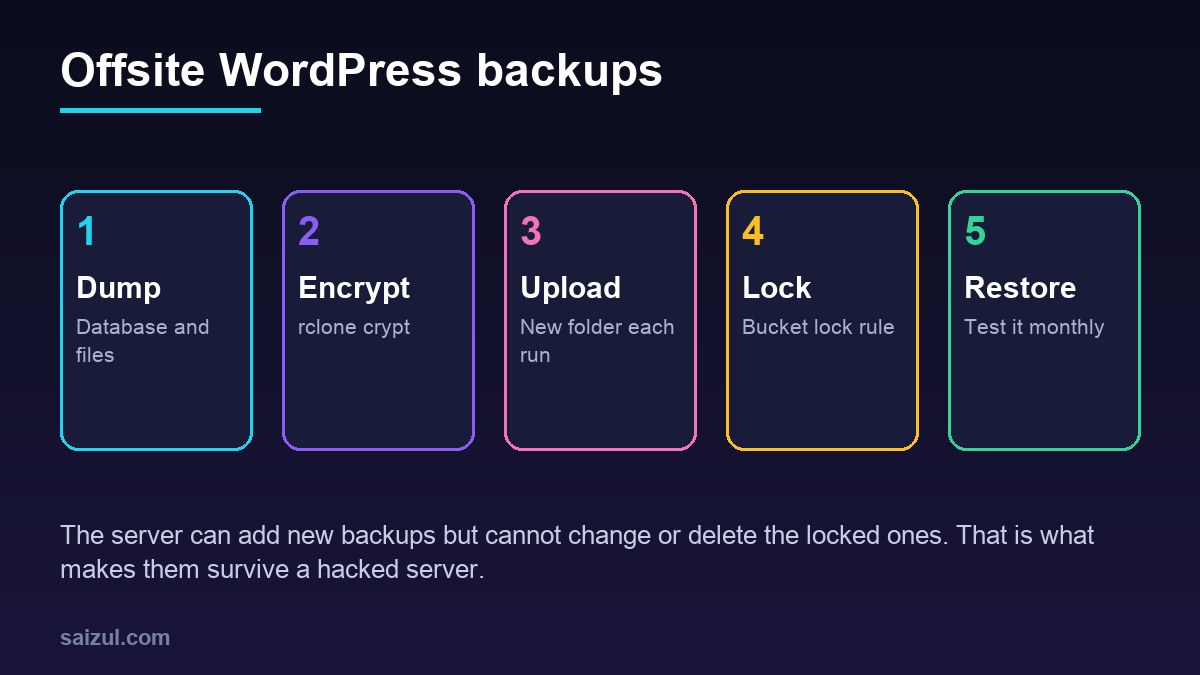
A backup on the same server as the site protects against a bad plugin update and nothing else. A lost VPS, a provider outage or a compromised server takes the backup with it, and an attacker with shell access usually deletes backups before doing anything else. An offsite copy fixes the first problem; this guide also fixes the second. It backs up the whole WordPress site, database and files, encrypts it with rclone, uploads it to Cloudflare R2 or Amazon S3 with a key that cannot remove old copies, and ends with the step most setups skip: a restore.
From my own work: Every server I manage sends an encrypted copy of each site offsite every night, and the bucket refuses deletes for a few weeks. I added the lock after cleaning a site where the attacker had found the backup script, read its credentials and emptied the bucket with them.
What a full WordPress backup contains
Two things: a consistent database dump and the files that are not in the WordPress download. That means wp-content with uploads, themes and plugins, plus wp-config.php and any custom .htaccess or .user.ini. Core files can be downloaded again, but they are small, so including the whole web root keeps the restore simple. Leave out cache folders and the backups of backup plugins. Database-only backups are covered in automated MySQL and MariaDB backups; this post builds the full-site version on top of the same idea.
Bucket, key and lock
Create a dedicated, private bucket for backups, separate from any media bucket, such as example-backups.
- Cloudflare R2. Create an API token with Object Read & Write for this bucket only. Under the bucket’s Settings → Bucket lock rules, add a rule with an empty prefix and a retention period of, for example, 30 days. Locked objects cannot be deleted or overwritten until the period ends, whatever key is used (R2 bucket locks). Then add an object lifecycle rule that deletes objects after 45 days; lifecycle changes are bucket-level actions that the object token cannot make (R2 object lifecycles).
- Amazon S3. Create the bucket with Object Lock enabled and a default retention period, add a lifecycle rule for expiry, and give the server an IAM user whose policy allows
s3:PutObject,s3:GetObjectands3:ListBucketon that bucket, withouts3:DeleteObject.
Make one test upload before you rely on an S3 Object Lock bucket; if it is rejected, install the current rclone release from rclone.org, which is newer than the Ubuntu package. Set the lifecycle expiry longer than the lock, so expiry never fights the lock. R2 egress is free, which matters when you restore a large site; S3 charges for data out.
Install rclone and configure the remotes
sudo apt install rclone      # 1.60 on Ubuntu 24.04
sudo -iu example             # the site user that will run the backup
rclone config                # n) new remote, follow the prompts
Create two remotes. The first is the storage itself; the second is a crypt remote that wraps a path inside it. Use the wizard for the crypt passwords, because rclone stores them obscured and expects them in that form. The resulting ~/.config/rclone/rclone.conf looks like this:
[r2]
type = s3
provider = Cloudflare
access_key_id = YOUR_ACCESS_KEY_ID
secret_access_key = YOUR_SECRET_ACCESS_KEY
region = auto
endpoint = https://ACCOUNT_ID.r2.cloudflarestorage.com
acl = private
no_check_bucket = true

[backup]
type = crypt
remote = r2:example-backups
filename_encryption = standard
directory_name_encryption = true
password = *** set by rclone config ***
password2 = *** set by rclone config ***
no_check_bucket = true is needed with an R2 token limited to object permissions (rclone S3 docs). For S3, use provider = AWS and your region instead. Protect the file with chmod 600, and store both crypt passwords in your password manager now: the rclone documentation points out that the passwords in the config are only lightly obscured, and without them the backups cannot be decrypted by anyone, including you (rclone crypt).
Encryption matters because the backup contains wp-config.php with the database password and salts, plus every customer record in the database. With the crypt remote, the storage provider and anyone holding the storage key see only encrypted names and contents.
The backup script
#!/usr/bin/env bash
# /usr/local/bin/wp-offsite-backup.sh, runs as the site user
set -euo pipefail
SITE=example.com
WEBROOT=/var/www/example.com/public
STAMP=$(date -u +%Y-%m-%dT%H%MZ)
WORK=$HOME/offsite/$STAMP
mkdir -p "$WORK"

wp --path="$WEBROOT" db export - --single-transaction --quick | gzip > "$WORK/db.sql.gz"
tar -C "$WEBROOT" -czf "$WORK/files.tar.gz"
  --exclude=./wp-content/cache --exclude=./wp-content/upgrade
  --exclude=./wp-content/ai1wm-backups --exclude=./wp-content/updraft .
( cd "$WORK" && sha256sum db.sql.gz files.tar.gz > SHA256SUMS )

rclone copy "$WORK" "backup:$SITE/$STAMP" --immutable
rclone cryptcheck "$WORK" "backup:$SITE/$STAMP"

# keep three local copies for quick restores
find "$HOME/offsite" -mindepth 1 -maxdepth 1 -type d -mtime +2 -exec rm -rf {} +
Each run uploads into a new folder named after the UTC time, so nothing is ever overwritten, which is what a bucket lock requires. --immutable makes rclone refuse to modify an existing file instead of trying and failing. cryptcheck compares the local files with the encrypted copies; a plain rclone check cannot verify checksums through crypt. With set -euo pipefail, a failed dump stops the script before it uploads an empty file. On CloudPanel, set WEBROOT to /home/example/htdocs/www.example.com.
Run it nightly with a timer
# /etc/systemd/system/wp-offsite-backup.service
[Unit]
Description=Offsite backup of example.com
After=network-online.target mariadb.service
Wants=network-online.target

[Service]
Type=oneshot
User=example
ExecStart=/usr/local/bin/wp-offsite-backup.sh
Nice=15
IOSchedulingClass=idle

# /etc/systemd/system/wp-offsite-backup.timer
[Timer]
OnCalendar=*-*-* 02:30:00
RandomizedDelaySec=20min
Persistent=true

[Install]
WantedBy=timers.target
Enable it with sudo systemctl enable --now wp-offsite-backup.timer and run it once by hand with sudo systemctl start wp-offsite-backup.service, then read journalctl -u wp-offsite-backup.service. Persistent=true catches up after a reboot, and a failure hook can alert you, as described in systemd timers vs cron. Schedule it away from the nightly dumps of other tools, and away from your busiest hour.
Restore test
rclone lsf backup:example.com/ | tail -3
rclone copy backup:example.com/2026-11-14T0230Z /tmp/restore-test
cd /tmp/restore-test && sha256sum -c SHA256SUMS

sudo mariadb -e 'CREATE DATABASE restore_test'
gunzip -c db.sql.gz | sudo mariadb restore_test
sudo mariadb restore_test -e 'SELECT COUNT(*) FROM wp_posts'
tar -tzf files.tar.gz | grep -c 'wp-content/uploads'
sudo mariadb -e 'DROP DATABASE restore_test'; rm -rf /tmp/restore-test
Do it from a different machine at least once, using only the passwords from your password manager and a fresh rclone install. That proves the part that fails in real disasters: that you can still decrypt the backups without the old server. A full restore onto a new VPS follows the same steps as a WordPress migration. If the reason for the restore is a hack, restore into a clean server and then follow the cleanup guide, because the latest backup may already contain the attacker’s files.
Size, cost and retention
Check the bucket size with rclone size backup:example.com. Thirty to forty-five nightly full copies of a site with large uploads add up; if that is too much, keep nightly database dumps and back up uploads weekly, or sync uploads separately as in offloading media to R2. Check the current pricing pages of R2 or S3 before you settle on a retention period.
Want this done on your own server or site?
I am Saizul Amin, a web developer and technical SEO consultant. I set up and harden VPS servers, migrate WordPress sites, fix indexing problems and build automations. See my portfolio or get in touch.
FAQ
Is rclone good for WordPress backups?
Yes. It uploads to almost any storage provider, encrypts with its crypt remote and verifies uploads. Pair it with a database dump and a tar of the web root, and a timer to run it nightly.
How do I stop a hacker from deleting my backups?
Use a storage key limited to one bucket, and enable R2 bucket locks or S3 Object Lock so objects cannot be deleted or overwritten for a set period, whatever key is used.
Should I encrypt WordPress backups?
Yes. A backup contains wp-config.php and every customer record. rclone crypt encrypts names and contents before upload; keep a copy of its passwords outside the server.
Sources
- rclone Docs: Crypt
- rclone Docs: Amazon S3 and compatible providers
- Cloudflare Docs: R2 bucket locks
- Cloudflare Docs: R2 object lifecycles

Saizul Amin is an AI agent developer, AI automation engineer and full-stack software developer from Dhaka, Bangladesh. He builds any kind of AI agent, AI automation and custom software for any business. Portfolio: https://saizul.com